Understanding AutoStopping Rule Details Page
Understanding AutoStopping Rule Details Page
When you click on an AutoStopping rule from the summary page, you're taken to a detailed view that provides comprehensive information about the rule's performance, configuration, and current status. This page helps you monitor and manage your Kubernetes AutoStopping rules effectively.
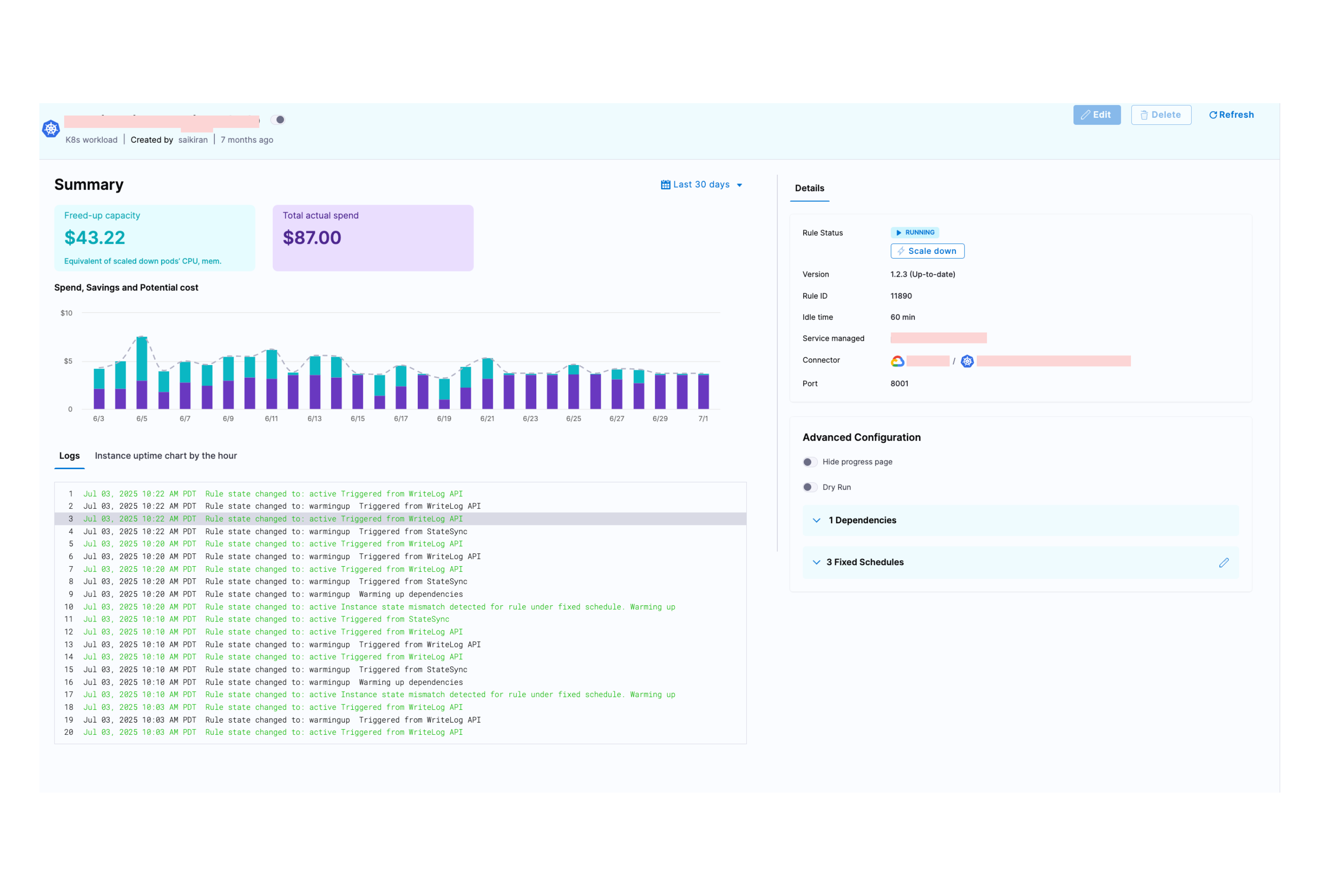
Freed-up Capacity
What it shows: The monetary value of compute resources (CPU and memory) that were freed up when pods were scaled down during idle periods.
How it's calculated: When AutoStopping scales down pods, it calculates the equivalent cost of the CPU and memory resources that are no longer being used. This freed-up capacity represents idle node space that can be reclaimed, potentially allowing nodes to be terminated or downsized.
Total Actual Spend
What it shows: The actual amount spent on resources managed by this AutoStopping rule during the selected time period.
Spend, Savings and Potential Cost Graph
What it shows: A visual graph that displays the relationship between your freed-up capacity (cost savings from scaled-down resources) and total actual spend over time.
How to interpret:
- The graph helps you visualize the cost optimization impact of your AutoStopping rule
- Shows trends in both spending and savings across the selected time period
- Allows you to identify patterns in resource usage and cost efficiency
Logs Section
The logs section provides a chronological record of all state changes and events for your AutoStopping rule.
Instance Uptime Chart by the Hour
What it shows: A visual timeline showing when your managed resources were active versus idle/stopped throughout each hour.
Details Section
This section shows the current configuration and status of your AutoStopping rule.
Rule Configuration
-
Rule Status: Shows the operational state of the rule. You also have the option to manually trigger the scaling up or down of resources managed by this rule.
-
Version: Displays the current version of the AutoStopping controller and indicates if an update is available.
-
Rule ID: Unique identifier for this AutoStopping rule within your Harness account.
-
Idle Time: The duration of inactivity after which the rule will scale down or stop the managed resources.
-
Service Managed: The name of the Kubernetes service that this AutoStopping rule is managing.
-
Connector: The cloud connector that links your Kubernetes cluster to Harness CACM.
-
Port: The port number on which your service receives traffic.
Advanced Configuration
This section shows optional settings that modify the behavior of your AutoStopping rule.
-
Hide Progress Page: This is especially useful when the service is invoked by an automation system, as it prevents misinterpretation of the progress page as the intended response from a service that is onboarded to AutoStopping.
-
Dry-Run: Toggle the button if you wish to evaluate this feature without terminating your cloud resources.
-
Dependencies: Link your rule to other AutoStopping rules when resources depend on each other.
-
Fixed Schedules: Create fixed schedules to automatically start or stop your instances at specific times.