Enable security
In Harness Code Repository, you can enable security controls that prevent secrets and known vulnerabilities from reaching your Git repositories, verify who authored each commit, and record sensitive repository events for audit. Blocking a secret at push time is cheaper than rotating it after a leak, because the secret never enters repository history.
Before you begin
-
Repository permissions: You need Edit on Repository to change repository security settings. Go to the permissions reference to review the full permission list, and to RBAC in Harness to configure roles.
-
Account access for audit logs: Viewing audit logs requires access to Account Settings > Security and Governance > Audit Trail, which is an account scope destination. Repository level permissions are not sufficient. Go to Audit trail to review the Platform feature.
-
Relationship to push rules: Harness Code Repository also provides push rules named Secret scanning enabled and Verify committer identity, which overlap with the repository settings on this page. Go to Rules to review them before you enable both.
Secret scanning
Harness Code Repository includes a built-in Gitleaks integration that prevents hardcoded secrets, such as passwords, API keys, and tokens, from entering your Git repository during a push. Scanning every push means secrets never reach repository history, which removes the need to rewrite history after a leak.
You enable secret scanning for individual repositories. Once you enable it, Harness denies any push containing a commit that matches a recognized secret pattern.
Secret scanning inspects only new or changed code in commits that users push after you enable it on a repository. Secrets in existing, unchanged code are not detected.
Enable secret scanning
To turn on secret scanning for a repository, do the following:
-
Go to the repository where you want to enable secret scanning, then select Settings.
-
Under General, scroll to the Security section.
-
Enable Secret Scanning.
Bypass or ignore detected secrets
Do not bypass or ignore a detected secret unless you are certain it does not represent a vulnerability, such as test data containing fake credentials.
Secret scanning uses Gitleaks. To bypass Gitleaks and knowingly commit a recognized secret, you have two options:
- Inline allow comment: Add
gitleaks:allowas a comment in your code. - Ignore file: Create a
.gitleaksignorefile in your repository.
Go to the Gitleaks README to review the syntax and usage for both options.
Vulnerability scanning
Vulnerability scanning prevents vulnerable code from entering your Git repository during a push. Harness Code Repository checks your code against a database of known Open Source Vulnerabilities (OSV). When it finds a match, Harness can block the push or display a warning to the code author.
You enable vulnerability scanning for individual repositories, and you choose whether a detection warns or blocks. Because some vulnerabilities carry a low severity, blocking every detection is often too strict, so warning the author is the softer option.
Vulnerability scanning inspects only new or changed code in commits that users push after you enable it on a repository. Vulnerabilities in existing, unchanged code are not detected.
Enable vulnerability scanning
To turn on vulnerability scanning for a repository, do the following:
- Go to the repository where you want to enable vulnerability scanning, then select Settings.
- Under General, scroll to the Security section.
- Enable Vulnerability Scanning.
- Select Save.
Committer email verification
Committer email verification enforces that the committer email on a pushed commit matches the email on the author's Harness user account. When the emails do not match, Harness blocks the push.
Enable committer email verification
To turn on committer email verification for a repository, go to Repository > Manage Repository > Security, then enable the setting.
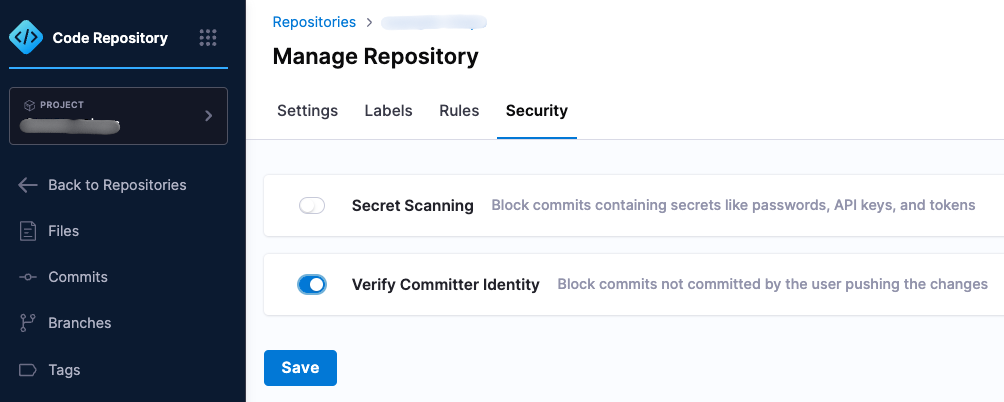
Enable the setting to require that committer emails match Harness user account emails.
Users can still create and push a new branch containing commits they did not author, as long as those commits already exist in the repository.
OPA policies for repositories
You can enforce Open Policy Agent (OPA) policies on your Harness Code repositories with Harness Policy as Code. Configure policies for the Repository entity type to apply them to repository configuration and operations.
Go to Harness Policy as Code overview to create policies and policy sets.
Audit logs for repository events
Harness Code Repository writes key repository events to the Harness audit trail, so you can trace sensitive actions and support compliance and incident response.
Events captured in audit logs
Harness logs the following repository events automatically:
- Force push: A force push to the default branch.
- Rule bypass: A user bypassing security rules, such as secret or vulnerability scans.
- Repository creation: A new repository created in the scope.
- Rule change: A rule created or modified, for example a branch protection rule.
Each entry records the user who performed the action, the timestamp, the event type, and the affected repository and branch.
View audit logs
Audit logs live in the Platform audit trail rather than in the repository. To find repository events, do the following:
- Go to Account Settings.
- Select Security and Governance.
- Select Audit Trail.
- Apply the
Resource Type = Repositoryfilter to narrow the results to the Code Repository module. - Search by user, action, or repository to investigate a specific event.

Filter the audit trail by resource type to isolate Code Repository events.
Go to Audit trail to review retention, filtering, and export behavior.
Troubleshooting
A push to a Harness Code repository is blocked by secret scanning but the detected string is test data, not a real secret
Add a gitleaks:allow comment on the line, or add the finding to a .gitleaksignore file in the repository. Confirm the value is not a live credential before bypassing.
A push to a Harness Code repository is blocked by vulnerability scanning because of a transitive dependency the author did not add
Switch the repository setting from block to warn while you upgrade the dependency, or pin a patched version of the transitive dependency.
A push to a Harness Code repository is rejected because the committer email does not match the Harness user account email
Set the local Git committer email to the address on your Harness user profile with git config user.email, then amend or rebase the affected commits.
Secret scanning is enabled on a Harness Code repository but does not detect a secret that is already committed
Scanning inspects only new or changed code pushed after you enable it. Rotate the exposed secret and remove it from history separately.
Next steps
You have enabled the repository security controls that block secrets, vulnerabilities, and unverified commits at push time, and you know where the resulting events are recorded. Layer rule based governance on top of them next.
- Rules: Configure branch, tag, and push rules, including the push rules that overlap with these settings.
- Audit trail: Review retention, filtering, and streaming for audit events.
- Harness Policy as Code overview: Write OPA policies for the Repository entity type.