Harness AI PR agents automate repetitive pull request and CI remediation work. Each agent analyzes code, identifies issues, and proposes improvements through a pull request, so a human reviews the change rather than writing it.
Instead of reviewing code, debugging CI failures, or writing missing tests by hand, you trigger an agent from a pipeline and review what it raises.
What you will learn
- Available agents: What the Code Review, AutoFix, and Code Coverage agents each do.
- Shared workflow: How every agent moves from pipeline trigger to pull request.
- Agent APIs: The endpoints and inputs a Run step passes to each agent.
Before you begin
- Harness AI enabled: Every agent requires Harness AI to be enabled in your account settings.
- Anthropic API key: Each agent takes an
llmKeyinput. Store it as a Harness text secret. - Harness API key: Each agent takes a
harnessKeyinput, which is a personal access token. Go to Manage API keys to create one. - Git connector: Each agent takes a
gitConnectorinput that grants access to the repository.
Agents may take several minutes to run, depending on repository size and the task.
Available agents
The following agents run as part of your pipeline workflows and interact directly with your repository:
- Code Review agent: Analyzes pull requests, then posts review feedback and suggestions. Go to AI code review to configure it.
- AutoFix agent: Generates fixes for build issues and proposes code changes through a pull request.
- Code Coverage agent: Generates unit tests to improve coverage and posts a coverage report.
These agents help teams reduce time spent on repetitive review and maintenance, recover faster from failing builds and lower mean time to resolution (MTTR), improve test coverage, and keep developers on feature work.
Shared agent workflow
Every agent follows the same sequence:
- A pipeline triggers the agent.
- The agent analyzes the repository or pull request.
- The agent posts results, creates a pull request, or both.
- Developers review and merge the change.
Code Coverage agent
The Code Coverage agent improves test coverage by generating unit tests for untested or under-tested code. Instead of identifying coverage gaps and writing tests by hand, you let the agent analyze the repository, generate tests, and raise a pull request with the result.
How the Code Coverage agent works
- A Run step calls the Code Coverage agent execute API.
- The agent analyzes the repository and identifies coverage gaps.
- The agent generates new tests and validates that they pass.
- The agent opens a pull request and posts a coverage report comment.
Code Coverage agent API
Call the following endpoint from a Run step:
POST https://app.harness.io/gateway/agents/api/v1/agents/Code%20Coverage/execute
The API expects the following inputs:
| Input | Type | Description |
|---|---|---|
llmKey | secret | Anthropic API key used by the agent. |
harnessKey | secret | Harness API key (personal access token). |
gitConnector | connector | Connector used to access the repository. |
repo | string | Repository name. Consider using ${DRONE_REPO_NAME} as the value. |
branch | string | Branch to analyze. Consider using <+codebase.branch> as the value. |
Code Coverage agent pull request summary
The following example shows a coverage report posted on a pull request:
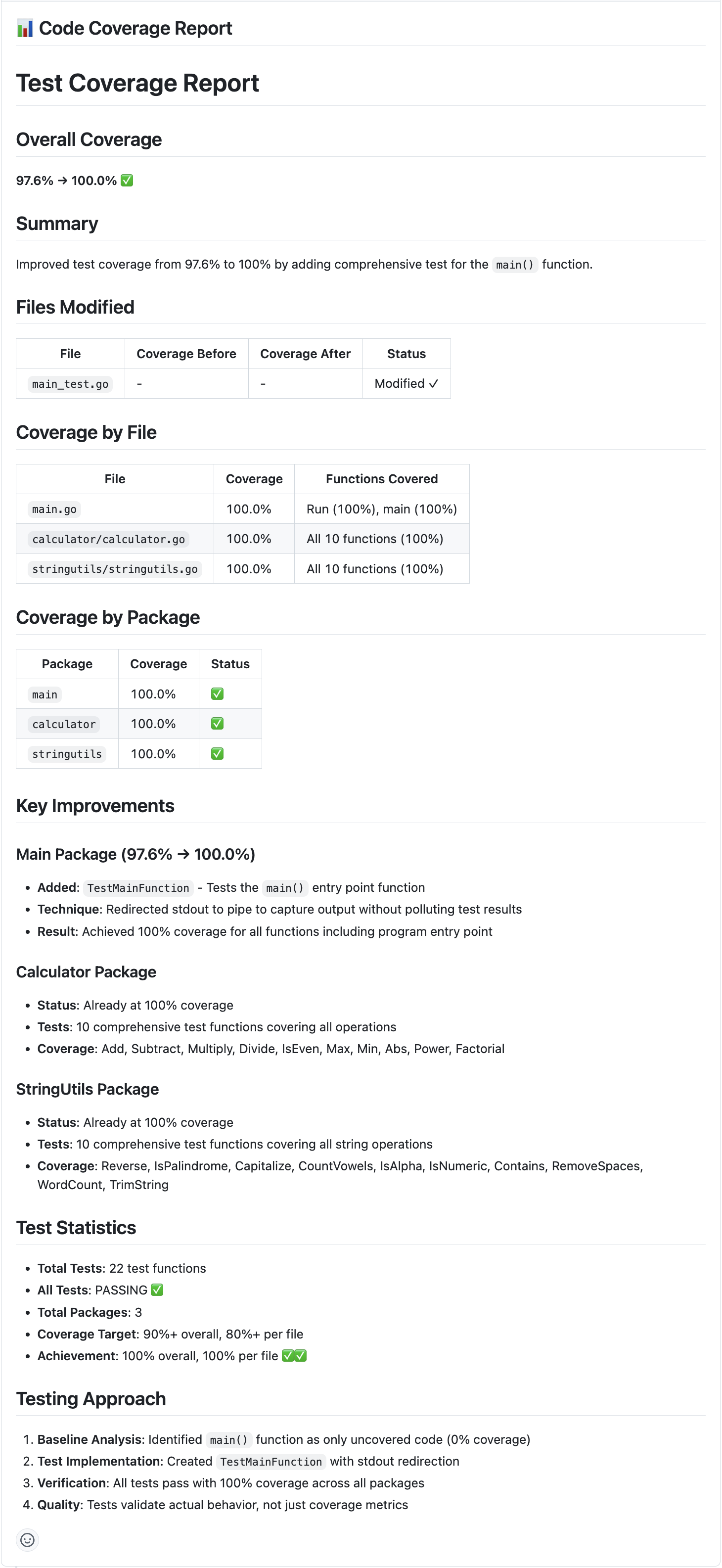
The agent posts a coverage summary comment alongside the pull request it raises.
AutoFix agent
The AutoFix agent supports self-healing CI pipelines. When a pipeline fails, the agent analyzes the failure and recent code changes, generates a fix, verifies that the build passes, and raises a pull request with the proposed solution.
How the AutoFix agent works
- A Run step configured to execute on failure calls the AutoFix agent.
- The agent analyzes the pipeline execution and repository changes.
- The agent generates and validates a fix.
- The agent creates a pull request and posts a summary comment.
AutoFix agent API
Call the following endpoint from a Run step:
POST https://app.harness.io/gateway/agents/api/v1/agents/AutoFix/execute
The API expects the following inputs:
| Input | Type | Description |
|---|---|---|
llmKey | secret | Anthropic API key used by the agent. |
harnessKey | secret | Harness API key (personal access token). |
gitConnector | connector | Connector used to access the repository. |
repo | string | Repository name. Consider using ${DRONE_REPO_NAME} as the value. |
branch | string | Branch to analyze. Consider using <+codebase.branch> as the value. |
executionId | string | Pipeline execution ID used as context for identifying failures. Consider using <+pipeline.executionId> as the value. |
AutoFix agent pull request summary
The following example shows an AutoFix summary created by the agent:
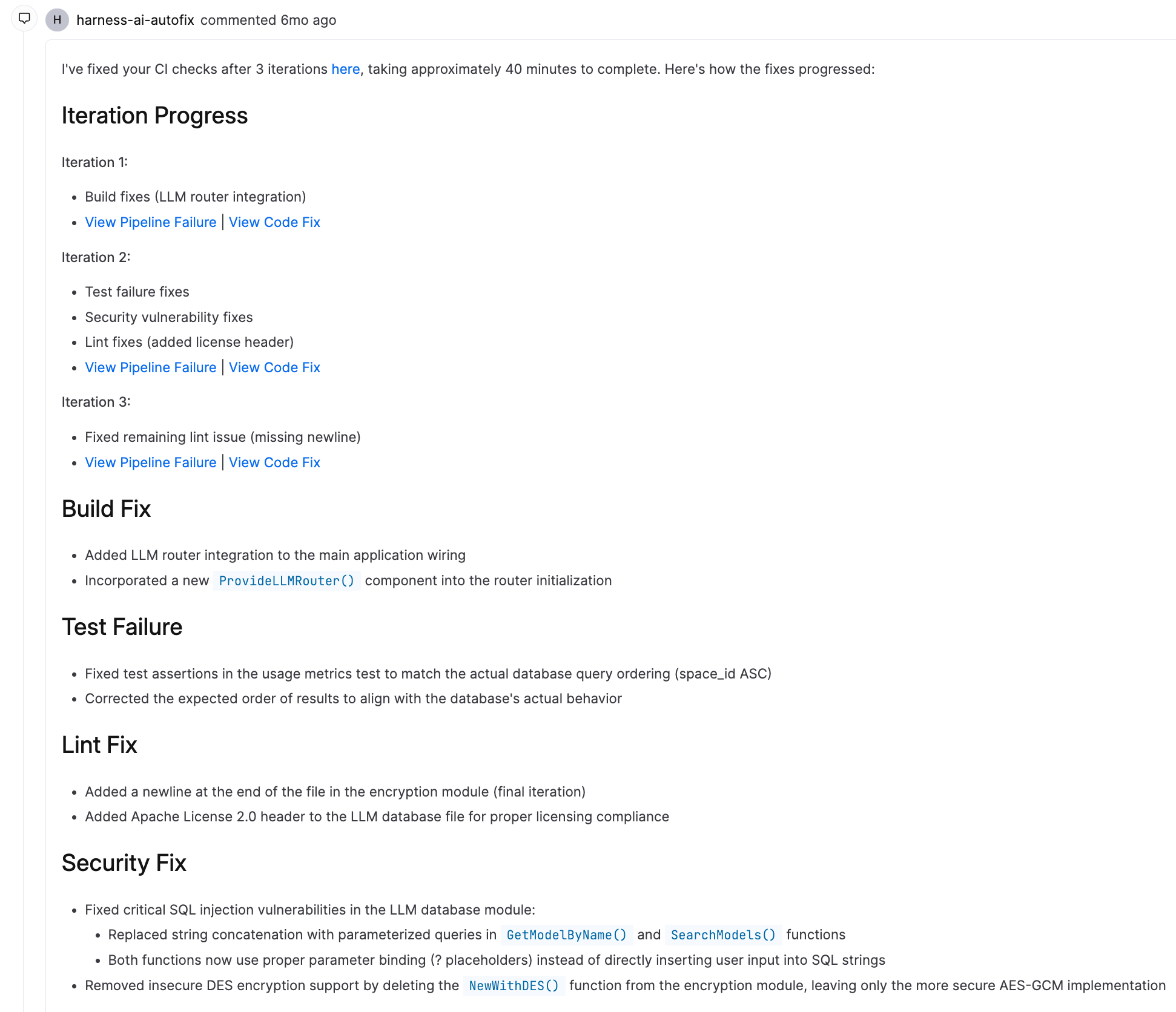
The agent explains the failure it diagnosed and the fix it applied.
Troubleshooting
A Harness AI agent Run step fails because Harness AI is not enabled on the account
Enable Harness AI in account settings, then rerun the pipeline. Agents cannot run without it.
A Harness AI agent runs but does not open a pull request in the repository
Check that the gitConnector and harnessKey grant push and pull request creation on the target repository, and that no branch rule blocks the agent from creating a branch.
A Harness AutoFix agent Run step does not execute after a pipeline stage fails
The Run step must be configured with a failure condition so it executes on stage failure. A step with default settings is skipped when an earlier step fails.
Next steps
You know which agents exist, what each one produces, and which inputs their APIs expect.
- Review pull requests: Configure the Code Review agent.
- Rules: Set the branch rules that govern the pull requests agents raise.
- Manage API keys: Create the personal access token agents require.