PR Dashboard
The PR Dashboard is a user-centric pull request page available at account, organization, and project scope. It shows the pull requests relevant to the signed-in user, and it can widen to every pull request in the selected scope regardless of author.
The dashboard suits leads, reviewers, and teams working across several projects or repositories who need visibility into all in-flight changes rather than only their own.
What you will learn
- Predefined queries: The three built-in views and what each returns.
- Scope: How account, organization, and project scope change the result set.
- Filters: How to narrow the list by author, status, label, and review status.
Before you begin
-
Feature flag: The PR Dashboard is behind the feature flag
CODE_SPACE_PULLREQ. Contact Harness Support to enable it on your account. -
Repository permissions: You see only the pull requests in repositories you can access. Go to the permissions reference to review the permission list.
Predefined queries
The dashboard includes three predefined queries:
- All: Every pull request in the selected scope.
- Created: Pull requests created by the signed-in user.
- Review Requested: Pull requests where the signed-in user has been requested as a reviewer.
Key capabilities
The dashboard gives a complete view of pull requests across the selected scope, whether that is account, organization, or project, and regardless of author. Teams can therefore track all ongoing work rather than only the pull requests tied to the current user.
You can filter the list by:
- Author: Narrow to the users who opened the pull requests.
- Status: Narrow by pull request status, such as open or closed.
- Labels: Narrow by labels such as
bug,feature, orneeds-review. Go to Labels to create them. - Your Reviews: For pull requests assigned to you, narrow further by review status:
Pending,Approved, orChanges Requested.
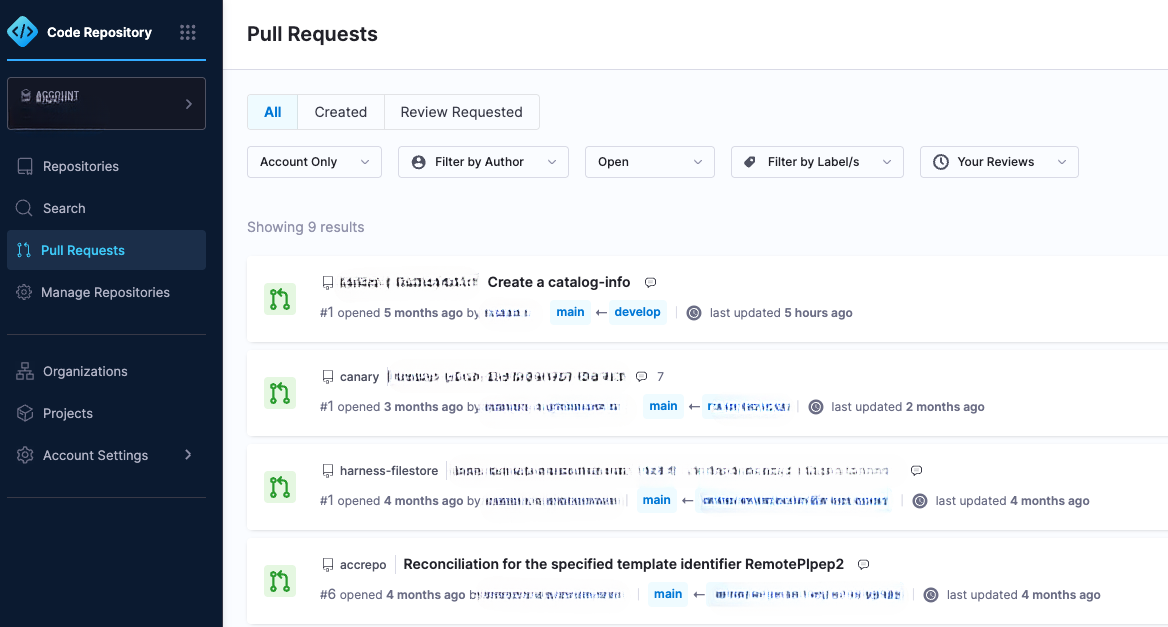
Switch between the All, Created, and Review Requested queries, then narrow the result set with filters.
Related concepts
You can now find the pull requests that need your attention across every repository you can reach.
- Labels: Create the labels the dashboard filters on.
- Review pull requests: Act on the pull requests assigned to you.
- Create a pull request: Open a pull request that appears under Created.