Remove provisioned infrastructure with the CloudFormation Delete step
Use the CloudFormation Delete Stack step to remove AWS resources provisioned by the CloudFormation Create Stack step. You can delete stacks in the same pipeline or in any pipeline within your Harness project by referencing the same Provisioner Identifier.
What you will learn from this topic
- How to add the CloudFormation Delete Stack step to your pipeline.
- How to configure the step using Inline or Inherit from Create modes.
- How the Provisioner Identifier links Create and Delete operations across pipelines.
Before you begin
- Harness project access: View and Execute permissions on Pipelines. For more information, refer to RBAC in Harness to configure roles.
- AWS connector: A Harness AWS connector with permissions to delete CloudFormation stacks in your target AWS account. For more information, refer to AWS connector settings reference.
- Harness Delegate: A delegate installed in an environment that can connect to AWS. For more information, refer to Delegate installation overview.
- CloudFormation stack created by Harness: The Delete Stack step removes stacks provisioned by the CloudFormation Create Stack step. For more information, refer to CloudFormation Create Stack step.
Add the Delete Stack step
You can use the CloudFormation Delete Stack step to remove stacks provisioned by the CloudFormation Create Stack step or any CloudFormation stacks in your AWS account.
In the Execution section of your Deploy stage, click Add Step, and then select CloudFormation Delete Stack.
Configuration modes
The CloudFormation Delete Stack step supports two configuration modes:
Inline configuration
The Inline mode lets you specify the stack details directly in the Delete Stack step. Use this mode to delete any CloudFormation stack in your AWS account, whether or not it was created by Harness.
- In the Configuration Type field, select Inline.
- In AWS Connector, select the Harness AWS connector for your target AWS account. The connector credentials must have permissions to delete CloudFormation stacks. For more information, refer to AWS connector settings reference.
- In Region, select the AWS region where the stack exists.
- In Role ARN, enter the AWS IAM Role ARN to use when deleting the stack. This is the same role you would use when deleting a stack using the AWS console or CLI.
- In Stack Name, enter the name of the CloudFormation stack to delete.
Inline configuration YAML example
- step:
    type: DeleteStack
    name: Delete CloudFormation Stack
    identifier: Delete_Stack
    spec:
      configuration:
        type: Inline
        spec:
          connectorRef: your_aws_connector
          region: us-east-1
          roleArn: arn:aws:iam::123456789012:role/CloudFormationRole
          stackName: my-cloudformation-stack
      connectorRef: your_aws_connector
    timeout: 10m
Inherit from Create configuration
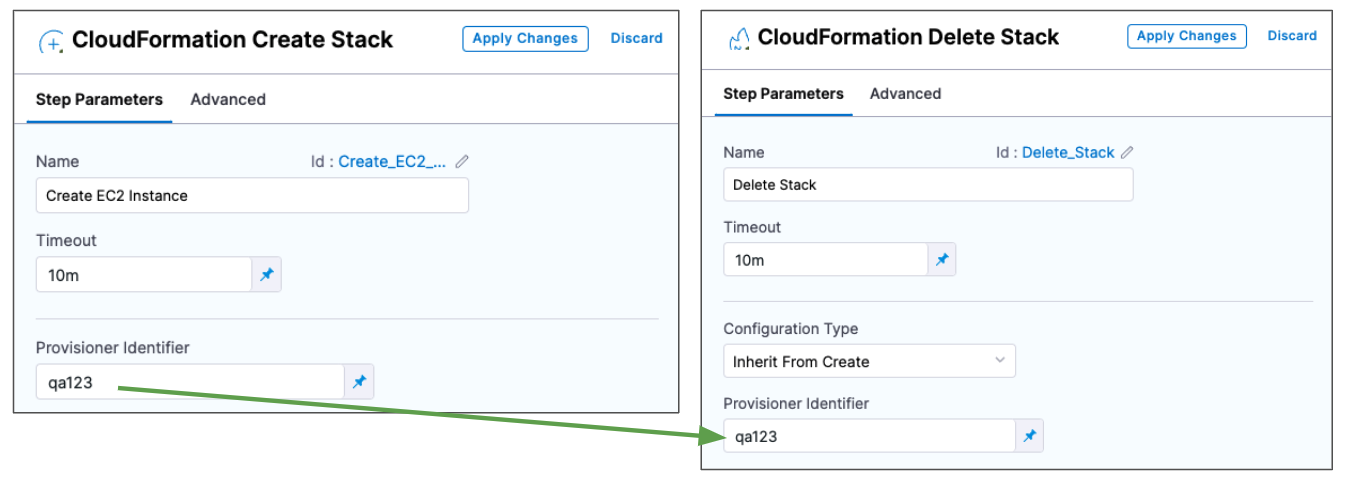
The Inherit from Create mode deletes the stack that was provisioned by a CloudFormation Create Stack step with the same Provisioner Identifier. Use this mode to tear down infrastructure provisioned earlier in the same pipeline or in a different pipeline within your project.
- In the Configuration Type field, select Inherit from Create.
- In Provisioner Identifier, enter the same Provisioner Identifier you used in the CloudFormation Create Stack step that provisioned the stack you want to delete.
Harness determines what to delete using a combination of Provisioner Identifier + Harness account ID + Harness org ID + Harness project ID.
Inherit from Create configuration YAML example
- step:
    type: DeleteStack
    name: Delete Provisioned Stack
    identifier: DeleteProvisionedStack
    spec:
      provisionerIdentifier: cfn_infrastructure
      configuration:
        type: InheritFromCreate
    timeout: 10m
Provisioner Identifier scope
The Provisioner Identifier is a project-wide setting. You can reference it across pipelines in the same Harness project.
When using the Inherit from Create mode, all project members must know the Provisioner Identifiers in use. This prevents one team member from accidentally deleting infrastructure provisioned by another team member in a different pipeline.
Next steps
- CloudFormation Rollback Stack step: Roll back a stack to its last successfully provisioned version.
- CloudFormation provisioning: Understand CloudFormation provisioning modes and capabilities in Harness.