Rollback provisioned infrastructure with the CloudFormation Rollback step
Use the CloudFormation Rollback Stack step to roll back a CloudFormation stack to the last version that was successfully provisioned by Harness. This step is typically added to the Rollback section of your pipeline stage to automatically revert infrastructure changes when a deployment fails.
What you will learn from this topic
- How to add the CloudFormation Rollback Stack step to your pipeline rollback section.
- How the Provisioner Identifier links the rollback operation to a previously created stack.
- How Harness determines which stack version to restore.
Before you begin
- Harness project access: View and Execute permissions on Pipelines. For more information, refer to RBAC in Harness to configure roles.
- AWS connector: A Harness AWS connector with permissions to update CloudFormation stacks in your target AWS account. For more information, refer to AWS connector settings reference.
- Harness Delegate: A delegate installed in an environment that can connect to AWS. For more information, refer to Delegate installation overview.
- CloudFormation stack created by Harness: The Rollback Stack step only works with stacks provisioned by the CloudFormation Create Stack step. For more information, refer to CloudFormation Create Stack step and CloudFormation provisioning.
Limitations
- You can only roll back to stacks that were provisioned by Harness. The CloudFormation Rollback Stack step does not work with stacks created outside of Harness.
Add the Rollback Stack step
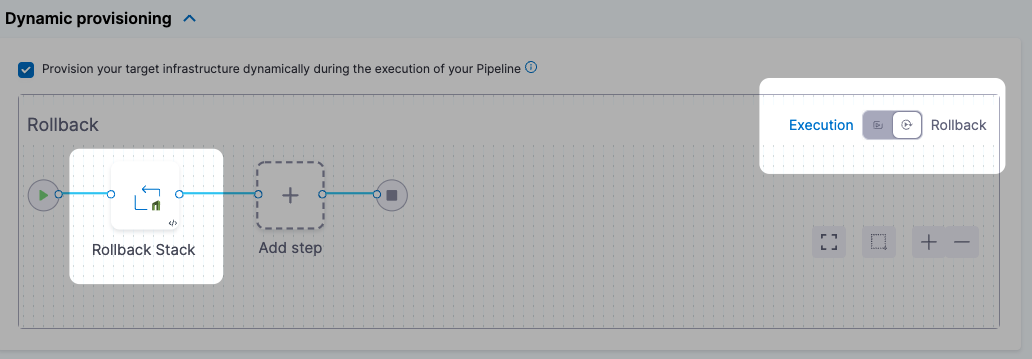
The CloudFormation Rollback Stack step is added to the Rollback section of your Deploy stage. When a deployment fails, Harness automatically runs the rollback steps to restore the infrastructure to its last known good state.
- In the Rollback section of your Deploy stage, click Add Step.
- Select CloudFormation Rollback Stack.
- Enter a name for the step.
- Set the Timeout for the rollback operation. The default is 10 minutes.
Provisioner Identifier
In the Provisioner Identifier field, enter the same Provisioner Identifier you used in the CloudFormation Create Stack step that provisioned the stack you want to roll back.
Harness determines what to roll back using a combination of:
Provisioner Identifier + Harness account ID + Harness org ID + Harness project ID
If you used Harness expressions for any of these identifiers in the Create Stack step, Harness evaluates the expressions at runtime and uses the resulting values to identify the stack.
YAML example
- step:
    type: RollbackStack
    name: Rollback CloudFormation Stack
    identifier: RollbackCloudFormationStack
    spec:
      provisionerIdentifier: cfn_infrastructure
    timeout: 10m
Rollback behavior
When the CloudFormation Rollback Stack step runs, Harness restores the stack to the last version that was successfully provisioned by a CloudFormation Create Stack step with the same Provisioner Identifier.
The rollback operation uses the AWS CloudFormation stack update mechanism to revert the stack to its previous template and parameter values. If the previous version of the stack does not exist or was not successfully provisioned, the rollback fails.
Next steps
- CloudFormation Delete Stack step: Clean up CloudFormation stacks after testing or deployment.
- CloudFormation provisioning: Understand CloudFormation provisioning modes and capabilities in Harness.