Use Harness expressions in GitOps applications
Inject dynamic values from Harness services and environments into your Kubernetes manifests during Argo CD's manifest generation phase, before anything touches the cluster.
What you will learn from this topic
- How to configure the plugin on new or existing GitOps agents
- How the plugin detects your manifest tool (Helm, Kustomize, or plain manifests)
- How to use expressions for service variables, environment variables, and secrets
- How to override variables per environment
- How to troubleshoot common expression resolution issues
This topic covers expressions and tool detection. For Vault and Secret Manager integration, and the security model, go to Secret injection in GitOps applications.
Before you begin
Before using Harness expressions in GitOps manifests, ensure you have:
- GitOps Agent: Agent version v0.105.x or later installed and running. Go to Install a Harness GitOps Agent for installation steps.
- Agent installer helper:
gitops-agent-installer-helperversion v0.0.16 or later (v0.0.18 or later is required for Kustomize support). - Harness service: A GitOps service configured with variables. Go to GitOps services to create and configure services.
- Harness environment: An environment configured with variables and linked to your service. Go to Environments for environment concepts.
Configure the Harness Argo CD plugin
For new Agent installations: Select the Enable ArgoCD Harness Plugin (Required for Harness expression resolution) checkbox during GitOps agent installation to use this feature. No additional configuration is needed.
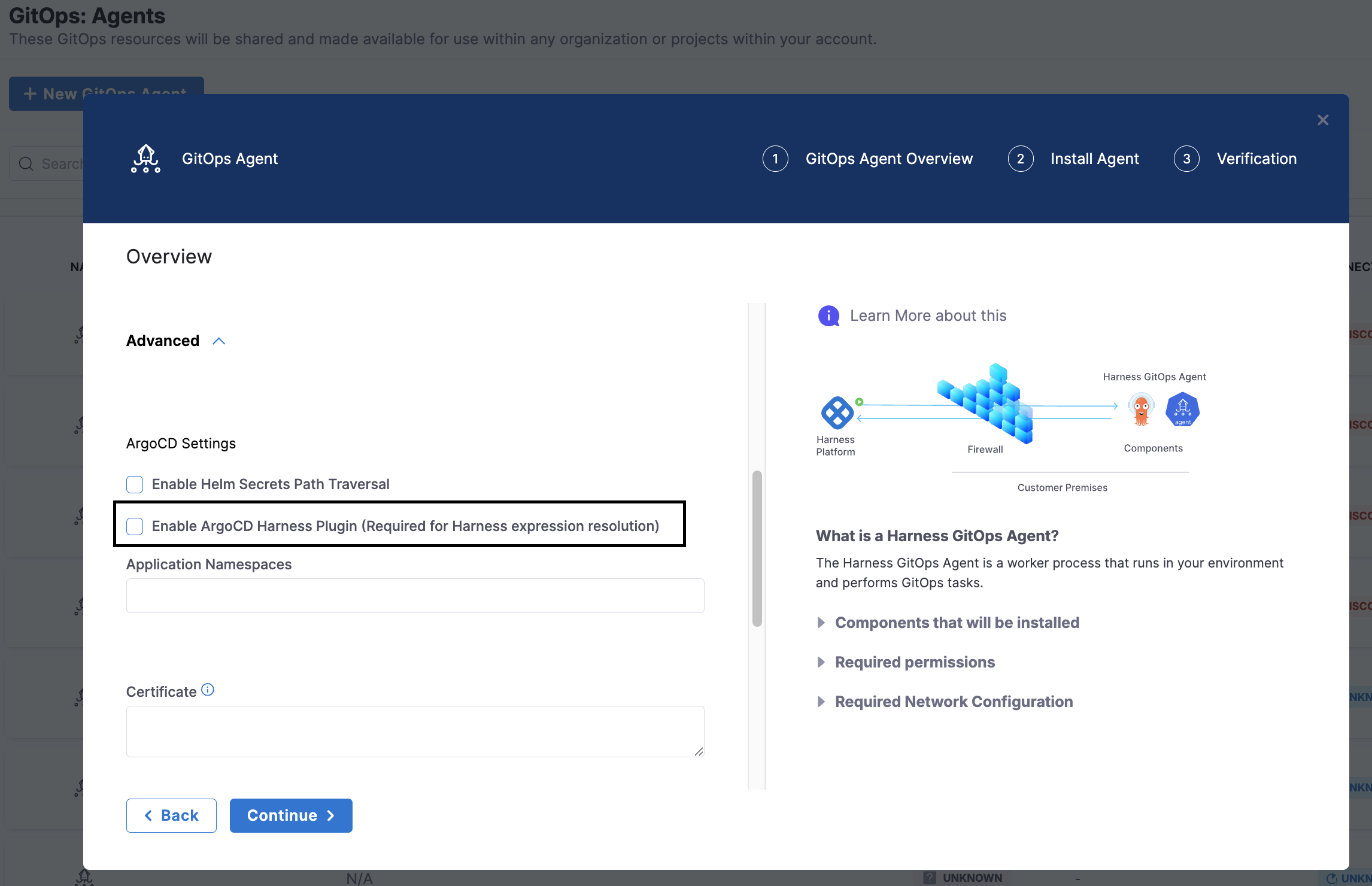
For existing Agent installations (BYOA or Harness-installed Argo): The Enable ArgoCD Harness Plugin (Required for Harness expression resolution) checkbox cannot be changed after the initial installation. You must configure the Harness Argo CD plugin manually. Go to Enable the plugin on an existing agent or BYOA for instructions.
Once enabled, point your Argo CD Application at the plugin and use expressions in your manifests:
Step 1. Point your Application at the plugin
Set the plugin name explicitly (recommended), or add .harness.yaml to the source directory to trigger auto-discovery:
spec:
  source:
    repoURL: https://github.com/your-org/your-repo
    targetRevision: HEAD
    path: manifests/
    plugin:
      name: argocd-harness-plugin
Step 2. Use expressions in your manifests
spec:
  replicas: <+serviceVariables.replicas>
  template:
    spec:
      containers:
        - name: app
          image: myapp:<+serviceVariables.imageTag>
          env:
            - name: LOG_LEVEL
              value: <+env.variables.logLevel>
            - name: ENV_NAME
              value: <+env.name>
Step 3. Sync the application
Expressions resolve at manifest generation time. Sync (or let auto-sync trigger) and the deployed manifest contains the resolved values.
Limitations
| Limitation | Details |
|---|---|
Kustomize secretGenerator | Secret resolution inside secretGenerator-produced Secret objects is unverified; use plain Secret manifests instead until confirmed. |
Application source type shows as Plugin | Argo CD shows source type as Plugin instead of Helm/Directory. Path listing in UI will not work; specify paths manually. |
HELM_ARGS | Shell-injection risk; see warning below. |
Manifest tool selection
The plugin automatically determines which manifest rendering tool to use based on your application configuration and repository contents.
Application discovery
The plugin takes over manifest generation for an Application in two ways:
| Method | How |
|---|---|
| Explicit plugin name (recommended) | spec.source.plugin.name: argocd-harness-plugin set on the Application |
| Auto-discovery | .harness.yaml is present in the Application's source directory |
With the explicit plugin name, Argo CD routes directly to the plugin regardless of what files are in the repo. Auto-discovery only runs when no plugin name is set: Argo CD probes the source directory for .harness.yaml and claims the Application if found.
Tool selection at generation time
Once the plugin is handling an Application, it auto-detects the manifest tool at generation time by inspecting the source directory:
| Priority | Condition | Tool used |
|---|---|---|
| 1 | .harness.yaml contains tool: <value> | Explicit pin: helm, kustomize, or native |
| 2 | kustomization.yaml, kustomization.yml, or Kustomization exists | kustomize build . |
| 3 | Chart.yaml or values.yaml exists | helm template |
| 4 | None of the above | Plain manifests (native) |
tool: in .harness.yaml is optional. Without it, the plugin auto-detects based on files present. Use it only to pin a specific tool or resolve ambiguity (e.g., a repo that has both Chart.yaml and kustomization.yaml).
Expressions are resolved on the tool's output, after Helm or Kustomize has already rendered the manifests.
Plain manifests
No Chart.yaml or kustomization.yaml: just raw manifests. No extra configuration needed:
apiVersion: v1
kind: ConfigMap
metadata:
  name: app-config
data:
  log-level: <+env.variables.logLevel>
  cluster: <+env.variables.clusterName>
Helm
Plugin runs helm template and resolves expressions in the output. Helm subchart dependencies (helm dependency build) run automatically; no need to vendor charts/:
replicaCount: <+serviceVariables.replicas>
image:
  tag: <+serviceVariables.imageTag>
Kustomize
Plugin runs kustomize build . and resolves expressions in the output. Expressions can appear in any resource Kustomize renders, including patches:
apiVersion: apps/v1
kind: Deployment
metadata:
  name: myapp
spec:
  replicas: <+serviceVariables.replicas>
secretGeneratorExpression resolution for kind: Secret objects produced by Kustomize's secretGenerator is not yet verified. Use plain Secret manifests (not secretGenerator) if you need secret injection with Kustomize.
.harness.yaml (optional)
.harness.yaml in the source directory serves two independent purposes:
- Auto-discovery trigger: when
spec.source.plugin.nameis not set on the Application, the plugin claims it if this file is present. - Tool pin: the optional
tool:field forces a specific manifest generation tool, overriding auto-detection.
tool: kustomize # optional: one of helm, kustomize, native
The file is valid with or without tool:. An empty .harness.yaml (or one without tool:) still triggers auto-discovery; the tool is then auto-detected from the directory contents at generation time.
Expression reference
All expressions resolve at manifest generation time (pre-deployment, not runtime).
Expression types
| Expression | Source | Example |
|---|---|---|
<+serviceVariables.name> | Service-level variables | <+serviceVariables.replicas> |
<+env.variables.name> | Environment-level variables | <+env.variables.logLevel> |
<+env.name> | Environment display name | production |
<+env.identifier> | Environment identifier | prod |
<+env.type> | Environment type | Production or PreProduction |
<+env.description> | Environment description | |
<+variable.account.name> | Account-scope fixed variable | <+variable.account.companyId> |
<+variable.org.name> | Org-scope fixed variable | <+variable.org.defaultRegion> |
<+variable.name> | Project-scope fixed variable | <+variable.projectCode> |
<+secrets.getValue("ref")> | Secret (direct reference) | <+secrets.getValue("vault_secret")> |
<+serviceVariables.name> (Secret type) | Secret via service variable | resolves to <+secrets.getValue(...)> |
Define variables
- Service variables: Deployments → Services → [Service] → Configuration → Variables
- Environment variables: Deployments → Environments → [Environment] → Configuration → Variables
- Fixed variables: Account/Org/Project Settings → Variables
Override priority
When the same variable name exists at multiple levels, the highest-priority override wins:
ENV_SERVICE > Service (base) > ENV_GLOBAL > Environment (base)
| Override type | How to configure | Scope |
|---|---|---|
| ENV_SERVICE | Environment → Service Overrides → select service | Overrides a service variable for a specific service+environment pair |
| ENV_GLOBAL | Environment → Configuration → Variables | Overrides an environment variable for all services in that environment |
Secret variables
Variables defined as type Secret in Harness go through two-stage resolution:
- Manifest generation:
<+serviceVariables.dbPassword>→<+secrets.getValue('account.prodDbPassword')> - Deployment time: actual secret value injected into the cluster
apiVersion: v1
kind: Secret
metadata:
  name: app-secrets
type: Opaque
stringData:
  db-password: <+serviceVariables.dbPassword>
  api-key: <+serviceVariables.apiKey>
Secret expressions (<+secrets.getValue()>) are only resolved when they appear inside a kind: Secret resource.
Complete example
apiVersion: apps/v1
kind: Deployment
metadata:
  name: myapp
  namespace: <+env.variables.namespace>
  labels:
    environment: <+env.type>
spec:
  replicas: <+serviceVariables.replicas>
  template:
    spec:
      containers:
        - name: myapp
          image: myapp:<+serviceVariables.imageTag>
          env:
            - name: LOG_LEVEL
              value: <+env.variables.logLevel>
            - name: REGION
              value: <+serviceVariables.region>
            - name: ENV_NAME
              value: <+env.name>
          resources:
            limits:
              memory: <+serviceVariables.memoryLimit>
              cpu: <+serviceVariables.cpuLimit>
GitOps expressions vs pipeline expressions
GitOps expressions are a subset of Harness expressions: they only have access to service and environment context, not pipeline runtime context.
When syncing manifests within PR Pipelines (for example, using the GitOps Sync step), GitOps expressions can access pipeline runtime context. This allows you to reference pipeline variables, execution details, and other pipeline-level expressions during PR Pipeline execution.
| GitOps expressions | Pipeline expressions | |
|---|---|---|
| When resolved | Manifest generation (pre-deploy) | Pipeline runtime |
| Context | Service + environment + metadata | Full pipeline (artifact.*, infra.*, stage.*, etc.) |
| Not available | pipeline.*, stage.*, artifact.*, infra.* |
Use GitOps expressions when the value is known at manifest generation time and tied to service or environment config. Use pipeline expressions for artifact versions, build numbers, or step outputs.
Enable the plugin on an existing agent or BYOA
The Enable ArgoCD Harness Plugin checkbox can only be set at initial Agent installation. Use one of these patch paths if your agent is already installed.
Helm chart installations
-
Set in
values.yaml:values.yamlharness:argocdHarnessPlugin:enabled: true -
Upgrade the release:
helm upgrade <release-name> gitops-agent/gitops-helm \--values values.yaml \--namespace <agent-namespace> -
Verify Kustomize is available (requires sidecar image ≥
v0.0.18):kubectl exec -n <agent-namespace> <argocd-repo-server-pod> \-c argocd-harness-plugin -- kustomize versionkubectl exec -n <agent-namespace> <argocd-repo-server-pod> \-c argocd-harness-plugin -- helm versionIf
kustomize versionreturns "command not found," bump the sidecar image tag abovev0.0.18and re-apply.
Plain Kubernetes manifest installations
-
Apply the plugin ConfigMap:
kubectl apply -n <agent-namespace> -f - <<'EOF'apiVersion: v1kind: ConfigMapmetadata:name: argocd-harness-pluginnamespace: <agent-namespace>data:harness.yaml: |---apiVersion: argoproj.io/v1alpha1kind: ConfigManagementPluginmetadata:name: argocd-harness-pluginspec:version: v1.0allowConcurrency: truediscover:find:command:- /bin/sh- -c- "test -f .harness.yaml"init:command:- /bin/sh- -c- |set -o pipefailif [ -f "Chart.yaml" ]; thenhelm dependency build > /dev/null 2>&1 || truefigenerate:command:- /bin/sh- -c- |set -o pipefailif [ -f ".harness.yaml" ] && grep -q '^tool:' ".harness.yaml"; thenTOOL=$(grep '^tool:' ".harness.yaml" | head -1 | cut -d: -f2 | tr -d ' "')elseTOOL=""fiif [ "$TOOL" = "kustomize" ] || { [ -z "$TOOL" ] && { [ -f "kustomization.yaml" ] || [ -f "kustomization.yml" ] || [ -f "Kustomization" ]; }; }; thenkustomize build . | argocd-harness-plugin generate -elif [ "$TOOL" = "helm" ] || { [ -z "$TOOL" ] && { [ -f "Chart.yaml" ] || [ -f "values.yaml" ]; }; }; thenhelm template $ARGOCD_APP_NAME -n $ARGOCD_APP_NAMESPACE ${ARGOCD_ENV_HELM_ARGS} --include-crds . \| argocd-harness-plugin generate -elseargocd-harness-plugin generate .filockRepo: falseEOF -
Patch the
argocd-repo-serverDeployment to add the sidecar (skip if already present):kubectl patch deployment argocd-repo-server -n <agent-namespace> --type=json -p='[{"op": "add", "path": "/spec/template/spec/containers/-", "value": {"name": "argocd-harness-plugin","command": ["/var/run/argocd/argocd-cmp-server"],"image": "harness/gitops-agent-installer-helper:v0.0.18","imagePullPolicy": "IfNotPresent","securityContext": {"runAsUser": 999, "runAsGroup": 999, "capabilities": {"drop": ["NET_RAW"]}},"volumeMounts": [{"name": "var-files", "mountPath": "/var/run/argocd"},{"name": "plugins", "mountPath": "/home/argocd/cmp-server/plugins"},{"name": "tmp", "mountPath": "/tmp"},{"name": "argocd-harness-plugin", "mountPath": "/home/argocd/cmp-server/config/plugin.yaml", "subPath": "harness.yaml"}]}},{"op": "add", "path": "/spec/template/spec/volumes/-", "value": {"name": "argocd-harness-plugin","configMap": {"name": "argocd-harness-plugin"}}}]' -
Verify:
kubectl rollout status deployment/argocd-repo-server -n <agent-namespace>kubectl exec -n <agent-namespace> <argocd-repo-server-pod> \-c argocd-harness-plugin -- kustomize version
If you already have an argocd-harness-plugin ConfigMap from a previous install, re-applying the ConfigMap in step 1 is sufficient; you do not need to re-patch the Deployment. Just verify the sidecar image tag is ≥ v0.0.18.
HELM_ARGS environment variable
The plugin passes ${ARGOCD_ENV_HELM_ARGS} directly to helm template:
spec:
  source:
    plugin:
      name: argocd-harness-plugin
      env:
        - name: HELM_ARGS
          value: -f values-dev.yaml --set replicaCount=3
HELM_ARGS is passed to helm template without escaping. Only use it when all users with Application edit access are trusted. Prefer chart-native values.yaml overrides in shared or multi-tenant clusters.
Troubleshooting
Expression appears literally in the deployed manifest
The expression was not resolved: it shows as <+serviceVariables.replicas> instead of 3.
Try first: Hard-refresh the Argo CD application to invalidate the manifest cache.
Then check:
- Variable exists? Verify the variable name and scope in Harness UI (exact match, case-sensitive).
- Plugin enabled? Check that
spec.source.plugin.name: argocd-harness-pluginis set on the Application. - Typo? Check for extra spaces or incorrect syntax; expressions are
<+serviceVariables.name>not<+ serviceVariables.name>.
Kustomize: "command not found"
kustomize: command not found
The sidecar image predates Kustomize support. Bump the image tag to ≥ v0.0.18 and re-apply. See Enable the plugin on an existing agent or BYOA.
Override not taking effect
- Wrong scope: Service variables must be overridden at ENV_SERVICE level; environment variables at ENV_GLOBAL. You cannot override a service variable using ENV_GLOBAL.
- Not saved? Verify the override is saved and the correct service+environment combination is selected.
- Name mismatch? Override variable name must match exactly (case-sensitive).
Numeric value rendered as string
Define the variable as type Number (not String) in Harness:
variables:
  - name: replicas
    type: Number   # not String
    value: 3
Secret not resolving
- Variable must be type Secret (not String) to trigger two-stage resolution.
- Secret must exist in Harness Secrets Manager before being referenced.
- Check secret reference format:
account.secretNameororg.secretName.
Next steps
- Secret injection in GitOps applications: Vault, Harness Secret Manager, and security model
- Manage GitOps Applications: Create, sync, and manage ArgoCD applications in Harness
- Harness GitOps basics: Core concepts and architecture of Harness GitOps