Sync GitOps applications
Sync is a process that ensures that the live state of a system matches its desired state by applying a declarative description. This process involves synchronizing the desired Git state with the live cluster state.
Sync for Single Sources application.
To sync applications from the Applications page:
-
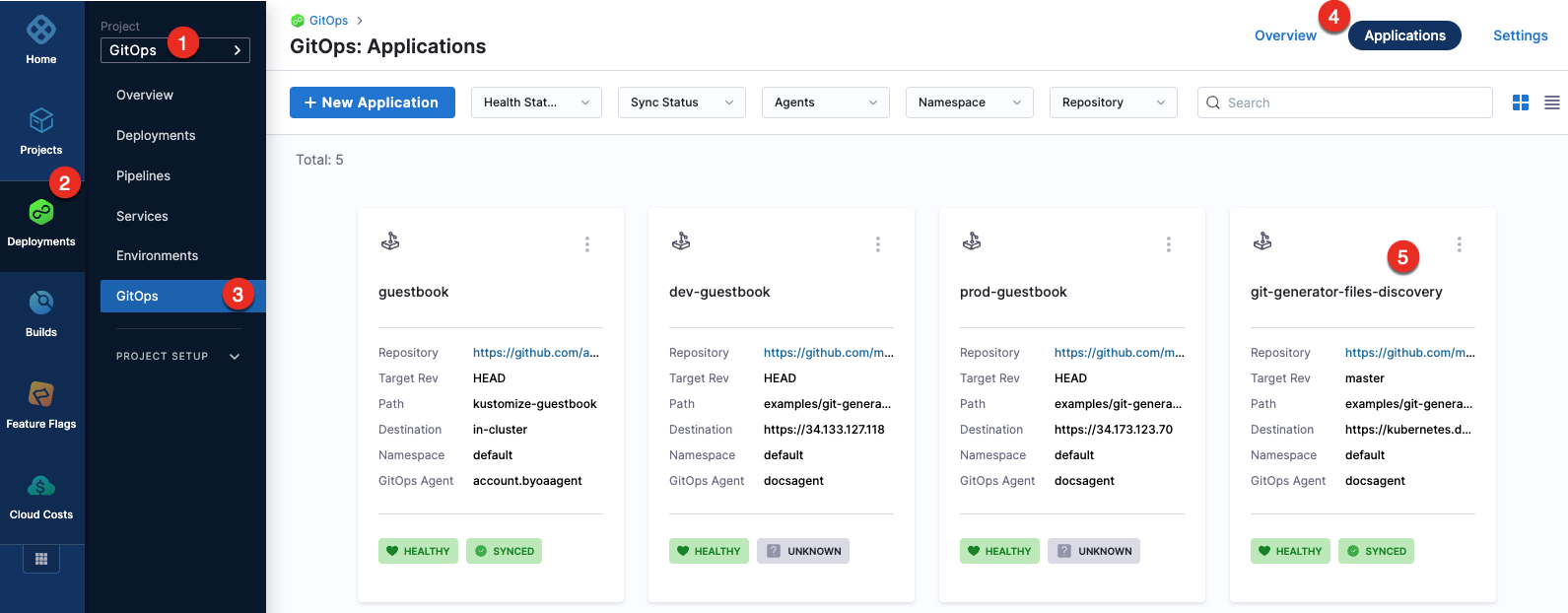
In your GitOps project, go to Deployments > GitOps > Applications, and then select your application.
-
To sync the selected application:
-
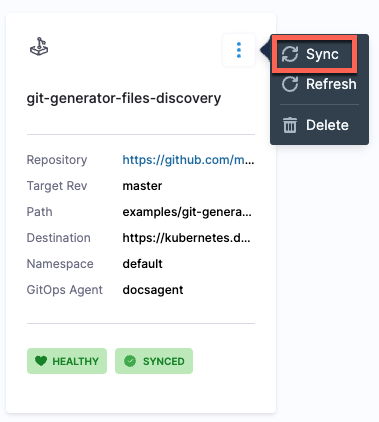
Select the more options icon, and then select Sync.
-
Select the application, and then select SYNC.

-
-
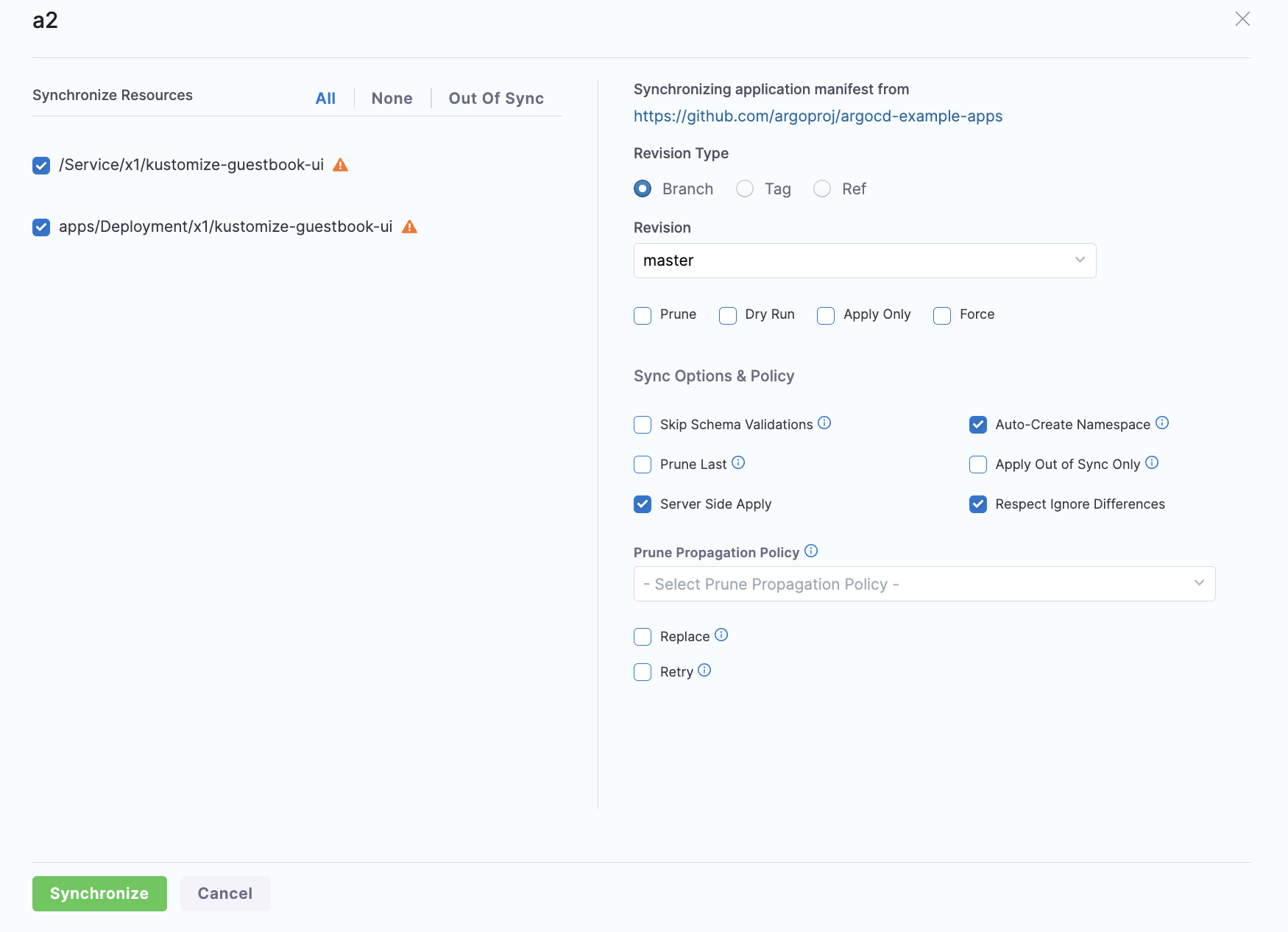
Configure the sync options, and then select Synchronize.
When synchronizing the application, you have the option to apply a specific revision. By default, target revision of the application is selected.
The Branch and Tag options display a list of available branches and tags, allowing you to make a selection. Additionally, the Ref option enables synchronization of branches, tags, and commit hashes.
To sync applications using the GitOpsSync step:
-
Select a pipeline and go to the Execution tab of a deploy stage.
infoMake sure that the service, environment, and cluster selected in the pipeline matches the service, environment, and cluster in the application.
-
Select Add Step, and then select the GitOpsSync step.
-
Select the GitOpsSync step to configure step parameters.
-
Optionally, click on the Wait until healthy checkbox, if you would like the step to run until the application reaches it's Healthy state.
-
Optionally, if you enabled Wait until healthy you can enable Fail If Step Times Out. This will cause the step to fail if it times out while waiting for the health check to pass.
tipFor example, if this option is enabled, the step may sync successfully but fail if a healthy state is not achieved before the timeout period expires. In contrast, with this option disabled, the step will always be marked as successful if the sync is successful, regardless of the healthy state.
-
In Advanced Configuration, select the application you want to sync and configure the sync options. You can either choose an application or applications manually, or you can match up to 1000 applications using a regex filter. The regex field uses Go (Golang) regex syntax, not JEXL. You can test your patterns at regex101 with the Golang flavor selected.
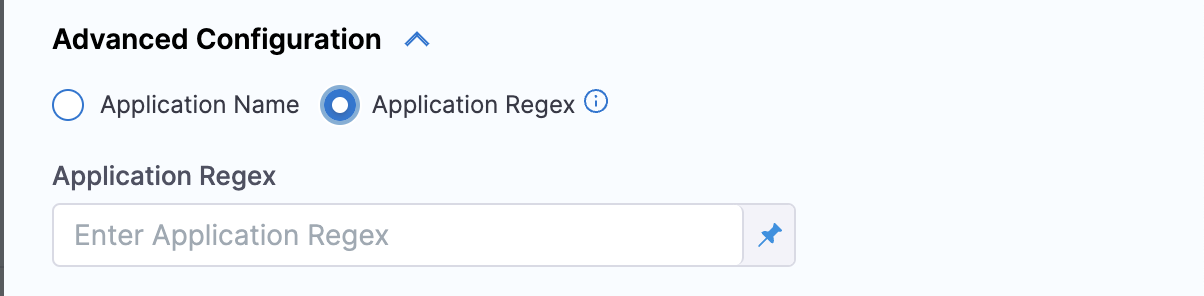
To sync only specific resource types instead of the entire application, select 'Application Name' and go to Sync specific resource types in the GitOps Sync step.
-
Select 'Apply Changes'.
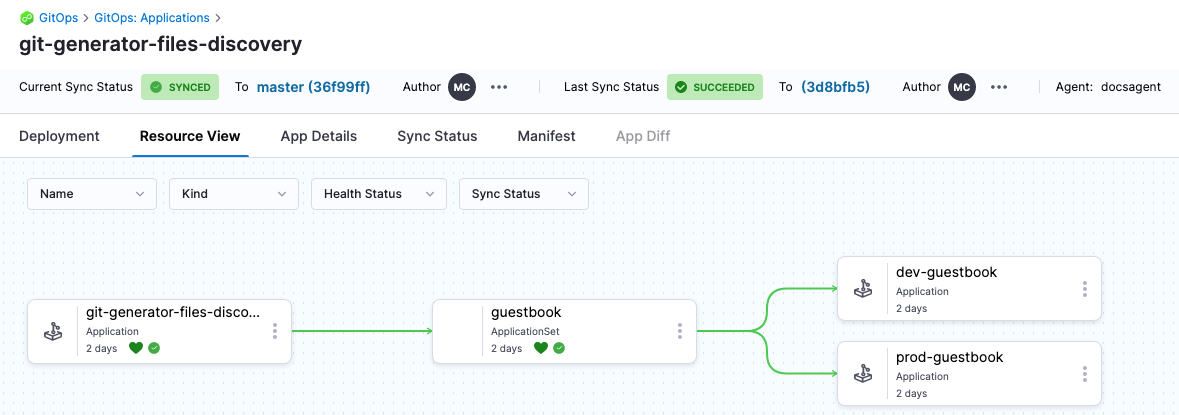
Here is how the resources would look in Harness after the sync process is complete.
Sync specific resource types in the GitOps Sync step
By default, the GitOps Sync step synchronizes every resource in a GitOps application. Use the 'Configure Resources' filter to limit sync to specific Kubernetes resource types, such as ConfigMap, Deployment, or ReplicaSet.
This does not let you cherry-pick individual resources from a list. You select resource types in Kind, and optionally narrow the sync with Group, Name, and Namespace patterns. Harness synchronizes all resources in the application that match your filters.
This feature requires ng-manager v1.154.0 and next-gen-ui v1.141.0.
Before you begin
- Manual application selection: Select 'Application Name' in the GitOps Sync step. Resource filters are not available when you target applications with 'Application Regex', 'Application Labels', or 'Fetch Linked Apps'.
- Argo CD behavior: Resource filtering uses the same capabilities Argo CD provides for selective sync. Any limitation in Argo CD also applies in Harness.
Configure resource filters
- In your pipeline, open the GitOps Sync step.
- In Advanced Configuration, under Application Selection, select 'Application Name'.
- Select the GitOps application you want to sync.
- Select 'Configure Resources'.
- In the Resource Selection dialog, set filters for each application row:
- Group: Filter by API group. For example,
appsor.*to match all groups. - Kind: Select one or more Kubernetes resource types to sync, such as
Deployment,ConfigMap, orReplicaSet. All resources of the selected kinds in the application are synchronized. - Name: Filter by resource name pattern. For example,
my-appor.*. - Namespace: Filter by namespace pattern. For example,
defaultor.*.
- Group: Filter by API group. For example,
- Select 'Save', then select 'Apply Changes' on the step.
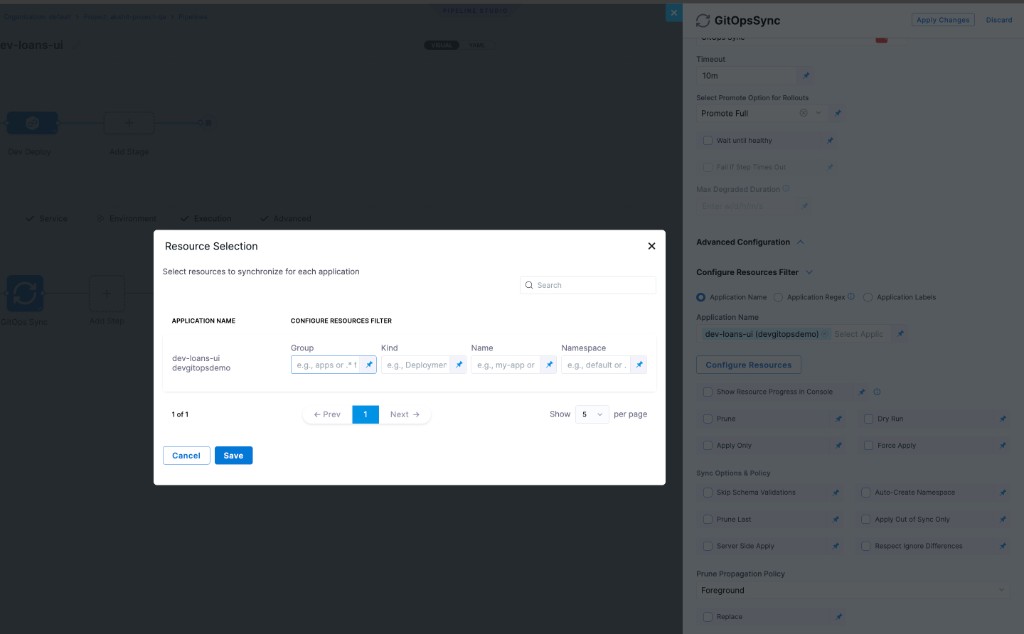
After the pipeline runs, only resources that match your filters are synchronized. Resources outside the selected kinds or filter patterns remain unchanged by this sync step.
Resource filters are available only when you select applications by name. They do not work with 'Application Regex', 'Application Labels', or 'Fetch Linked Apps'.
GitOps Sync step parameter reference
- step:
    type: GitOpsSync
    name: GitOps Sync
    identifier: GitOpsSync
    spec:
      applicationsList:                    # UI: "Application Name" — auto-populated by Fetch Linked Apps
        - agentId: my-agent
          applicationName: my-app
      # applicationRegex: "^payments-.*"   # UI: "Application Regex" — Go regex, max 1000; not JEXL
      # applicationLabels:                 # UI: "Application Labels" — Key:Value label selectors
      #   - "env:production"

      prune: false                         # UI: "Prune" — delete cluster resources absent from Git
      dryRun: false                        # UI: "Dry Run" — preview without applying to cluster
      applyOnly: false                     # UI: "Apply Only" — skip pre/post-sync hooks and sync waves
      forceApply: false                    # UI: "Force Apply" — delete and recreate instead of patch
      showResourceProgress: true           # UI: "Show Resource Progress" — stream per-resource status to logs

      waitTillHealthy: true                # UI: "Wait until healthy"
      failOnTimeout: false                 # UI: "Fail If Step Times Out" — only meaningful when waitTillHealthy: true
      degradedStateTimeout: "0"            # UI: "Degraded State Timeout" — duration string (e.g. "30s", "5m")
                                           # max time app may stay Degraded before step fails; "0" = disabled
                                           # ⚠ transient degraded states (e.g. rolling updates) can trigger this early

      autoPromoteRolloutBehavior: null     # promote-full | resume | retry | abort | restart
                                           # omit if not using Argo Rollouts

      resourcesFilter:                     # scope sync to specific resource types (applicationsList only)
        group: apps
        kind: Deployment
        name: ".*"
        namespace: default
        label: "app=my-app"

      syncOptions:
        skipSchemaValidation: false
        autoCreateNamespace: false
        pruneResourcesAtLast: false
        applyOutOfSyncOnly: false
        replaceResources: false
        serverSideApply: false
        respectIgnoreDifferences: false
        prunePropagationPolicy: foreground # foreground | background | orphan

      retryStrategy:
        limit: 3
        baseBackoffDuration: "5s"
        increaseBackoffByFactor: 2
        maxBackoffDuration: "3m"
    timeout: 10m
Application selection (use one):
| Parameter | Type | Required | Description |
|---|---|---|---|
Application Name (applicationsList) | list<object> | No | Explicit {agentId, applicationName} pairs. Auto-populated when Fetch Linked Apps ran earlier in the stage. |
Application Regex (applicationRegex) | string (Go regex) | No | Matches up to 1000 app names. Not JEXL. |
Application Labels (applicationLabels) | list<string> | No | Key:Value label selectors. Partial matches also consider service and environment names. |
Sync behaviour:
| Parameter | Type | Required | Description |
|---|---|---|---|
Prune (prune) | boolean | No (false) | Delete cluster resources absent from Git. |
Dry Run (dryRun) | boolean | No (false) | Preview sync without applying changes. |
Apply Only (applyOnly) | boolean | No (false) | Skip pre/post-sync hooks and sync waves. |
Force Apply (forceApply) | boolean | No (false) | Delete and recreate resources instead of patching. |
Show Resource Progress (showResourceProgress) | boolean | No (false) | Stream per-resource sync status to step logs. |
Health and timeout:
| Parameter | Type | Required | Description |
|---|---|---|---|
Wait until healthy (waitTillHealthy) | boolean | No (false) | Hold step until all synced apps reach Healthy. |
Fail If Step Times Out (failOnTimeout) | boolean | No (false) | When waitTillHealthy: true, fail the step if Healthy is not reached before timeout. |
Degraded State Timeout (degradedStateTimeout) | duration string | No ("0") | Max time app may stay in Degraded before the step fails (e.g. "30s", "5m"). "0" disables early-exit. Only evaluated when waitTillHealthy: true. |
degradedStateTimeout can fire during transient degraded states such as rolling updates where pods are briefly unavailable. Set conservatively or leave at "0".
Sync options (syncOptions):
| Parameter | Type | Required | Description |
|---|---|---|---|
Skip schema validation (skipSchemaValidation) | boolean | No (false) | Skip Kubernetes schema validation before applying. |
Auto-create namespace (autoCreateNamespace) | boolean | No (false) | Create the destination namespace if it does not exist. |
Prune resources at last (pruneResourcesAtLast) | boolean | No (false) | Defer pruning until all other resources are applied. |
Apply out-of-sync only (applyOutOfSyncOnly) | boolean | No (false) | Only apply resources that differ from cluster state. |
Replace resources (replaceResources) | boolean | No (false) | Use kubectl replace instead of apply. |
Server-side apply (serverSideApply) | boolean | No (false) | Use Kubernetes server-side apply. |
Respect ignore differences (respectIgnoreDifferences) | boolean | No (false) | Honor the app's ignoreDifferences config during sync. |
Prune propagation policy (prunePropagationPolicy) | enum | No (foreground) | How pruned resources are deleted: foreground, background, orphan. |
Retry strategy (retryStrategy):
| Parameter | Type | Required | Description |
|---|---|---|---|
Limit (limit) | integer (≥ 0) | No | Max retry attempts. |
Base backoff (baseBackoffDuration) | duration string | No | Initial wait before first retry (e.g. 5s). |
Backoff factor (increaseBackoffByFactor) | integer (≥ 0) | No | Multiply backoff by this factor on each retry. |
Max backoff (maxBackoffDuration) | duration string | No | Backoff ceiling (e.g. 3m). |
Sync for Multiple Sources application
For more information on creating a multi-source application, refer to the Support for Multiple Sources documentation
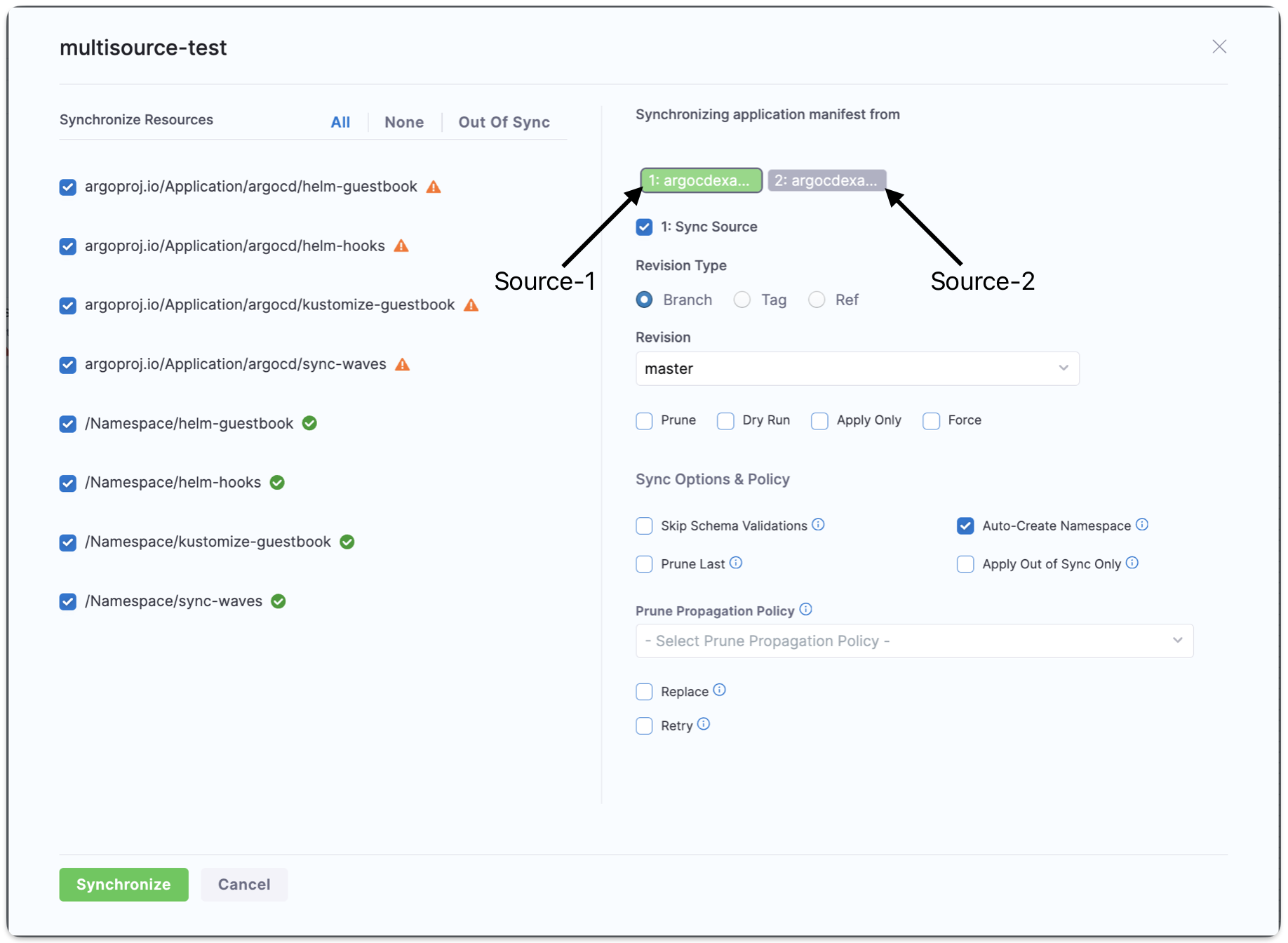
After the application with multiple source is created, you can also choose which source to sync with the application during the sync operation. By default, all applications will be synced.
To sync a specific source:
- Click the Sync button in the top right corner of the Applications page.
- Under Synchronizing application manifest from, select the source tab from which you want to sync your application.
- Check the Sync Source checkbox. The tab for the selected source, where the checkbox is enabled, will be highlighted in green.
Terminate sync
To terminate an in-progress sync, go to the application for the syncing app and locate the Terminate Sync button in the top right corner of the UI. Replace the Sync button when a sync is in progress.

Bulk Sync and Refresh
This feature requires GitOps agent version of 0.93 or higher. Please ensure you have the correct agent version.
Having the incorrect version will result in your bulk syncs timing out after three minutes.
You can bulk sync or refresh your applications from the application page. In your GitOps project, go to Deployments > GitOps > Applications to get to your applications page.
Click the Bulk Sync button in the top left to sync many applications at once or click Refresh in the top right. The following screen will appear for bulk sync, and a very similar screen will appear for refresh:
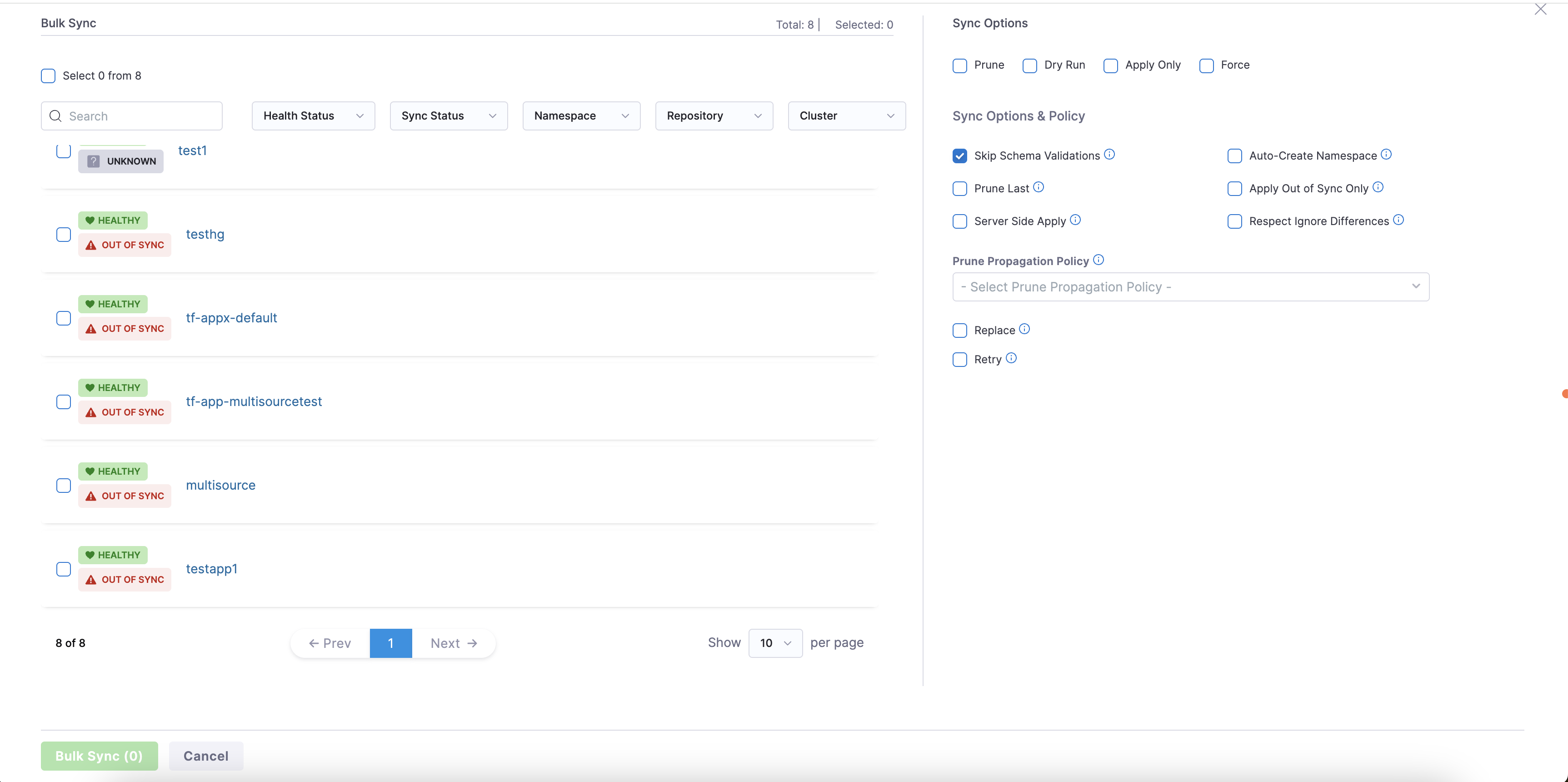
In the top left you can select all the applications on the page, or you can select applications individually from the list shown.
On the right you can modify your sync or refresh options. These options will apply to all the applications selected.
Once you've selected your applications and options, click Bulk Sync or Bulk Refresh.
The recommended batch size is 100 applications. To sync more than 100 applications, increase the GITOPS_AGENT_NUM_PROCESSORS value in the config by 1 for every additional 100 applications. For example, set it to 2 for 200 applications.
Required Permissions
- Bulk Sync: User must have the
gitops app syncpermission. - Bulk Refresh: User must have the
gitops app viewpermission.
Sync notifications
You can receive notifications for sync success/failure, out-of-sync drift, and health degradation. Go to Centralised notification to configure alerts for GitOps application events.