Helm canary deployment
A Helm canary deployment deploys your chart to a subset of instances first, using a separate Helm release with a distinct name. After the canary is deployed and validated, Harness removes the canary release and runs a full basic deployment to promote the new version across all instances. If a failure occurs at any point, Harness cleans up the canary release and rolls back the stable release automatically.
Before you begin
- A Helm service: Go Helm services set up a service with a chart source and values files.
- A Helm infrastructure: Go Helm infrastructure connect a cluster and namespace.
- A Harness delegate in the target cluster: The delegate runs Helm commands against your cluster.
- Runtime configuration: Every Helm stage requires a
runtimeblock specifying the connector and namespace. Go Helm runtime configuration understand the required fields.
How canary deployments work
A Helm canary deployment runs three steps in sequence:
-
Helm Canary Deploy: Installs a separate Helm release alongside the stable release using a unique canary release name. You control the canary scope by specifying a count or percentage of instances. Harness waits for the canary workloads to reach steady state before proceeding.
-
Helm Canary Delete: Uninstalls the canary release using
helm uninstall, referencing the release name produced by the Helm Canary Deploy step. This clears canary workloads before full promotion begins. -
Helm Basic Deploy: Runs
helm upgrade --installon the stable release name to deploy the new version to all instances. Helm increments the stable release revision.
Use a canary deployment when:
- You want to validate a new version against a small subset of traffic before promoting.
- Your application supports running two versions simultaneously in the same namespace.
- You need automatic cleanup of the canary release before promotion to avoid resource conflicts.
Pipeline YAML
View complete canary stage YAML
pipeline:
  name: helm-canary-deploy
  identifier: helm_canary_deploy
  clone:
    disabled: true
  stages:
    - name: helm-canary-deploy
      id: helm_canary_deploy
      service:
        type: helm
        items:
          - <your-service-id>
      environment:
        id: <your-environment-id>
        deploy-to: <your-infrastructure-id>
      steps:
        - name: Helm Canary Deploy
          id: helmDeployCanaryStep
          template:
            uses: helmDeployCanaryStep
        - name: Helm Canary Delete
          id: helmCanaryDeleteStep
          template:
            uses: helmCanaryDeleteStep
          with:
            release: <+stage.steps.helmDeployCanaryStep.output.outputVariables.canaryRelease>
        - name: Helm Basic Deploy
          id: helmDeployBasicStep
          template:
            uses: helmDeployBasicStep
      rollback:
        - group:
            steps:
              - if: ${{rollback.data.PLUGIN_CANARY_RELEASE_NAME != ''}}
                name: Helm Canary Delete Rollback
                id: helmCanaryDeleteStepRollback
                template:
                  uses: helmCanaryDeleteStep
                with:
                  release: ${{rollback.data.PLUGIN_CANARY_RELEASE_NAME}}
              - name: Helm Rollback
                id: helmRollbackStep
                template:
                  uses: helmRollbackStep
            id: helmCanaryRollback
            name: Helm Canary Rollback
      on-failure:
        errors: all
        action: stage-rollback
      runtime:
        kubernetes:
          namespace: <target-namespace>
          connector: <your-kubernetes-connector-id>
          delegate: <your-delegate-name>
Go Helm runtime configuration understand the required runtime block and how to find your connector and namespace values.
Configure canary stage
Select canary strategy
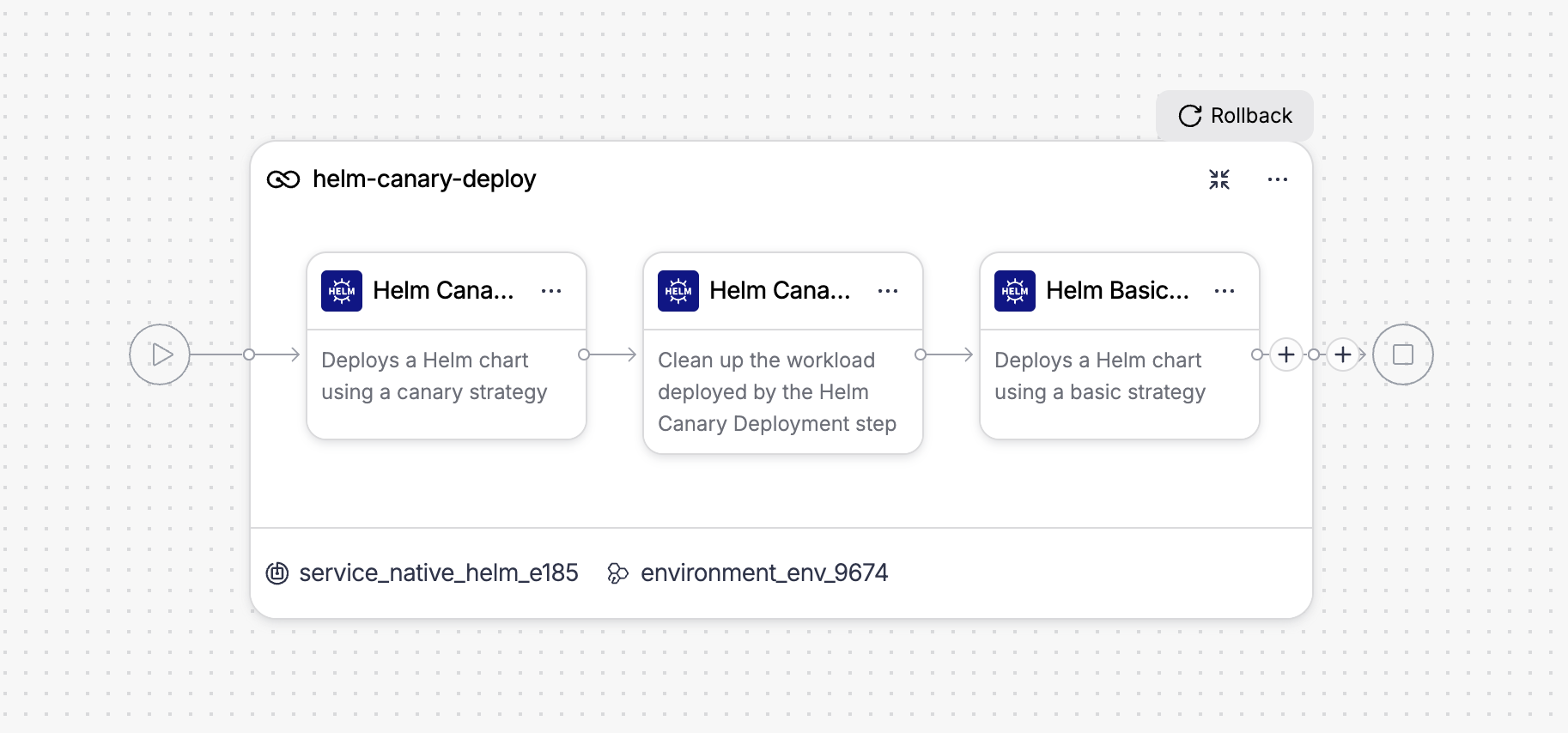
When creating a new Helm stage, the strategy wizard asks you to choose a deployment strategy. Select Canary from the list.
Harness automatically adds three steps to the stage canvas: Helm Canary Deploy, Helm Canary Delete, and Helm Basic Deploy.
Configure Helm Canary Deploy step
The following fields are available:
| Parameter | Description | Default |
|---|---|---|
| Name | Display name for the step in the pipeline canvas. | Helm Canary Deploy |
| Instance Count | Select count to specify an absolute number of instances, or percentage to specify a fraction of the total. | count |
| Instances | The number or percentage of instances to include in the canary release. When Instance Count is count, enter a whole number. When set to percentage, enter a value between 1 and 100. | 1 (count) / 100 (percentage) |
| Ignore Failed Release History | When true, proceeds with deployment even if the previous Helm release has a failed status. Use this to recover from a broken release without manual cleanup. | false |
| Skip Steady State Check | When true, skips waiting for canary workloads to reach steady state after deployment. | false |
| Run Chart Tests | When true, runs helm test against the canary release after a successful deployment. | false |
| Environment Variables | Additional environment variables to pass into the Helm plugin execution. | — |
| Command Flags | Additional flags to append to the helm upgrade command, for example --atomic or --cleanup-on-fail. | — |
Click + More options to access additional fields:
| Parameter | Description | Default |
|---|---|---|
| Skip Cleanup | When true, skips cleanup of a failed first release. Use this to inspect resources left behind after a failed initial install. | false |
| Print Manifests | When true, logs the full rendered chart manifest to the step output with secrets redacted. | false |
| Server-Side Rendering | When true, passes --server to helm template so manifests are rendered against the live cluster rather than locally. | false |
Go Helm Canary Deploy step reference review the full field reference.
After the canary is deployed and before Harness removes it, insert approval, verification, or notification steps to validate the canary release manually or automatically before proceeding to full promotion.
Configure Helm Canary Delete step
The following fields are available:
| Parameter | Description | Default |
|---|---|---|
| Name | Display name for the step in the pipeline canvas. | Helm Canary Delete |
| Release Name | The name of the Helm release to uninstall. Harness pre-populates this with the expression <+stage.steps.helmDeployCanaryStep.output.outputVariables.canaryRelease>, which references the canary release name produced by the Helm Canary Deploy step. Do not modify this value unless you use a custom canary release name. | <+stage.steps.helmDeployCanaryStep.output.outputVariables.canaryRelease> |
Go Helm Canary Delete step reference review the full field reference.
Configure Helm Basic Deploy step
This step runs the full promotion after the canary release is removed. The following fields are available:
| Parameter | Description | Default |
|---|---|---|
| Name | Display name for the step in the pipeline canvas. | Helm Basic Deploy |
| Ignore Failed Release History | When true, proceeds with deployment even if the previous Helm release has a failed status. | false |
| Skip Steady State Check | When true, skips waiting for all deployed workloads to reach steady state after helm upgrade --install. | false |
| Run Chart Tests | When true, runs helm test against the release after a successful deployment. | false |
| Environment Variables | Additional environment variables to pass into the Helm plugin execution. | — |
| Command Flags | Additional flags to append to the helm upgrade command. | — |
Go Helm Basic Deploy step reference review the full field reference.
Rollback
If any step in the canary stage fails, Harness runs the rollback group automatically. The rollback group is named Helm Canary Rollback and contains two steps.
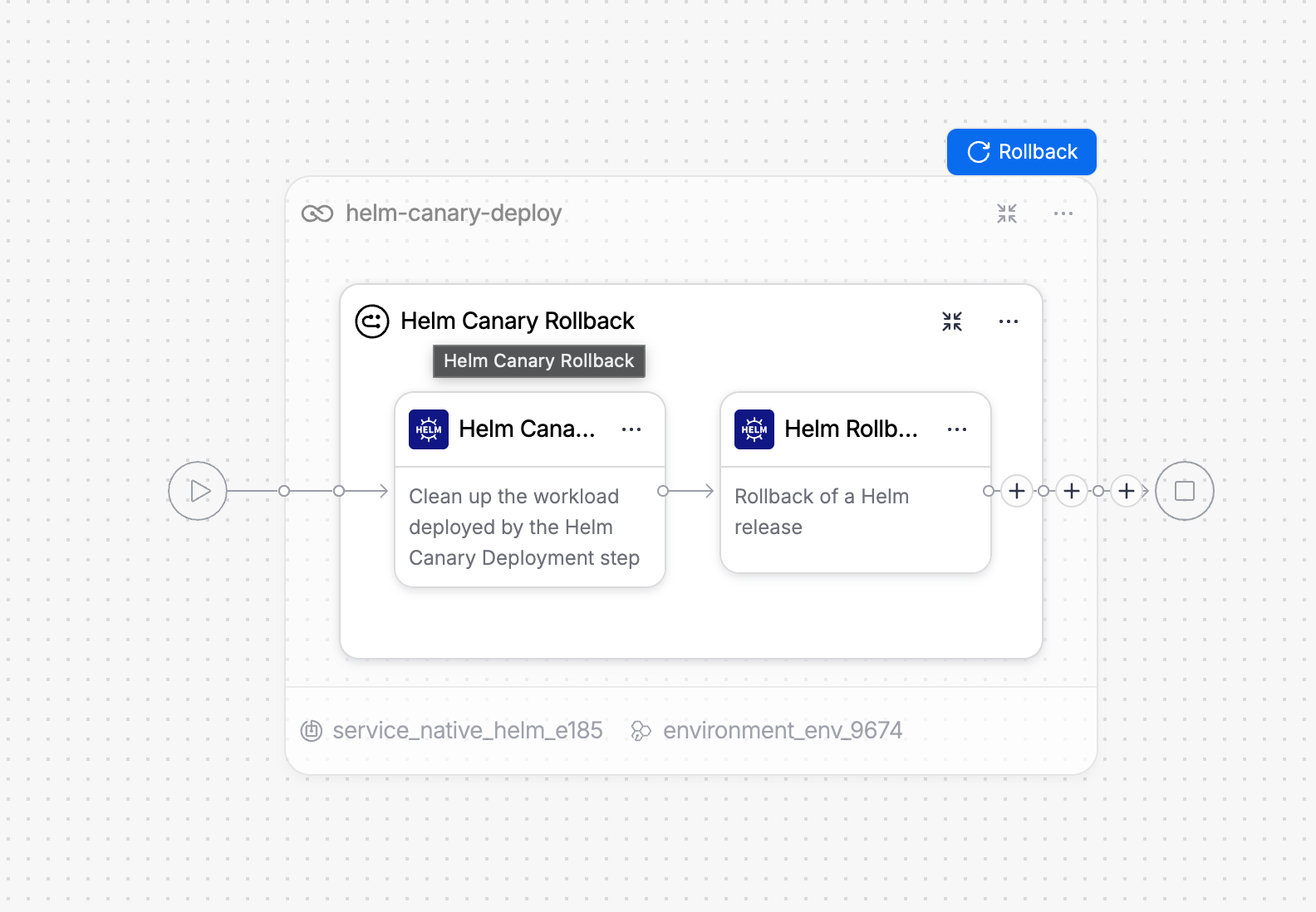
Helm Canary Delete Rollback runs first and cleans up the canary release if one was deployed before the failure.
| Parameter | Description |
|---|---|
| Release Name | Set to ${rollback.data.PLUGIN_CANARY_RELEASE_NAME}. Harness auto-populates this from the canary deploy step's rollback data. |
| Conditional execution | The step runs only when ${rollback.data.PLUGIN_CANARY_RELEASE_NAME != ''}. If the stage failed before the canary was deployed, this step is skipped automatically. |
Helm Rollback then runs helm rollback on the stable release to restore the previous version.
| Parameter | Description | Default |
|---|---|---|
| Name | Display name for the rollback step. | Helm Rollback |
| Skip Steady State Check | When true, skips waiting for workloads to reach steady state after helm rollback. | false |
| Run Chart Tests | When true, runs helm test after a successful rollback. | false |
| Environment Variables | Additional environment variables to pass into the rollback execution. | — |
| Command Flags | Additional flags to append to the helm rollback command. | — |
Harness uses the PreCanaryReleaseRevision value, which is automatically populated from the canary deploy step's rollback data. This ensures rollback targets the revision immediately before the canary was deployed, skipping the canary revision in the release history. For example, if the stable release is at revision 3 after the Helm Basic Deploy step, Harness rolls back to revision 1, not revision 2, which was the canary revision.
Go Helm Rollback step reference review the full reference.
What happens on execution
When you run a pipeline with a canary stage, the execution view shows the full step sequence. A successful run looks like this:
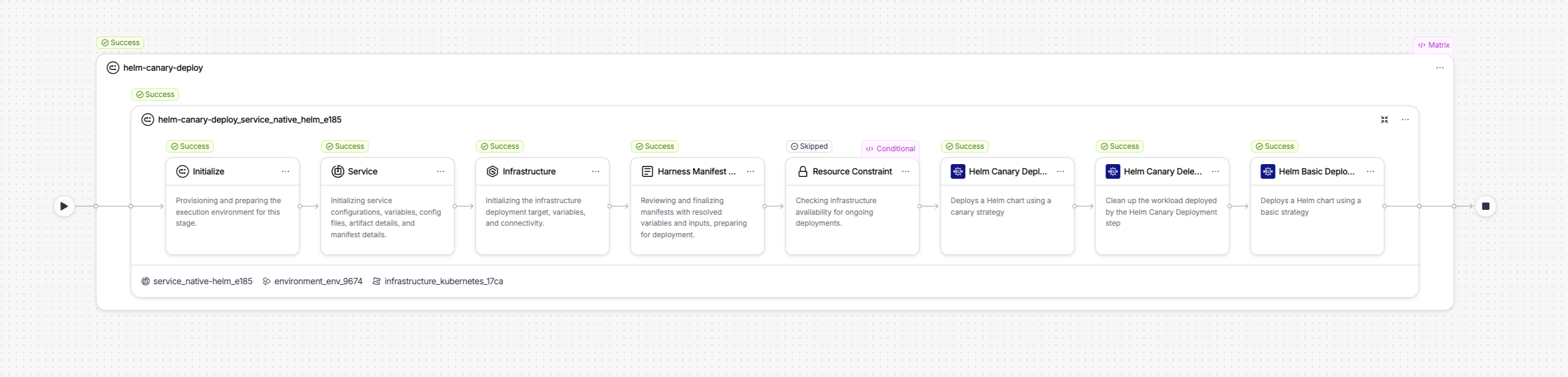
The execution includes setup steps Harness runs automatically before the configured steps:
- Initialize: Provisions and prepares the execution environment for the stage.
- Service: Initializes service configurations, variables, config files, artifact details, and manifest details.
- Infrastructure: Generates a kubeconfig file by connecting to the Kubernetes connector. The kubeconfig is written to a shared path and used by all subsequent Helm steps in the stage.
- Harness Manifest: Runs two sub-steps.
fetch-fileslocates the chart directory and values files in the source repository.render-filesresolves and prints the values files to the step output so you can verify the exact values passed to Helm. - Resource Constraint: Checks infrastructure availability for concurrent deployments. Skipped if no resource constraints are configured.
The three configured steps follow in order: Helm Canary Deploy, Helm Canary Delete, and then Helm Basic Deploy.
Helm Canary Deploy step in execution
The step executes the following actions internally:
-
Input validation: Resolves and prints all input parameters, including release name, chart path, values files, instance count or percentage, Helm flags, namespace, and credentials. Prints
PARAM VALIDATION: All looks goodbefore proceeding. -
Canary release name generation: Harness derives the canary release name by appending
-canaryto the stable release name. For example, if the stable release name isrelease-50fd6a, the canary release isrelease-50fd6a-canary. The canary release name is emitted as an output variable (canaryRelease) for use in the Helm Canary Delete step. -
Release history check: Runs
helm historyto inspect the current state of the release. If no release exists, Harness proceeds with a fresh install. If Ignore Failed Release History is enabled and the last release shows a failed status, Harness clears it before upgrading. -
Helm upgrade: Runs
helm upgrade --install <canary-release-name> <chart-path>with the resolved instance scope applied. Helm tracks the canary as a separate release with its own revision history. -
Steady state check: Polls the cluster until all canary workloads reach ready status. Bypassed if Skip Steady State Check is enabled.
Helm Canary Delete step in execution
The step executes the following actions internally:
-
Input validation: Resolves the release name from the
canaryReleaseoutput variable of the Helm Canary Deploy step and prints all parameters. PrintsPARAM VALIDATION: All looks goodbefore proceeding. -
Helm version check: Detects the Helm CLI version available on the delegate.
-
Helm uninstall: Runs
helm uninstall <canary-release-name> --namespace <namespace> --timeout 300s. The canary release and all its associated Kubernetes resources are removed from the cluster. The stable release is not affected.
Helm Basic Deploy step in execution
The step executes the same actions as the standalone Helm Basic Deploy step: input validation, release history check, helm upgrade --install against the stable release name, and a steady state check. At this point the stable release increments to its next revision and all instances run the new version.
Next steps
- Go Helm blue-green deployment route production traffic between two full release environments.
- Go Helm basic deployment use a single-phase deployment without canary validation.
- Go Helm Canary Deploy step reference review all step settings.