Explore and Use a Module
Once a module is registered, Harness parses metadata from the module repository and presents it on the module detail view. The tabs are populated automatically from the module's files, so you can review its inputs, outputs, dependencies, resources, documentation, and submodules without manually entering this information.
If you make changes to the module, update the source files and sync the module to refresh the registry metadata.
Before you begin
- A registered module: Register a module before you explore its details or use it. Go to Register a Module to add one.
Explore module details
Each tab maps to a file in your module repository.
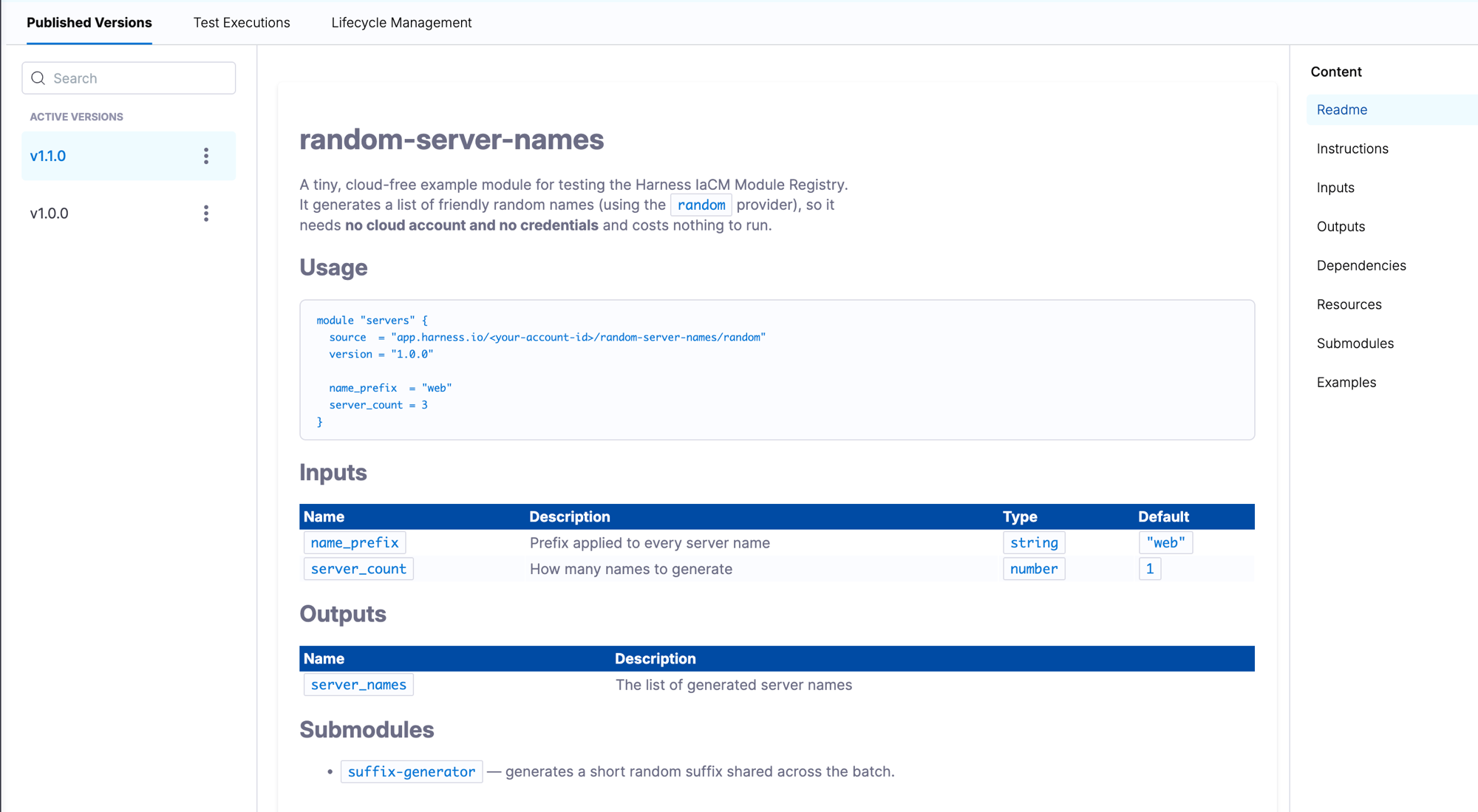
| Tab | Source file | What it shows |
|---|---|---|
| Readme | README.md | Renders the module's README.md directly. |
| Instructions | Generated | A code snippet you can copy into your OpenTofu or Terraform configuration to reference the module. |
| Inputs | variables.tf | The module's input variables: name, type, description, and default value. |
| Outputs | outputs.tf | The values the module returns after execution. |
| Dependencies | versions.tf | Required providers and version constraints. |
| Resources | OpenTofu/Terraform configuration files | The resources defined by the module. |
| Submodules | modules/ | Metadata extracted from the modules/ folder (one level deep). |
| Examples | examples/ | Example configurations from the module's examples/ directory. |
- Readme
- Instructions
- Inputs
- Outputs
- Dependencies
- Resources
- Submodules
- Examples
The Readme tab renders the module's README.md directly. Harness parses this file from the module repository and displays it formatted on the detail page. A well-structured README documents the module's purpose, required inputs, and usage examples for consumers.
# aws-vpc

Creates an AWS VPC with public and private subnets.

## Usage

module "vpc" {
  source     = "app.harness.io/<account-id>/aws-vpc/aws"
  version    = "1.0.0"
  cidr_block = "10.0.0.0/16"
}

## Inputs

| Name | Description | Type | Default |
|------|-------------|------|---------|
| cidr_block | CIDR block for the VPC | string | "10.0.0.0/16" |
Go to Set Up a Module for the required module file structure.
The Instructions tab shows a generated code snippet you can copy directly into your OpenTofu or Terraform configuration. The snippet pre-fills the source address and latest version for the module.
module "my-module" {
  source  = "app.harness.io/<account-id>/<module-name>/<provider>"
  version = "1.0.0"

  # Add required input variables here
}
Go to Reference a root module and Reference a submodule for the full source address format and version pinning details.
The Inputs tab is populated from variables.tf:
variable "aws-region" {
  description = "The AWS region to deploy resources"
  type        = string
  default     = "us-west-2"
}

variable "instance_type" {
  description = "EC2 instance type"
  type        = string
  default     = "t2.micro"
}
The Outputs tab is populated from outputs.tf:
output "instance_id" {
  description = "The ID of the EC2 instance"
  value       = aws_instance.example.id
}

output "public_ip" {
  description = "The public IP address of the instance"
  value       = aws_instance.example.public_ip
}
The Dependencies tab is populated from versions.tf:
terraform {
  required_providers {
    aws = {
      source  = "hashicorp/aws"
      version = "~> 3.0"
    }
  }
  required_version = ">= 0.12"
}
Resources are defined within your OpenTofu or Terraform configuration files. They are applied when you run your provision pipelines:
resource "aws_instance" "example" {
  ami           = "ami-0c55b159cbfafe1f0"
  instance_type = var.instance_type

  tags = {
    Name = "ExampleInstance"
  }
}
The Submodules tab shows metadata extracted from the modules/ folder. The registry collects metadata one level deep, so only direct children of modules/ appear.
modules/
├── networking/       ← appears in the Submodules tab
│   ├── main.tf
│   └── variables.tf
└── storage/          ← appears in the Submodules tab
    ├── main.tf
    └── variables.tf
Go to Set Up a Module for submodule structure and metadata requirements.
The Examples tab shows configurations from the module's examples/ directory. Each example demonstrates a working usage pattern for the module.
# examples/basic/main.tf

module "vpc" {
  source     = "app.harness.io/<account-id>/aws-vpc/aws"
  version    = "1.0.0"
  cidr_block = "10.0.0.0/16"
}
Go to Set Up a Module for the examples directory structure.
Manage module versions and source
Version dropdown
Select a published version to view its metadata. The available versions correspond to Git tags that have been registered for the module. Selecting a version reflects the module's state at that point in time.
Source Code
Click SOURCE CODE to open the module's source repository.

Sync
Click Sync to fetch newly available matching Git tags and make their versions available in the registry. This is in addition to auto-sync, if you enabled it at registration.
After you review a module and choose a version, you can reference it from your OpenTofu or Terraform configuration.
Use a module
How you reference it depends on whether you want the whole module or a submodule inside it.
Reference a root module
Reference the root module by its source and version. The version corresponds to a Git tag, so specifying a version pins the configuration to that module version. The source address follows the format app.harness.io/<account-id>/<module-name>/<provider>. Replace <account-id>, <module-name>, and <provider> with the values for your registered module. You can find the pre-filled source address and version for your module on the Instructions tab of the module detail page.
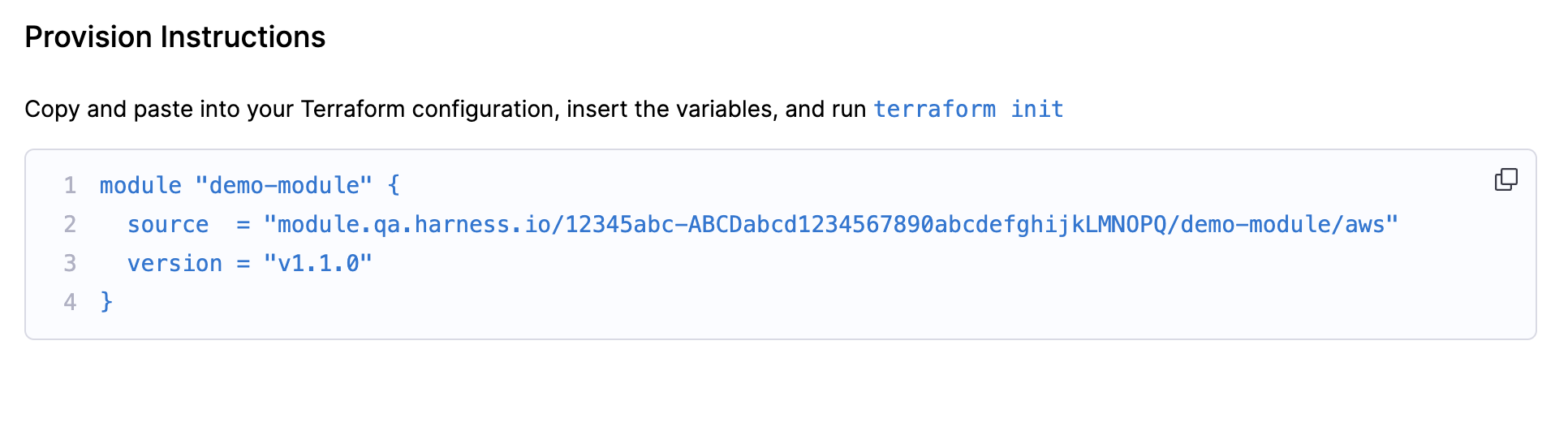
module "native-module" {
  source  = "app.harness.io/<account-id>/native-module/aws"
  version = "1.2.1"  # This matches a Git tag on your repository
}
Reference a submodule
Reference a submodule with the // subpath syntax. A submodule does not carry its own version; it inherits the root module's version. Submodules must be located in the module's modules/ directory to appear in the registry. Go to Set Up a Module for submodule structure and metadata requirements.
module "native-submodule" {
  source = "app.harness.io/<account-id>/native-module//modules/native-submodule"
  # No version here — submodules inherit the root module's Git tag
}
Authenticate the OpenTofu or Terraform CLI
When you run OpenTofu or Terraform commands locally against a configuration that sources modules from the Harness registry, the CLI must authenticate with app.harness.io. Without this authentication, tofu init or terraform init fails with a 401 error when it tries to download the module.
OpenTofu and Terraform read authentication tokens from environment variables named TF_TOKEN_<hostname>, where dots in the hostname are replaced with underscores. Set the variable to a Harness personal access token (PAT) before running any local commands:
export TF_TOKEN_app_harness_io=<your_harness_pat>
tofu init
# or: terraform init
If your organization runs Harness on a custom domain (for example, registry.example.com), replace dots with underscores in that hostname:
export TF_TOKEN_registry_example_com=<your_harness_pat>
tofu init   # or: terraform init
Once the variable is set, subsequent tofu validate, tofu plan, and equivalent Terraform commands work for the duration of your shell session. To persist the token across sessions, add the export line to your shell profile (for example, ~/.zshrc or ~/.bashrc). Alternatively, store credentials in the OpenTofu or Terraform credentials file (~/.tofurc or ~/.terraform.d/credentials.tfrc.json).
TF_TOKEN_app_harness_io authenticates your local OpenTofu or Terraform CLI with the Module Registry. It is separate from the Git credentials used to access the module repository. Go to Register a Module to set up the Git connector.
Troubleshooting
tofu init or terraform init returns a 401 error when sourcing a module from the Harness IaCM Module Registry
Set the TF_TOKEN_app_harness_io environment variable to a valid Harness Personal Access Token before running init. If your organization uses a custom domain, replace dots in the hostname with underscores for the variable name (for example, TF_TOKEN_registry_example_com).
A registered module version is not appearing in the Harness IaCM Module Registry after syncing
Confirm that the repository has at least one Git tag matching the configured tag pattern. Branches are not synced. Trigger a manual sync by clicking Sync on the module detail page and check the onboarding pipeline execution for errors.
A submodule is not appearing in the Submodules tab of the Harness IaCM Module Registry
Confirm that the submodule is a direct child of the modules/ directory. The registry only collects metadata one level deep. Deeply nested submodules remain usable through the // subpath syntax but do not appear as registry tabs.
Next steps
- Go to Test a Module to validate module changes before consumers use them.
- Go to Manage Version Lifecycle to manage the lifecycle of published module versions.
- Go to Govern Module Usage to control which modules and versions teams can use.