Create a workspace
A workspace is a named environment that stores Terraform configurations, variables, states, and other resources necessary to manage infrastructure. Each workspace is mapped to a single state, and you can define a single Terraform configuration with multiple workspaces to enforce the same desired configuration across independent lifecycles.
Before you begin
- IaCM module access: Your Harness account must have the IaCM module enabled.
- Workspace permissions: You need Create or Edit permissions on workspaces. Go to Workspace RBAC to configure roles.
- Git repository: A Git repository (GitHub, GitLab, Bitbucket, or Harness Code) containing your Terraform or OpenTofu configuration.
- Cloud provider connector: A configured connector for your cloud provider or backend system. Go to Connectors to set one up.
Workspace statuses
A workspace can have one of the following statuses:
- Active: Successfully deployed and running.
- Inactive: Successfully destroyed or was not provisioned.
- Drifted: Drift was detected.
- Provisioning: Currently being provisioned.
- Destroying: Currently being destroyed.
- Failed: Errors were encountered during provisioning or destroying.
- Apply_Needed: Apply is required to bring the infrastructure in sync with the workspace configuration.
- Unknown: Changes were made outside the product.
Go to Workspace statuses to filter workspaces by status.
Create a new workspace
- Interactive guide
- Step-by-step
To create a new workspace, follow these steps:
- Sign in to app.harness.io.
- In the module pane, select Infrastructures as Code Management.
- Select Workspaces, then select +New Workspace, then select Start from scratch.
Step 1: About workspace
- Enter a name for your workspace. This name will appear in your workspace list.
- (Optional) Add a description to clarify the purpose of the workspace.
- (Optional) Add tags for easier filtering and organization.
- Click Next.
Step 2: Configure repository details
-
Select a git provider: choose either Harness Code Repository or a third-party git provider (for example, GitHub, GitLab, or Bitbucket).
-
Select a git connector: choose an existing connector or create a new one.
-
Choose a git fetch type:
- Latest from Branch is selected by default.
- Enter the git branch name you want to fetch from.
Branch with JEXLYou can configure the workspace branch to be a JEXL expression that references a pipeline variable, and then set the pipeline variable as a runtime input.

Set your branch variable as a runtime input in the pipeline:
variables:- name: iacm_branchtype: Stringdescription: ""required: truevalue: <+input>.default(main)- (Optional) Enter a folder path: if your IaC code resides in a subdirectory, specify the folder path.
- Click Next.
Step 3: Provisioner
- Select a Connector: choose the connector for the cloud provider or backend system (for example,
aws-oidc). - Set Scope: confirm the scope for the connector (for example, Account, Project, or Organization).
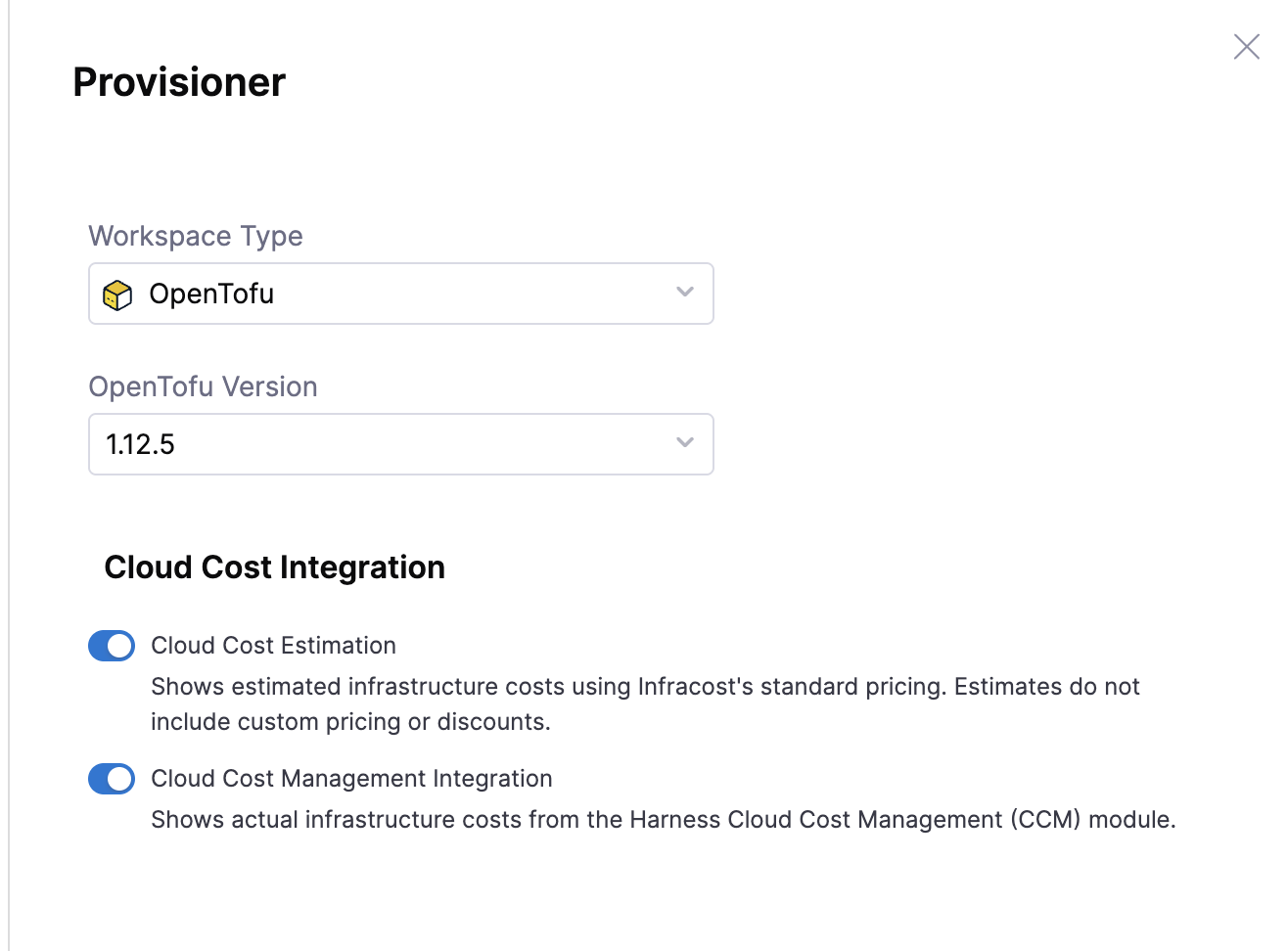
- Choose Workspace Type: select OpenTofu or Terraform based on your IaC framework.
- Select the Version of OpenTofu or Terraform to use (for example,
1.12.5).
Cloud Cost Management Integration is currently pending release. Contact Harness Support to request access.
Under Cloud Cost Integration, toggle the cost features you want to enable for this workspace:
- Cloud Cost Estimation: Runs Infracost during each Terraform or OpenTofu plan and shows estimated cost changes in approval steps and the Cost Change Estimation tab.
- Cloud Cost Management Integration: Pulls actual infrastructure costs and optimization recommendations from the Harness CCM module and displays them on the workspace Overview tab.
Go to Cost estimation for details on each option.
Click Create to finalize and create the workspace.
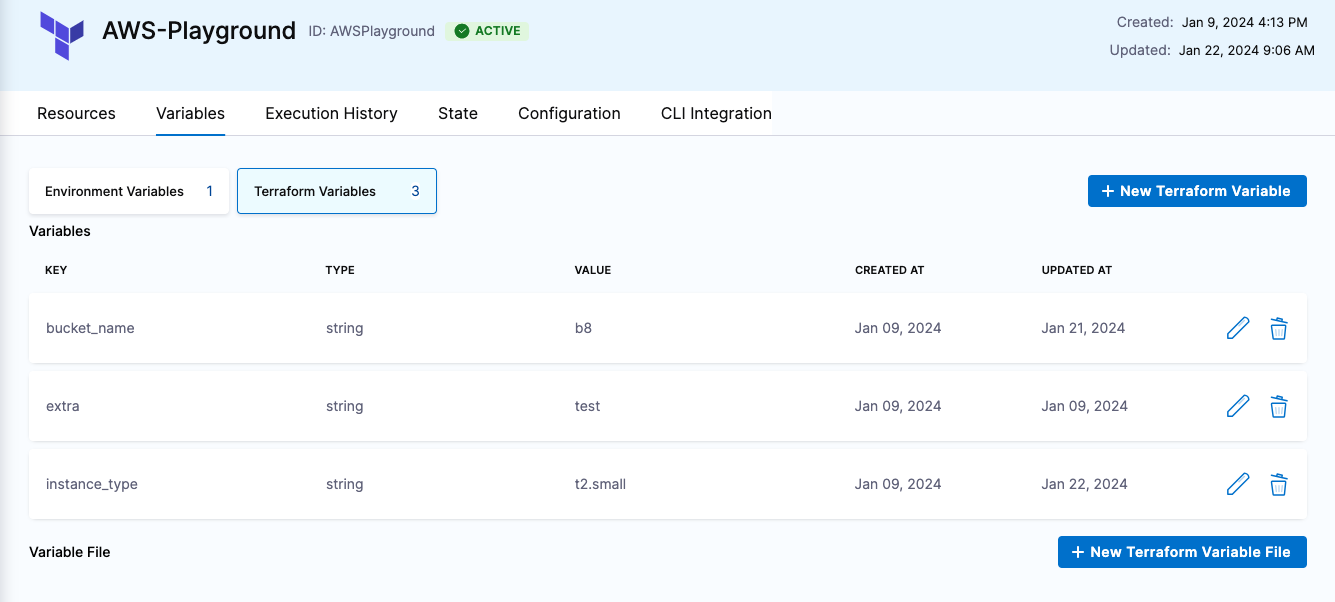
If you need to use either environment or Terraform variables during execution, select the Variables tab to define the variables.
- Environment Variables: can be either String, Secret, or a reference to another variable using a JEXL expression (it can be in the same or a different workspace or from the pipeline).
- Terraform Variables: can be provided in the following ways:
- Inline: you can define Terraform variables within the workspace. Variables can be either String, hcl, Secret, or a reference to another variable, using a JEXL expression (can be in the same or a different workspace, or from the pipeline).
- From Git Repo (Implicit): you can store
.tfvarfiles in the same folder as the Terraform code for the workspace. - From Git Repo (Explicit): you can define a specific folder for
.tfvarfiles (which can be different from the Terraform code's location). These files can be in the same or different repository as the Terraform code.
JEXL expressions cannot be used to reference tfvar files.
The values defined inline with the workspace take precedence over the git configuration.
Clone a workspace
Harness supports workspace cloning for quick setup of new workspaces with the same or similar configuration as existing workspaces.
- Interactive guide
- Step-by-step
- In your IaCM project, go to Workspaces.
- Select the option icon (vertical ellipsis) beside the workspace you want to clone.
- Select Clone.
- Name your new workspace.
- The default placeholder name will be "cloned_workspace_name-clone".
- Select Clone.
Review your new workspace and make any amendments in the Configuration tab if necessary.
Workspace templates
Create reusable workspace templates to standardize your workspace configurations across projects. Go to Workspace templates to learn how to create and manage workspace templates.
Next steps
Once you have created your workspace by creating a new workspace from scratch, cloning, or using a template, you can provision it to apply your OpenTofu or Terraform state.