Barriers
In complex pipelines that orchestrate interdependent services or components, you may need to coordinate the execution flow across different stages or step groups. For example, you might want to verify a group of services only after all of them are deployed successfully.
Harness provides Barriers to help with this kind of synchronization. A barrier pauses execution at defined points so that multiple parallel entities, such as stages or step groups, proceed only after all required parts reach the same barrier.
Barrier steps are only supported inside Deploy and Custom stage types.
What you will learn from this topic
- How barriers work to synchronize parallel execution
- How barrier scope determines where barriers can be used
- How barrier synchronization requirements prevent deadlocks
- How barrier failure behavior affects pipeline execution
- How to use barriers and looping strategies together
- How to add a barrier to your pipeline
- How to use a barrier in a step within stages
- How to use multiple barriers in a stage or step group for different synchronization points
- How to avoid rollback barrier cycles that cause deadlocks
- When to use barriers versus other flow-control options
Before you begin
- Harness project access: You need View and Edit permissions on Pipelines. An administrator must assign you a role that includes these permissions. For more information, refer to RBAC in Harness.
- Existing pipeline: You need a pipeline with parallel stages or step groups to use barriers. For more information, refer to Add a stage.
How barriers work
Barriers follow these rules:
- A barrier synchronizes two or more stages or step groups that use the same Barrier Reference and can execute concurrently.
- All participating stages or step groups must reach the barrier before any of them can proceed.
- If a participating stage or step group fails before reaching the barrier, the other participants are signaled to fail.
- If a participant does not reach the barrier before the timeout, the barrier fails.
- Each affected stage or step group follows its configured failure strategy.
Barriers are scoped to a single pipeline by default. Barriers can also synchronize stages across parent and child pipelines when the PIPE_BARRIERS_FOR_CHAINED_PIPELINES feature flag is enabled. Contact Harness Support to enable the feature.
Barrier scope
Barriers are scoped to a pipeline. The same barrier reference can be used by multiple stages or step groups within the same pipeline to synchronize execution. A barrier reference cannot normally be used across separate pipelines. For example, a barrier created in one pipeline cannot be referenced by a stage in another pipeline.
Barriers can also be used across parent and child pipelines when the feature for chained pipelines is enabled. For more information, refer to Pipeline chaining in Harness.
This is especially useful because your pipelines can coordinate execution flows both within a single pipeline and across pipeline hierarchies.
Barrier synchronization requirements
A barrier only synchronizes execution when the related stages or step groups can reach the barrier concurrently.
Do not use the same Barrier Reference in sequential stages or step groups. The first stage or step group waits at the barrier for a later one, but the later one cannot start until the first stage completes, resulting in a deadlock.
Barrier failure behavior
If a stage or step group fails before reaching a shared barrier, the other stages or step groups waiting at the barrier are also signaled to fail. Each affected stage or step group follows its configured failure strategy.
If a stage or step group does not reach the barrier before the barrier timeout expires, the barrier is considered failed and execution fails according to the configured failure strategy.
When to use barriers
Use barriers when you need to synchronize execution at parallel stages or step groups at a specific point in a pipeline.
For example, if multiple services are deployed in parallel and a verification step should run only after all deployments reach a specific point, use a barrier to synchronize them.
Use other flow-control options for different requirements:
- Barriers: Synchronize parallel stages or step groups within a pipeline.
- Resource Constraints: Prevent simultaneous deployments to the same service or infrastructure combination.
- Queue steps: Control the execution order of pipeline executions that share a resource key.
Barrier synchronization example
Here is a visualization of how barriers synchronize parallel stages:
- Stage A and Stage B both wait at Barrier X and proceed only when both reach it.
- Stage B and Stage C both wait at Barrier Y and proceed together once both are ready.
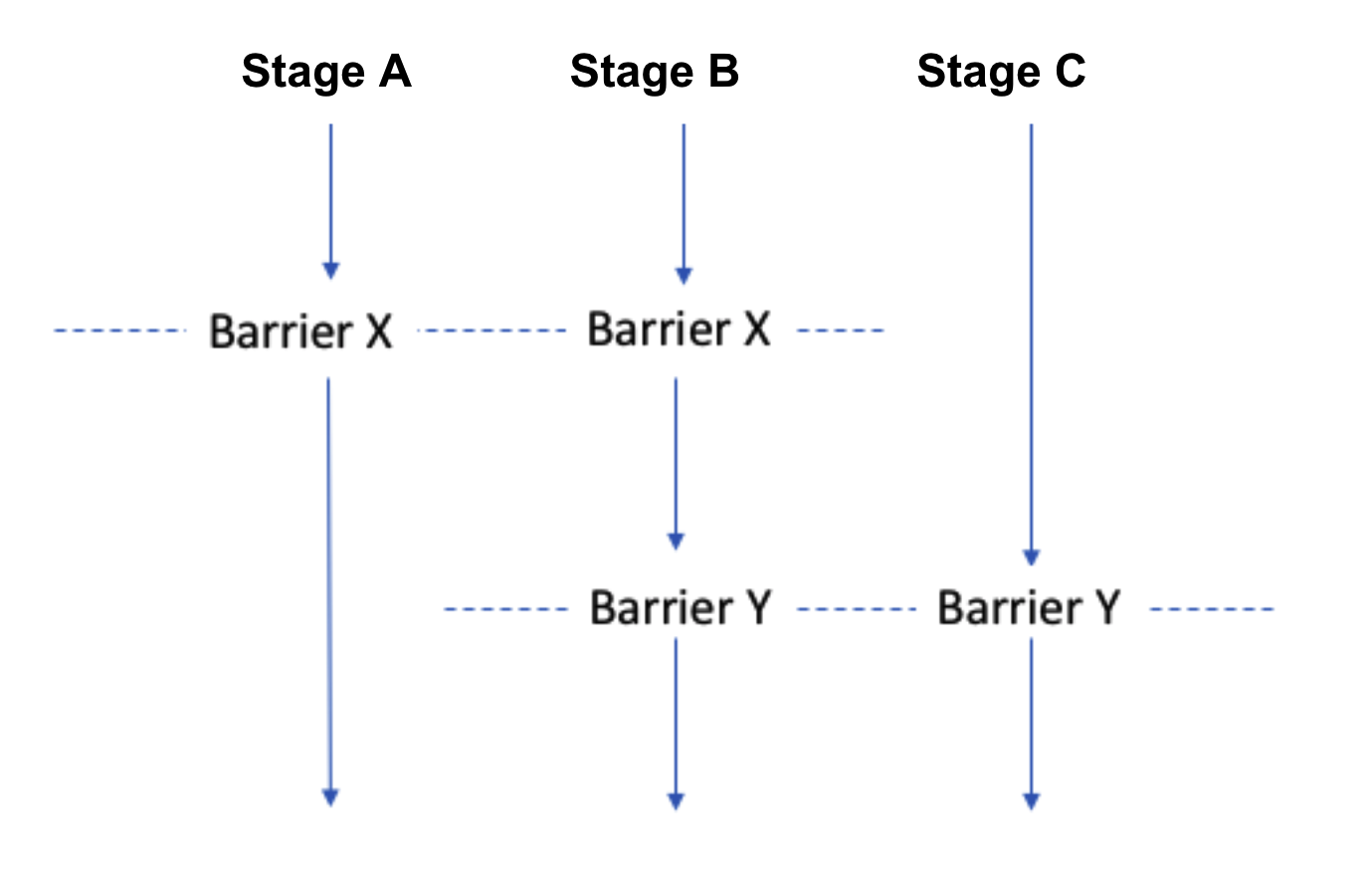
This allows you to control complex coordination logic within a pipeline without resorting to manual delays or checks.
Add a barrier
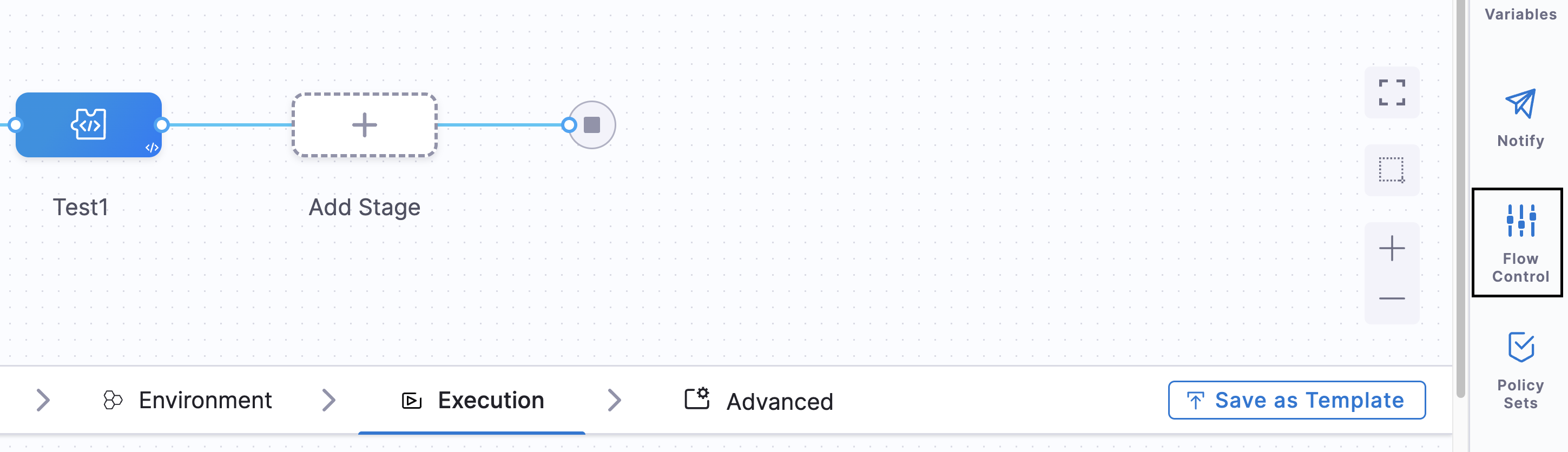
A barrier is a name added in a pipeline's Flow Control settings.
Perform the following steps to add a barrier:
-
In your pipeline, select Flow Control.
-
In Flow Control, select Add Barrier.
-
In Barrier Name, enter a unique name, and then click outside of the settings. The barrier is created.
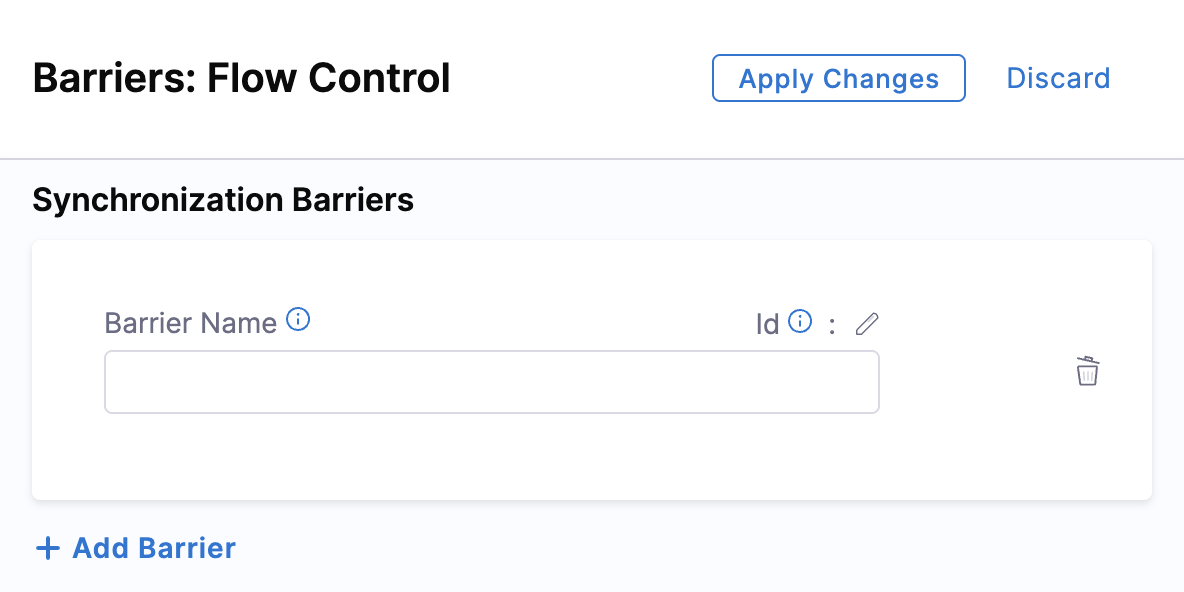
Next, select the name using the Barrier step in the stages where you want to synchronize.
Use a barrier in a step
Perform the following steps to apply a barrier:
-
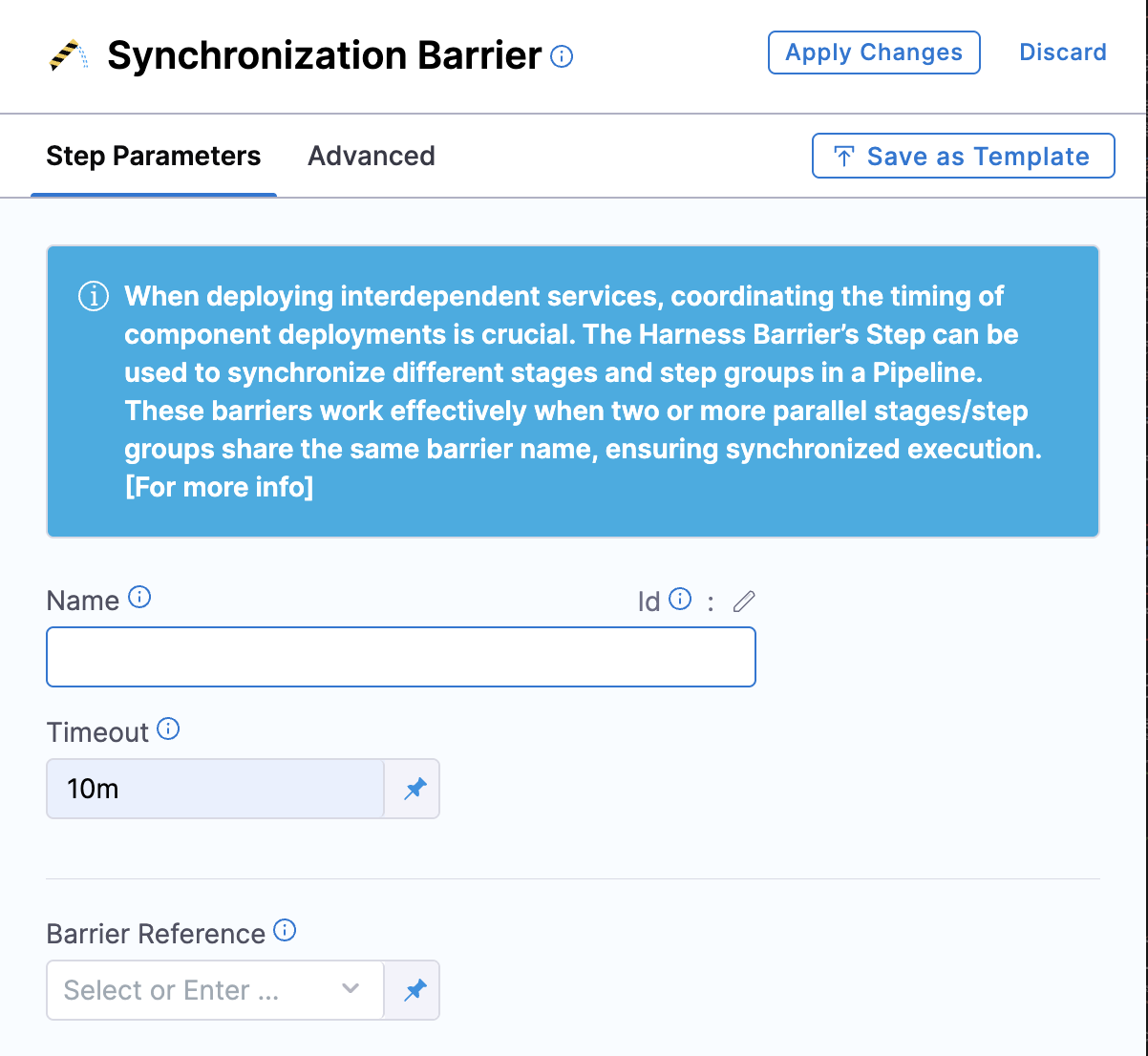
In your stage, under Execution, select Add Step, and then select Barrier.
-
Enter a name for the step.
-
In Timeout, enter the timeout period in milliseconds. For example,
600000milliseconds is 10 minutes. The timeout period determines how long each stage with a barrier must wait for the other stages to reach the barrier point. When the timeout expires, it is considered a deployment failure. -
Barrier timeouts are not hard timeouts. A barrier can fail anytime between the timeout value and
timeout + 1 minute. -
In Barrier Reference, select the name of an existing barrier.
-
Select Apply Changes.
Use multiple barriers in a stage or step group
You can add multiple Barrier steps to the same stage or step group. Each Barrier step in the same stage or step group must use a different Barrier Reference.
For example, a stage can use one barrier to synchronize deployment steps and another barrier to synchronize verification steps later in the same stage.
Use the same Barrier Reference across different parallel stages or step groups that should synchronize at a particular point.
Barriers and looping strategies
Barriers can also be used with looping strategies. Additional constraints apply when you use barriers in looped parallel executions. For more information, refer to Using barriers with looping strategies.
Important considerations for looping strategies
When using barriers with looping strategies:
- Use the same Barrier Reference for all looped stages or step groups that need to synchronize.
- Do not use
maxConcurrencyin a looping strategy that contains a barrier. Some iterations might not start until earlier iterations finish, while running iterations wait at the barrier, causing the pipeline to become stuck. - For multi-service deployments, enable Deploy Services in Parallel so all participating stages can reach the barrier.
- A barrier can synchronize multiple groups of looped stages or a single stage group with looped stages, as long as the participating executions use the same Barrier Reference.
Avoid rollback barrier cycles
Do not reuse the same Barrier Reference in both the normal execution flow and a rollback section. A barrier waits for every position that shares its reference, including any position in a rollback section. Because rollback steps run only when the normal flow fails, that rollback position never arrives during a successful run, so the barrier keeps standing and the pipeline hangs until the step timeout.
For example, if the reference wall3 is used in the normal steps of two parallel stages and also in the rollback steps of one stage, the two normal-flow positions reach the barrier and wait for the rollback position. The rollback position does not execute unless the stage fails, so the pipeline stalls and eventually times out.
To synchronize a rollback flow, use a dedicated barrier reference for rollback instead of the one used in the normal flow.
Barrier reference cycle (anti-pattern) and the corrected configuration
# Anti-pattern: barrier "wall3" is referenced in both normal and rollback steps
pipeline:
  stages:
    - parallel:
        - stage:
            name: deploy
            spec:
              execution:
                steps:
                  - step:
                      type: Barrier
                      spec:
                        barrierRef: wall3        # normal flow
                rollbackSteps:
                  - step:
                      type: Barrier
                      spec:
                        barrierRef: wall3        # rollback flow -> cycle
        - stage:
            name: deploy2
            spec:
              execution:
                steps:
                  - step:
                      type: Barrier
                      spec:
                        barrierRef: wall3        # normal flow
  flowControl:
    barriers:
      - identifier: wall3
# Corrected: use a dedicated reference for the rollback flow
  flowControl:
    barriers:
      - identifier: wall3            # normal flow
      - identifier: wall3_rollback   # rollback flow
# Set barrierRef: wall3_rollback in the rollback step so it no longer shares "wall3".
Harness detects this anti-pattern and fails validation with a Barrier Deadlock Detected error that names the barrier reference and whether it was found in the normal flow, the rollback flow, or both. The check runs both when you save the pipeline and when it starts running, so a barrier reference supplied as a runtime input is caught at execution time. To resolve the error, give the rollback barrier a different reference.
Barrier Deadlock Detected: 'wall3' (mixed in normal flow and rollback flow)

Problem:
Barriers with the same reference must execute concurrently (at the same time).
Your pipeline has barriers with 'wall3' that execute sequentially,
creating a deadlock where each barrier waits for the others that have not started yet.
The same validation applies to any barriers that share a reference but cannot execute concurrently, such as the same reference reused across sequential stages. Barriers that share a reference and run in parallel remain valid.
This validation is behind the feature flag PIPE_DETECT_BARRIER_CYCLES. Contact Harness Support to enable the feature.
Next steps
- DAG pipelines: Create pipelines with directed acyclic graph dependencies for complex orchestration.
- Pipeline chaining in Harness: Chain pipelines together and use barriers across parent and child pipelines.
- Synchronize deployments using barriers: Advanced deployment synchronization patterns.