Best practices for looping strategies
This topic covers Harness’s recommended best practices for looping strategies in production pipelines and highlights common failure points when those practices are overlooked. Apply these recommendations before scaling matrix dimensions, increasing parallelism, or nesting looping strategies.
Go to Looping strategies to understand how matrix, parallelism, and repeat strategies work.
Plan resource requirements before implementing complex looping strategies
Complex looping scenarios (multi-dimensional matrices, multi-layered matrices at both stage and step levels, or multiple looping strategies in the same stage) can fail, time out, over-consume resources, or run "successfully" but with incorrect results if you do not calculate resource requirements upfront.
- Calculate resource consumption before implementing: Determine the maximum CPU and memory required at any point in the stage, accounting for compounding effects. If there are too many concurrent stages or steps and the pipeline's resources are exhausted, the pipeline fails or times out midway.
- Rule of thumb: If you cannot visualize how the looping strategy will run and calculate the memory and CPU required, your scenario is too complex. Simplify the dimensions, add
maxConcurrencylimits, or split the work across multiple stages.
Resource calculation example:
When a pipeline requests resources for a stage, it reserves the maximum CPU and memory required at any point in the stage.
- Assume you have a Build stage with three steps. The first step builds an artifact for a web app. The second step runs the artifact in a browser to confirm that it runs. The third step pushes it to a registry. Each step consumes up to 500Mi (memory) and 400m (CPU).

-
If the steps run serially, the pipeline reserves 500Mi memory and 400m CPU for the entire stage (the maximum at any one time).
-
If you want to test the app on both Chrome and Firefox, you can apply a matrix strategy to the second step:
YAML example
matrix:
  browser: [chrome, firefox]
  maxConcurrency: 2
- Now the pipeline creates two copies of the second step and runs them concurrently. This doubles the resource consumption at that point in the stage. The pipeline reserves double the resources (1000Mi memory, 800m CPU) to meet the new maximum requirement.
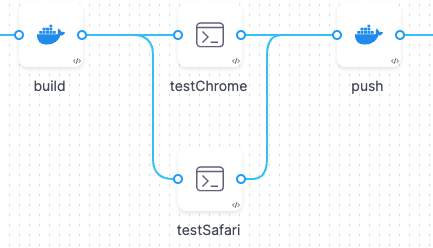
- If you expand the matrix strategy to include another browser and a dimension to test on different operating systems, and you run all the tests (nine instances) at once:
YAML example
matrix:
  os: [macos, linux, android]
  browser: [chrome, firefox, opera]
  maxConcurrency: 9
- In this case, the stage requires nine times the original resources to run. The pipeline will likely fail due to insufficient resources to run these nine instances concurrently.
Why this matters: If you do not calculate resource requirements before implementing complex looping strategies, the pipeline can fail midway, time out, or silently queue instances until the pipeline aborts. For more information, refer to Resource allocation.
Consequence: If you do not use maxConcurrency to limit concurrent instances, the pipeline can exhaust cluster capacity, fail resource allocation, or queue indefinitely until the pipeline aborts.
Calculate maxConcurrency iteratively starting with low values
Use an iterative workflow to determine the ideal maxConcurrency for a specific stage or step, because infrastructure capacity and workload vary across environments and teams.
- Start low: Begin with a low
maxConcurrencyvalue of 2 or 3, run the pipeline, and monitor resource consumption. - Increase gradually: Increase the
maxConcurrencybased on each successive run until you reach a balance between total run time and resource consumption. - Do not guess high: If you set
maxConcurrencytoo high without testing, the pipeline can fail midway or queue instances until the pipeline times out, wasting execution time and resources.
Why this matters: An untested maxConcurrency value can either bottleneck your pipeline (too low) or overload your infrastructure (too high). Iterative testing finds the sweet spot for your specific workload and cluster capacity.
Use split() method to loop over comma-separated variable lists
When you need to loop over a list of items stored in a single variable, use the split() method to convert the comma-separated string into an array that looping strategies can iterate over.
- Store lists in string variables: Create a Harness string variable containing a comma-separated list (for example,
HD-29193,HD-29194,HD-29195). For more information, refer to Create Harness string variable. - Split at runtime: Use the expression
<+pipeline.variables.jiraTickets.split(',')>in your looping strategy to split the string into an array:
YAML example
repeat:
  items: <+pipeline.variables.jiraTickets.split(',')>
matrix:
  jira: <+stage.variables.jiraTickets.split(',')>
- Reference values in steps: Use
<+repeat.item>(for repeat strategies) or<+matrix.jira>(for matrix strategies) to reference each value in the loop.
Why this matters: If you do not use split() and instead pass the entire string to the looping strategy, the pipeline treats the entire string as a single item and runs the loop only once, defeating the purpose of looping. For more information, refer to Harness variable expressions.
Using when conditions with looping strategies
Your looping strategies can include when conditions that apply to the looping strategy logic, and your pipeline can include conditional executions, which are when conditions that determine whether to run a particular stage, step, or step group.
It is important to understand where to use each type of when condition and how they impact pipeline execution.
Use when conditions in looping strategies to evaluate whether to create instances of a stage or step. For example:
- You sometimes want to skip the looping strategy. For example, in a unified deployment pipeline, you might skip a matrix applied to a
proddeployment stage when the pipeline is not running against theprodenvironment. - You do not always need to run a stage or step for every item in a matrix.
- Your looping strategy is populated by variable input, and you want to skip it if it resolves to empty.
Use conditional executions with looping strategies to evaluate whether to run a stage, step, or step group that was generated from a looping strategy. For example:
- Only run stages generated from a looping strategy if they run in a particular deployment environment.
You can also use both conditional executions and looping strategy when conditions for multi-dimensional evaluation, and you can use expressions in when conditions.
Conditional execution with looping strategy
Conditional executions determine whether a stage, step, or step group should run. If you add a conditional execution to a stage or step with a looping strategy, the conditional execution is evaluated for every instance created by the looping strategy.
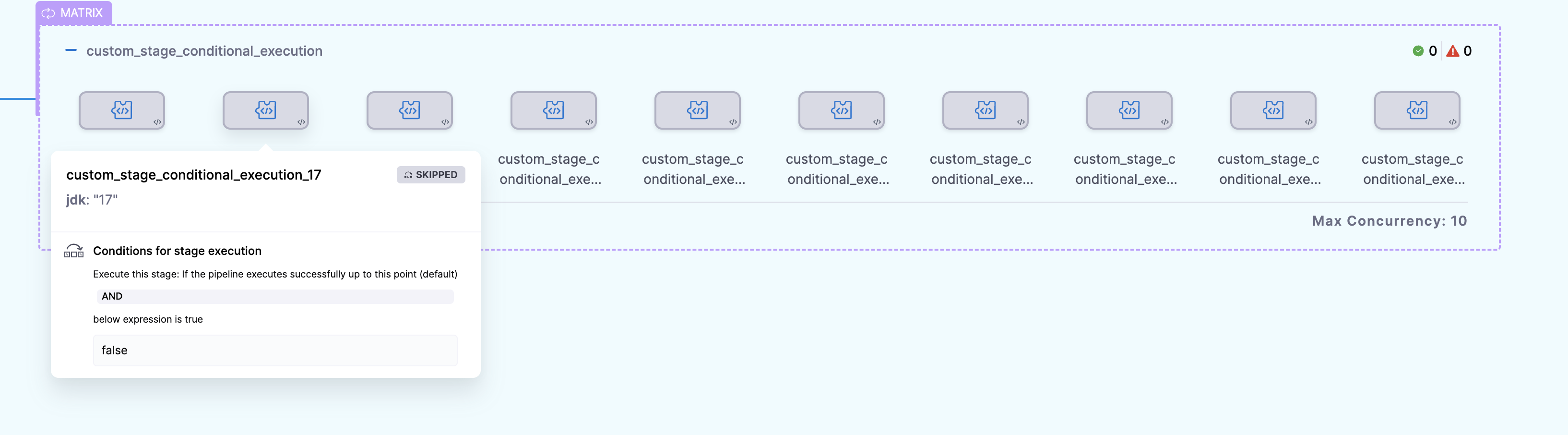
In this example, the stage has a matrix looping strategy and a conditional execution. When the pipeline runs, multiple stage instances are created by the matrix looping strategy (one for each item in the jdk list), and then Harness checks the stage's conditional execution against each instance created by the matrix.
YAML example
    - stage:
        name: custom_stage_conditional_execution
        identifier: custom_stage_conditional_execution
        description: ""
        type: Custom
        spec:
          execution:
            steps:
              - step:
                  type: ShellScript
                  name: ShellScript_1
                  identifier: ShellScript_1
                  spec:
                    shell: Bash
                    executionTarget: {}
                    source:
                      type: Inline
                      spec:
                        script: |
                          echo hey
                    environmentVariables: []
                    outputVariables: []
                  timeout: 10m
        tags: {}
        strategy:
          matrix:
            jdk:
              - "18"
              - "17"
              - "16"
              - "15"
              - "14"
              - "13"
              - "12"
              - "11"
              - "10"
              - "9"
        when:
          pipelineStatus: Success
          condition: "false"
In this example, the conditional execution is hardcoded to resolve to false, so every stage is skipped.
When condition in looping strategy
In this example, the matrix looping strategy is modified by a when condition:
YAML example
        strategy:
          when: <+pipeline.name> == "looping_strategy_when"
          matrix:
            jdk:
              - "18"
              - "17"
              - ...
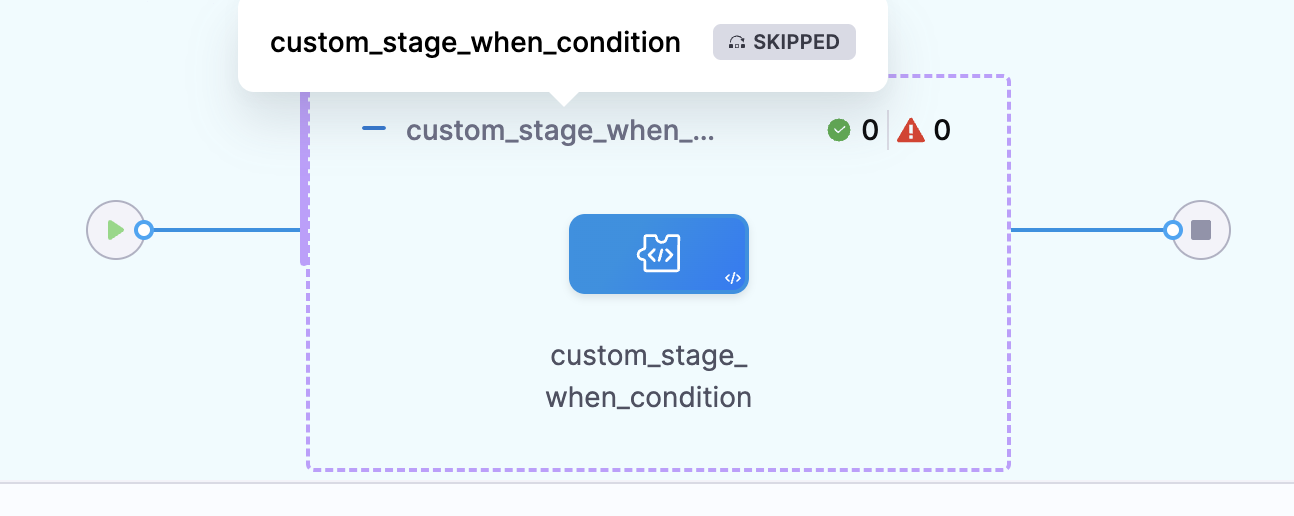
In this example, when the pipeline runs, Harness checks the matrix strategy's when condition before creating each instance in the matrix. If the condition is met, Harness creates an instance for that item in the matrix. If the condition is not met, Harness does not create an instance for that item. This evaluation is repeated for each item in the matrix.
YAML example
    - stage:
        name: custom_stage_when_condition
        identifier: custom_stage_conditional_execution
        description: ""
        type: Custom
        spec:
          execution:
            steps:
              - step:
                  type: ShellScript
                  name: ShellScript_1
                  identifier: ShellScript_1
                  spec:
                    shell: Bash
                    executionTarget: {}
                    source:
                      type: Inline
                      spec:
                        script: |
                          echo hey
                    environmentVariables: []
                    outputVariables: []
                  timeout: 10m
        tags: {}
        strategy:
          when: <+pipeline.name> == "looping_strategy_when"
          matrix:
            jdk:
              - "18"
              - "17"
              - "16"
              - "15"
              - "14"
              - "13"
              - "12"
              - "11"
              - "10"
              - "9"
In this example, the when condition checks if the pipeline name is looping_strategy_when. Since that is not the name of this example pipeline, no stages are created from the matrix.
Combination of conditional execution and looping strategy when condition
You can also use both conditional executions and looping strategy when conditions.
When you use both, Harness first evaluates the looping strategy when condition to determine how many instances to create from the looping strategy, based on how many items pass the when condition. Then Harness checks each created instance against the conditional execution to determine whether to run each created instance.
Here is an example that uses both. In this example, the matrix looping strategy has a when condition that checks if the pipeline name is looping_strategy_when. Then, the stage has a conditional execution that checks if the pipeline has executed successfully so far and that the environment name is not QA.
YAML example
pipeline:
  name: looping_strategy_when
  identifier: looping_strategy_when
  tags: {}
  projectIdentifier: fdsf
  orgIdentifier: default
  stages:
    - stage:
        name: sA
        identifier: sA
        description: ""
        type: Custom
        spec:
          execution:
            steps:
              - step:
                  type: ShellScript
                  name: ShellScript_1
                  identifier: ShellScript_1
                  spec:
                    shell: Bash
                    executionTarget: {}
                    source:
                      type: Inline
                      spec:
                        script: echo hey
                    environmentVariables: []
                    outputVariables: []
                  timeout: 10m
        tags: {}
        strategy:
          when: <+pipeline.name> == "looping_strategy_when"
          matrix:
            jdk:
              - "18"
              - "17"
              - "16"
              - "15"
              - "14"
              - "13"
              - "12"
              - "11"
              - "10"
              - "9"
        when:
          pipelineStatus: Success
          condition: <+environment.name> != "QA"
  allowStageExecutions: true
When this pipeline runs:
- Harness checks the looping strategy
whencondition and creates a stage instance for each item in the matrix that passes the condition. In this example, the condition checks that the pipeline name islooping_strategy_when. Since that is the pipeline's name, all items in the matrix pass the check and Harness creates a stage for each. - Harness checks each created stage instance against the conditional execution to determine whether to run each stage. In this example, the stage runs if the pipeline has executed successfully so far and the environment name is not
QA. Assuming this pipeline is run for theprodenvironment and no prior stages failed, then all the stage instances in the matrix will run.
Expressions in when conditions
You can use Harness and JEXL expressions in your when conditions, conditional executions, and your looping strategies.
This example reflects a complex use case that involves pipeline chaining. The previous pipeline in the series of chained pipelines produces an output variable called number_of_services that indicates how many services were deployed by that prior pipeline. It also produces a list of the deployed services (stored in deployed_services), if any.
The matrix strategy uses the value of the number_of_services variable in a when condition to determine whether to trigger the matrix strategy in the chained pipeline. If no services (0) were deployed, then the chained pipeline skips the matrix strategy. If at least one service (greater than 0) was deployed, then it executes a matrix strategy that iterates over the list of deployed services (generating one instance per deployed service).
YAML example
        strategy:
          when: <+pipeline.stages.STAGE_ID.spec.execution.steps.STEP_ID.output.outputVariables.number_of_services> > 0
          matrix:
            service: <+json.list("services", <+pipeline.stages.STAGE_ID.spec.execution.steps.STEP_ID.output.outputVariables.deployed_services>)>
            maxConcurrency: 4
The above example shows expressions in a when condition in a looping strategy. For information about expressions in conditional execution, go to Define conditional executions for stages and steps.
Use onFailure field to control iteration behavior after failures
When one iteration of a matrix or repeat strategy fails, use the onFailure field to control whether remaining iterations continue or abort, because the default behavior (abort) can waste resources if you want independent iterations to complete regardless of individual failures.
- Set
onFailure: ignorefor independent iterations: If iterations are independent (for example, testing different browsers), useonFailure: ignoreto continue testing remaining combinations even if one fails. This gives you complete test coverage rather than aborting early. - Set
onFailure: abortfor dependent iterations: If iterations are dependent (for example, building artifacts that later stages consume), useonFailure: abortto stop building remaining versions if one fails, saving execution time and resources. - Not applicable to parallelism: The
onFailurefield is only available formatrixandrepeatstrategies. Parallelism runs all instances independently and does not support this field.
YAML example
matrix:
  browser: [chrome, firefox, safari]
  os: [windows, mac, linux]
  maxConcurrency: 3
  onFailure: ignore  # Continue testing other combinations even if one fails
repeat:
  items: ["v18", "v17", "v16"]
  onFailure: abort  # Stop building remaining versions if one fails
Why this matters: If you do not set onFailure appropriately, independent test iterations can abort early (missing failures in untested combinations), or dependent build iterations can continue after a critical failure (wasting resources building artifacts you cannot use). For more information, refer to Control iteration behavior after a failure.
Next steps
Adopt the practices above as defaults, then layer in looping strategy expressions and runtime input to build flexible, production-ready pipelines.
- Looping strategies: Understand how matrix, parallelism, and repeat strategies work.
- Matrix examples: Review complete matrix strategy examples.
- Conditional executions for stages and steps: Control when stages and steps run based on pipeline status and JEXL conditions.