Run stages in parallel
You can run multiple stages in parallel when your pipeline needs to perform independent operations concurrently. Parallel stage execution can reduce overall pipeline run time by allowing multiple stages to run simultaneously.
The maximum number of stages that can be run in parallel is 256.
Common use cases include the following:
- CI stages: Run builds and tests in parallel to speed up the integration process, reduce test execution time, and provide faster feedback to developers.
- CD stages: Run deployments in parallel to reduce deployment time and improve operational efficiency.
- Infrastructure as Code (IaC): Run IaC operations in parallel to accelerate resource provisioning and improve infrastructure scalability.
What you will learn from this topic
- How to add stages to your pipeline in preparation for parallel execution.
- How to arrange stages in parallel using the Visual editor or YAML editor.
Before you begin
- Pipeline access: You need View or Execute permissions on pipelines. For more information, refer to RBAC in Harness.
- Pipeline basics: You should understand stages and how to add them. For more information, refer to Add a stage.
Add stages to your pipeline
Before you can run stages in parallel, you must add stages to your pipeline. Each stage represents a logical unit of work (for example, a build stage, test stage, or deployment stage).
Add at least two stages to your pipeline that you want to run concurrently.
Arrange stages in parallel
After adding stages to your pipeline, arrange them to run in parallel using either the Visual editor or YAML editor.
- Visual editor
- YAML editor
In the Visual editor, drag and drop stages to arrange them in parallel.
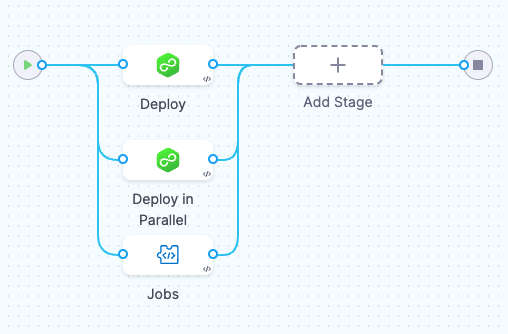
In the YAML editor, indent the stages under a parallel flag.
stages:
    - parallel: ## Stages indented under this flag will run in parallel.
        - stage:
          ...
        - stage:
          ...
    - stage: ## This stage is not in the parallel group.
Parallel stages execution
When you arrange stages in parallel and run the pipeline, all stages in the parallel group start executing at the same time. The pipeline waits for all parallel stages to complete before moving to the next stage or stage group.
Execution behavior:
- Concurrent start: All stages in a parallel group begin execution simultaneously, regardless of the number of stages.
- Independent execution: Each parallel stage executes independently. One stage does not wait for another unless there is a resource constraint (common in deployment stages).
- Pipeline progression: The pipeline moves to the next stage or stage group only after all parallel stages complete. If any parallel stage fails, the pipeline's failure strategy determines whether the pipeline continues or stops.
- Resource usage: Parallel stages consume resources concurrently. Ensure your infrastructure has sufficient capacity to handle the parallel workload. For more information, refer to Looping strategy best practices.
Example execution order:
If you have stages A, B, C in parallel, followed by stage D:
- Stages A, B, and C all start at the same time.
- The pipeline waits for A, B, and C to all complete.
- Stage D starts only after A, B, and C have all finished.
The total execution time is determined by the slowest stage in the parallel group, not the sum of all stage execution times.
In Continuous Delivery (CD), a resource constraint step is added to every stage automatically to prevent using two infrastructures simultaneously. As a result, one parallel stage executes first. Once the execution of the first stage finishes, the other stage or stages start.
You can deploy multiple services to multiple environments in a single deployment stage. However, running multi-service stages in parallel deploys each service to each environment in parallel. This can become complicated. For such use cases, Harness recommends using separate stages.
Next steps
- Looping strategies: Use matrix, parallelism, and repeat strategies to run stages or steps multiple times with different inputs.
- Looping strategy best practices: Plan resource usage and avoid common pitfalls when implementing parallel execution.
- Add a stage: Learn more about creating and configuring pipeline stages.