Pipeline chaining in Harness
Pipeline chaining connects multiple pipelines so that the completion of one pipeline triggers the next. Outputs from an upstream pipeline can be passed as inputs to downstream pipelines, enabling you to automate sequential workflows such as testing an application before deploying it to production.
For example, you can have one pipeline deploy an application to a test environment, followed by another pipeline that runs integration tests, and finally a pipeline that deploys the application to production. Each pipeline is triggered when the previous pipeline completes, with outputs from one pipeline passed as inputs to the next. This allows you to automate the entire workflow and ensure the application is tested before it is deployed to production.
Chaining pipelines in Harness offers the following benefits:
- Development of complex workflows involving multiple stages of deployment, testing, and verification.
- Ease of handling errors. Visibility into the deployment process makes it easier to identify and troubleshoot issues.
- Faster and more efficient deployment.
- Reusability of pipelines across multiple applications and environments, reducing the need to recreate steps for each deployment.
- Improved collaboration and communication by allowing different teams to work on different stages of the deployment process.
- Enable greater compliance with regulatory requirements and industry best practices through automatic deployments.
What you will learn from this topic
- How to chain pipelines together in Harness
- How to use looping strategies for chained pipelines to run the same pipeline multiple times
- How to use parent output in child pipelines by passing variables
- How to use child pipeline outputs in the parent pipeline to reference child outputs
- How to re-run chained pipelines after failures
- How to handle failures in chained pipelines using conditional execution and failure strategies
- How to work with remote chained pipelines stored in source control management (SCM)
Before you begin
- Harness project access: You need read permissions for the child (chained) pipeline and edit permissions for the parent (primary) pipeline to add a chained pipeline (a pipeline stage) to a pipeline. For more information, refer to Pipelines permissions.
- Execute permissions: To manually run a chain of pipelines, you need execute permissions for both parent and child pipelines to ensure successful execution.
- Existing pipelines: You need at least two pipelines to chain together. For more information, refer to Add a stage.
Considerations and limitations
- If you change runtime inputs in a chained pipeline, select Inputs in the parent pipeline to see the changes.
- When manually running a pipeline, pre-flight checks do not validate child pipelines.
- Pipeline stages do not support auto-suggested expressions in Outputs.
- Artifacts, test results, and other output produced by chained pipelines are available in the execution details of the chained pipeline that produced the outputs. This information is not stored in the parent pipeline's execution details.
- Nested pipeline chaining is not supported. When a referred pipeline invokes a child pipeline, it cannot be included within another pipeline.
- Outputs from a child pipeline are available only after the child pipeline stage has completed. You cannot reference a child pipeline output before the child pipeline has executed.
Chain pipelines
Perform the following steps to chain pipelines in Harness:
-
Create pipelines that you want to chain together, including the parent pipeline to which you will link child pipelines.
-
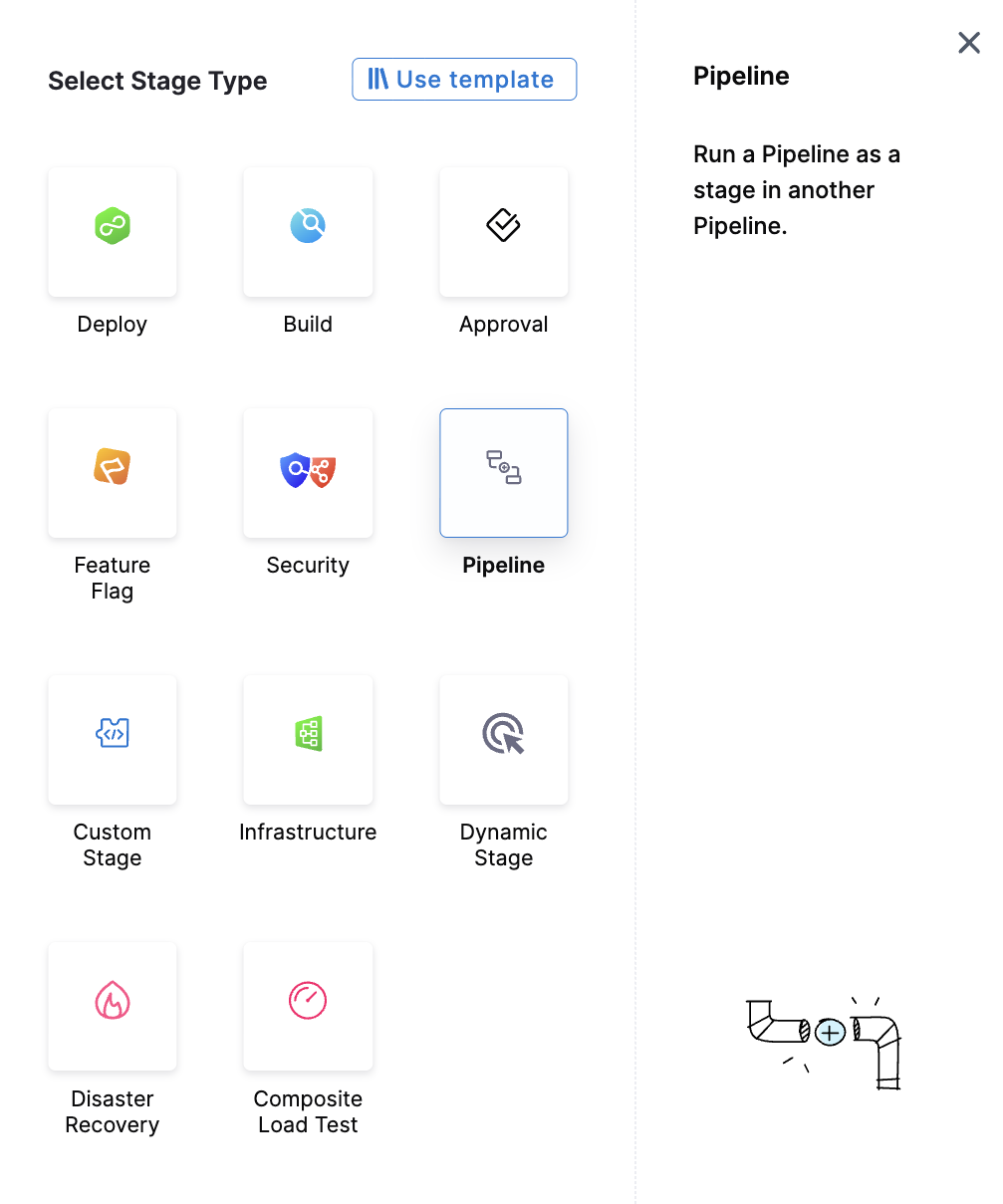
To chain pipelines, go to the parent pipeline, select Add Stage, and then select Pipeline.
-
Select the child pipeline that you want to chain to the parent. You can select any pipeline you can access across different organizations and projects in your Harness account.
-
Select Apply Selected.
-
Repeat the steps to continue chaining pipelines as needed, and then save the parent pipeline.
In the final chained pipeline stage, you can add concluding steps, such as a Deploy step if you need to deploy the application.
Harness recommends running the pipeline in a development environment to test it before executing it in production.
Pipeline settings in chained pipelines
The parent and child pipelines use their own settings during their respective executions. The parent pipeline's settings apply while the parent pipeline is executing. When execution reaches the Pipeline stage, the child pipeline's settings apply while the child pipeline runs.
For example, if the parent and child pipelines have different notification settings, the parent pipeline's settings apply to the parent execution, while the child pipeline's settings apply to the child execution.
Looping strategies for chained pipelines
You can apply looping strategies (matrix, repeat, parallelism) to pipeline stages with child pipelines. This allows you to run the same child pipeline multiple times with different inputs or configurations in a single parent pipeline execution.
This feature requires two feature flags to be enabled:
PIPE_ENABLE_STRATEGY_FOR_CHAINED_PIPELINES- Enables looping strategies for pipeline stagesPIPE_POPULATE_STEP_DETAILS_IN_RUNTIME_ID_FOR_STRATEGY_CHILD_NODES- Enables UI visualization
Contact Harness Support to enable these feature flags.
Looping strategies for chained pipelines enable scenarios such as:
- Running the same deployment across multiple environments (development, staging, production) using a matrix strategy
- Running integration tests across multiple configurations or data sets using a repeat strategy
- Executing parallel build pipelines for different platforms or versions
Configure looping strategies for pipeline stages
Perform the following steps to configure a looping strategy for a pipeline stage that references a child pipeline:
-
In the parent pipeline, select the pipeline stage that references the child pipeline.
-
In the stage configuration, select the Advanced tab.
-
Under Looping Strategy, select the type of strategy you want to apply:
- Matrix: Run the child pipeline multiple times with different combinations of input values
- Repeat: Run the child pipeline multiple times iterating over a list
- Parallelism: Run multiple instances of the child pipeline concurrently
-
Configure the strategy parameters based on your selection.
-
Use expressions for the loop values in the child pipeline inputs.
When you run the parent pipeline, Harness creates multiple instances of the child pipeline stage according to the looping strategy configuration and executes them based on the strategy type.
Looping strategy example
This example shows a parent pipeline that runs a build stage, followed by a deployment pipeline stage with a matrix strategy. The child deployment pipeline runs multiple times across different environments and regions.
Parent pipeline with matrix strategy on pipeline stage
pipeline:
  name: build-and-deploy
  identifier: buildanddeploy
  projectIdentifier: MyProject
  orgIdentifier: default
  stages:
    - stage:
        name: build
        identifier: build
        description: Build and test the application
        type: Custom
        spec:
          execution:
            steps:
              - stepGroup:
                  name: build_steps
                  identifier: build_steps
                  steps:
                    - step:
                        type: Run
                        name: run_tests
                        identifier: run_tests
                        spec:
                          connectorRef: account.harnessImage
                          image: maven:3.8-jdk-11
                          shell: Sh
                          command: |
                            echo "Running unit tests"
                            mvn clean test
                            echo "Tests passed"
          infrastructure:
            type: KubernetesDirect
            spec:
              connectorRef: build_cluster
          rollbackSteps: []
        tags: {}
    - stage:
        name: deploy
        identifier: deploy
        description: Deploy to multiple environments and regions
        type: Pipeline
        spec:
          org: default
          project: MyProject
          pipeline: deployment_pipeline
          inputs:
            identifier: deployment_pipeline
            variables:
              - name: environment
                type: String
                value: <+matrix.env>
              - name: region
                type: String
                value: <+matrix.region>
        strategy:
          matrix:
            env:
              - dev
              - staging
              - prod
            region:
              - us-east-1
              - eu-west-1
          maxConcurrency: 3
In this example, the child deployment pipeline runs nine times (three environments × three regions). The maxConcurrency setting limits execution to three concurrent instances at a time. Each iteration receives different environment and region variables through <+matrix.env> and <+matrix.region> expressions.
You can use similar approaches with repeat strategies (<+repeat.item>) and parallelism strategies (<+strategy.iteration>) to run child pipelines multiple times with different configurations.
View execution details for looped pipeline stages
When you run a parent pipeline with a looping strategy on a pipeline stage, the execution view shows all iterations of the child pipeline:
- Each iteration appears as a separate execution instance with its own execution ID
- You can expand each iteration to view the complete execution graph for that instance of the child pipeline
- The parent pipeline execution summary shows the overall status across all iterations
- Failed iterations are highlighted, and you can retry individual iterations or re-run the failed iteration
The execution details for each child pipeline instance (artifacts, logs, test results) remain available in the child pipeline's own execution history, just like standard chained pipelines.
Use parent output in child pipelines
You can use Harness expressions to reference the output of a parent pipeline as input in a child pipeline stage.
Perform the following steps to pass parent pipeline output to a child pipeline:
-
In the child pipeline, select Variables. You need to create a child pipeline variable so that when you add the child pipeline to the parent pipeline as a stage, the child pipeline stage will have an input you can use to map output variables from the parent pipeline.
-
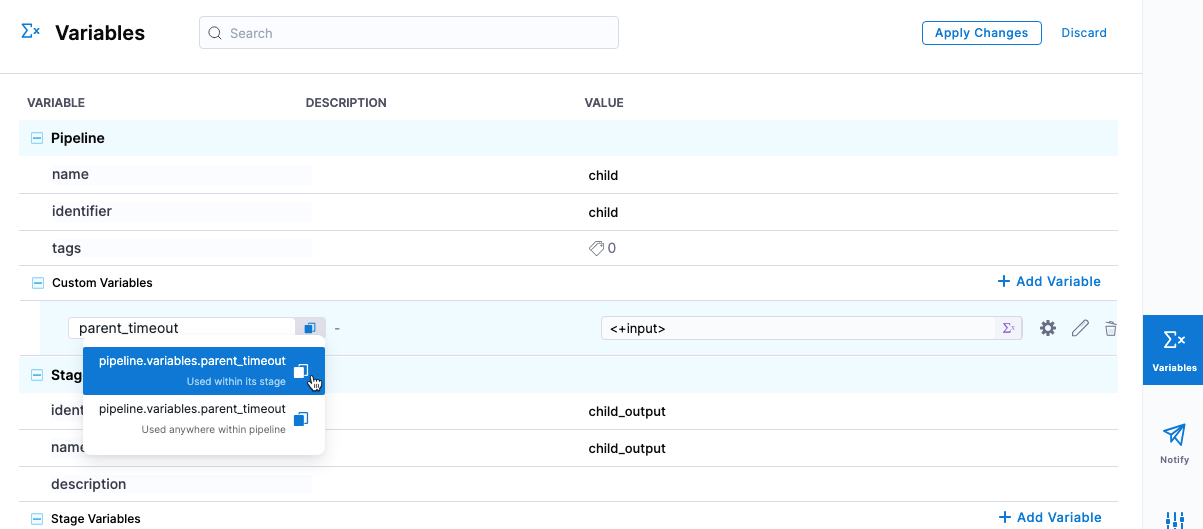
Under Pipeline, in Custom Variables, select Add Variable. You can also utilize variables defined in any stage in the child pipeline.
-
Enter a name for the variable and set its value as a runtime input, and make note of the variable expression name. Setting this as a runtime input allows the Parent Pipeline to see the variable and define information within the variable.
-
Select Apply Changes. Save the child pipeline.
-
In the parent pipeline, verify you have an output variable to pass to the child pipeline. This can be any variable within the parent pipeline. For example, a Shell Script step output variable. Copy the reference to the variable to be used later.
-
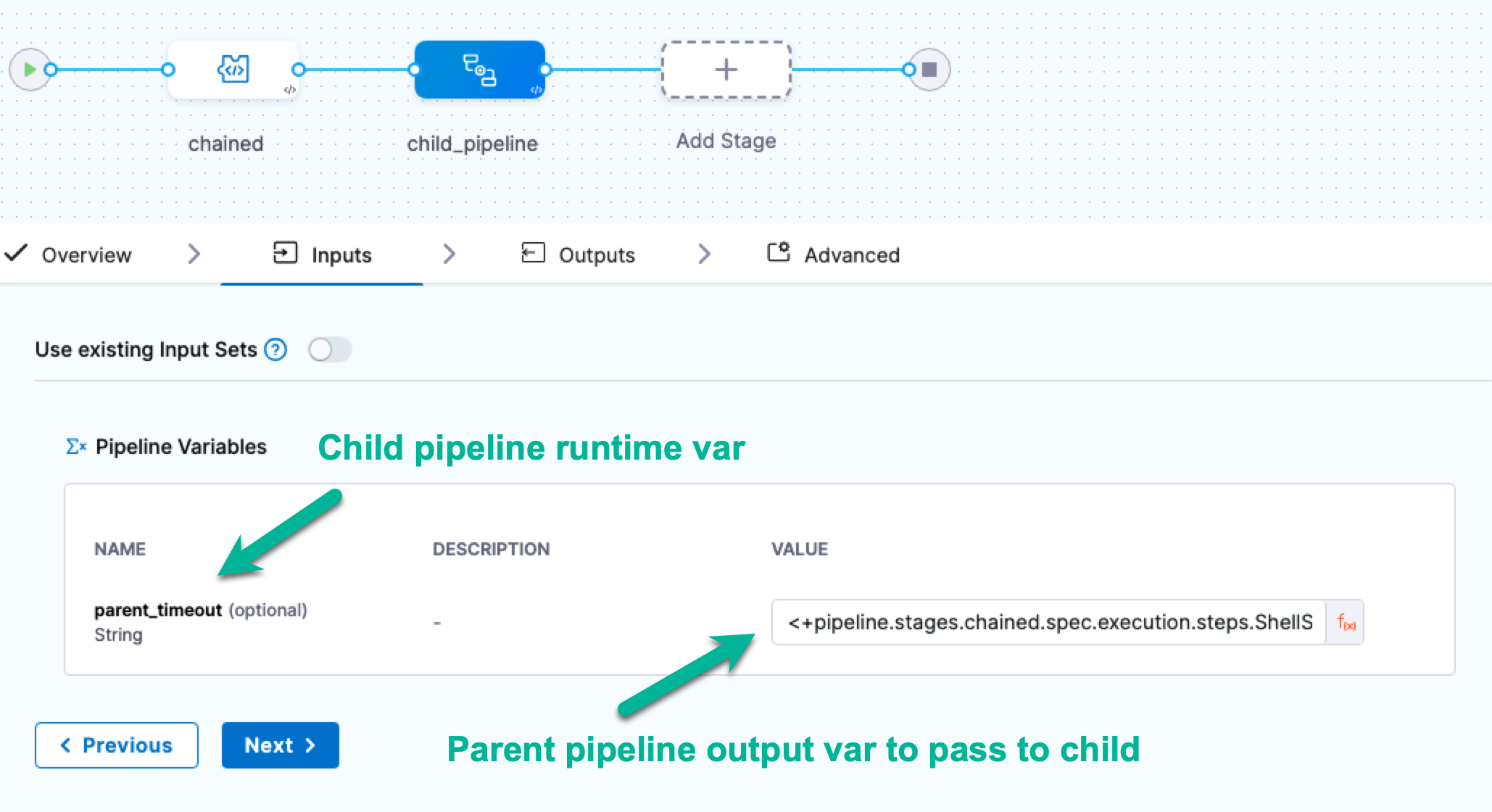
In the parent pipeline, select or add the child pipeline stage. The runtime pipeline variable you added to the child pipeline appears in the Inputs tab, with a runtime input indicator.
-
Click on the runtime input indicator to change it to an expression.
-
In Inputs, you should see the runtime input for the child pipeline variable you created.
-
In Value, enter the expression that references the parent pipeline output variable you want to pass to the child pipeline, in this case, the reference to the parent pipeline variable from step 5. Save the changes in the parent pipeline.
The Inputs tab supports auto-suggested expressions, but the Outputs tab does not. You can still pass pipeline-level output variables to the child pipeline through manually entered expressions.
YAML example: Chained pipelines with variables
Here is an example of a child and a parent pipeline where a parent pipeline output expression is mapped and used in the child pipeline stage.
Child pipeline YAML:
pipeline:
  name: child
  identifier: child
  projectIdentifier: CD_Docs
  orgIdentifier: default
  tags: {}
  stages:
    - stage:
        name: child_output
        identifier: child_output
        description: ""
        type: Custom
        spec:
          execution:
            steps:
              - step:
                  type: ShellScript
                  name: ShellScript_1
                  identifier: ShellScript_1
                  spec:
                    shell: Bash
                    onDelegate: true
                    source:
                      type: Inline
                      spec:
                        script: echo <+pipeline.variables.parent_timeout>
                    environmentVariables: []
                    outputVariables: []
                  timeout: 10m
        outputs: []
        tags: {}
  variables:
    - name: parent_timeout
      type: String
      description: ""
      required: false
      value: <+input>
Parent pipeline with child pipeline stage:
pipeline:
  name: parent
  identifier: parent
  projectIdentifier: CD_Docs
  orgIdentifier: default
  tags: {}
  stages:
    - stage:
        name: chained
        identifier: chained
        description: ""
        type: Custom
        spec:
          execution:
            steps:
              - step:
                  type: ShellScript
                  name: ShellScript_1
                  identifier: ShellScript_1
                  spec:
                    shell: Bash
                    onDelegate: true
                    source:
                      type: Inline
                      spec:
                        script: timeout=<+pipeline.stages.chained.spec.execution.steps.ShellScript_1.timeout>
                    environmentVariables: []
                    outputVariables:
                      - name: parent_timeout
                        type: String
                        value: timeout
                  timeout: 10m
        outputs: []
        tags: {}
    - stage:
        name: child_pipeline
        identifier: child_pipeline
        description: ""
        type: Pipeline
        spec:
          org: default
          pipeline: child
          project: CD_Docs
          outputs: []
          inputs:
            identifier: child
            variables:
              - name: parent_timeout
                type: String
                value: <+pipeline.stages.chained.spec.execution.steps.ShellScript_1.output.outputVariables.parent_timeout>
Use child pipeline outputs in the parent pipeline
You can expose outputs from a child pipeline and use them in subsequent stages of the parent pipeline. To do this, define an output on the Pipeline stage that references an output from the child pipeline.
For example, a child pipeline can generate an output variable containing an artifact tag, deployment URL, or other value. The parent pipeline can expose that value through the child pipeline stage's Outputs and reference it in a subsequent stage.
The child pipeline must complete before its outputs can be referenced.
For example:
outputs:
  - name: childOutput
    value: <+pipeline.stages.child_stage.spec.execution.steps.step_id.output.outputVariables.output_name>
You can then reference the output from a subsequent stage in the parent pipeline using:
<+pipeline.stages.child_stage.output.childOutput>
For more information, go to Output variables with chained pipelines.
Re-run chained pipelines
When you re-run a parent pipeline that includes a chained pipeline, the child pipeline is also re-run as part of the parent pipeline execution.
YAML example: Re-running chained pipelines
Pipeline A YAML:
pipeline:
  name: pipelineA
  identifier: pipelineA
  projectIdentifier: CD_Samples
  orgIdentifier: default
  tags: {}
  stages:
    - stage:
        name: cust_1
        identifier: cust_1
        description: ""
        type: Custom
        spec:
          execution:
            steps:
              - step:
                  type: ShellScript
                  name: ShellScript_1
                  identifier: ShellScript_1
                  spec:
                    shell: Bash
                    executionTarget: {}
                    source:
                      type: Inline
                      spec:
                        script: echo hello
                    environmentVariables: []
                    outputVariables: []
                  timeout: 10m
        tags: {}
    - stage:
        name: cust_2
        identifier: cust_2
        description: ""
        type: Pipeline
        spec:
          org: default
          pipeline: pipelineB
          project: CD_Samples
In this pipeline, we are using a chained pipeline pipelineB.
Pipeline B YAML:
pipeline:
  name: pipelineB
  identifier: pipelineB
  projectIdentifier: CD_Samples
  orgIdentifier: default
  tags: {}
  stages:
    - stage:
        name: cust_3
        identifier: cust_3
        description: ""
        type: Custom
        spec:
          execution:
            steps:
              - step:
                  type: ShellScript
                  name: ShellScript_1
                  identifier: ShellScript_1
                  spec:
                    shell: Bash
                    executionTarget: {}
                    source:
                      type: Inline
                      spec:
                        script: echo hello_2
                    environmentVariables: []
                    outputVariables: []
                  timeout: 10m
        tags: {}
    - stage:
        name: cust_4
        identifier: cust_4
        description: ""
        type: Custom
        spec:
          execution:
            steps:
              - step:
                  type: ShellScript
                  name: ShellScript_1
                  identifier: ShellScript_1
                  spec:
                    shell: Bash
                    executionTarget: {}
                    source:
                      type: Inline
                      spec:
                        script: hello
                    environmentVariables: []
                    outputVariables: []
                  timeout: 10m
        tags: {}
In this pipeline, stage cust_4 will fail due to an incorrect shell script command. Now, if you select Re-run on the failed execution:
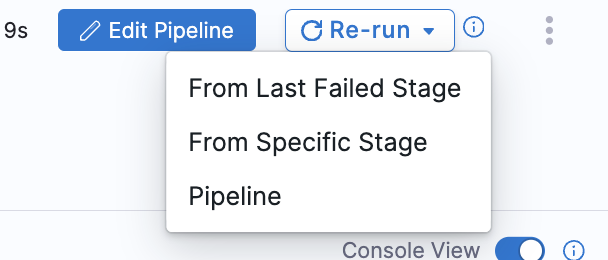
Harness will re-execute the failed stage in the chained pipeline.

Handle failures in chained pipelines
A child pipeline runs as part of the Pipeline stage in the parent pipeline. The result of the child pipeline affects the execution of the parent pipeline according to the configuration of the Pipeline stage and its failure strategy.
You can configure conditional execution and failure strategies for the Pipeline stage to control how the parent pipeline responds when the child pipeline succeeds or fails.
For example, you can configure a subsequent stage to run only when the chained pipeline fails, or configure a failure strategy to retry or stop the parent pipeline when the child pipeline fails.
For more information, go to Define conditional executions for stages and steps.
Remote chained pipelines
Consider the following when executing remote (stored in SCM) chained pipelines:
- A chained pipeline is fetched from the default branch if the parent pipeline is defined inline, and the chained pipeline is defined remotely.
- When the parent pipeline is defined remotely and the chained pipeline is defined inline, the parent pipeline is fetched from the corresponding branch, and the chained pipeline is fetched inline.
- When both the chained pipeline and parent pipeline are defined remotely, but under the same repository, the chained pipeline should belong to the same branch as the parent pipeline.
- A chained pipeline is fetched from the default branch when both the parent and chained pipelines are defined remotely in separate repositories. This is irrespective of the branch of the parent pipeline.
Next steps
- DAG pipelines: Create pipelines with directed acyclic graph dependencies for complex orchestration.
- Barriers: Synchronize parallel stages in chained pipelines using barriers.
- Templates: Create reusable pipeline templates from your chained pipelines.