Define conditional executions for stages and steps
Conditional executions let you control when a stage or step runs based on the outcome of your pipeline or other conditions. This allows you to build more dynamic pipelines that respond to different scenarios without requiring manual intervention.
You can use conditional executions independently or together with failure strategies. For example, you can configure a step to run only when a previous step fails, or check whether a cache was restored and install dependencies only when the cache is not available.
What you will learn from this topic
- How to configure conditional executions for stages, steps, and step groups.
- How to add stage-level conditional execution settings using pipeline status and JEXL conditions.
- How to add step-level conditional execution settings to override stage conditions.
- How to use JEXL expressions and variables in conditional execution conditions.
- How Harness prioritizes and handles conditional executions and failure strategies.
Before you begin
- Harness project access: You need View or Execute permissions on pipelines. For more information, refer to RBAC in Harness.
- Pipeline basics: You should understand pipelines, stages, and steps. For more information, refer to Add a stage.
- JEXL expressions: Familiarity with JEXL syntax helps you write custom conditions. For more information, refer to Harness expressions and variables.
Configure conditional executions
In Harness, conditional executions are when conditions that can be broad, such as always execute this stage/step, or refined by specific JEXL conditions.
You can configure conditional executions for:
- Stages: A stage's conditional execution settings apply to all steps in that stage that do not have their own step-level conditional execution settings.
- If you use pipeline chaining, you can configure conditional executions for child pipelines.
- Steps: A step's conditional execution settings overrides the stage's conditional execution settings.
- Step groups: A step group's conditional execution determines when to run that step group. Step group conditional execution settings apply to all steps in the group, and you can apply step-level conditional executions to steps within the group.
For details about how Harness prioritizes stage and step conditional executions, go to Conditional execution priority and failure handling.
Add a stage conditional execution
The stage conditional execution applies to all steps in the stage that do not have their own conditional execution configured.
To add a stage conditional execution:
-
In your pipeline, select the stage where you want to add the conditional execution.
-
Select the Advanced tab.
-
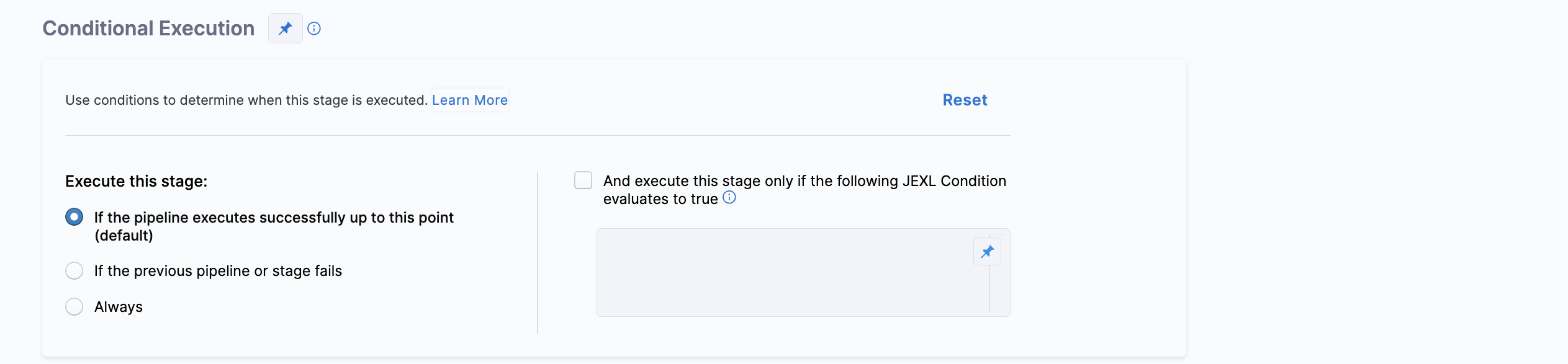
Under Conditional Execution, select a broad condition for when you want to execute the stage:
- If the pipeline executes successfully up to this point (default): Run this stage if all previous stages in the pipeline were successful. This is the default and most commonly used setting.
- If the previous pipeline or stage fails: Run this stage only if the prior stage or chained pipeline failed.
- Always: Run this stage regardless of the status of prior stages or pipelines.
-
You can add JEXL conditions to further refine the conditional execution requirements. To do this, select And execute this stage only if the following JEXL Condition evaluates to true, and then enter your JEXL condition.
The stage runs if both the broad condition AND your JEXL condition evaluate to true.
Your JEXL condition can include Harness expressions and variables, including the output of previous steps. For example:
<+pipeline.stages.STAGE_ID.spec.execution.steps.STEP_ID.status> == "SUCCEEDED"<+environment.name> != "QA"<+variable.Boolean1> == "True" && <+variable.Boolean2> == "True"
-
Save the stage.
YAML example
Here's an example of a stage conditional execution that runs if the stage has executed successfully so far and the build type is PR.
    when:
      stageStatus: Success
      condition: <+codebase.build.type>=="PR"
Add a step conditional execution
A step's conditional execution settings overrides the stage's conditional execution settings.
To add a step conditional execution:
-
In your pipeline, edit the step where you want to add the conditional execution.
-
Select the Advanced tab.
-
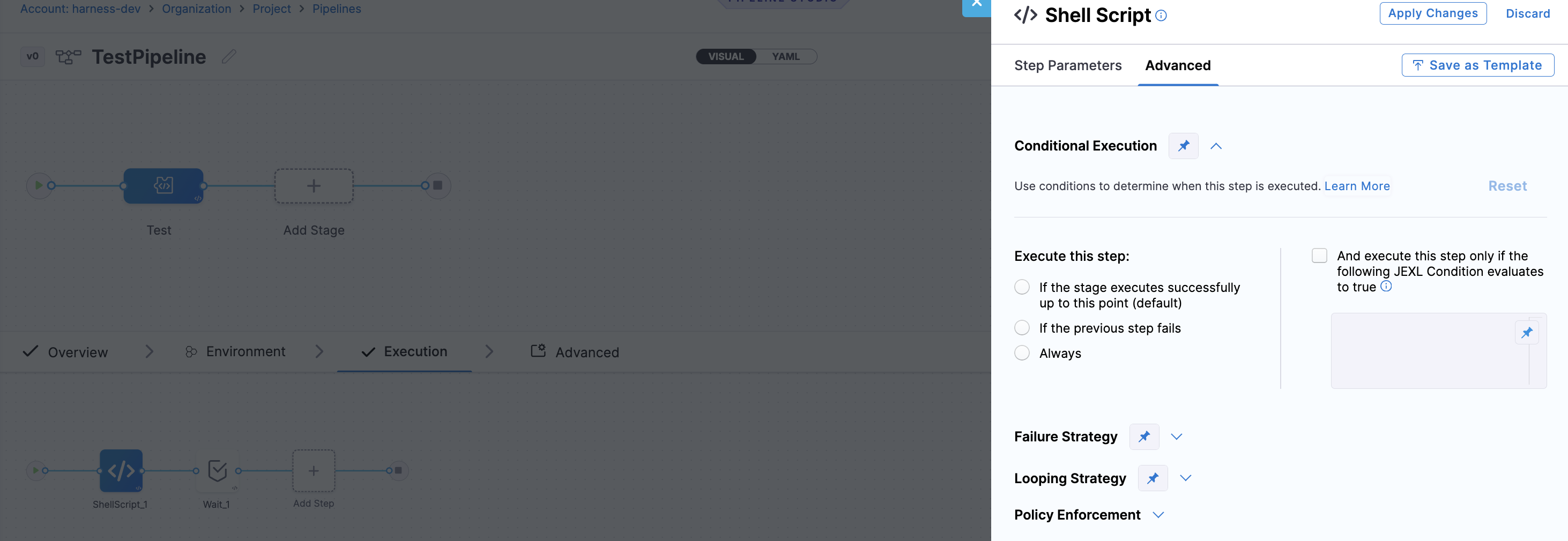
Under Conditional Execution, select a broad condition for when you want to execute the step:
- If the stage executes successfully up to this point (default): Run this step if all previous steps in the stage were successful. This is the default and most commonly used setting.
- If the previous step fails: Run this step only if the prior step failed.
- Always: Run this step regardless of the status of prior steps.
-
You can add JEXL expressions to further refine the conditional execution requirements. To do this, select And execute this step only if the following JEXL Condition evaluates to true, and then enter your JEXL condition.
The step runs if both the broad condition AND your JEXL condition evaluate to true.
-
Click Apply Changes.
YAML example
Here is an example of a step conditional execution that runs if a previous step fails.
- step:
    type: ShellScript
    name: ShellScript_1
    identifier: ShellScript_1
    spec:
      shell: Bash
      executionTarget: {}
      source:
        type: Inline
        spec:
          script: echo hello
      environmentVariables: []
      outputVariables: []
    timeout: 10m
    when:        #indicates the condition
      stageStatus: Failure
You can also configure conditional execution for a step group. The condition applies to all steps in the group, while a conditional execution configured on an individual step overrides the step group's condition.
For more information, go to Organize steps in step groups.
Remove conditional executions
To clear a stage, step, or step group's conditional execution settings,
- Go to the Conditional Execution settings (on the stage/step Advanced tab).
- Select Reset.
- In the dialog box, click Remove to remove the condition.
Conditional executions as runtime input
You can also define stage, step group, and step conditional executions settings at runtime by configuring them as runtime inputs.
To do this, go to the Conditional Execution settings where you want to configure a condition to be specified at runtime, change the input type to Runtime Input.
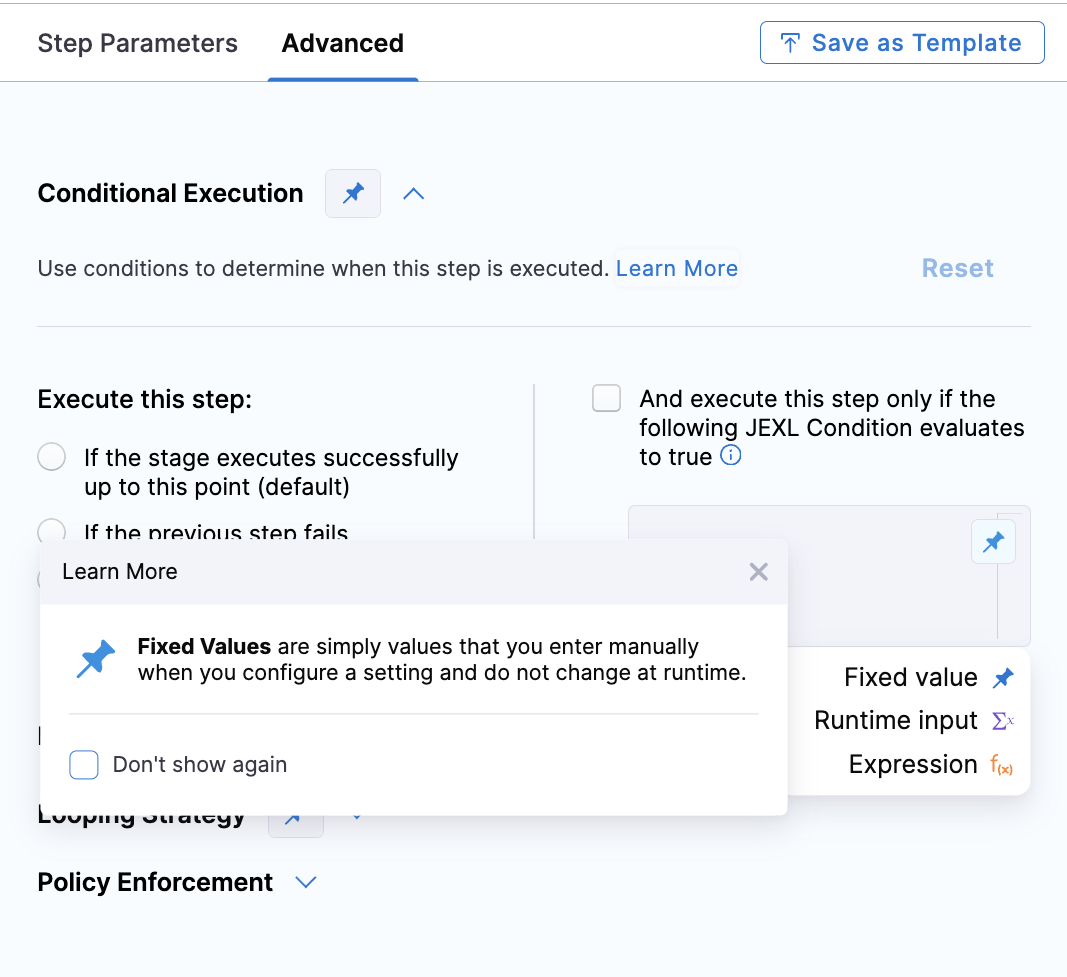
When you run the pipeline, you'll be prompted to define the conditional execution settings for that run.
Due to the potential complexity of JEXL expressions in conditional executions, input sets are useful for conditional executions as runtime input. Input sets contain pre-defined runtime inputs that you select at runtime. This eliminates the need to manually enter the entire conditional execution each time.
Configure conditional execution for steps in the execution and rollback sections
When using templates with conditional execution based on custom JEXL expressions, you need to configure the when conditions separately for the execution and rollback sections to ensure they run as expected during rollbacks.
-
In Step Template: Set the
whencondition as a runtime input:when: <+input> -
Specify the
whencondition to run the step only on successful executionthus farin production environments:when:stageStatus: Successcondition: <+env.type> == "Production" -
Specify the
whencondition to run the step always in production environments:when:stageStatus: Allcondition: <+env.type> == "Production"
Variables and expressions in conditional execution settings
Conditional execution settings support Harness expressions and variables, including values produced by previous steps.
Ensure values are available at evaluation time
The variables and expressions used in a JEXL condition must be resolved before the condition is evaluated.
Because conditional execution determines whether a stage or step runs, the condition cannot depend on a value that is produced only after that stage or step starts.
For example, for a stage-level conditional execution, all variables and expressions referenced in the JEXL condition must be resolved before the stage starts. If the condition references a value produced by a step within the same stage, Harness cannot resolve that value when evaluating the condition. As a result, the condition might not be evaluated as expected or the value might resolve to null.
Compare strings and Booleans
When comparing a string with a Boolean, the comparison evaluates to true unless the string is literally false.
Reference pipeline, stage, and step statuses
The status values for pipelines, stages, and steps are Java enum values. You can find the available values in the Status filter on the pipeline Execution History page.
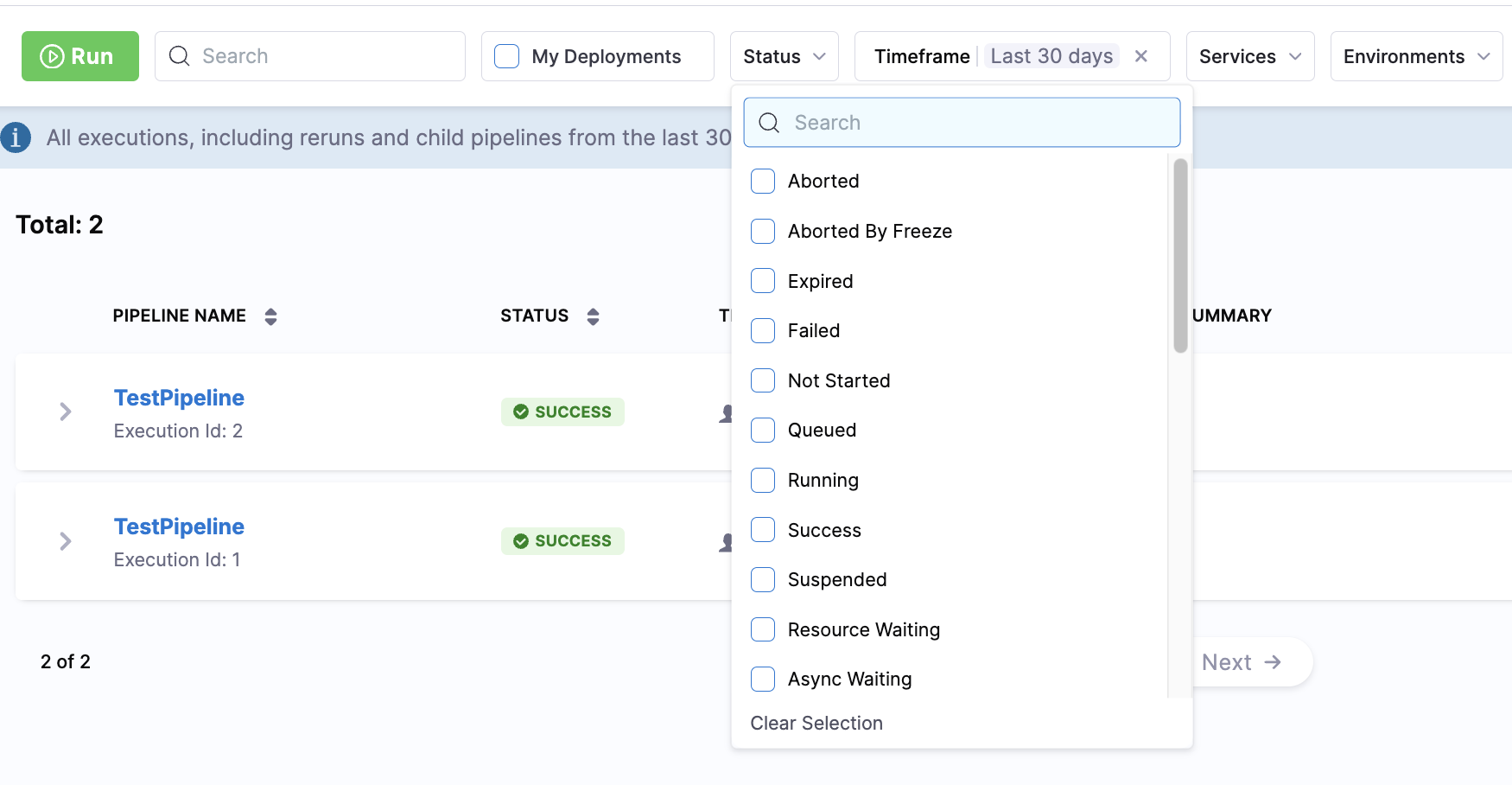
You can reference these status values in JEXL conditions. However, the referenced stage or step must have already executed when the condition is evaluated.
-
Stage status: To get the status of a stage, use
<+pipeline.stages.STAGE_ID.status>. For example:<+pipeline.stages.somestage.status> == "FAILED" -
Step status: To get a step's status, use the expression
<+pipeline.stages.STAGE_ID.spec.execution.steps.STEP_ID.status>, for example:<+pipeline.stages.somestage.spec.execution.steps.somestep.status> == "FAILED"
Conditional execution priority and failure handling
Conditional execution settings are evaluated hierarchically. Stage-level conditions are evaluated first, followed by step group and step-level conditions.
-
Stage: Stage-level conditional execution determines whether a stage runs. If the condition is met, the stage starts and its step groups and steps are evaluated.
-
Step group: Step group-level conditional execution determines whether a step group runs. If the condition is met, the steps in the group are evaluated.
-
Step: Step-level conditional execution determines whether an individual step runs. Step conditions are evaluated after the stage and step group conditions. As a result, a step-level condition can prevent an individual step from running even when its stage and step group are running.
In Deploy stages, the Rollback phase takes precedence over Conditional Execution. As a result, steps configured with Condition: Always might not run as expected when a rollback is triggered.
For more information, go to Deploy Stage and Step Conditional Execution Settings.
Understand the effect of a false condition
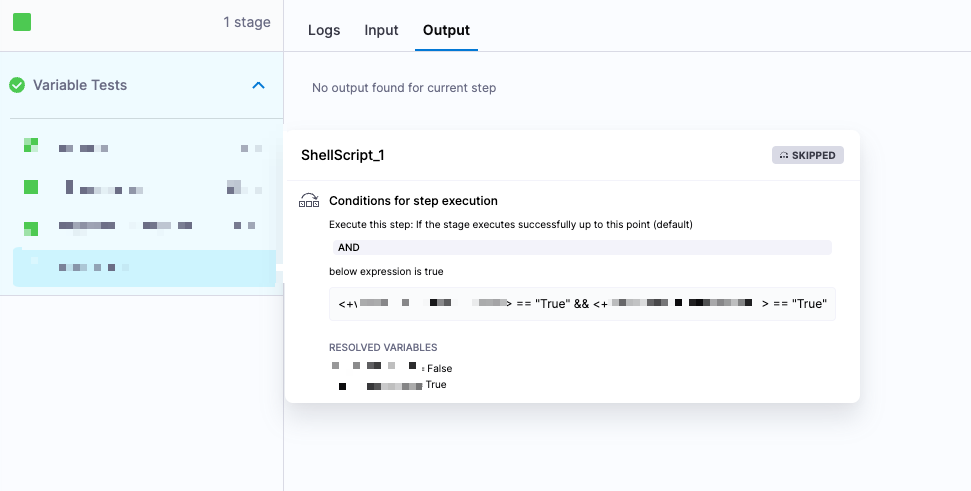
When a JEXL Boolean condition evaluates to false, the associated step or stage is skipped.
A skipped step or stage can still appear as successfully completed. This might be the expected behavior when you intentionally want to skip execution. If you need the pipeline to fail instead, configure a failure strategy for the step or stage.
Failure strategies take precedence over conditional execution
Stages and steps can have both conditional execution and failure strategies. When you use both, the failure strategy can affect whether a conditional execution is triggered.
For example, assume a pipeline has two stages, stage1 and stage2:
stage2has a Conditional Execution setting configured to Execute this stage only if prior pipeline or stage failed.stage1has a Failure Strategy configured to Rollback Stage for All Errors.
If stage1 encounters an error, the failure strategy rolls back the stage instead of leaving it in a failed state. Because stage1 is not marked as failed, the conditional execution for stage2 is not triggered, and stage2 does not run.
To allow stage2 to run, configure the failure strategy for stage1 to Ignore Failure. This allows the pipeline to continue while marking stage1 as failed. The conditional execution for stage2 can then detect the failure and run stage2.
Run steps when a stage fails
If you want specific steps to run when a stage fails, add those steps to the stage's Rollback failure strategy settings.
Typically, you do not want a rollback to continue after an error. However, if you need a step to run regardless of whether the rollback succeeds or fails:
- Add the step to the stage's Rollback settings.
- Set the step's conditional execution to Always.
- Configure the preceding step's failure strategy to Mark as failure for All Errors.
This configuration ensures that the required step runs even when the preceding step fails.
Next steps
- Define a failure strategy on stages and steps: Learn how to configure failure strategies that work together with conditional executions.
- Harness expressions and variables: Explore the full reference of Harness expressions you can use in JEXL conditions.
- Input sets and overlays: Create reusable sets of runtime input values for your conditional execution settings.