Kubernetes (Harness Infrastructure)
Kubernetes (Harness Infrastructure) runs chaos experiments through the Harness Delegate, also known as the Delegate-Driven Chaos Runner (DDCR). The Delegate is already used across Harness modules, so chaos reuses it instead of installing a separate operator.
This page explains what DDCR is, how an experiment executes, the two install approaches, and the resource cost.
What you will learn from this topic
- What DDCR is and how it relates to the Harness Delegate.
- How an experiment executes against a target cluster.
- The two ways to deploy the Delegate (dedicated vs centralized) and how to choose between them.
- The CPU and memory profile of every component.
What is DDCR?
DDCR (Delegate-Driven Chaos Runner, also called Delegate-Driven Chaos Infrastructure or DDCI) is a chaos infrastructure type that runs on top of the Harness Delegate. There is no separate chaos agent, operator, or set of CRDs to manage. The Delegate orchestrates the chaos runner pods directly, using existing Kubernetes connectors to reach the target cluster.

What DDCR provides
- No separate operator. Reuses the Delegate already deployed for other Harness modules.
- Automated service discovery. A transient discovery agent maps Kubernetes workloads and the network traffic between them.
- Service onboarding. Turn discovered workloads into services with health probes attached, so chaos targets a known service rather than a raw workload.
- Application maps. Group onboarded services into application maps so chaos targets a logical app.
- Service-level resilience score in addition to the per-experiment score.
- CI/CD adaptability. Runs out of the same Delegate your pipelines already use.
How an experiment executes
When you trigger an experiment, the Delegate creates a transient chaos runner (DDCI) pod in the configured namespace. The runner then creates short-lived fault pods that perform the actual injection (kill processes, drop packets, throttle CPU, etc.). After execution, both the runner and the fault pods are cleaned up.
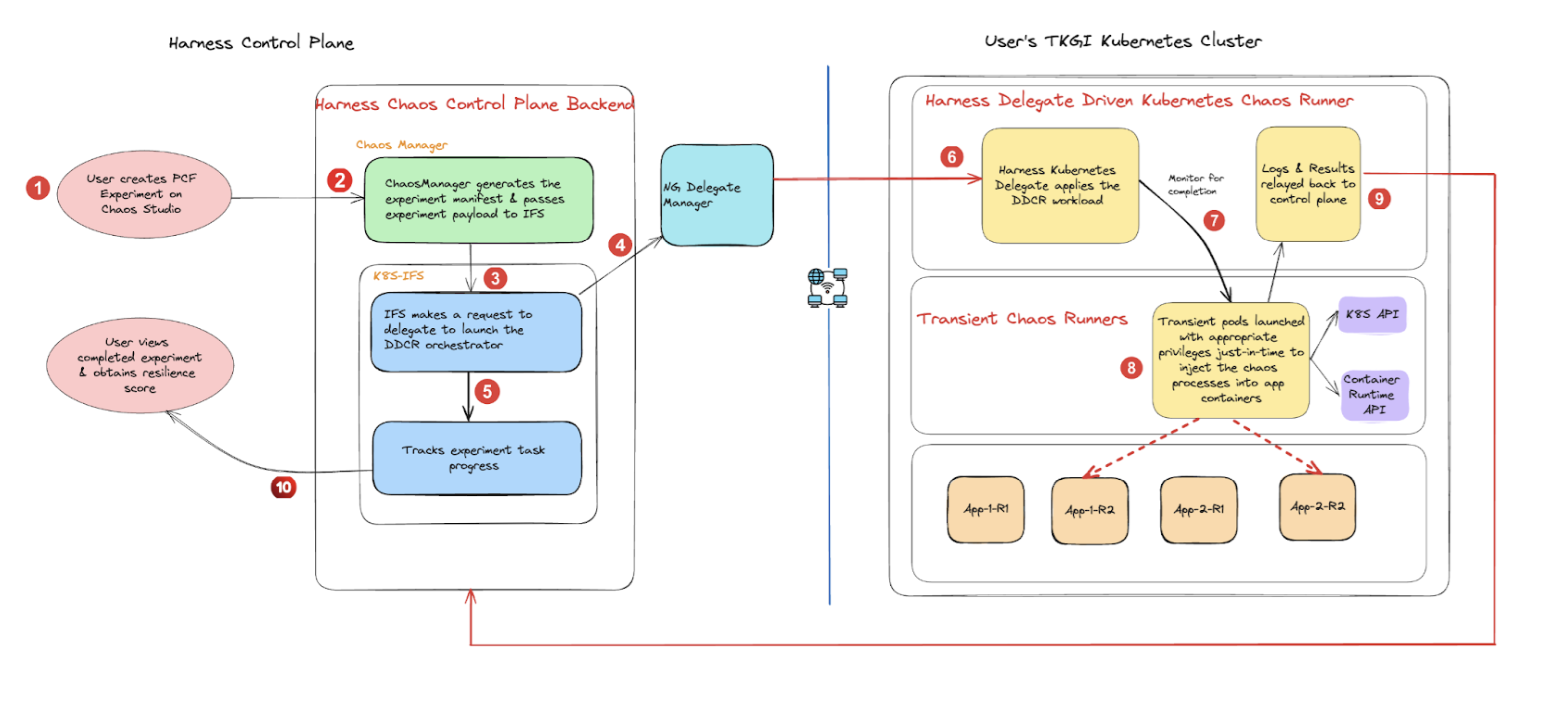
For the API permissions the runner needs to do this, go to Cluster permissions.
Two install approaches
The Delegate that powers the chaos runner can live inside the target cluster or on a separate cluster that reaches the target through a Kubernetes connector. This is a Delegate install decision, not a chaos infrastructure form field.
| Approach | Where the Delegate runs | When to choose | Doc |
|---|---|---|---|
| Dedicated delegate | Inside the target cluster (one Delegate per cluster) | Strongest isolation; simplest single-cluster setup; you control the cluster | Dedicated delegate approach |
| Centralized delegate | Outside the target cluster, orchestrates many target clusters through Kubernetes connectors | Multi-cluster fleets; central platform team owns the chaos runner | Centralized delegate approach |
The Dedicated delegate approach itself offers two variants: a Basic install that uses the default cluster-admin role, and a Limited Permissions install that scopes the Delegate to a dedicated namespace with custom RBAC.
OpenShift uses the same DDCR pipeline, plus a Security Context Constraint (SCC) binding and CRI-O fault tunables. Go to OpenShift for the extra setup.
Before you begin
- Harness Delegate version
24.09.83900or above. Earlier versions cannot execute DDCR experiments. Go to Install Delegate for the platform install steps. - A Kubernetes connector. Go to Kubernetes connector settings to create one.
- A Harness environment. A chaos infrastructure always lives inside an environment. Go to Create an environment if you do not have one.
- Cluster RBAC for the chaos service account. Default is
cluster-admin. To restrict to least privilege, go to Cluster permissions for theClusterRole,Role, and binding manifests.
Resource requirements
The Delegate is the only long-running component. Everything else is transient and spun up on demand.
| Component | Lifecycle | Image | CPU request / limit | Memory request / limit |
|---|---|---|---|---|
| Delegate | Long-running | harness/delegate | 1 (request); no limit | 2Gi / 2Gi |
| service-discovery-lifecycle-agent | Transient (per discovery agent / cron) | harness/service-discovery-collector | 50m / 200m | 50Mi / 200Mi |
| sd-cluster (2 containers: log-watcher + agent) | Transient | harness/chaos-log-watcher, harness/service-discovery-collector | 50m / 200m (each) | 50Mi / 200Mi (each) |
| sd-node (2 containers: log-watcher + agent) | Transient | harness/chaos-log-watcher, harness/service-discovery-collector | 50m / 200m (each) | 50Mi / 200Mi (each) |
| DDCI runner | Transient (per experiment) | harness/chaos-ddcr | 50m / 100m | 250Mi / 500Mi (+250Mi ephemeral storage) |
| Helper pod (2 containers: log-watcher + fault) | Transient (per fault) | harness/chaos-log-watcher, harness/chaos-ddcr-faults | Configurable | Configurable |
The Helper pod is the pod that executes the actual fault injection (also called the fault pod in some fault references). Its CPU and memory requests and limits are configurable per fault in the experiment YAML; there are no default requests or limits, so set them to match the workload the fault is run against.
The Delegate defaults above suit most installs. For heavier workloads, raise the request and limit in the Delegate values file. Transient pods are released after each experiment, so cluster capacity only needs to cover concurrent runs.
Using the minimal Delegate image
Harness publishes two Delegate images:
- Standard Delegate image (recommended): ships with
kubectlandgo-template, which the chaos runner and discovery agent both need. No extra setup is required. - Delegate-minimal image: lightweight image without
kubectlorgo-template. Chaos experimentation and discovery are not supported out of the box on this image. If your platform team is standardized on the minimal image, install the two binaries with one of the options below before creating a Kubernetes infrastructure.
Pick one of the two options below. Do not mix them in the same Delegate.
Option 1: Create a custom Delegate image
Build a Docker image that starts FROM the minimal Delegate image and adds kubectl and go-template. Push it to your container registry and reference it as the Delegate image in your Helm values or Delegate manifest. Use this when your security team requires every image to be scanned and stored internally.
Option 2: Install the binaries via INIT_SCRIPT (recommended)
The Delegate runs the value of the INIT_SCRIPT environment variable on startup. Add the snippet below to the Delegate values file (Helm) or to the Deployment manifest:
- env:
  - name: INIT_SCRIPT
    value: |
      ##kubectl
      curl -L0 https://app.harness.io/public/shared/tools/kubectl/release/v1.28.7/bin/linux/amd64/kubectl -o kubectl
      chmod +x ./kubectl
      mv kubectl /usr/local/bin/
      ## go-template
      curl -L0 https://app.harness.io/public/shared/tools/go-template/release/v0.4.1/bin/linux/amd64/go-template -o go-template
      chmod +x ./go-template
      mv go-template /usr/local/bin/
The Delegate pod runs the script on each restart. Both binaries land in /usr/local/bin/ and are picked up automatically by the chaos runner.
View a complete minimal-Delegate Deployment with INIT_SCRIPT
apiVersion: apps/v1
kind: Deployment
metadata:
  labels:
    app.kubernetes.io/instance: minimal-delegate
    app.kubernetes.io/managed-by: Helm
    app.kubernetes.io/name: minimal-delegate
    harness.io/name: minimal-delegate
  name: minimal-delegate
  namespace: harness-delegate-ng
spec:
  replicas: 1
  selector:
    matchLabels:
      app.kubernetes.io/instance: minimal-delegate
      app.kubernetes.io/name: minimal-delegate
  template:
    metadata:
      labels:
        app.kubernetes.io/instance: minimal-delegate
        app.kubernetes.io/name: minimal-delegate
        harness.io/name: minimal-delegate
    spec:
      containers:
      - name: delegate
        image: us-docker.pkg.dev/gar-prod-setup/harness-public/harness/delegate:25.08.86602.minimal
        imagePullPolicy: Always
        env:
        - name: INIT_SCRIPT
          value: |
            ##kubectl
            curl -L0 https://app.harness.io/public/shared/tools/kubectl/release/v1.28.7/bin/linux/amd64/kubectl -o kubectl
            chmod +x ./kubectl
            mv kubectl /usr/local/bin/
            ## go-template
            curl -L0 https://app.harness.io/public/shared/tools/go-template/release/v0.4.1/bin/linux/amd64/go-template -o go-template
            chmod +x ./go-template
            mv go-template /usr/local/bin/
        envFrom:
        - configMapRef:
            name: minimal-delegate
        - secretRef:
            name: minimal-delegate
        ports:
        - containerPort: 8080
          protocol: TCP
        - containerPort: 3460
          name: api
          protocol: TCP
        livenessProbe:
          httpGet:
            path: /api/health
            port: 3460
          initialDelaySeconds: 30
          periodSeconds: 20
        securityContext:
          allowPrivilegeEscalation: false
          runAsUser: 0
      serviceAccount: minimal-delegate
      serviceAccountName: minimal-delegate
      terminationGracePeriodSeconds: 600
Replace the image tag with the minimal Delegate version your account is on.
For the underlying platform context, go to Install minimal Delegate with 3rd-party custom binaries.
Next steps
- Dedicated delegate approach: install the Delegate inside the target cluster, either with default
cluster-adminpermissions or with a custom least-privilege RBAC. - Centralized delegate approach: run one Delegate that targets multiple clusters through Kubernetes connectors.
- OpenShift: SCC binding and CRI-O fault tunables for OpenShift target clusters.
- Cluster permissions: full API permission reference for the chaos service account.
- Network configuration: mTLS and Harness Network Proxy (HNP) settings for restricted networks.