> For the complete documentation index, see [llms.txt](https://developer.harness.io/llms.txt). Markdown versions of documentation pages are available by appending `.md` to page URLs; this page is available as [Markdown](https://developer.harness.io/ai-security-use-ai-security-ai-firewall-policies/use-ai-security/ai-agents.md).

# AI Agents

Review the AI agents discovered in your applications, the AI models they use, and the sensitive data in their traffic

An **AI agent** is a logical, runtime entity that autonomously plans and executes tasks toward a goal by coordinating multiple AI and non-AI components, such as AI models, tools, memory, data sources, and other services. Harness identifies an AI agent when it observes these components working together in a coordinated execution pattern.

The **AI Agents** page under **Discovery** provides a centralized view of the AI agents that Harness discovers in your applications. It helps you understand the AI models used by these agents, the sensitive data detected in their prompt and response traffic, and the environments in which they operate.

## What you will learn from this topic <a href="#what-you-will-learn-from-this-topic1" id="what-you-will-learn-from-this-topic1"></a>

By the end of this topic, you will understand:

* The widgets and information available on the AI Agents page.
* The information displayed in the AI agent inventory, and how to use filters to find specific agents.
* The sensitive data detected in agent prompt and response traffic.
* How to use the information available on the page.

***

## Agent discovery signals <a href="#agent-discovery-signals" id="agent-discovery-signals"></a>

Agent discovery uses available runtime telemetry to identify AI agents and map their dependencies. For applications where the hosting service exposes entry and exit calls, Harness analyzes these interactions to identify AI models and downstream components, including services, MCP servers, and third-party APIs. Support for capturing entry and exit calls varies by deployment and tracing agent. For current coverage, see the [AI Security Deployment Support Matrix](/ai-security-use-ai-security-ai-firewall-policies/new-to-ai-security/ai-security-deployment-support-matrix.md) and [Third-Party Monitoring Support Matrix](/web-application-and-api-protection-waap-discovery-discovery/discovery/discovery-1/third-party/third-party-monitoring-support-matrix.md).

For applications using Server-Sent Events (SSE), SSE capture is supported by the tracing agent where applicable, enabling Harness to analyze streaming interactions as part of agent discovery.

{% hint style="success" icon="thumbs-up" %}
Use the latest supported version of the Harness tracing agent for the best discovery experience, as newer versions improve the capture of large request and response bodies, providing more complete telemetry for analysis.
{% endhint %}

***

## AI agents view <a href="#understand-the-ai-agents-view" id="understand-the-ai-agents-view"></a>

The **AI Agents** page provides an overview of the AI agents discovered in your environment. The page includes widgets summarizing agent discovery, exposure, and AI model usage, followed by an inventory of discovered agents.

### Widgets <a href="#widgets" id="widgets"></a>

The widgets at the top of the page provide a high-level view of the discovered AI agents.

<figure><img src="https://1965274368-files.gitbook.io/~/files/v0/b/gitbook-x-prod.appspot.com/o/spaces%2FWkhxazUhF4HZSnOgyi26%2Fuploads%2FOlRscPybcqO1VSOG5C7s%2Fdiscovery_widgets_on_the%20_ai_agents%20page.png?alt=media&amp;token=23c9248a-2326-4643-b3e8-1ab75200df85" alt=""><figcaption><p>Widgets on the AI Agents page</p></figcaption></figure>

* **Total Agents**: Displays the number of AI agents discovered in the last 24 hours.
* **Internal vs Internet-Facing Agents**: Displays the distribution of discovered AI agents based on the exposure of their trigger API endpoints. An **Internet-facing** agent is triggered via an API endpoint exposed to the internet, whereas an **Internal** agent is triggered via an API endpoint not exposed to the internet.
* **Most Used AI Models**: Displays the number of discovered AI agents that invoke each AI model.

You can hide these widgets by clicking the **Visualizations** (<img src="https://1965274368-files.gitbook.io/~/files/v0/b/gitbook-x-prod.appspot.com/o/spaces%2FWkhxazUhF4HZSnOgyi26%2Fuploads%2Fgit-blob-3a70dd64d12f97a9e0f2478a09f5d08eacc5d529%2FVisualization%20icon.png?alt=media" alt="" data-size="line">) icon in the top-right corner of the page.

### AI agent inventory <a href="#ai-agent-inventory4" id="ai-agent-inventory4"></a>

The **AI agent inventory** lists the AI agents that Harness discovers in your environment. It allows you to review key information about each agent, including the AI models it uses, the environment in which it operates, and any sensitive data detected in its prompt and response traffic.
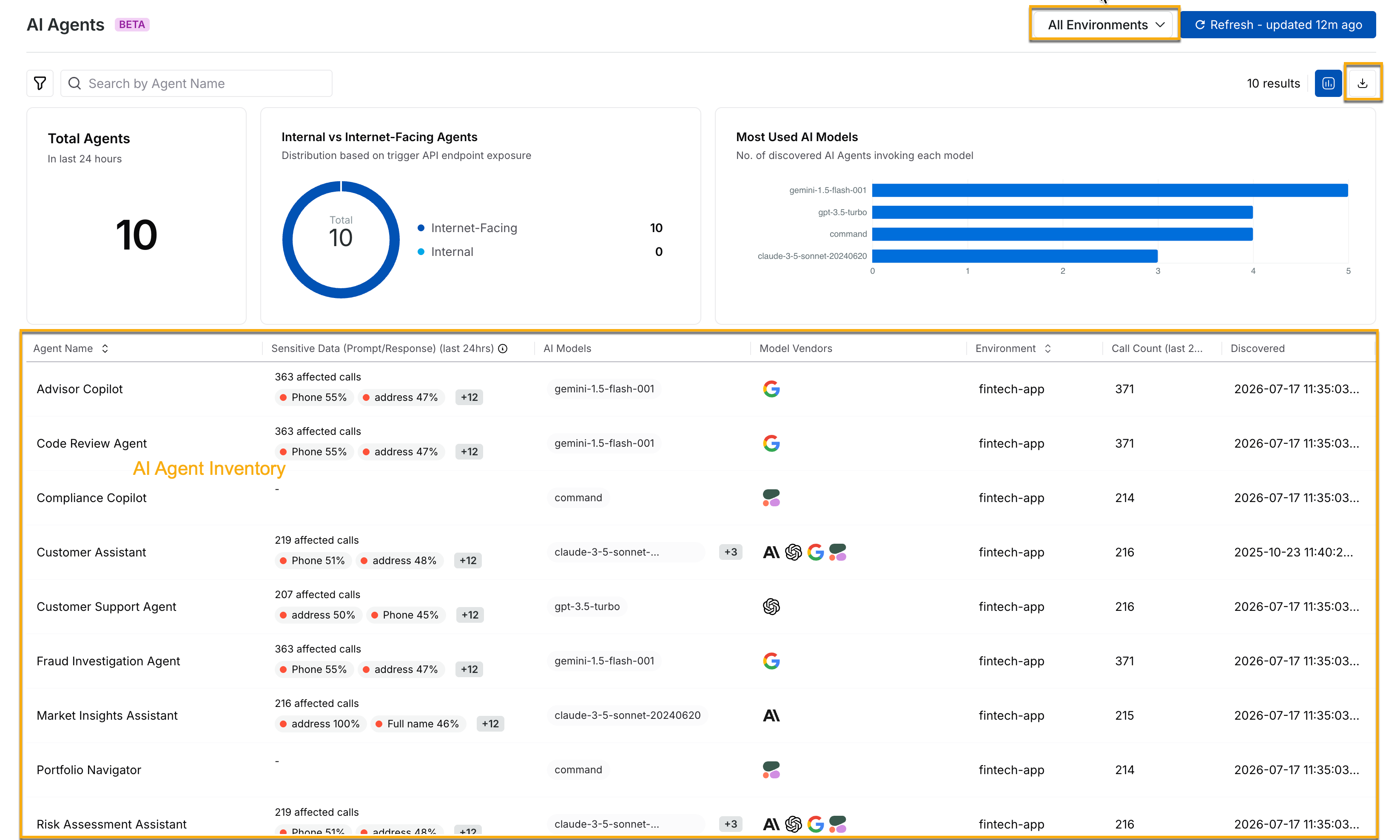
<figure><img src="https://1965274368-files.gitbook.io/~/files/v0/b/gitbook-x-prod.appspot.com/o/spaces%2FWkhxazUhF4HZSnOgyi26%2Fuploads%2Fgit-blob-10f07734ddf67af267df5df8ac549e77531f54ca%2Ftraceable_discovery_ai_agent_inventory.png?alt=media" alt=""><figcaption><p>AI Agent Inventory</p></figcaption></figure>

The inventory displays the following information for each AI agent:

| **AI Agent Details**                 | **Description**                                                                                                                                                                                                                                                                                                                                      |
| ------------------------------------ | ---------------------------------------------------------------------------------------------------------------------------------------------------------------------------------------------------------------------------------------------------------------------------------------------------------------------------------------------------- |
| **Agent Name**                       | The name of the AI agent.                                                                                                                                                                                                                                                                                                                            |
| **Sensitive Data (Prompt/Response)** | The number of affected calls and the types of sensitive data detected in the agent's prompt and response traffic. The percentage next to each data type represents the percentage of affected calls in which that data type was detected. For example, *Phone 53%* means that Phone was detected in 53 percent of the affected calls for that agent. |
| **AI Models**                        | The AI models invoked by the agent.                                                                                                                                                                                                                                                                                                                  |
| **Model Vendors**                    | The vendors of the AI models used by the agent.                                                                                                                                                                                                                                                                                                      |
| **Environment**                      | The environment associated with the agent.                                                                                                                                                                                                                                                                                                           |
| **Call Count**                       | The number of calls associated with the agent.                                                                                                                                                                                                                                                                                                       |
| **Discovered**                       | The time at which Harness discovered the agent.                                                                                                                                                                                                                                                                                                      |

You can use the **Environment** controls at the top of the page to control the agents and activity displayed in the inventory. You can also download the data displayed in the inventory as a **CSV** file by clicking the **Download** (<img src="https://1965274368-files.gitbook.io/~/files/v0/b/gitbook-x-prod.appspot.com/o/spaces%2FWkhxazUhF4HZSnOgyi26%2Fuploads%2Fgit-blob-5330605d9c6dc17e105e9d6e8b488c3b46b6852b%2FDownload%20icon.png?alt=media" alt="" data-size="line">) icon. When downloading the data, you can specify the number of rows to download.

To investigate an individual agent further, select it from the inventory to view its details. Go to [AI agent details](/ai-security-use-ai-security-ai-firewall-policies/use-ai-security/ai-agents-details.md) for more details.

***

## Filters <a href="#filters1" id="filters1"></a>

The **AI Agents** page provides filters that you can use to narrow the agents displayed in the inventory. To open the filter pane, click the **Filter** (<img src="https://1965274368-files.gitbook.io/~/files/v0/b/gitbook-x-prod.appspot.com/o/spaces%2FWkhxazUhF4HZSnOgyi26%2Fuploads%2Fgit-blob-e66dcb78179dd683e4005db02af2a16f794b78e3%2FFilter%20icon.png?alt=media" alt="" data-size="line">) icon in the top-left corner of the page.

The filter pane includes the following tabs:

| **Tab**     | **Description**                                      |
| ----------- | ---------------------------------------------------- |
| **Filters** | Lists the filters available for AI agents.           |
| **Saved**   | Lists the filters that you have saved for later use. |
| **Recent**  | Lists the filters that you have recently applied.    |

Under **Filters**, you can filter agents by:

* **Agent Name**
* **AI Models**
* **Environment**
* **Internet-Facing Agent**

For example, to view only agents that use a specific AI model, click the filter icon, select **AI Models**, and choose the required model. The following demo illustrates how to do this:

{% embed url="<https://demo.arcade.software/Yg6gNbP4YRGWXDEGdQOH?embed&embed_desktop=inline&embed_mobile=tab&show_copy_link=true>" %}

***

## Leverage the AI agents view <a href="#leverage-the-ai-agents-view3" id="leverage-the-ai-agents-view3"></a>

Once you understand the information available on the **AI Agents** page, you can use it to see which agents are operating in your environment and identify those that require further investigation. The widgets help you understand agent exposure and AI model usage, while the inventory helps you identify individual agents that invoke specific models or have sensitive data detected in their prompt and response traffic.

When you want to focus your investigation, use the available filters, **Environment** selector, and time period selector to narrow the inventory. For example, you can use the available filters to focus on internet-facing agents or agents that invoke a specific AI model. After identifying an agent that requires further investigation, you can select it from the inventory to view its details.

## Next steps

* [AI agent details](/ai-security-use-ai-security-ai-firewall-policies/use-ai-security/ai-agents-details.md): View detailed information about an individual AI agent discovered in your environment.
* [AI Assets](/ai-security-use-ai-security-ai-firewall-policies/use-ai-security/ai-assets.md): Review the AI APIs and MCP assets discovered in your environment.
* [AI Security Dashboard](/ai-security-use-ai-security-ai-firewall-policies/use-ai-security/ai-security-dashboard.md): View AI assets, identified issues, threat activity, and your overall AI security posture in one place.
* [AI Security Deployment Support Matrix](/ai-security-use-ai-security-ai-firewall-policies/new-to-ai-security/ai-security-deployment-support-matrix.md): Check which deployments and tracing agents support AI discovery capabilities.
