> For the complete documentation index, see [llms.txt](https://developer.harness.io/llms.txt). Markdown versions of documentation pages are available by appending `.md` to page URLs; this page is available as [Markdown](https://developer.harness.io/ai-security/use-ai-security/ai-asset-details.md).
# AI Asset Details
Detailed views for AI APIs and MCP tools, servers, resources, and prompts, and how to use them to assess risk
Updates (April 2026 to June 2026)
* *September 2026*: Updated the topic to add information about the Issues tab displayed for MCP tools, MCP servers, MCP resources, and MCP prompts, and updated the list of tabs available on the AI API details page.
Harness provides a detailed view of each AI asset, displaying key insights about it. This helps you track inventory in detail, understand how the asset is integrated and how it performs, and identify whether it is monitored or secured in your environment. Harness organizes the detailed view page for each asset into tabs that let you gather deep-level insights and metrics. This ensures that you can evaluate the health, performance, and risks (if any) associated with an AI asset.
## What you will learn from this topic
By the end of this topic, you will be able to:
* Identify AI assets and navigate their detailed view.
* Understand the information displayed for different AI asset types, such as AI APIs, MCP tools, MCP prompts, MCP resources, and MCP servers.
* Understand how to use the insights to improve security, reliability, and maintain compliance.
***
## Identify AI assets
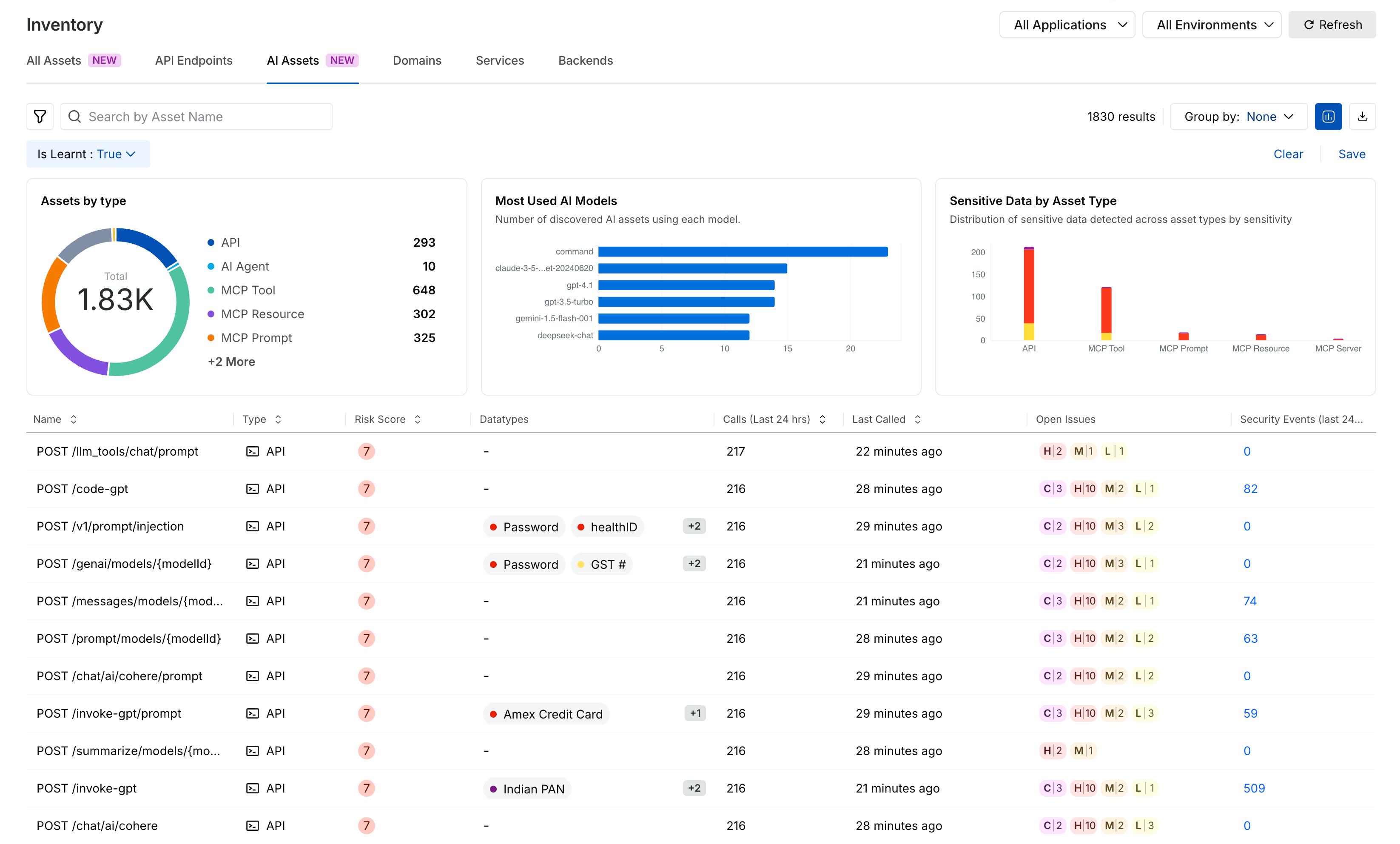
Harness displays AI assets on the AI assets tab under Inventory. Go to [AI Assets](/ai-security/use-ai-security/ai-assets.md) for details on the information displayed on the page.
AI Assets Page
### Filters
While Harness displays AI assets on the page, you can also apply various AI filters to view AI assets in the **All Assets** tab, according to your requirements. Harness provides the following filters that you can use to view such assets:
AI Asset Filters
* **Is AI Asset**: Filters assets whether they are AI-related, for example, *AI APIs* and *MCP tools*.
* **AI Model Types**: Filters assets by AI model type, for example, *Google-gemini-pro* and *gpt-3.5-turbo*.
* **AI Vendors**: Filters assets by the vendor providing the AI capability, for example, *OpenAI* and *Google*.
Once you have applied the necessary filters, Harness displays the information on the page. You can click on an AI asset to view its details. Go to [Drill down into AI assets](https://developer.harness.io/ai-security/ai-asset-details#drill-down-into-ai-assets) for the details shown for each asset type.
***
## Drill down into AI assets
The following sections highlight these details for each AI asset. You can use this information to gain insights and take actions based on your requirements.
### AI API details
The AI API details page is similar to the [Endpoint Details](https://developer.harness.io/web-application-and-api-protection-waap/discovery/discovery-1/inventory/endpoint-details) page but provides insights tailored to AI traffic and AI workloads. It helps you understand how AI APIs are being used, monitor sensitive data flowing through requests and responses, identify risks, and investigate abnormal activities.
The AI API details page contains multiple tabs, including **Overview**, **Parameters**, **Open** **Issues**, **Posture Events**, **Security Events,** **Traces**, and **Metrics**. These tabs help you monitor API activity, review parameters, investigate suspicious behavior, and performance metrics.
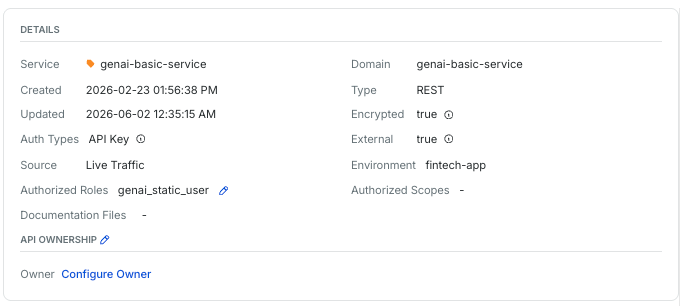
The **Overview** tab also provides AI-specific insights that help you understand how sensitive data flows through AI APIs and how those APIs are used in your environment.
AI API Details
The tab displays the following information:
| Section | Description |
| ------------------------------------- | ------------------------------------------------------------------------------------------------------------------------------------------------------------------------------------------------------------------------------------------------------------------------------------------------------------------------------------------------------------------------------------------------------------------------------------------------------------------------------------------------------------------------------------------------------------------------------------------------------------------------------------------------------------------------------------------------------------------------------------------------------------------- |
| Details |
Provides details, such as the associated service and domain, the creation and last update times, the source, and the associated environment.
|
| Risk Score Details |
Provides the API's risk score, its contributors, calculations, and a risk lookup table for detailed analysis.
|
| Sensitive Data in Prompt and Response |
Provides details, such as the total number of API calls in the selected time frame and the number of data types. The table represents the sensitivity level, the number of calls containing specific sensitive data, the percentage of calls out of the total calls that contain a particular data type, and the type trend charts.
Upon clicking a data type, Harness also displays the corresponding evidence for further analysis.
|
| User Roles |
Provides details on the user roles using your API and helps identify unauthorized roles accessing it. Additionally, it displays a chart with the number of requests per role.
|
| Requests and Attacks |
Provides details, such as the total number of API requests, along with a chart showing requests over time. It also displays active attack and block requests to the API.
|
The tab also displays the API documentation for the AI API, including the OpenAPI specification, helping you review the API structure and parameters directly from the detailed view. These insights help you identify unusual activity, monitor sensitive data exposure, investigate risky API behavior, and improve AI governance.
Go to [Endpoint Details](https://developer.harness.io/web-application-and-api-protection-waap/discovery/discovery-1/inventory/endpoint-details) for details on the functionality available in the other tabs.
### MCP tools details
The MCP Tools details page provides information on how individual tools are operating within your MCP server. The following details are displayed for each MCP tool:
* The **Overview** tab provides information such as the associated MCP server, host, documentation files, and the time the tool was created and last updated. It also displays the schema associated with the tool.
* The **Open Issues** tab displays the security issues detected for the tool, so you can identify and investigate security gaps associated with it. Go to [Issues Overview](https://developer.harness.io/web-application-and-api-protection-waap/discovery/risk/issues-overview) and [Issue Management](https://developer.harness.io/web-application-and-api-protection-waap/discovery/risk/issue-management) for more details.
* The **Spans** tab provides information on interactions with services, APIs, and backends, along with the request, response, and attributes in each span.
MCP Tools Detailed View
This information helps you understand whether the tool is reliable, working as expected, or adding errors, delays, or dependencies. Using this information, you can keep your MCP tools aligned with your business requirements.
### MCP servers details
The MCP Server details page provides a server-level view of your MCP infrastructure. It displays the following information:
* The details associated with the MCP server, such as its name, creation and last call times, environment, host, and the documentation files used to add the server.
* The MCP primitives highlight the underlying MCP tools, prompts, and resources.
* The list of MCP primitives hosted on the server, along with information such as the datatypes passing through each primitive and the associated risk score. You can click a primitive to open its detailed view.
* The issues detected across the MCP server and its primitives, including their severity and current status.
* The spans associated with the MCP server and its primitives.
MCP Server Details
This hierarchy makes it easy for you to trace relationships between MCP tools, resources, prompts, and servers, manage distributed deployments, and quickly identify whether issues are originating in the tools on a given server.
### MCP resources details
MCP resources are the data sources or external systems that provide contextual information to AI workflows. These resources are usually read-only or query-based, and AI clients use them to retrieve information without performing actions, such as internal APIs, databases, or document repositories.
Harness automatically discovers MCP resources exposed by connected MCP servers and displays them as AI assets in the **All Assets** tab of the **Inventory** page. This enhances your visibility beyond executable tools to include the data context available to AI systems.
When you select an MCP resource, Harness displays details that help you understand what data the resource exposes, how it is accessed, and the associated security posture:
MCP Resource Details
* Resource identity, such as name and host, as defined by the MCP server.
* Documentation files used to add the resource.
* Lifecycle information, such as the creation, update, and last read times.
* The associated environment, such as production or staging.
* Security context, such as encryption, authentication, and external exposure details.
* Schema associated with the resource.
* Issues, indicating security risks detected for the resource, along with their severity and current status.
* Spans, indicating how the resource is accessed during AI workflows.
Harness analyzes the MCP resource metadata to classify data sensitivity and identify potential exposure of sensitive or regulated data, such as personally identifiable information. This helps you understand which AI workflows have access to high-risk data sources and to assess governance and compliance impact.
### MCP prompts details
MCP prompts are structured instruction templates that define how AI clients interact with your MCP tools and resources. They can include system instructions, variables, and contextual data used to create conversations with an MCP server. Harness discovers MCP prompts exposed by MCP servers and surfaces them as AI assets, providing visibility into the instruction layer of AI workflows. When you select an MCP prompt, Harness displays details that help you understand its construction, where it is used, and whether it introduces security or compliance risks.
MCP Prompt Details
* Prompt identity, such as server name and host, as defined by the MCP server.
* Documentation files used to add the prompt.
* Lifecycle information, such as the creation, update, and last accessed times.
* The associated environment, such as production or staging.
* External usage indicator, indicating whether the prompt is exposed outside the environment.
* Schema associated with the prompt.
* The issues associated with the prompt, including their severity and current status.
* The spans associated with the prompt.
Harness analyzes the prompt metadata to identify potential references to sensitive data, risky context, or variables that may introduce unintended data exposure. This allows you to review prompts during AI governance and security assessments, and to detect changes or drifts in prompt definitions over time.
### AI domains, services, backends, and their details
The detailed pages for AI [backends, services, and domains](https://developer.harness.io/web-application-and-api-protection-waap/discovery/discovery-1/inventory/domains-services-and-backends) are built on the existing infrastructure but display context tailored to AI-specific use cases. On these detailed pages, Harness displays activity trends, traffic volumes, and response times for the assets processing AI requests. This provides you with a detailed view of how your application infrastructure supports AI workloads. The page also highlights anomalies, such as misconfigurations, unauthorized access, or traffic patterns.
Domains, Services, and Backends Detailed View
This information helps you ensure that your AI infrastructure stays reliable and compliant.
***
## Leverage the AI asset details
These detailed views provide information while helping you act on it. You can use them to monitor activity trends, troubleshoot issues with spans and traces, and identify risks where sensitive data is flowing into the AI services. You can also use the details for audits and governance reviews, demonstrating accountability for AI usage in your organization.
### Example
Consider a scenario where you are preparing for an AI governance review. From an AI API details page, you can confirm which APIs are associated with the AI services. The MCP tool's detailed view page displays whether tools are restricted to specific environments. Similarly, the detailed view pages for AI domains, services, and backends display whether any of these assets are serving production traffic in violation of compliance rules. These insights help you reduce security issues and ensure that AI adoption remains secure and compliant.
{% @harness-feedback/feedback %}