> For the complete documentation index, see [llms.txt](https://developer.harness.io/llms.txt). Markdown versions of documentation pages are available by appending `.md` to page URLs; this page is available as [Markdown](https://developer.harness.io/ai-security/use-ai-security/ai-agents-details.md).
# AI Agents Details
Investigate an individual AI agent, its dependencies, the sensitive data in its traffic, and its traces
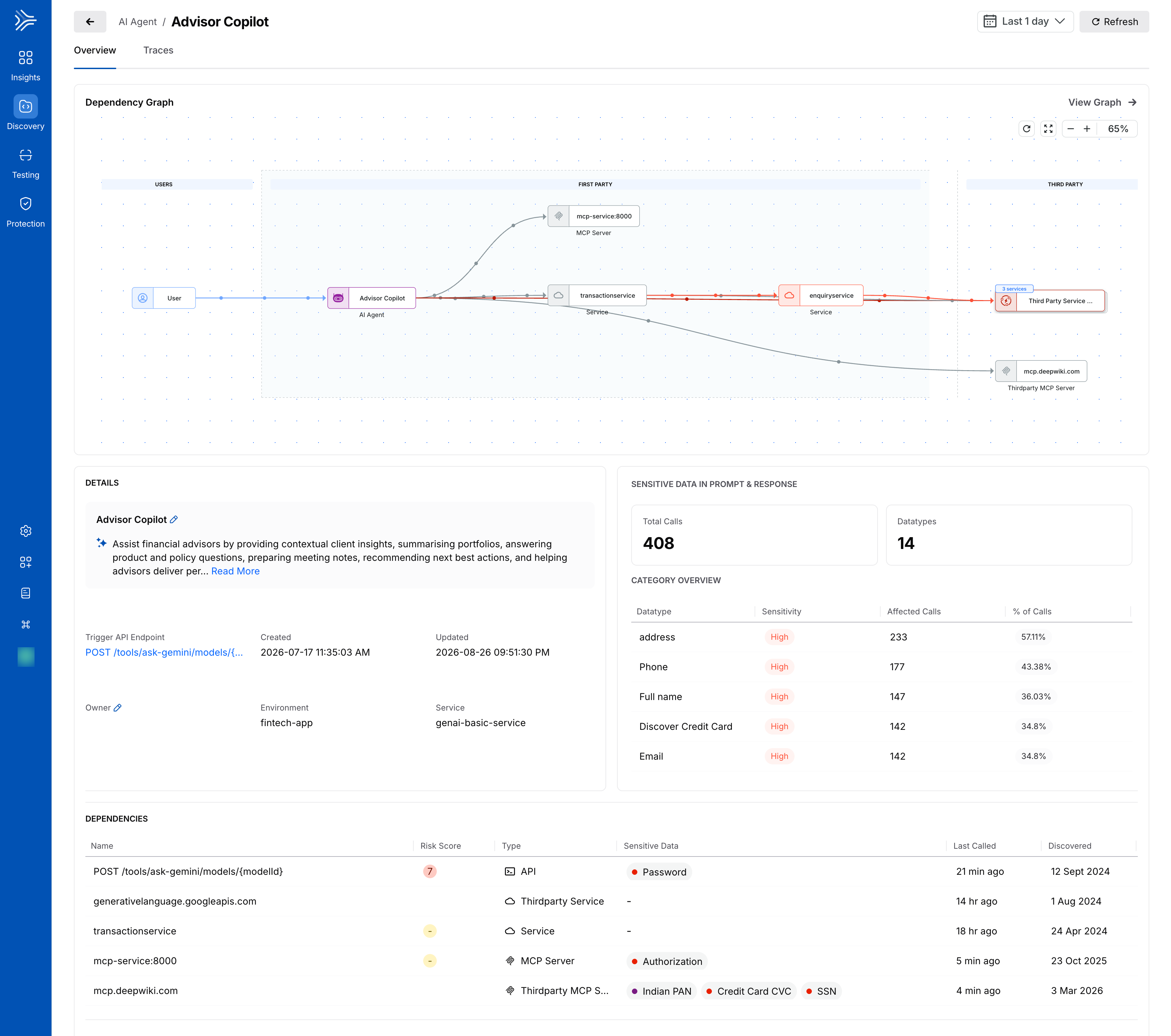
The **AI agent details page** provides a detailed view of an individual AI agent and its associated activity. To open the page, select an AI agent from the **AI Agents** inventory. You can use the page to understand the agent's dependencies, review sensitive data detected in its prompt and response traffic, and investigate individual requests associated with the agent.
## What you will learn from this topic
By the end of this topic, you will be able to:
* Understand the information available on the **Overview** and **Traces** tabs.
* Understand the **Dependency Graph** and the components associated with an AI agent.
* Review sensitive data detected in an AI agent's prompt and response traffic.
* Understand the dependencies associated with an AI agent.
* Investigate the traces associated with an AI agent.
* Use the information available on the details page to investigate an AI agent and its activity.
***
## Understand the AI agent details page
The AI agent details page provides information about an individual AI agent through the **Overview** and **Traces** tabs. By default, the page opens with the **Overview** tab selected.
AI Agents details
{% tabs %}
{% tab title="Overview" %}
The **Overview** tab provides information about the AI agent, its dependencies, and the sensitive data detected in its prompt and response traffic.
### Dependency graph
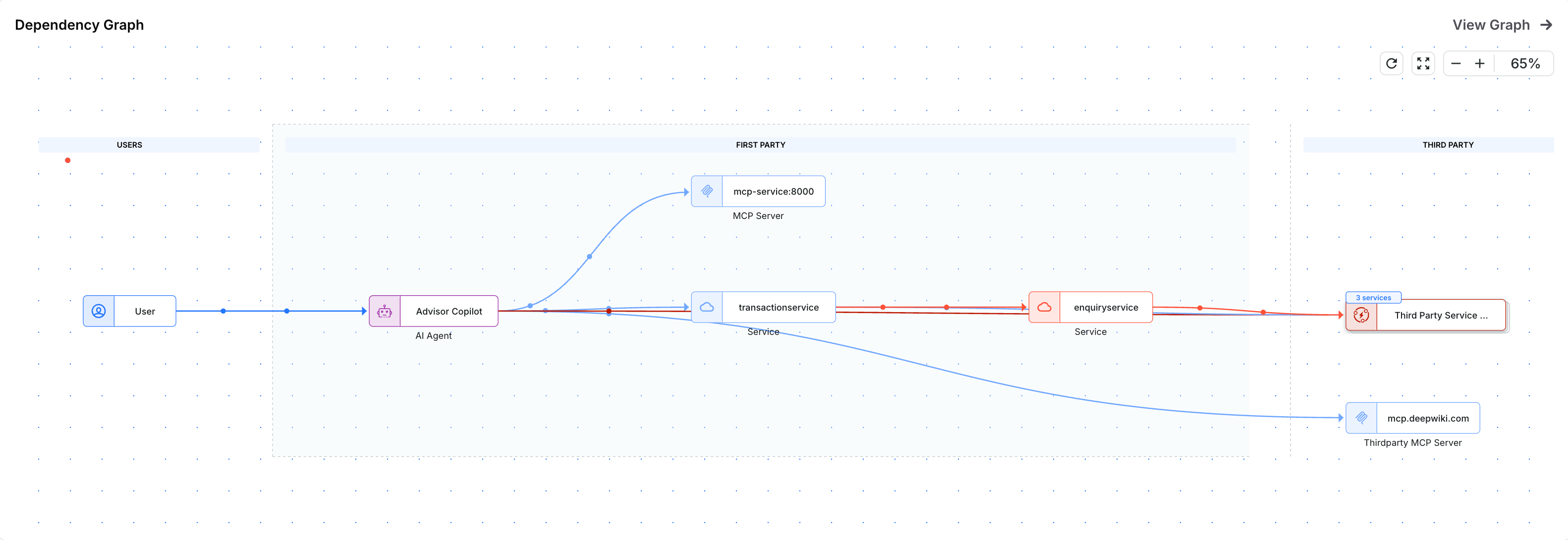
The **Dependency Graph** provides a visual representation of the AI agent and its connected components.
Dependency Graph
The graph shows the flow from the user to the AI agent, as well as the components associated with the agent's activity. These components can include the agent's direct dependencies and other services or dependencies reachable through them.
Dependencies are organized into the following groups:
* **First-party**: Components that are part of your environment.
* **Third-party**: External services and dependencies that are reachable from the agent or its associated components.
Use the dependency graph to understand how the AI agent is connected to other components and investigate how its activity can extend to services and dependencies within and outside your environment.
You can use the graph controls in the top-right corner to adjust the dependency graph view.
### Details
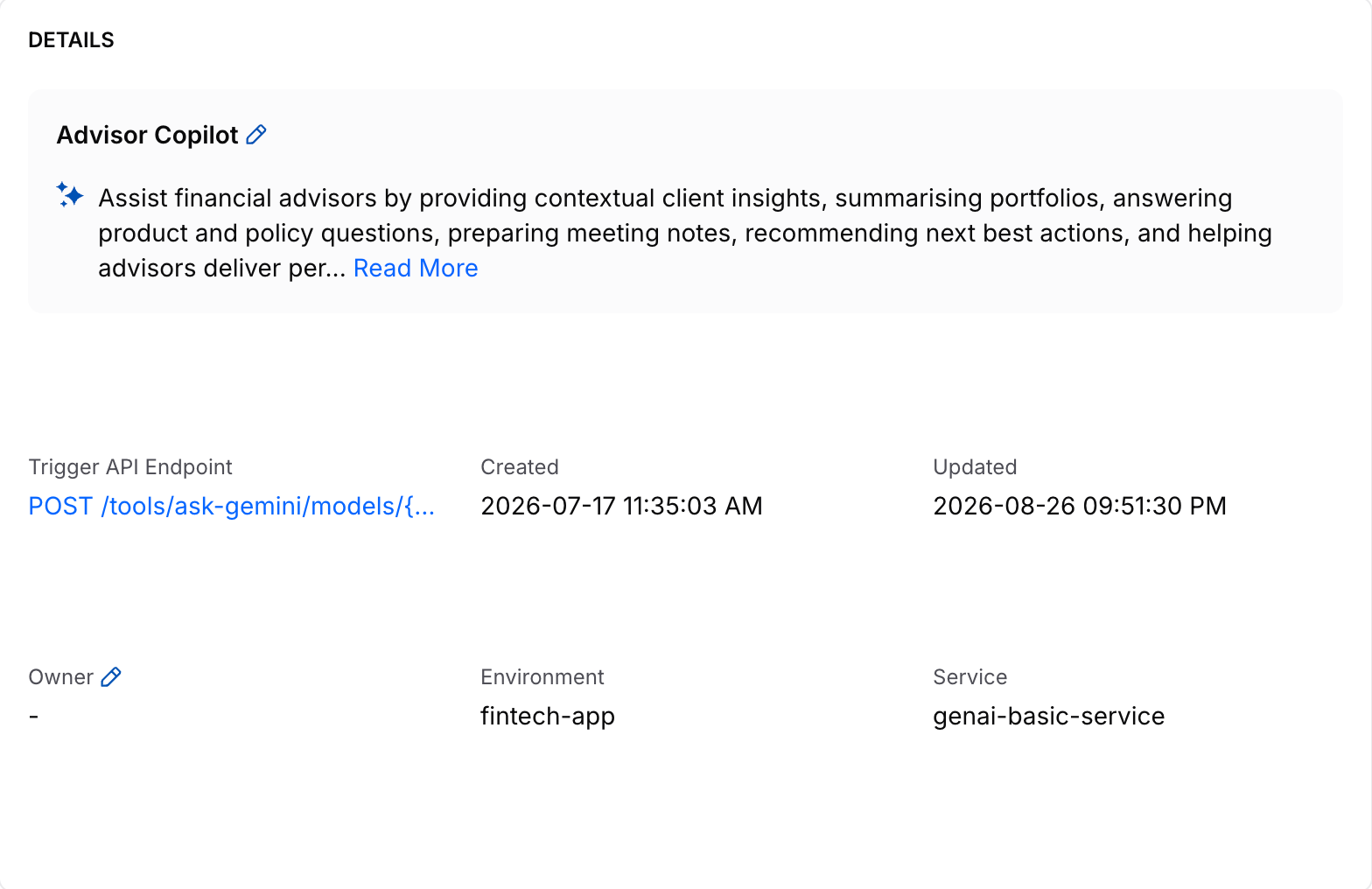
The **Details** section provides information about the selected AI agent, including its associated trigger API endpoint, service, environment, owner, and description. It also shows when the AI agent was created and when it was last updated.
Details
### Sensitive data in prompt and response
The **Sensitive Data in Prompt & Response** section shows the total number of calls associated with the AI agent, the number of detected sensitive data types, and a breakdown of the detected data in the **Category Overview** table.
Sensitive data in prompt and response
The table includes the data type, its sensitivity level, the number of affected calls, and the percentage of calls in which the data type was detected.
### Dependencies
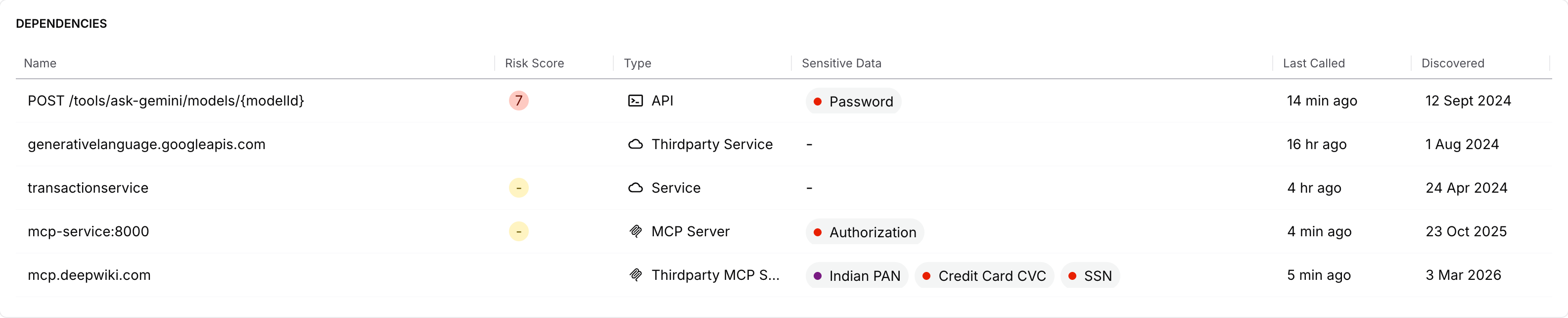
The **Dependencies** section lists the components associated with the AI agent and displays information such as their risk score, type, sensitive data, last called time, and discovery time.
Dependencies
{% endtab %}
{% tab title="Traces" %}
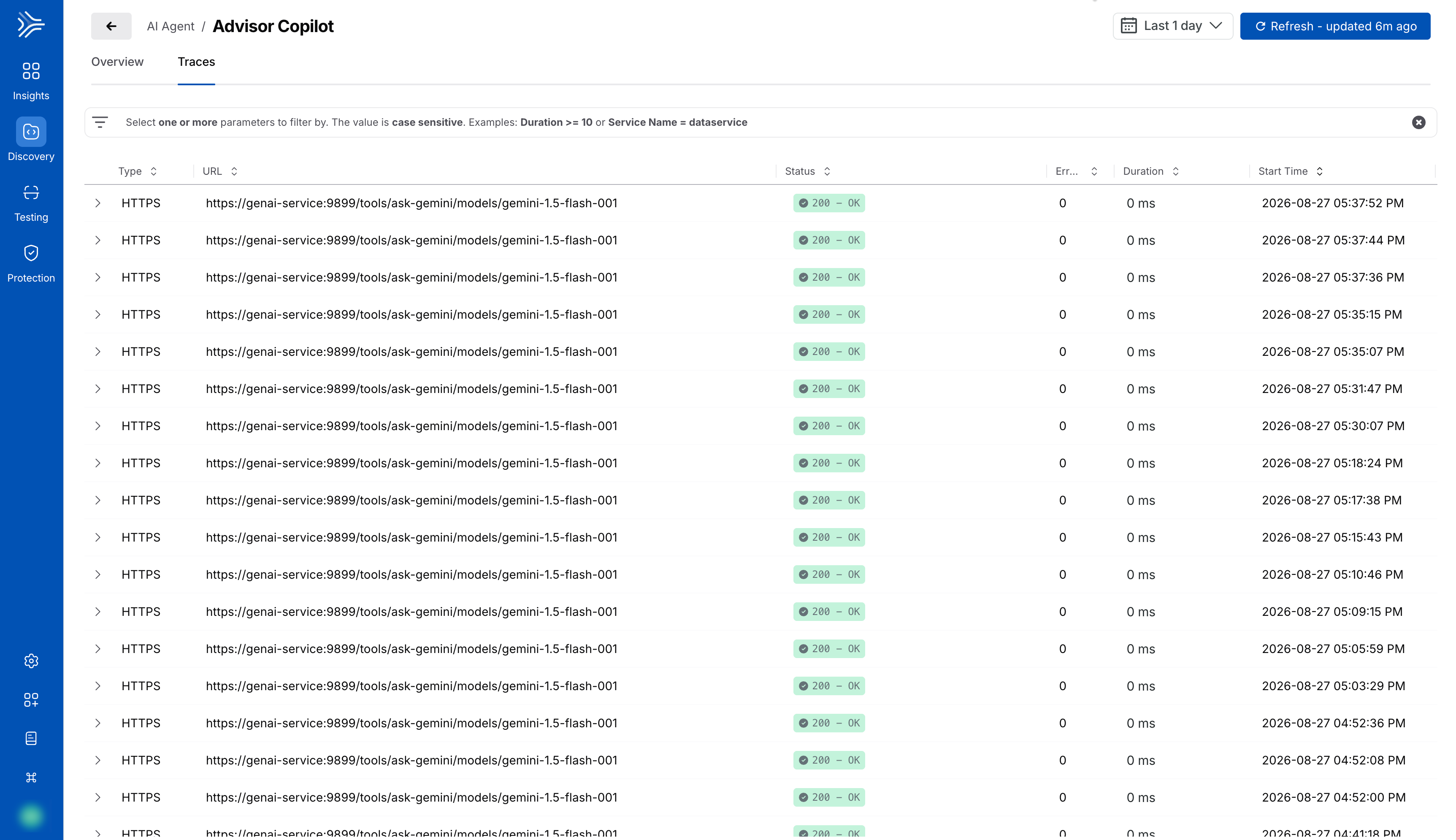
The **Traces** tab lists traces associated with the AI agent.
Traces for an AI Agent
It shows the following information:
* The type of protocol used to transmit the data, for example, HTTP or HTTPS.
* The URL associated with the trace.
* The status or outcome of the request.
* The number of errors encountered while processing the request, if any.
* The duration or time taken to process the request.
* The start time or timestamp at which the request was initiated.
You can expand a trace to view additional information, including the trace ID, status code, and URL.
The expanded trace provides the following tabs:
* **Request**: Displays the request information, including headers, cookies, and the request body.
* **Response**: Displays the response information.
* **Attributes**: Displays the attributes associated with the trace.
* **Suppressions**: Displays the data classification rules applied to the span.
You can also filter the data displayed on the page to meet your requirements. To do so, click the search bar at the top of the tab and select the parameter or parameters based on which you want to filter the data.
{% endtab %}
{% endtabs %}
***
## Leverage the AI agent details page
Once you understand the information available on the AI agent details page, you can use it to investigate an individual agent and understand the components and requests associated with its activity.
The **Overview** tab provides a starting point for understanding the agent. You can review the components connected to the agent, see whether they are first-party or third-party, and identify sensitive data detected in the agent's prompt and response traffic.
When you need to investigate a particular request in more detail, use the **Traces** tab. You can filter the available traces to focus on relevant requests and expand a trace to review the information captured for it.
***
## Example scenario Example: Investigate sensitive data associated with an AI agent
Suppose you are reviewing an AI agent that has sensitive data detected in its prompt and response traffic and want to understand where that activity might extend.
Start by reviewing the **Sensitive Data in Prompt & Response** section to identify the types of sensitive data involved and how frequently they appear in the agent's traffic. You can then use the **Dependency Graph** and **Dependencies** section to understand the components associated with the agent, including whether its activity reaches third-party services and which dependencies handle sensitive data. If you need to investigate a specific request further, use the **Traces** tab to find and expand the relevant trace, then review its request, response, attributes, and the data classification rules applied to the span.