> For the complete documentation index, see [llms.txt](https://developer.harness.io/llms.txt). Markdown versions of documentation pages are available by appending `.md` to page URLs; this page is available as [Markdown](https://developer.harness.io/ai-sre/3.0/ai-sre-for-incident-responders/handle-on-call/oncall-mobile-app.md).
# Set Up the Mobile App
Complete guide to using the Harness AI SRE mobile app for on-call incident response and alert management.
The Harness AI SRE mobile app extends your incident response capabilities to mobile devices, ensuring you never miss critical alerts or incidents while on-call.
Built as part of the comprehensive AI SRE platform, the mobile app integrates seamlessly with your existing incident management workflows, runbook automation, and team collaboration tools.
### Download the app
[](https://apps.apple.com/us/app/harness-on-call/id6753579217?itscg=30200\&itsct=apps_box_badge\&mttnsubad=6753579217)
***
### Overview
The mobile app serves as your command center for incident response, providing:
#### Real-time incident management
* Instant push notifications for critical alerts and incidents
* Direct integration with AI SRE's intelligent alert routing
* Context-rich notifications with incident severity and affected services
* Seamless connection to your organization's runbook automation
#### Mobile-optimized experience
* Native iOS and Android applications with platform-specific optimizations
* Critical alert override for Do Not Disturb mode (Android)
* Offline capability for viewing recent incidents and alerts
* Biometric authentication support for secure access
#### Unified platform integration
* Synchronized with your web-based AI SRE dashboard
* Real-time updates across all connected devices
* Integration with communication tools (Slack, Teams, Zoom)
* Direct connection to monitoring and observability platforms
***
### Prerequisites
Before using the Harness AI SRE mobile app, ensure you have:
#### Account requirements
* Active Harness account with AI SRE module enabled
* Organization and Project access configured in your Harness account
* SSO authentication supported (SAML, OAuth)
* Proper role-based permissions for incident response
#### Device requirements
The mobile app requires the following device capabilities:
| Requirement | Details |
| --------------- | ------------------------------------------------------------------ |
| **Platforms** | iOS 14.0+ or Android 8.0+ |
| **Permissions** | Push notifications (required), Biometric authentication (optional) |
| **Network** | Internet connectivity for real-time sync |
| **Storage** | 50MB available space |
#### Integration setup
Ensure your AI SRE platform is configured with:
* [Alert integrations](/ai-sre/ai-sre-for-administrators/set-up-alert-management/webhooks/templates/overview.md) from monitoring tools
* [Incident types](/ai-sre/3.0/ai-sre-for-administrators/set-up-incident-management/incident-templates.md) and severity levels
* [On-call schedules](/ai-sre/3.0/ai-sre-for-administrators/set-up-on-call-management/oncall.md) and escalation policies
* [Runbook automation](/ai-sre/3.0/ai-sre-for-administrators/set-up-runbook-management/runbooks.md) for incident response
{% hint style="info" %}
**OPTIMIZE YOUR SETUP**
For the best mobile experience, configure your *notification preferences* to ensure critical alerts reach you instantly while filtering out noise.
{% endhint %}
***
### Get started
#### Step 1: Environment configuration
Select the environment the app connects to:
1. Launch the app.
2. On the Environment screen, select the correct environment (e.g., Prod, QA).
* Tap the environment name, then Continue.
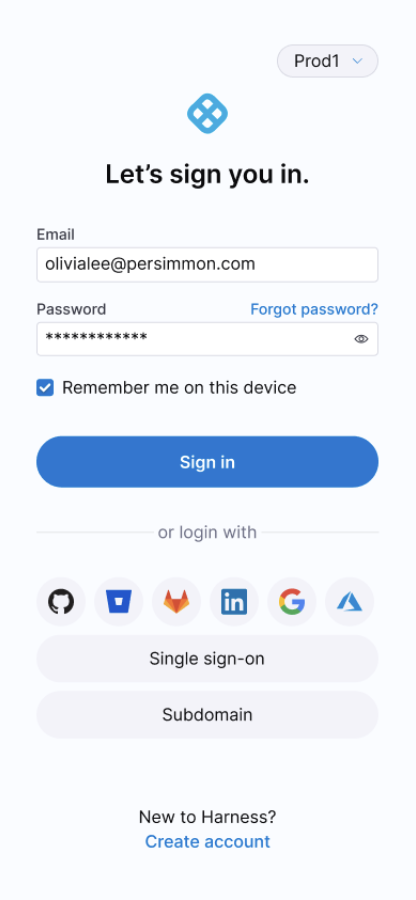
#### Step 2: Authentication
Choose your preferred authentication method:
**Option A: Harness credentials**
* Enter your email and password
* Complete two-factor authentication if enabled
**Option B: Single Sign-On (SSO)**
* Select your SSO provider (SAML, OAuth)
* Complete authentication through your identity provider
* Automatic redirect back to the mobile app
Mobile App Sign-In Screen
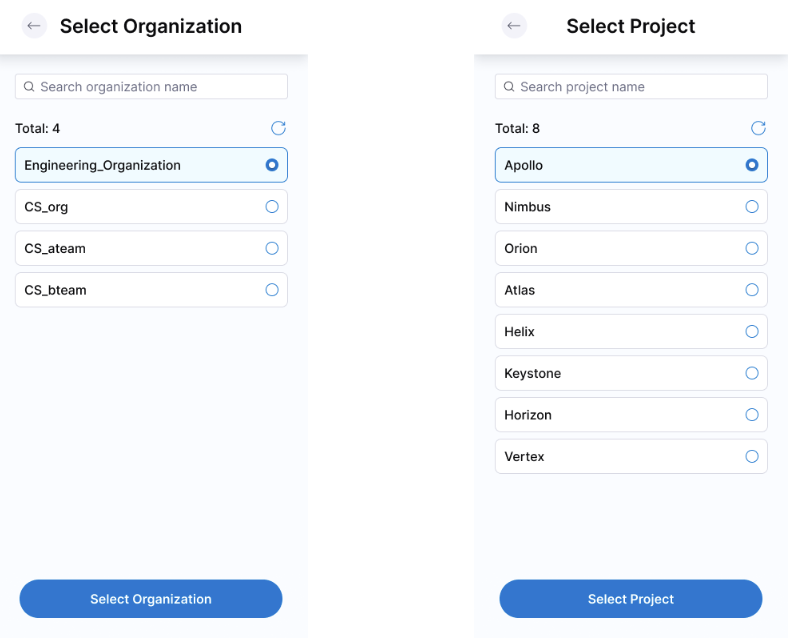
#### Step 3: Organization and project setup
1. **Select Organization:** Choose from your available organizations.
2. **Select Project:** Select the project containing your AI SRE configuration.
3. **Confirm Selection:** These settings determine:
* Which alerts and incidents you receive
* Your on-call schedule visibility
* Available runbooks and escalation policies
Organization and Project Selection
{% hint style="info" %}
**CONTEXT MATTERS**
Your Organization and Project selection directly impacts your incident response scope. Choose the project where your critical services and monitoring integrations are configured.
{% endhint %}
#### Step 4: Notification permissions
Grant the necessary permissions for optimal incident response:
* **Push Notifications:** Essential for real-time alerts
* **Critical Alerts Override:** Allows urgent incidents to bypass Do Not Disturb
* **Background App Refresh:** Ensures continuous sync with AI SRE platform
{% hint style="info" %}
**PLATFORM-SPECIFIC SETUP GUIDES**
For detailed instructions on configuring notifications to work during Do Not Disturb mode:
* **Android users:** Go to the [Android notification setup guide](/ai-sre/3.0/ai-sre-for-incident-responders/handle-on-call/notifications-android.md) to configure notifications.
* **iOS users:** Go to the [iOS notification setup guide](/ai-sre/3.0/ai-sre-for-incident-responders/handle-on-call/notifications-ios.md) to configure notifications.
{% endhint %}
***
### Dashboard overview
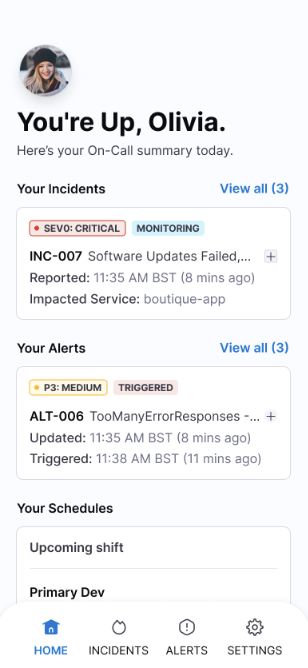
Your mobile dashboard provides a comprehensive view of your incident response status and activities.
Mobile App Home Screen Dashboard
#### At-a-glance status
The home screen displays:
| Section | Information | Actions |
| ------------------ | --------------------------------------------------------- | ------------------------- |
| **On-Call Status** | Current on-call assignment, rotation schedule, next shift | View full schedule |
| **Active Alerts** | Count and severity of unresolved alerts | Quick acknowledge/resolve |
| **Open Incidents** | Critical incidents requiring attention | Jump to incident details |
#### Quick actions
Access frequently used functions:
* **Emergency Escalation:** Instantly escalate to next responder
* **Runbook Launcher:** Execute automated response workflows
* **Team Communication:** Connect to incident-specific Slack channels or Zoom bridges
* **Status Updates:** Post updates to status pages or communication channels
***
### Intelligent notification system
The AI SRE mobile app leverages advanced notification technology to ensure critical alerts reach you instantly while minimizing notification fatigue.
#### Technical implementation
* **Android:** Firebase Cloud Messaging (FCM) with critical alert override
* **iOS:** Apple Push Notification Service (APNS) with time-sensitive delivery
* **Cross-platform:** Real-time synchronization with web dashboard
#### Route alerts intelligently
Notifications are intelligently filtered and prioritized based on:
| Priority Level | Behavior | Examples |
| -------------- | ------------------------------------------- | --------------------------------------- |
| **Critical** | Overrides Do Not Disturb, persistent alerts | Production outages, security breaches |
| **High** | Immediate delivery, sound + vibration | Service degradation, failed deployments |
| **Medium** | Standard delivery during business hours | Monitoring threshold breaches |
| **Low** | Batched notifications, silent delivery | Informational updates, resolved alerts |
#### Rich notification content
Each notification includes:
* **Service Impact:** Affected systems and user impact
* **Severity Indicators:** Color-coded priority levels
* **Quick Actions:** Acknowledge, escalate, or view details
* **Context Links:** Direct access to runbooks, dashboards, or communication channels
#### Customization options
Configure notifications to match your response preferences:
* **Escalation Delays:** Set custom timeouts before auto-escalation
* **Quiet Hours:** Define periods for non-critical alert suppression
* **Team Overrides:** Allow team members to send urgent notifications
* **Integration Filters:** Customize which monitoring tools trigger mobile alerts
For comprehensive notification setup including Do Not Disturb configuration:
* Go to the [Android notification setup guide](/ai-sre/3.0/ai-sre-for-incident-responders/handle-on-call/notifications-android.md) to configure Android notifications.
* Go to the [iOS notification setup guide](/ai-sre/3.0/ai-sre-for-incident-responders/handle-on-call/notifications-ios.md) to configure iOS notifications.
***
### Alert management
#### Alert list view
Access your alerts through multiple pathways:
* **Dashboard Widget:** Quick view of active alerts
* **Navigation Menu:** Complete alert history and filtering
* **Search Function:** Find specific alerts by ID, service, or keywords
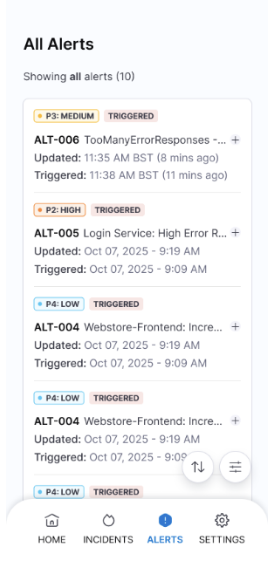
Alerts List View
The alert list displays comprehensive information:
| Column | Information | Visual Indicators |
| ------------ | ------------------------------- | ------------------------ |
| **Priority** | Critical, High, Medium, Low | Color-coded badges |
| **Service** | Affected system or component | Service health icons |
| **Duration** | Time since alert creation | Auto-updating timestamps |
| **Status** | New, Acknowledged, Resolved | Progress indicators |
| **Assignee** | Current owner or on-call person | Profile avatars |
#### Filter alerts
Filter alerts using multiple criteria:
* **Time Range:** Last hour, 24 hours, week, or custom range
* **Severity Levels:** Focus on critical or high-priority alerts
* **Service Categories:** Filter by application, infrastructure, or security
* **Status Types:** View only unresolved or recently acknowledged alerts
* **Assignment:** Show only your alerts or team-wide visibility
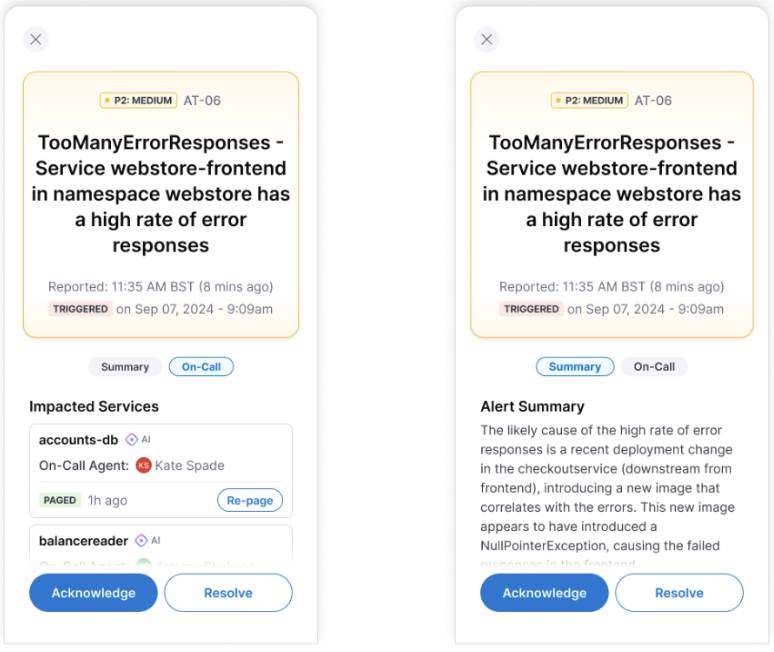
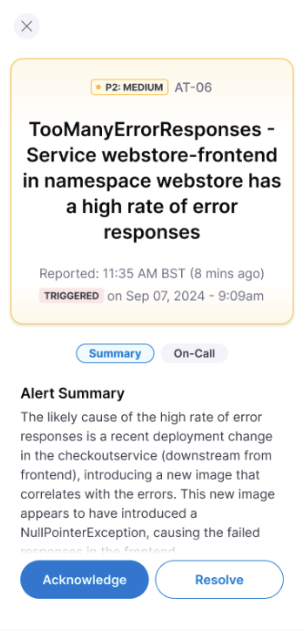
Alerts Summary and On-Call View
#### Alert actions
**Acknowledge alert**
* **Purpose:** Take ownership and stop escalation timers
* **Effect:** Updates status across all connected systems
* **Automation:** Can trigger associated runbooks automatically
* **Notification:** Informs team members of ownership change
**Resolve alert**
* **Purpose:** Mark issue as fixed and close the alert
* **Validation:** May require confirmation or resolution notes
* **Integration:** Updates monitoring systems and closes related tickets
**Escalate alert**
* **Manual Escalation:** Pass to next responder or specialist team
* **Context Preservation:** Includes all previous actions and communications
* **Automated Handoff:** Triggers notification to escalated responder
* **Audit Trail:** Maintains complete escalation history
***
### Incident response
#### Incident overview
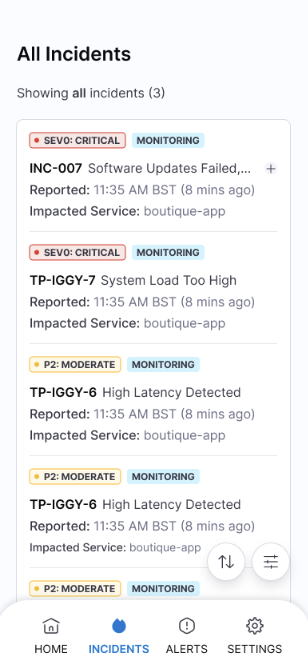
Incidents represent higher-severity issues that may impact multiple services or require coordinated response efforts. The mobile app provides full incident management capabilities.
Incidents Overview
#### Incident dashboard
View and manage incidents with comprehensive details:
| Field | Description | Mobile Features |
| ------------------ | ---------------------------------------- | --------------------- |
| **Incident ID** | Unique identifier with severity badge | Quick copy and share |
| **Impact Scope** | Affected services and user impact | Visual service map |
| **Timeline** | Creation time and duration | Real-time updates |
| **Response Team** | Assigned responders and escalation level | Contact shortcuts |
| **Related Alerts** | Contributing alerts and monitoring data | Drill-down navigation |
#### Incident lifecycle management
**Acknowledge incident**
* **Immediate Response:** Take ownership and begin coordination
* **Team Notification:** Alerts all stakeholders of active response
* **Runbook Activation:** Automatically launches relevant response procedures
* **Communication Setup:** Creates incident-specific channels and bridges
**Coordinate response**
* **Team Assembly:** Invite specialists and subject matter experts
* **Resource Access:** Quick links to dashboards, logs, and documentation
* **Status Broadcasting:** Update status pages and communication channels
* **Progress Tracking:** Log actions and decisions for post-incident review
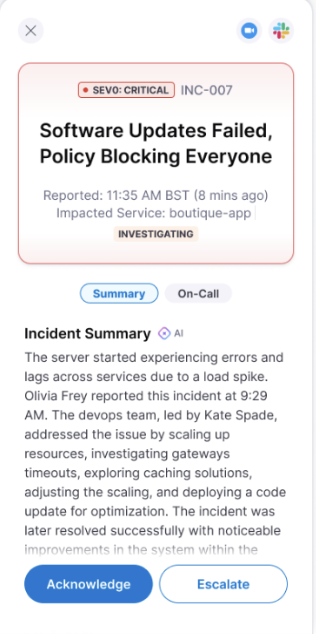
**Escalate when needed**
* **Context Transfer:** Complete handoff with full incident history
* **Automatic Triggers:** Time-based or condition-based escalation rules
Incident Escalation
**Resolve incidents**
* **Resolution Workflow:** Mark incidents as resolved with detailed notes
* **Impact Assessment:** Document the scope and duration of the incident
* **Post-Incident Actions:** Trigger follow-up tasks and reviews
Incident Resolution
***
### Common workflows
#### Critical alert response
1. **Receive Notification:** Critical alert bypasses Do Not Disturb
2. **Quick Assessment:** Review service impact and severity from notification
3. **Immediate Action:** Acknowledge to stop escalation timer
4. **Runbook Execution:** Launch automated response procedures
5. **Team Coordination:** Join incident bridge or communication channel
6. **Resolution:** Mark resolved once issue is fixed and verified
#### Incident coordination
1. **Incident Assignment:** Receive incident notification with full context
2. **Situation Assessment:** Review affected services, timeline, and related alerts
3. **Team Assembly:** Invite relevant specialists and stakeholders
4. **Response Execution:** Follow runbooks and coordinate remediation efforts
5. **Communication:** Provide regular updates to stakeholders and customers
6. **Handoff or Resolution:** Either escalate with full context or resolve completely
#### On-call management
1. **Schedule Awareness:** Check upcoming on-call shifts and coverage
2. **Proactive Monitoring:** Review service health and potential issues
3. **Shift Handoff:** Coordinate with previous or next on-call responder
4. **Coverage Requests:** Request backup coverage for planned unavailability
***
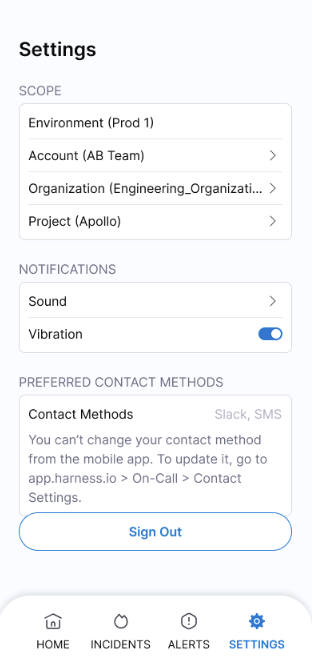
### Configuration and settings
Mobile App Settings
#### Notification management
Customize your alert experience:
* **Sound Profiles:** Different tones for different severity levels
* **Vibration Patterns:** Unique patterns for critical versus standard alerts
* **Quiet Hours:** Suppress non-critical notifications during off-hours
* **Escalation Timing:** Configure how long before alerts auto-escalate
#### Security and authentication
* **Biometric Login:** Enable fingerprint or face recognition
* **Session Management:** Configure automatic logout timing
* **Two-Factor Authentication:** Additional security for sensitive actions
* **Device Registration:** Manage trusted devices for your account
#### Organization settings
* **Project Switching:** Change between different AI SRE projects
* **Team Visibility:** Configure which team activities you see
* **Role Permissions:** View your current incident response permissions
* **Integration Access:** Manage connections to monitoring and communication tools
#### Performance and sync
* **Background Refresh:** Control how often the app syncs with AI SRE platform
* **Data Usage:** Manage cellular data usage for large incident attachments
* **Offline Mode:** Configure what data is available when disconnected
* **Cache Management:** Clear stored data to free up device storage
***
### Next steps
#### Optimize your setup
* **Route Alerts:** Set up intelligent filtering in your AI SRE web dashboard
* **Create Runbooks:** Build automated response procedures for common incidents
* **Set Up Integrations:** Connect monitoring tools and communication platforms
* **Train Your Team:** Ensure all team members understand mobile response procedures
#### Related resources
* [AI SRE onboarding guide for administrators](/ai-sre/ai-sre-for-administrators/get-started/overview.md): Onboard your organization to AI SRE.
* [Runbook automation](/ai-sre/3.0/ai-sre-for-administrators/set-up-runbook-management/runbooks.md): Build automated response procedures.
* [Alert management best practices](/ai-sre/3.0/troubleshooting-and-resources/ai-sre-best-practices.md): Reduce noise and route alerts effectively.
* [Integration setup guides](/ai-test-automation/integrations/integrations.md): Connect monitoring and communication tools.
{% @harness-feedback/feedback %}