> For the complete documentation index, see [llms.txt](https://developer.harness.io/llms.txt). Markdown versions of documentation pages are available by appending `.md` to page URLs; this page is available as [Markdown](https://developer.harness.io/ai-sre/ai-sre-for-administrators/set-up-alert-management/webhooks/overview.md).
# Ingest Alerts
Send alerts to Harness AI SRE from any system that can make an HTTP request, with field mapping for any JSON payload shape instead of a fixed integration list. Configure webhooks to receive alerts fro
Harness AI SRE webhooks receive alerts from any system that can send HTTP requests.
### Overview
Webhooks provide a flexible way to integrate with any monitoring system or custom application.
The webhook integration supports **any** JSON payload format with advanced filtering capabilities, making it easy to integrate with:
* **Custom monitoring solutions:** Internal tools and homegrown systems.
* **Internal applications:** Business logic alerts and custom triggers.
* **Third-party services:** Any service with webhook support.
* **Legacy monitoring systems:** Older tools without native integrations.
***
### Webhook capabilities
#### Flexible payload support
Accept any JSON structure:
* No schema restrictions
* Nested field support
* Array handling
* Custom field mapping
#### Custom field mappings
Map webhook payload fields to alert properties:
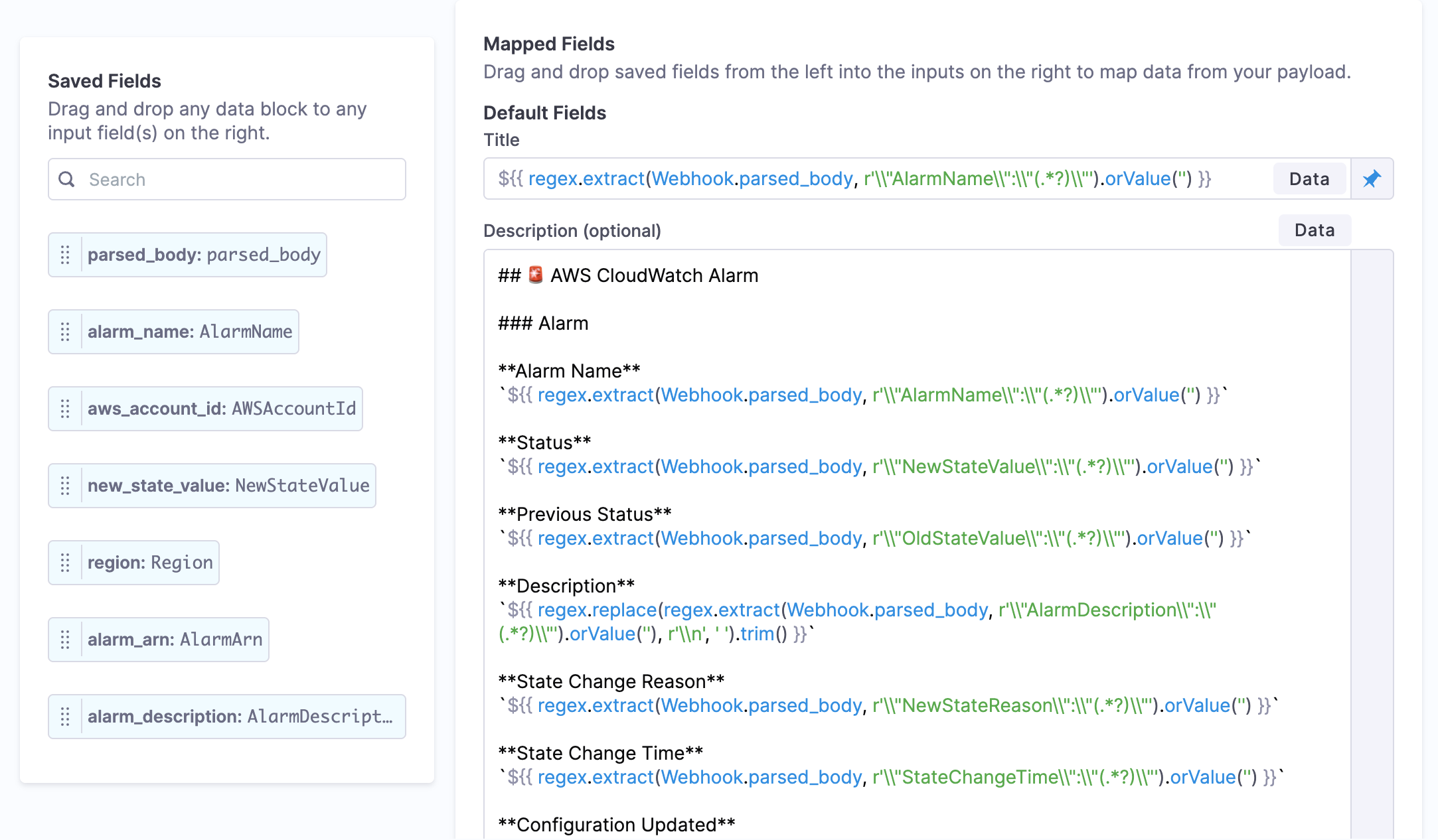
* **Dynamic values:** Populate alert fields from incoming payloads.
* **Nested field access:** Access nested data with dot notation.
* **Mustache templates:** Reference webhook fields with `{{webhook.field_name}}`.
* **CEL expressions:** Complex boolean logic for advanced scenarios.
Advanced webhook field mapping with CEL expressions for data extraction and transformation
Go to [Use CEL in Webhooks](/ai-sre/ai-sre-for-administrators/set-up-alert-management/webhooks/use-cel-webhooks.md) for details.
Go to [Use Mustache in Webhooks](/ai-sre/ai-sre-for-administrators/set-up-alert-management/webhooks/use-mustache-webhooks.md) for details.
***
### Getting started
#### Step 1: Choose your integration approach
Select the integration method that fits your use case:
* **Use a webhook template:** Pre-configured templates for popular monitoring tools with field mappings already set up. Go to [Webhook Templates](/ai-sre/ai-sre-for-administrators/set-up-alert-management/webhooks/templates/overview.md) for Datadog, PagerDuty, Grafana, and other supported tools.
* **Create a custom webhook:** Configure your own webhook for any tool that can send HTTP requests. Go to [Create a Webhook](/ai-sre/ai-sre-for-administrators/set-up-alert-management/webhooks/create-webhook.md) for step-by-step instructions.
#### Step 2: Configure the external system
After creating your webhook in Harness, configure the external monitoring tool to send alerts to your webhook URL. Go to [External System Setup](/ai-sre/ai-sre-for-administrators/set-up-alert-management/webhooks/integration-guides/overview.md) for detailed guides on configuring Datadog, PagerDuty, Splunk, and other tools.
{% hint style="info" %}
**SERVICE PAGING WEBHOOKS**
For services that need dedicated on-call paging from external systems, use **Service Paging Webhooks** instead. Service paging webhooks automatically create alerts and page the on-call team via HTTP POST or email. Go to [Service Paging Webhook](/ai-sre/ai-sre-for-administrators/set-up-on-call-management/service-paging-webhook.md) to set up dedicated paging.
{% endhint %}
***
### Next steps
* [Create a Webhook](/ai-sre/ai-sre-for-administrators/set-up-alert-management/webhooks/create-webhook.md): Set up your webhook endpoint.
* [External System Setup](/ai-sre/ai-sre-for-administrators/set-up-alert-management/webhooks/integration-guides/overview.md): Configure Datadog, PagerDuty, Splunk, and other tools to send webhooks to Harness.
* [Use CEL in Webhooks](/ai-sre/ai-sre-for-administrators/set-up-alert-management/webhooks/use-cel-webhooks.md): Filter webhook payloads with conditional logic.
* [Use Mustache in Webhooks](/ai-sre/ai-sre-for-administrators/set-up-alert-management/webhooks/use-mustache-webhooks.md): Map webhook fields to alert properties.
* [Route Alerts](/ai-sre/ai-sre-for-administrators/set-up-alert-management/alert-rules/overview.md): Route and process incoming alerts.
{% @harness-feedback/feedback %}