> For the complete documentation index, see [llms.txt](https://developer.harness.io/llms.txt). Markdown versions of documentation pages are available by appending `.md` to page URLs; this page is available as [Markdown](https://developer.harness.io/ai-sre/ai-sre-for-administrators/set-up-alert-management/webhooks/use-cel-webhooks.md).
# Use CEL Expressions in Webhooks
Use CEL expressions to filter incoming webhooks and route them to different incident types based on payload content.
Use CEL expressions in webhook advanced mapping conditions to filter incoming webhooks and route them based on payload content.
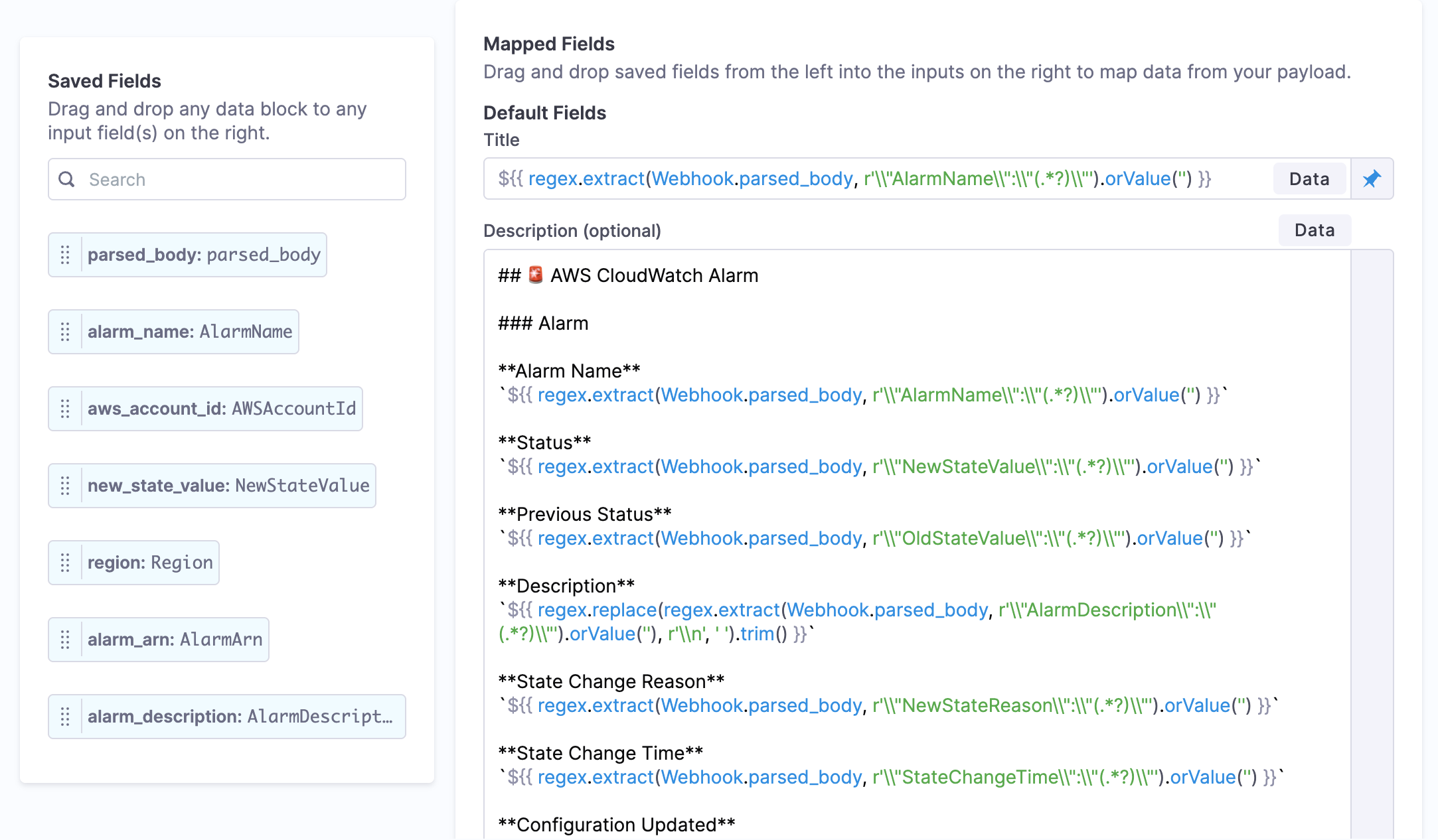
Advanced CEL field mapping with regex.extract(), orValue(), and trim() in webhook configuration
{% hint style="info" %}
**FEATURE FLAG REQUIRED**
CEL expression support in webhooks requires the `IR_CEL_CONDITIONS` feature flag. Contact your Harness account team to enable this feature.
{% endhint %}
### When to use CEL webhook filters
Use CEL expressions in webhook mappings when you need:
* **Payload-based routing**: Route webhooks to different incident types based on payload content
* **Priority filtering**: Only create incidents for high-priority alerts
* **Service filtering**: Filter by service name patterns or specific services
* **Region-based routing**: Route webhooks based on geographic region
* **Complex conditions**: Combine multiple criteria with boolean logic
* **Custom field matching**: Filter on custom fields from your monitoring tools
***
### Available webhook data
All fields from the webhook payload are accessible via the `Webhook` namespace:
```cel
Webhook.field_name // Any field parsed from webhook payload
Webhook.nested.field // Access nested fields with dot notation
Webhook.array_field[0] // Access array elements by index
```
**Common webhook fields** (varies by source):
```cel
Webhook.priority
Webhook.severity
Webhook.service
Webhook.environment
Webhook.region
Webhook.alert_name
Webhook.status
Webhook.metric_value
Webhook.tags
```
{% hint style="info" %}
Use the data picker in the webhook configuration UI to discover available fields from your webhook payload. The picker shows actual field names from sample payloads.
{% endhint %}
***
### CEL webhook examples
**Filter by priority**:
```cel
Webhook.priority == "P1"
```
**Filter by environment**:
```cel
Webhook.environment == "production"
```
**Production high-priority webhooks only**:
```cel
Webhook.priority == "P1" && Webhook.environment == "production"
```
**Service pattern matching**:
```cel
Webhook.service.matches("^(payment|billing|subscription)-.*")
```
**Region filtering**:
```cel
Webhook.region.matches("^us-.*")
```
**Multiple services or priorities**:
```cel
Webhook.service in ["api-gateway", "auth-service", "user-service"] &&
Webhook.priority in ["P1", "P2"]
```
**Severity threshold with environment**:
```cel
Webhook.severity == "critical" && Webhook.environment.matches("^prod-.*")
```
**Metric threshold filtering**:
```cel
Webhook.metric_value > 100 && Webhook.metric_name == "error_rate"
```
**Complex multi-condition filter**:
```cel
(Webhook.priority == "P1" && Webhook.region.matches("^us-.*")) ||
(Webhook.severity == "critical" && Webhook.service in ["payment-api", "auth-api"]) ||
Webhook.affected_users > 1000
```
**Status-based filtering**:
```cel
Webhook.status == "firing" && Webhook.environment == "production"
```
**Tag-based filtering**:
```cel
Webhook.tags.exists(t, t == "customer-impact")
```
**Null-safe custom field check**:
```cel
Webhook.custom_field != null && Webhook.custom_field.contains("critical")
```
***
### Webhook payload examples with CEL
#### Datadog webhook filters
```cel
// Only create incidents for Datadog critical alerts in production
Webhook.alert_type == "error" &&
Webhook.priority == "1" &&
Webhook.tags.exists(t, t.startsWith("env:prod"))
```
#### PagerDuty webhook filters
```cel
// Only process PagerDuty triggered events for high-urgency incidents
Webhook.event == "incident.triggered" &&
Webhook.incident.urgency == "high"
```
#### Prometheus AlertManager filters
```cel
// Only create incidents for firing alerts above threshold
Webhook.status == "firing" &&
Webhook.labels.severity in ["critical", "error"] &&
Webhook.labels.environment == "production"
```
#### New Relic webhook filters
```cel
// Filter by violation severity and duration
Webhook.severity in ["CRITICAL", "WARNING"] &&
Webhook.duration_ms > 300000 &&
Webhook.policy_name.contains("Production")
```
#### CloudWatch webhook filters
```cel
// Filter CloudWatch alarms by state and metric
Webhook.NewStateValue == "ALARM" &&
Webhook.Trigger.MetricName == "CPUUtilization" &&
Webhook.Trigger.Threshold > 80
```
***
### Best practices for webhook CEL filters
**1. Start with simple filters and iterate**:
```cel
// ✅ Start simple
Webhook.priority == "P1"
// Later add more conditions
Webhook.priority == "P1" && Webhook.environment == "production"
```
**2. Use explicit field checks for optional fields**:
```cel
// ✅ Null-safe
Webhook.custom_field != null && Webhook.custom_field == "value"
// ❌ May fail if field is missing
Webhook.custom_field == "value"
```
**3. Test filters with sample webhooks**:
* Send test webhooks through your integration
* Verify they are filtered correctly
* Check webhook processing logs
* Refine conditions based on results
**4. Use `in` for multiple values**:
```cel
// ✅ Concise
Webhook.priority in ["P1", "P2"]
// ❌ Verbose
Webhook.priority == "P1" || Webhook.priority == "P2"
```
**5. Document complex filters**:
```cel
// Good: Comment explains business logic
// Only create incidents for payment/billing services in US regions during business impact
Webhook.service.matches("^(payment|billing)-.*") &&
Webhook.region.matches("^us-.*") &&
Webhook.tags.exists(t, t == "business-impact")
```
**6. Use regex anchors for exact matches**:
```cel
// ✅ Matches exactly "payment-api"
Webhook.service.matches("^payment-api$")
// ❌ Matches "payment-api-v2", "my-payment-api", etc.
Webhook.service.matches("payment-api")
```
***
### Field mapping with CEL
You can also use CEL expressions to transform webhook field values during mapping:
**Extract from nested JSON**:
```cel
// Extract alert name from nested structure
${{Webhook.alert.details.name}}
```
**Conditional field mapping**:
```cel
// Map priority based on webhook severity
${{Webhook.severity == "critical" ? "P1" : Webhook.severity == "high" ? "P2" : "P3"}}
```
**Format timestamps**:
```cel
// Convert epoch timestamp to readable format
${{Webhook.timestamp.format("yyyy-MM-dd HH:mm:ss", "UTC")}}
```
**Combine multiple fields**:
```cel
// Create composite title
${{Webhook.service + ": " + Webhook.alert_name + " in " + Webhook.environment}}
```
**Extract with regex patterns**:
```cel
// Extract alarm name from CloudWatch JSON payload
regex.extract(Webhook.parsed_body, r"\"AlarmName\"\:\"(.*)\"")
```
**Provide default values**:
```cel
// Use orValue() to provide fallback when extraction fails
regex.extract(Webhook.parsed_body, r"\"AlarmName\"\:\"(.*)\"").orValue("Unknown Alert")
// Chain with other operations
Webhook.alert_name.orValue("Unnamed").trim()
```
**Clean up extracted values**:
```cel
// Remove whitespace and clean up text
regex.extract(Webhook.parsed_body, r"\"AlarmDescription\"\:\"(.*)\"").orValue("").trim()
// Replace newlines with spaces
regex.replace(Webhook.description, r"\n", " ").trim()
```
**Advanced field mapping example**:
```cel
// Extract, clean, and format in one expression
regex.replace(
regex.extract(Webhook.parsed_body, r"\"AlarmDescription\"\:\"(.*)\"").orValue(""),
r"\n",
", "
).trim()
```
***
### Advanced CEL functions
#### regex.extract()
Extract values from JSON strings or text using regular expressions.
**Syntax**:
```cel
regex.extract(string, pattern)
```
**Examples**:
```cel
// Extract alarm name
regex.extract(Webhook.parsed_body, r"\"AlarmName\"\:\"(.*)\"")
// Extract service name from message
regex.extract(Webhook.message, r"service: (\w+)")
// Extract first number
regex.extract(Webhook.error_message, r"(\d+)")
```
#### .orValue()
Provide a default value when a field is null or empty.
**Syntax**:
```cel
expression.orValue(defaultValue)
```
**Examples**:
```cel
// Return empty string if null
Webhook.description.orValue("")
// Provide meaningful default
regex.extract(Webhook.body, r"service:(\w+)").orValue("unknown-service")
// Chain with other operations
Webhook.title.orValue("Untitled").trim().upperAscii()
```
#### .trim()
Remove leading and trailing whitespace from strings.
**Syntax**:
```cel
string.trim()
```
**Examples**:
```cel
// Clean up extracted values
regex.extract(Webhook.body, r"name: (.*)").orValue("").trim()
// Remove whitespace from field
Webhook.alert_name.trim()
// Chain with other operations
Webhook.description.trim().lowerAscii()
```
#### regex.replace()
Replace text matching a pattern with a replacement string.
**Syntax**:
```cel
regex.replace(string, pattern, replacement)
```
**Examples**:
```cel
// Replace newlines with commas
regex.replace(Webhook.description, r"\n", ", ")
// Remove all non-alphanumeric characters
regex.replace(Webhook.service_name, r"[^a-zA-Z0-9]", "")
// Normalize spacing
regex.replace(Webhook.message, r"\s+", " ")
```
***
### Troubleshooting CEL webhook filters Webhook not creating incidents despite matching filter
Check webhook processing logs for errors. Verify the webhook payload contains the fields you are referencing. Use the data picker to confirm field names match exactly (case-sensitive). Test with a simple condition first like Webhook.priority == "P1".
Field not found errors in webhook CEL filter
Verify the field exists in the webhook payload. Use Webhook. prefix (capital W). Field names are case-sensitive. For nested fields use dot notation: Webhook.nested.field. Check the webhook logs to see the actual payload structure.
Webhook filter not evaluating regex matches correctly
Test your regex pattern separately. Escape special characters with backslashes. Use ^ for start and $ for end to avoid partial matches. Example: Webhook.service.matches("^payment-.\*$ ") for exact start match.
Null pointer errors when webhook filter executes
Add null checks for optional fields: Webhook.custom\_field != null && Webhook.custom\_field == "value". Not all webhook payloads contain every field. Check your monitoring tool documentation for which fields are always present.
Webhook creates incidents for all payloads ignoring CEL filter
Verify CEL mode is enabled for the webhook condition. Check that the condition returns a boolean (true/false), not a string. The expression Webhook.priority returns a value; use Webhook.priority == "P1" to return boolean.
***
### Next steps
* Go to [Create Dynamic Content](/ai-sre/ai-sre-for-administrators/get-started/expression-languages.md) for complete CEL syntax reference and advanced patterns
* Go to [Ingest Alerts](/ai-sre/ai-sre-for-administrators/set-up-alert-management/webhooks/overview.md) to learn about webhook setup and configuration
* Go to [Route Alerts](/ai-sre/ai-sre-for-administrators/set-up-alert-management/alert-rules/overview.md) to learn about post-webhook alert processing
{% hint style="info" %}
**Need Help?** Contact our support team by email at **** or visit the [Harness Documentation](https://docs.harness.io) for additional resources and troubleshooting guides.
{% endhint %}
{% @harness-feedback/feedback %}