> For the complete documentation index, see [llms.txt](https://developer.harness.io/llms.txt). Markdown versions of documentation pages are available by appending `.md` to page URLs; this page is available as [Markdown](https://developer.harness.io/ai-sre/ai-sre-for-administrators/set-up-runbook-management/integrations/source-control/github.md).
# GitHub Integration
Create issues, comment on pull requests, and list commits from runbooks.
Integrate GitHub with AI SRE runbooks to automate pull request management during incident response.
### Use cases
Use GitHub runbook actions to:
* Create pull requests for hotfixes
* List open pull requests for incident correlation
* Track incident remediation through pull requests
* Automate PR creation for code changes
***
### Prerequisites
* GitHub account with repository access
* GitHub personal access token or GitHub App
* Repository permissions: repo, read:org (minimum)
***
### Configure the GitHub integration
Set up the connector with these steps:
1. Go to **Project Settings**, then **Third-Party Integrations for AI SRE**.

2. Select the connector you want to use or create a new one.
3. Provide your GitHub credentials:
* **Personal Access Token:** Generate from GitHub settings
* **Permissions:** repo, read:org (minimum)
4. Test the connection.
5. Save the integration.
***
### Available actions
#### Create pull request
Create a pull request in a GitHub repository.
**Required fields:**
* Owner: Repository owner (user or organization)
* Repository: Repository name
* Source Branch: Branch with changes
* Target Branch: Branch to merge into
* Title: Pull request title
* Body: Pull request description (optional)
#### List pull requests
List pull requests from a GitHub repository.
**Required fields:**
* Owner: Repository owner (user or organization)
* Repository: Repository name
* State: Filter by state (open, closed, or all)
***
### Use GitHub actions in runbooks
GitHub actions are configured through the runbook action form in the UI:
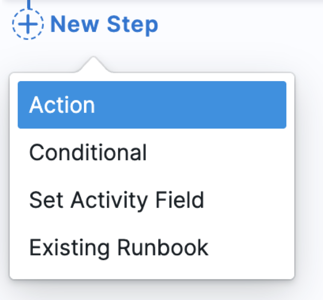
1. **In your runbook**, click **New Step**, then **Action**.
2. In the **Select Action** dialog, go to the **Tickets & Code** category.
3. Select **GitHub** from the available actions.

4. Choose the action type (**Create GitHub Pull Request** or **List GitHub Pull Requests**).
5. Fill in the form fields using the **Data Picker** to insert dynamic values like `incident.severity`, `incident.title`, etc.
***
### Available Mustache variables
Use these variables to map AI SRE incident data to GitHub fields:
| Variable | Description | Example Value |
| -------------------------- | --------------------------- | --------------------------------------- |
| `{{Activity.title}}` | Incident title | `API Gateway Outage` |
| `{{Activity.summary}}` | Incident summary | `Payment API returning 500 errors` |
| `{{Activity.severity}}` | Incident severity | `0`, `1`, `2`, `3`, `4` |
| `{{Activity.status}}` | Incident status | `Detected`, `Investigating`, `Resolved` |
| `{{Activity.service}}` | Affected service name | `payment-service` |
| `{{Activity.environment}}` | Environment | `production`, `staging` |
| `{{Activity.owner}}` | Incident owner email | `jane.doe@company.com` |
| `{{Activity.created_at}}` | Incident creation timestamp | `2026-05-06T20:30:00Z` |
| `{{Activity.url}}` | Incident URL in AI SRE | `https://app.harness.io/...` |
| `{{Activity.id}}` | Unique incident identifier | `abc123...` |
| `{{Activity.short_id}}` | Human-readable ID | `INC-123` |
***
### Example runbook actions
#### Create a pull request for a fix
**Use case:** Create a pull request for incident remediation with full context.
**Runbook configuration:**
1. In the runbook editor, add a **Create GitHub Pull Request** action.
2. Configure the form fields:
* **Owner:** `myorg`
* **Repository:** `payment-service`
* **Source Branch:** `hotfix/incident-{{Activity.short_id}}`
* **Target Branch:** `main`
* **Title:** `Fix for incident {{Activity.short_id}}: {{Activity.title}}`
* **Body:**
```markdown
## Incident Fix
**Incident**: [{{Activity.short_id}}]({{Activity.url}})
**Severity**: SEV{{Activity.severity}}
**Service**: {{Activity.service}}
**Environment**: {{Activity.environment}}
### Description
{{Activity.title}}
### Related
- Incident URL: {{Activity.url}}
```
**Result:** Pull request created with title `Fix for incident INC-123: API Gateway Outage` targeting `main` from `hotfix/incident-INC-123`.
#### List open pull requests
**Use case:** List all open pull requests to check for existing fixes before creating a new one.
**Runbook configuration:**
1. In the runbook editor, add a **List GitHub Pull Requests** action.
2. Configure the form fields:
* **Owner:** `myorg`
* **Repository:** `payment-service`
* **State:** `open`
**Result:** Returns a list of all open pull requests in the repository with details including title, branch, and URL.
#### Create a hotfix PR with context
**Use case:** Create a pull request with detailed incident context and action items.
**Runbook configuration:**
1. In the runbook editor, add a **Create GitHub Pull Request** action.
2. Configure the form fields:
* **Owner:** `myorg`
* **Repository:** `payment-service`
* **Source Branch:** `hotfix/{{Activity.short_id}}-{{Activity.service}}`
* **Target Branch:** `main`
* **Title:** `[SEV{{Activity.severity}}] {{Activity.title}}`
* **Body:**
```markdown
## Hotfix for Incident {{Activity.short_id}}
**Status**: {{Activity.status}}
**Service**: {{Activity.service}}
**Environment**: {{Activity.environment}}
**Detected**: {{Activity.created_at}}
### Incident Summary
{{Activity.summary}}
### Action Items
- [ ] Code changes implemented
- [ ] Tests added
- [ ] Reviewed and approved
- [ ] Ready to deploy
### Links
- [Incident Details]({{Activity.url}})
cc: {{Activity.owner}}
```
**Result:** Pull request created with full incident context and checklist for tracking remediation progress.
***
### PR title conventions
Use consistent PR title formats for incident-related pull requests:
**By severity:**
* SEV0/SEV1: `[SEV0] {{Activity.title}}`
* SEV2+: `Fix: {{Activity.title}}`
**By type:**
* Hotfix: `Hotfix/{{Activity.short_id}}: {{Activity.title}}`
* Investigation: `Investigation/{{Activity.short_id}}: {{Activity.title}}`
* Post-incident: `Post-incident/{{Activity.short_id}}: {{Activity.title}}`
***
### Branch naming conventions
Use consistent branch naming for incident-related work:
```yaml
# Pattern examples:
hotfix/incident-{{Activity.short_id}}
fix/{{Activity.service}}-{{Activity.short_id}}
incident/{{Activity.short_id}}-{{Activity.severity}}
```
***
### Security best practices
Follow these practices to secure the GitHub integration:
* Use fine-grained personal access tokens
* Limit repository access to only what is needed
* Rotate tokens regularly
* Use GitHub Apps for organization-wide access
* Enable two-factor authentication
* Audit integration usage regularly
***
### Next steps
* [Configure Runbook Actions](/ai-sre/ai-sre-for-administrators/set-up-runbook-management/create-runbook.md): Add GitHub actions to runbooks.
* [Runbook Best Practices](/ai-sre/ai-sre-for-administrators/set-up-runbook-management/workflows/best-practices.md): Review automation patterns.
{% @harness-feedback/feedback %}