> For the complete documentation index, see [llms.txt](https://developer.harness.io/llms.txt). Markdown versions of documentation pages are available by appending `.md` to page URLs; this page is available as [Markdown](https://developer.harness.io/ai-sre/ai-sre-for-incident-responders/handle-on-call/oncall-mobile-app.md).
# Set Up the Mobile App
Respond to on-call incidents and manage alerts from your phone.
The Harness AI SRE mobile app extends your incident response capabilities to mobile devices, ensuring you never miss critical alerts or incidents while on-call.
Built as part of the comprehensive AI SRE platform, the mobile app integrates seamlessly with your existing incident management workflows, runbook automation, and team collaboration tools.
### Download the app
[](https://apps.apple.com/us/app/harness-on-call/id6753579217?itscg=30200\&itsct=apps_box_badge\&mttnsubad=6753579217)
***
### Overview
The mobile app serves as your command center for incident response, providing:
#### Real-time incident management
* Instant push notifications for critical alerts and incidents
* Direct integration with AI SRE's intelligent alert routing
* Context-rich notifications with incident severity and affected services
* Seamless connection to your organization's runbook automation
#### Mobile-optimized experience
* Native iOS and Android applications with platform-specific optimizations
* Critical alert override for Do Not Disturb mode (Android)
* Offline capability for viewing recent incidents and alerts
* Biometric authentication support for secure access
#### Unified platform integration
* Synchronized with your web-based AI SRE dashboard
* Real-time updates across all connected devices
* Integration with communication tools (Slack, Teams, Zoom)
* Direct connection to monitoring and observability platforms
***
### Prerequisites
Before using the Harness AI SRE mobile app, ensure you have:
#### Account requirements
* Active Harness account with AI SRE module enabled
* Organization and Project access configured in your Harness account
* SSO authentication supported (SAML, OAuth)
* Proper role-based permissions for incident response
#### Device requirements
The mobile app requires the following device capabilities:
| Requirement | Details |
| --------------- | ------------------------------------------------------------------ |
| **Platforms** | iOS 14.0+ or Android 8.0+ |
| **Permissions** | Push notifications (required), Biometric authentication (optional) |
| **Network** | Internet connectivity for real-time sync |
| **Storage** | 50MB available space |
#### Integration setup
Ensure your AI SRE platform is configured with:
* [Alert integrations](/ai-sre/ai-sre-for-administrators/set-up-alert-management/webhooks/templates/overview.md) from monitoring tools
* [Incident types](/ai-sre/ai-sre-for-administrators/set-up-incident-management/incident-templates.md) and severity levels
* [On-call schedules](/ai-sre/ai-sre-for-administrators/set-up-on-call-management/oncall.md) and escalation policies
* [Runbook automation](/ai-sre/ai-sre-for-administrators/set-up-runbook-management/runbooks.md) for incident response
{% hint style="info" %}
**OPTIMIZE YOUR SETUP**
For the best mobile experience, configure your *notification preferences* to ensure critical alerts reach you instantly while filtering out noise.
{% endhint %}
***
### Get started
#### Step 1: Environment configuration
Select the environment the app connects to:
1. Launch the app.
2. On the Environment screen, select the correct environment (e.g., Prod, QA).
* Tap the environment name, then Continue.
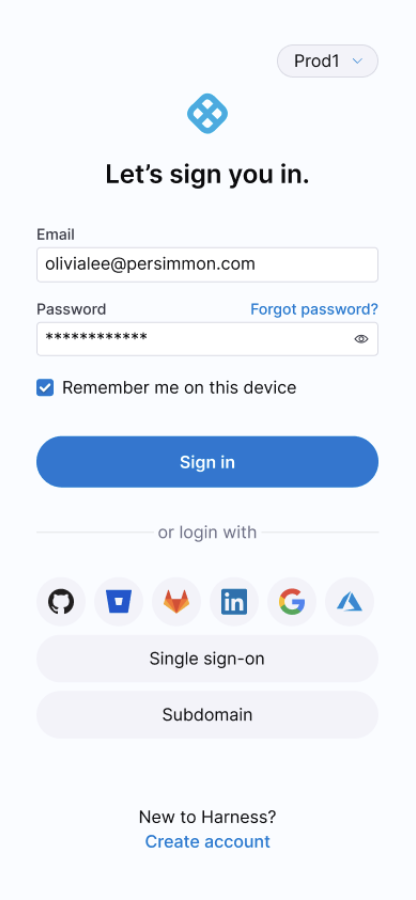
#### Step 2: Authentication
Choose your preferred authentication method:
**Option A: Harness credentials**
* Enter your email and password
* Complete two-factor authentication if enabled
**Option B: Single Sign-On (SSO)**
* Select your SSO provider (SAML, OAuth)
* Complete authentication through your identity provider
* Automatic redirect back to the mobile app
Mobile App Sign-In Screen
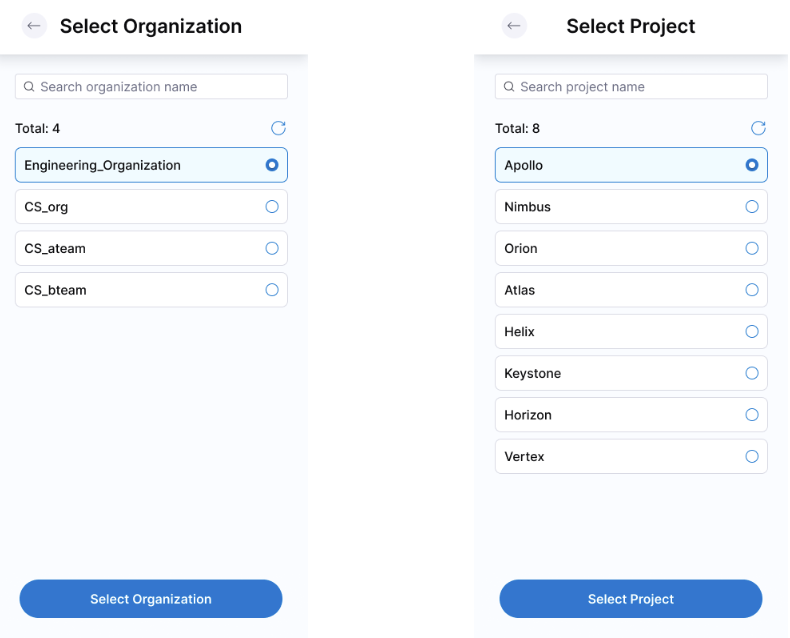
#### Step 3: Organization and project setup
1. **Select Organization:** Choose from your available organizations.
2. **Select Project:** Select the project containing your AI SRE configuration.
3. **Confirm Selection:** These settings determine:
* Which alerts and incidents you receive
* Your on-call schedule visibility
* Available runbooks and escalation policies
Organization and Project Selection
{% hint style="info" %}
**CONTEXT MATTERS**
Your Organization and Project selection directly impacts your incident response scope. Choose the project where your critical services and monitoring integrations are configured.
{% endhint %}
#### Step 4: Notification permissions
Grant the necessary permissions for optimal incident response:
* **Push Notifications:** Essential for real-time alerts
* **Critical Alerts Override:** Allows urgent incidents to bypass Do Not Disturb
* **Background App Refresh:** Ensures continuous sync with AI SRE platform
{% hint style="info" %}
**PLATFORM-SPECIFIC SETUP GUIDES**
For detailed instructions on configuring notifications to work during Do Not Disturb mode:
* **Android users:** Go to the [Android notification setup guide](/ai-sre/ai-sre-for-incident-responders/handle-on-call/notifications-android.md) to configure notifications.
* **iOS users:** Go to the [iOS notification setup guide](/ai-sre/ai-sre-for-incident-responders/handle-on-call/notifications-ios.md) to configure notifications.
{% endhint %}
***
### Dashboard overview
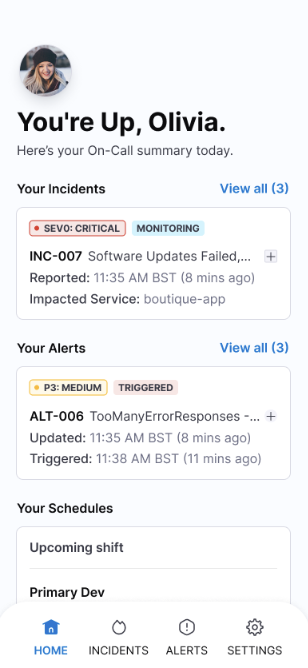
Your mobile dashboard provides a comprehensive view of your incident response status and activities.
Mobile App Home Screen Dashboard
#### At-a-glance status
The home screen displays:
| Section | Information | Actions |
| ------------------ | --------------------------------------------------------- | ------------------------- |
| **On-Call Status** | Current on-call assignment, rotation schedule, next shift | View full schedule |
| **Active Alerts** | Count and severity of unresolved alerts | Quick acknowledge/resolve |
| **Open Incidents** | Critical incidents requiring attention | Jump to incident details |
#### Quick actions
Access frequently used functions:
* **Emergency Escalation:** Instantly escalate to next responder
* **Runbook Launcher:** Execute automated response workflows
* **Team Communication:** Connect to incident-specific Slack channels or Zoom bridges
* **Status Updates:** Post updates to status pages or communication channels
***
### Intelligent notification system
The AI SRE mobile app leverages advanced notification technology to ensure critical alerts reach you instantly while minimizing notification fatigue.
#### Technical implementation
* **Android:** Firebase Cloud Messaging (FCM) with critical alert override
* **iOS:** Apple Push Notification Service (APNS) with time-sensitive delivery
* **Cross-platform:** Real-time synchronization with web dashboard
#### Route alerts intelligently
Notifications are intelligently filtered and prioritized based on:
| Priority Level | Behavior | Examples |
| -------------- | ------------------------------------------- | --------------------------------------- |
| **Critical** | Overrides Do Not Disturb, persistent alerts | Production outages, security breaches |
| **High** | Immediate delivery, sound + vibration | Service degradation, failed deployments |
| **Medium** | Standard delivery during business hours | Monitoring threshold breaches |
| **Low** | Batched notifications, silent delivery | Informational updates, resolved alerts |
#### Rich notification content
Each notification includes:
* **Service Impact:** Affected systems and user impact
* **Severity Indicators:** Color-coded priority levels
* **Quick Actions:** Acknowledge, escalate, or view details
* **Context Links:** Direct access to runbooks, dashboards, or communication channels
#### Customization options
Configure notifications to match your response preferences:
* **Escalation Delays:** Set custom timeouts before auto-escalation
* **Quiet Hours:** Define periods for non-critical alert suppression
* **Team Overrides:** Allow team members to send urgent notifications
* **Integration Filters:** Customize which monitoring tools trigger mobile alerts
For comprehensive notification setup including Do Not Disturb configuration:
* Go to the [Android notification setup guide](/ai-sre/ai-sre-for-incident-responders/handle-on-call/notifications-android.md) to configure Android notifications.
* Go to the [iOS notification setup guide](/ai-sre/ai-sre-for-incident-responders/handle-on-call/notifications-ios.md) to configure iOS notifications.
***
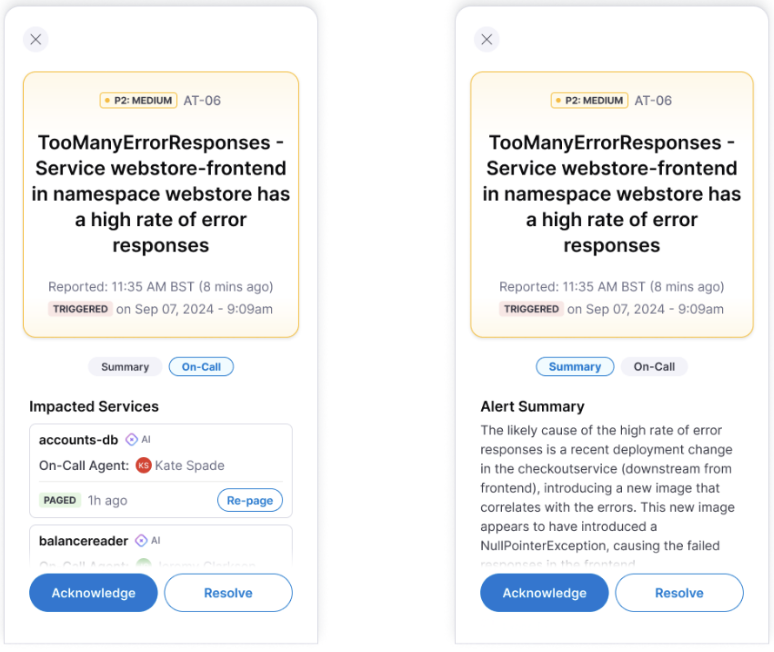
### Alert management
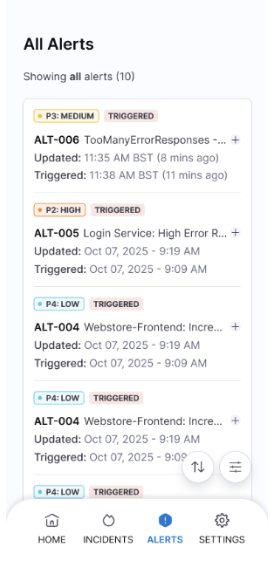
#### Alert list view
Access your alerts through multiple pathways:
* **Dashboard Widget:** Quick view of active alerts
* **Navigation Menu:** Complete alert history and filtering
* **Search Function:** Find specific alerts by ID, service, or keywords
Alerts List View
The alert list displays comprehensive information:
| Column | Information | Visual Indicators |
| ------------ | ------------------------------- | ------------------------ |
| **Priority** | Critical, High, Medium, Low | Color-coded badges |
| **Service** | Affected system or component | Service health icons |
| **Duration** | Time since alert creation | Auto-updating timestamps |
| **Status** | New, Acknowledged, Resolved | Progress indicators |
| **Assignee** | Current owner or on-call person | Profile avatars |
#### Filter alerts
Filter alerts using multiple criteria:
* **Time Range:** Last hour, 24 hours, week, or custom range
* **Severity Levels:** Focus on critical or high-priority alerts
* **Service Categories:** Filter by application, infrastructure, or security
* **Status Types:** View only unresolved or recently acknowledged alerts
* **Assignment:** Show only your alerts or team-wide visibility
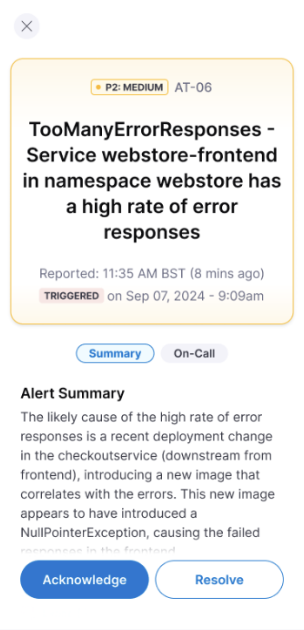
Alerts Summary and On-Call View
#### Alert actions
**Acknowledge alert**
* **Purpose:** Take ownership and stop escalation timers
* **Effect:** Updates status across all connected systems
* **Automation:** Can trigger associated runbooks automatically
* **Notification:** Informs team members of ownership change
**Resolve alert**
* **Purpose:** Mark issue as fixed and close the alert
* **Validation:** May require confirmation or resolution notes
* **Integration:** Updates monitoring systems and closes related tickets
**Escalate alert**
* **Manual Escalation:** Pass to next responder or specialist team
* **Context Preservation:** Includes all previous actions and communications
* **Automated Handoff:** Triggers notification to escalated responder
* **Audit Trail:** Maintains complete escalation history
***
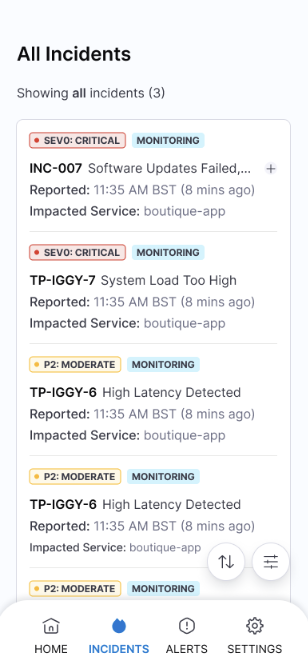
### Incident response
#### Incident overview
Incidents represent higher-severity issues that may impact multiple services or require coordinated response efforts. The mobile app provides full incident management capabilities.
Incidents Overview
#### Incident dashboard
View and manage incidents with comprehensive details:
| Field | Description | Mobile Features |
| ------------------ | ---------------------------------------- | --------------------- |
| **Incident ID** | Unique identifier with severity badge | Quick copy and share |
| **Impact Scope** | Affected services and user impact | Visual service map |
| **Timeline** | Creation time and duration | Real-time updates |
| **Response Team** | Assigned responders and escalation level | Contact shortcuts |
| **Related Alerts** | Contributing alerts and monitoring data | Drill-down navigation |
#### Incident lifecycle management
**Acknowledge incident**
* **Immediate Response:** Take ownership and begin coordination
* **Team Notification:** Alerts all stakeholders of active response
* **Runbook Activation:** Automatically launches relevant response procedures
* **Communication Setup:** Creates incident-specific channels and bridges
**Coordinate response**
* **Team Assembly:** Invite specialists and subject matter experts
* **Resource Access:** Quick links to dashboards, logs, and documentation
* **Status Broadcasting:** Update status pages and communication channels
* **Progress Tracking:** Log actions and decisions for post-incident review
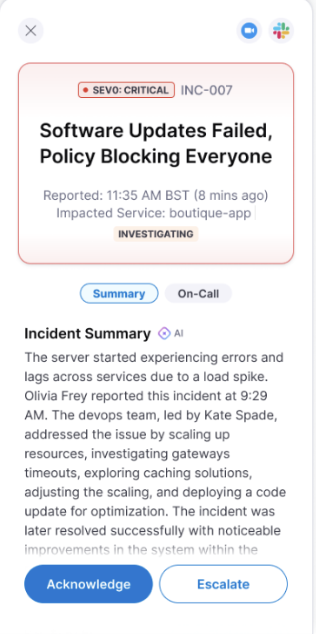
**Escalate when needed**
* **Context Transfer:** Complete handoff with full incident history
* **Automatic Triggers:** Time-based or condition-based escalation rules
Incident Escalation
**Resolve incidents**
* **Resolution Workflow:** Mark incidents as resolved with detailed notes
* **Impact Assessment:** Document the scope and duration of the incident
* **Post-Incident Actions:** Trigger follow-up tasks and reviews
Incident Resolution
***
### Common workflows
#### Critical alert response
1. **Receive Notification:** Critical alert bypasses Do Not Disturb
2. **Quick Assessment:** Review service impact and severity from notification
3. **Immediate Action:** Acknowledge to stop escalation timer
4. **Runbook Execution:** Launch automated response procedures
5. **Team Coordination:** Join incident bridge or communication channel
6. **Resolution:** Mark resolved once issue is fixed and verified
#### Incident coordination
1. **Incident Assignment:** Receive incident notification with full context
2. **Situation Assessment:** Review affected services, timeline, and related alerts
3. **Team Assembly:** Invite relevant specialists and stakeholders
4. **Response Execution:** Follow runbooks and coordinate remediation efforts
5. **Communication:** Provide regular updates to stakeholders and customers
6. **Handoff or Resolution:** Either escalate with full context or resolve completely
#### On-call management
1. **Schedule Awareness:** Check upcoming on-call shifts and coverage
2. **Proactive Monitoring:** Review service health and potential issues
3. **Shift Handoff:** Coordinate with previous or next on-call responder
4. **Coverage Requests:** Request backup coverage for planned unavailability
***
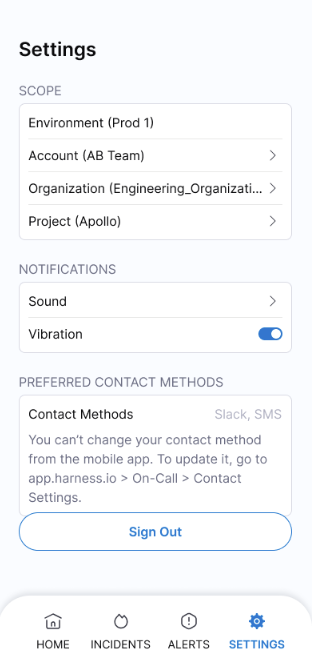
### Configuration and settings
Mobile App Settings
#### Notification management
Customize your alert experience:
* **Sound Profiles:** Different tones for different severity levels
* **Vibration Patterns:** Unique patterns for critical versus standard alerts
* **Quiet Hours:** Suppress non-critical notifications during off-hours
* **Escalation Timing:** Configure how long before alerts auto-escalate
#### Security and authentication
* **Biometric Login:** Enable fingerprint or face recognition
* **Session Management:** Configure automatic logout timing
* **Two-Factor Authentication:** Additional security for sensitive actions
* **Device Registration:** Manage trusted devices for your account
#### Organization settings
* **Project Switching:** Change between different AI SRE projects
* **Team Visibility:** Configure which team activities you see
* **Role Permissions:** View your current incident response permissions
* **Integration Access:** Manage connections to monitoring and communication tools
#### Performance and sync
* **Background Refresh:** Control how often the app syncs with AI SRE platform
* **Data Usage:** Manage cellular data usage for large incident attachments
* **Offline Mode:** Configure what data is available when disconnected
* **Cache Management:** Clear stored data to free up device storage
***
### Next steps
#### Optimize your setup
* **Route Alerts:** Set up intelligent filtering in your AI SRE web dashboard
* **Create Runbooks:** Build automated response procedures for common incidents
* **Set Up Integrations:** Connect monitoring tools and communication platforms
* **Train Your Team:** Ensure all team members understand mobile response procedures
#### Related resources
* [AI SRE onboarding guide for administrators](/ai-sre/ai-sre-for-administrators/get-started/overview.md): Onboard your organization to AI SRE.
* [Runbook automation](/ai-sre/ai-sre-for-administrators/set-up-runbook-management/runbooks.md): Build automated response procedures.
* [Alert management best practices](/ai-sre/troubleshooting-and-resources/ai-sre-best-practices.md): Reduce noise and route alerts effectively.
* [Integration setup guides](/ai-test-automation/integrations/integrations.md): Connect monitoring and communication tools.
{% @harness-feedback/feedback %}