> For the complete documentation index, see [llms.txt](https://developer.harness.io/llms.txt). Markdown versions of documentation pages are available by appending `.md` to page URLs; this page is available as [Markdown](https://developer.harness.io/ai-test-automation/3.0/use-ai-test-automation/test-authoring/harness-ai-copilot/parameter-ai.md).
# Parameter Creation Through AI
Learn how to create and extract parameters using AI-driven parameterization.
AI-driven parameter extraction in Harness AI Test Automation enables you to automatically capture dynamic data from your application and convert it into reusable parameters. Instead of manually identifying and extracting values, you describe what data you need in natural language, and the AI locates, extracts, and creates parameters that can be used throughout your test scenarios.
### What are AI Parameters?
AI parameters allow you to extract data from your application's UI and store it as test parameters without writing complex selectors or extraction logic. The AI understands the context of your request, locates the relevant data on the page, and creates named parameters with the extracted values that can be reused in subsequent test steps.
**Key characteristics:**
* **Natural language based** - Describe what data you want to extract in plain English
* **Context-aware extraction** - AI understands the application state and locates data intelligently
* **Automatic parameter creation** - Extracted values are automatically stored as reusable parameters
* **Dynamic value handling** - Works with data that changes between test runs (order IDs, timestamps, generated codes)
### Creating AI Parameters
To extract data and create parameters, describe what information you want to capture in natural language.
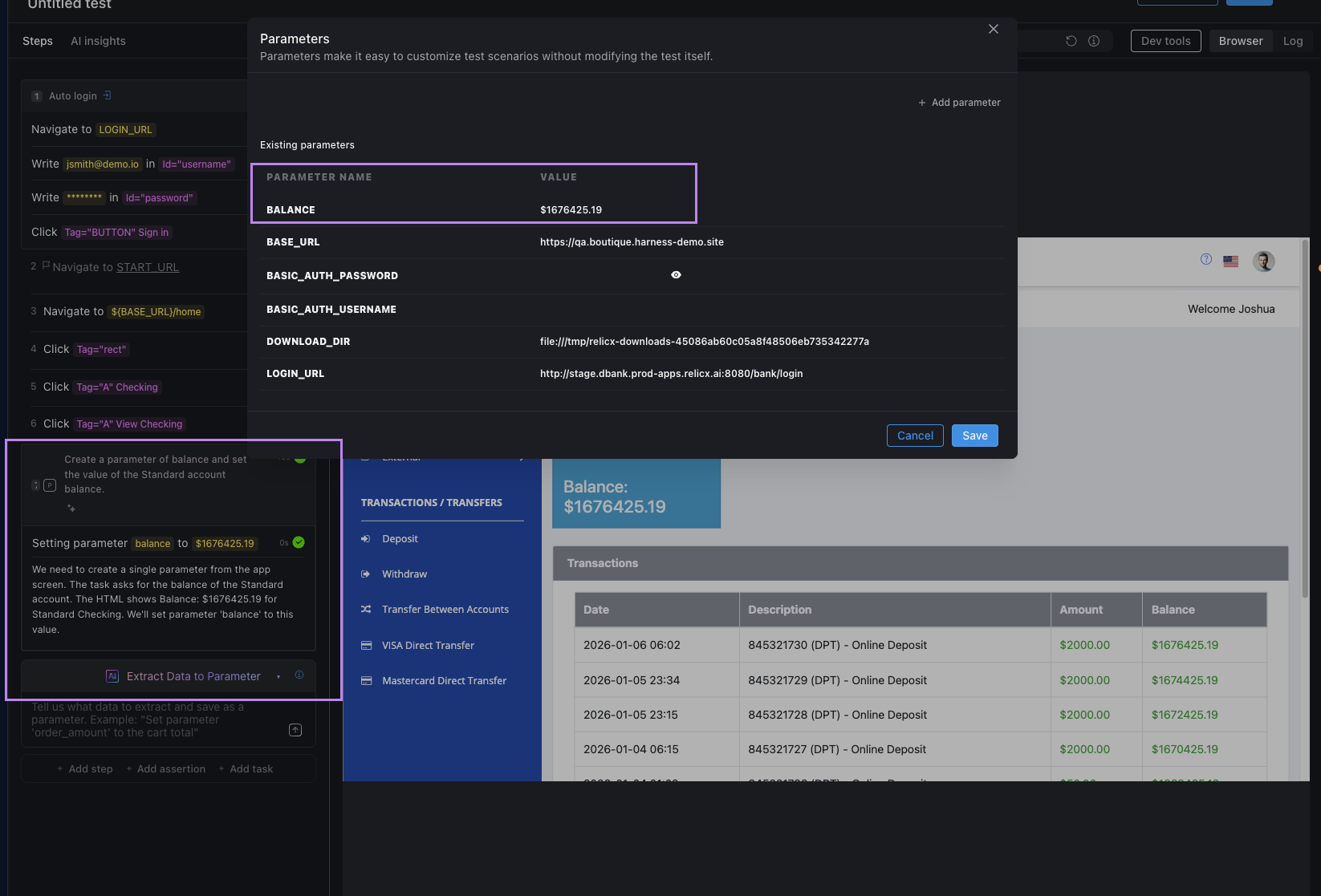
Parameter creation follows a natural language pattern. You can describe what data you want to capture and the AI will locate it, extract the value, and create a parameter for you.
**Example prompts:**
* `Create a parameter of balance and set the value of the Standard account balance`
* `Extract the order ID as order_number`
* `Create a parameter called cart_total with the total price from the cart`
* `Extract the confirmation code displayed on the success page as confirmation_code`
Once a parameter is created, you can reference it in subsequent test steps using `{parameter_name}`. The AI automatically substitutes the parameter value when executing the test.
**How it works:**
When you provide a prompt like "Create a parameter of balance and set the value of the Standard account balance", the Copilot:
1. Analyzes the page to locate the Standard account balance
2. Extracts the value from that element
3. Creates a parameter named `balance` with the extracted value
4. Confirms completion with "I am done with the task"
The parameter is now available for use in any subsequent test steps as `{balance}`.
### Best practices
* Use descriptive parameter names that clearly indicate what data is stored (e.g., `user_email` instead of `param1`)
* Extract values as soon as they appear to avoid navigation issues
* Be specific in extraction prompts - provide context to help AI locate the correct data (e.g., "Extract the total price from the checkout summary" instead of just "Extract the price")
* Include validation steps to verify that extracted data meets expected criteria
* Consider scenarios where the data might not be present and handle them gracefully
### Next Steps
* Learn about [Simple Steps - AI Actions](/ai-test-automation/3.0/use-ai-test-automation/test-authoring/harness-ai-copilot/simple-step.md) for basic interactions
* Explore [Multi-Step AI Tasks](/ai-test-automation/3.0/use-ai-test-automation/test-authoring/harness-ai-copilot/natural-language-tests.md) for complex workflows
* Understand [AI Assertions](/ai-test-automation/3.0/use-ai-test-automation/test-authoring/harness-ai-copilot/ai-assertions.md) to validate extracted parameters
* Review the [Harness AI documentation](https://developer.harness.io/harness-ai/3.0/) for comprehensive capabilities
{% @harness-feedback/feedback %}