> For the complete documentation index, see [llms.txt](https://developer.harness.io/llms.txt). Markdown versions of documentation pages are available by appending `.md` to page URLs; this page is available as [Markdown](https://developer.harness.io/ai-test-automation/best-practices-and-resources/ait-how-to-guides/finally-block.md).
# Use the FINALLY Block for Guaranteed Cleanup
Walk through a NovaMart checkout test with IF/ELSE branches and a FINALLY block that always clears the cart.
When you run a test suite, individual tests can leave behind artifacts such as items in a shopping cart, form data, or user sessions. Conditional logic makes this worse, because depending on which IF or ELSE branch runs, different state gets left behind and the next test may or may not start cleanly.
The **FINALLY** block in Harness AI Test Automation (AIT) solves this by running a set of cleanup steps at the end of the test, regardless of which conditional branch was taken. Think of it as your guaranteed teardown. Go to [Conditionals](/ai-test-automation/use-ai-test-automation/test-authoring/create-tests/conditionals.md) to review the full reference for IF, ELSE, ELSE IF, END IF, and FINALLY.
This guide walks you through building a conditional checkout test against a sample e-commerce app (NovaMart), adding a FINALLY block to clear the cart, and verifying the cleanup runs even when an IF or ELSE branch is skipped.
#### Prerequisites
* A Harness account with AI Test Automation enabled.
* A test environment configured in AIT. Go to [Add an application environment](/ai-test-automation/use-ai-test-automation/test-environments/adding-application-environments.md) to set one up.
#### Step 1: Create a new test
Navigate to AI Test Automation in your Harness project. Select 'Create Test' and select your environment.
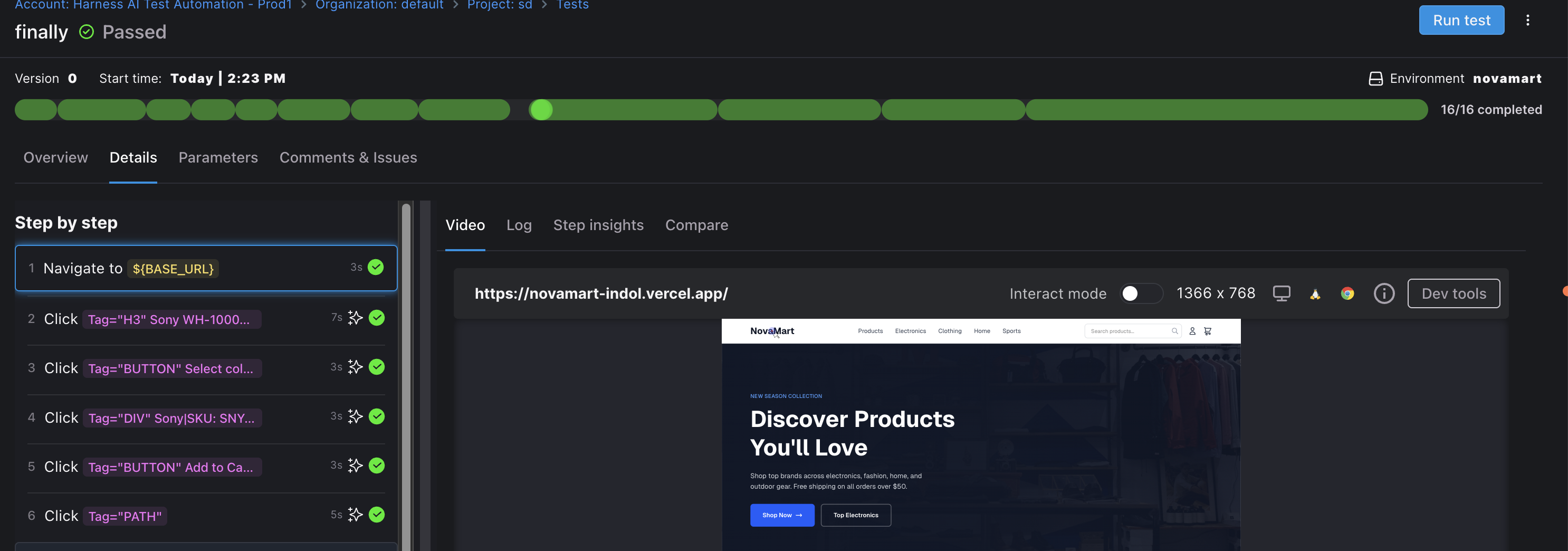
#### Step 2: Navigate to a product and add it to the cart
Use AI commands or record the following actions:
| Action | Description |
| ----------------------------------- | --------------------------------------- |
| Navigate to `START_URL` | Opens the NovaMart homepage |
| Click on "Sony WH-1000XM5..." | Navigates to the product detail page |
| Click the color or variant selector | Selects a product variant |
| Click the 'Add to Cart' button | Adds the $349.99 headphones to the cart |
| Click the cart icon | Navigates to the shopping cart |
Cart setup steps in the AIT step panel
At this point, the cart has one item totaling $377.99 (product plus tax).
#### Step 3: Build the IF/ELSE conditional block
This step uses IF, ELSE, and END IF to branch the test based on the cart total.
**Add the IF condition**
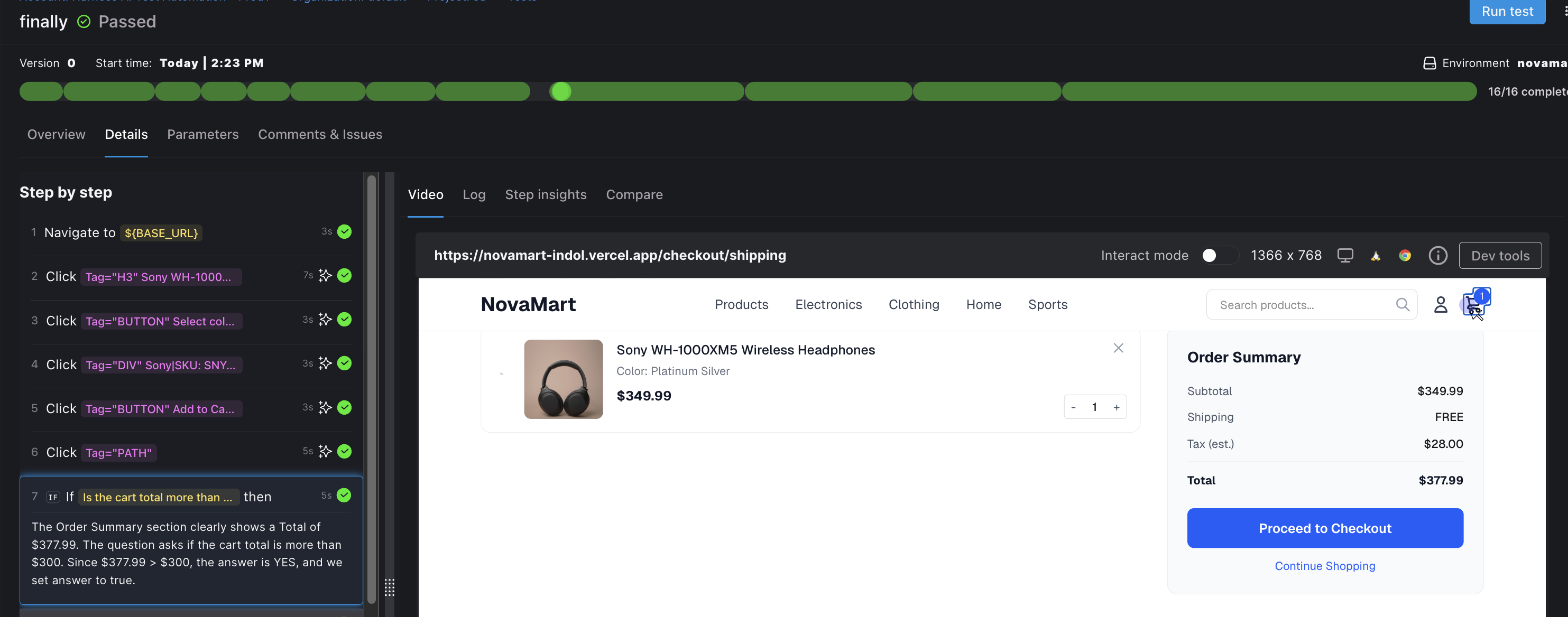
Select **+ Add step** > **Conditionals** > **IF**. For the IF condition, use an assertion question:
> Is the cart total more than $300?
AIT evaluates the page and determines the answer. In this case, $377.99 is greater than $300, so the condition is TRUE.
IF condition evaluated against the cart total
**Add the IF branch (proceed to checkout)**
After the IF step, add the action that runs when the condition is true:
* Use an AI command: `Proceed to Checkout`.
This navigates the user to the checkout or shipping page.
**Add the ELSE branch (continue shopping)**
Select **+ Add step** > **Conditionals** > **ELSE**. After the ELSE marker, add the action for when the cart total is $300 or less:
* Use an AI command: `Click the Continue Shopping button to navigate back to products`.
Since the IF condition was true, this ELSE branch is skipped during execution.
**Close the conditional with END IF**
Select **+ Add step** > **Conditionals** > **END IF**. This closes the IF/ELSE block and tells AIT where the conditional branching ends.
#### Step 4: Build the FINALLY block with cleanup
This step adds the FINALLY marker and the cleanup actions that always run, regardless of which conditional branch executed.
**Add the FINALLY marker**
Select **+ Add step** > **Conditionals** > **FINALLY**. Everything after this marker is guaranteed to run, regardless of which branch (IF or ELSE) was executed.
{% hint style="info" %}
**FINALLY RESTRICTIONS**
Each test can have at most one FINALLY block. FINALLY cannot be nested inside conditional blocks or used within [tasks](/ai-test-automation/use-ai-test-automation/test-authoring/create-tests/tasks.md).
{% endhint %}
**Add cleanup steps inside FINALLY**
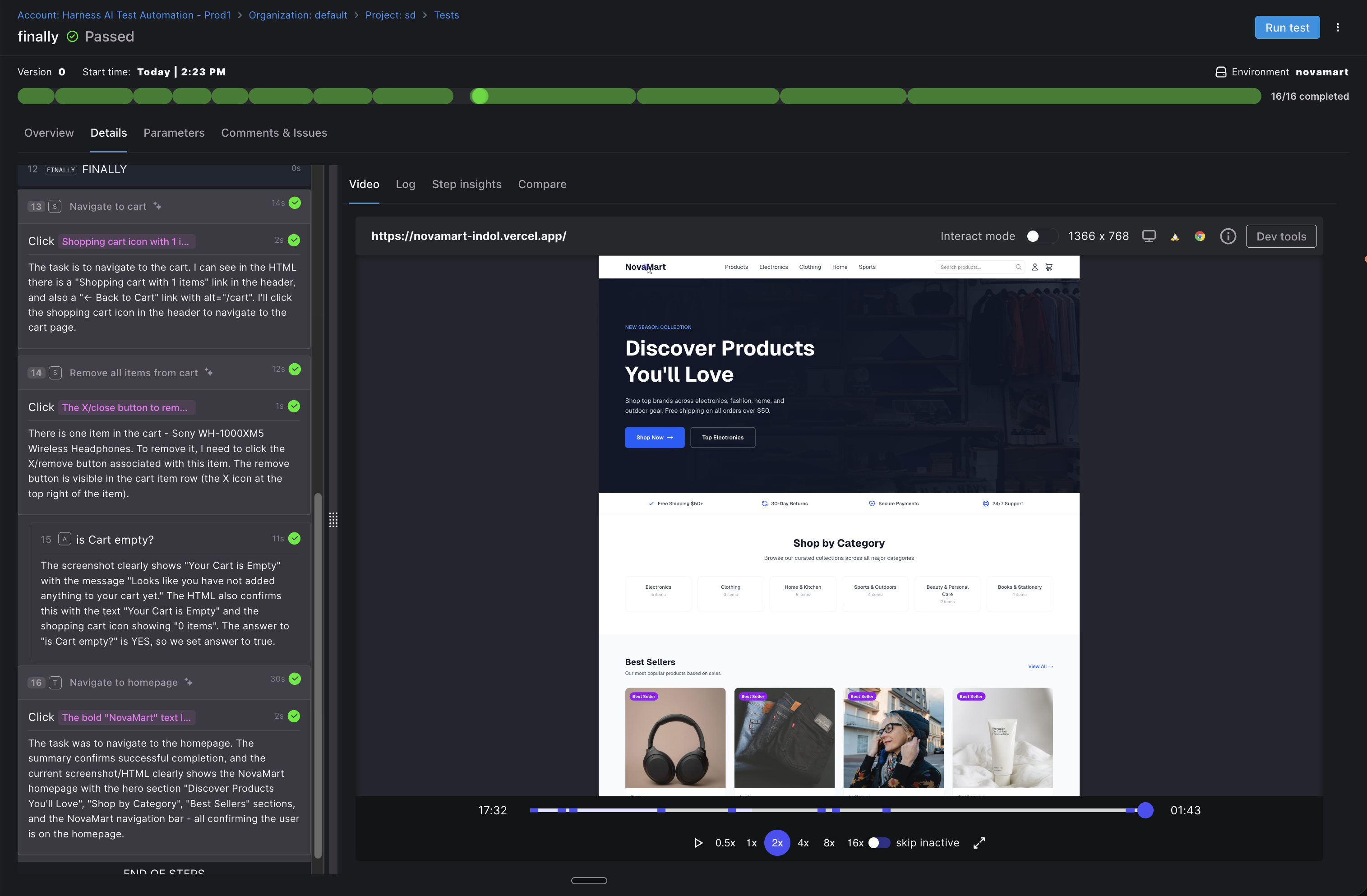
After the FINALLY marker, add your cleanup actions:
| Action | Description |
| ------------------------------ | ------------------------------------------ |
| Navigate to the cart | Goes to the cart page |
| Remove all items from the cart | Clicks the remove button to clear the cart |
| Assert: `Is the cart empty?` | Confirms cleanup was successful |
| Navigate to the homepage | Returns to a neutral starting state |
FINALLY block cleanup steps executing after the conditional branch
#### Step 5: Save and run
Select 'Save' to store the test. You can now run it individually or add it to a test suite.
When the test runs:
* The product steps add the headphones to the cart and always execute.
* The IF condition (`cart > $300`) evaluates against the page.
* `Proceed to Checkout` runs because the condition was TRUE; the `Continue Shopping` action in the ELSE branch is skipped.
* If the cart total had been $300 or less, `Continue Shopping` would have run instead and `Proceed to Checkout` would have been skipped.
* The cleanup steps inside the FINALLY block always run after the conditional, regardless of which branch executed.
That is the value of FINALLY: your cleanup is decoupled from your test logic, so dirty state never leaks into the next test in the suite.
{% hint style="info" %}
**USE FINALLY FOR**
Clearing carts, logging users out, navigating to a neutral page, or resetting form state at the end of any test that branches on runtime conditions.
{% endhint %}
#### Next steps
You now have a test that branches on a runtime condition and always leaves the application in a clean state. Use the same FINALLY pattern in any test that mutates user-facing state.
* Go to [Conditionals](/ai-test-automation/use-ai-test-automation/test-authoring/create-tests/conditionals.md) to review the full IF, ELSE, ELSE IF, END IF, and FINALLY reference.
* Go to [Set up a test suite with setup and teardown](/ai-test-automation/use-ai-test-automation/test-suites/setup-and-teardown.md) to combine FINALLY with suite-level teardown for layered cleanup.
* Go to [Tasks](/ai-test-automation/use-ai-test-automation/test-authoring/create-tests/tasks.md) to understand where FINALLY cannot be used and how to structure cleanup inside reusable tasks instead.
#### FAQs Does the FINALLY block run if a step earlier in the test fails?
Yes. FINALLY is designed as guaranteed teardown, so the steps inside it execute even when an earlier step in the test fails. The overall test status still reflects the upstream failure, but cleanup runs.
Can a test have more than one FINALLY block?
No. Each test can have at most one FINALLY block, and it must be at the top level of the test. FINALLY cannot be nested inside an IF, ELSE, ELSE IF, or task.
Can I use IF/ELSE conditionals inside a FINALLY block?
Yes. You can use IF, ELSE, ELSE IF, and END IF inside a FINALLY block to branch your cleanup logic. The restriction is the other direction: you cannot wrap a FINALLY block inside an IF/ELSE block.
What happens if a cleanup step inside FINALLY itself fails?
The remaining steps inside FINALLY continue to evaluate, but the failing step is reported in the test results. Keep FINALLY steps simple and resilient (for example, navigate to a known URL rather than relying on UI state) so a single cleanup failure does not block the rest of the teardown.
How is FINALLY different from test suite setup and teardown?
FINALLY runs at the end of a single test as guaranteed per-test cleanup. Test suite setup and teardown run once around the entire suite. Use FINALLY for state that one test creates (cart items, form data, user sessions). Use suite-level teardown for shared environment cleanup that spans multiple tests.
{% @harness-feedback/feedback %}