> For the complete documentation index, see [llms.txt](https://developer.harness.io/llms.txt). Markdown versions of documentation pages are available by appending `.md` to page URLs; this page is available as [Markdown](https://developer.harness.io/ai-test-automation/use-ai-test-automation/test-execution/data-driven-tests.md).
# Data Driven Tests
How do you run data Driven tests
{% hint style="info" %}
This feature is available in the Enterprise Tier Plan
{% endhint %}
Data-Driven Testing is a common extension of any kind of automated test, and Harness AI Test Automation provides the capability to execute tests with parameterised datasets, and to execute multiple iterations of the testing with different pieces of data
### Provide data sets for a test suite
To iterate a set of tests for different combinations or instances of data, we can provide AI Test Automation with a file that specifies what values each Parameter should take with each “Iteration”. Harness will then run the suite of tests multiple times, once for each instance of data
#### File format
Below is an example of the JSON file we would upload to drive the testing in AI Test Automation:
```javascript
{
"paramOverridesPerRun": {
"all": {
"Iteration 1": {
"ACCOUNT_TYPE": "checking",
"DEPOSIT_AMOUNT": "3000",
"EXPECTED_PAGE": "view",
"FORM_ACTION": "submit",
"NAME": "My Account 1",
"PERSON_TYPE": "individual"
},
"Iteration 2": {
"ACCOUNT_TYPE": "checking",
"DEPOSIT_AMOUNT": "3000",
"EXPECTED_PAGE": "add",
"FORM_ACTION": "reset",
"NAME": "My Account 2",
"PERSON_TYPE": "individual"
}
}
}
}
```
1. “Iteration 1” & “Iteration 2” are labels we can define for our different iterations of data for reporting purposes, within each object we define the data for *that suite test run*
2. "ACCOUNT\_TYPE", "DEPOSIT\_AMOUNT", "EXPECTED\_PAGE" etc. are the names of our parameters that we have been using in our suite, within the iteration objects you can see the values that will be executed. In this example we are running our suite twice, once with a “FORM\_ACTION” of “reset” and once with a value of “submit”
3. “All” refers to the scope of our data: it refers to *all* of the tests in our suite. This means we will run *All* of our tests with the following iterations/data
4. If we need our individual tests to use different data values from one another, we can declare them separately by using their `IDs` instead of “all” like so:
```javascript
{
"paramOverridesPerRun": {
"34889": {
"Iteration 1": {
"ACCOUNT_TYPE": "checking",
"DEPOSIT_AMOUNT": "3000",
"EXPECTED_PAGE": "view",
"FORM_ACTION": "submit",
"NAME": "My Account 1",
"PERSON_TYPE": "individual"
},
"Iteration 2": {
"ACCOUNT_TYPE": "checking",
"DEPOSIT_AMOUNT": "3000",
"EXPECTED_PAGE": "add",
"FORM_ACTION": "reset",
"NAME": "My Account 2",
"PERSON_TYPE": "individual"
}
}
"12184": {
"Iteration 1": {
"ACCOUNT_TYPE": "checking",
"DEPOSIT_AMOUNT": "333",
"EXPECTED_PAGE": "add",
"FORM_ACTION": "submit",
"NAME": "My Account 1",
"PERSON_TYPE": "individual"
}
}
}
}
```
Here we can see that we can have different iterations, and different data within them, *per test* in the suite.
#### Run a data driven suite
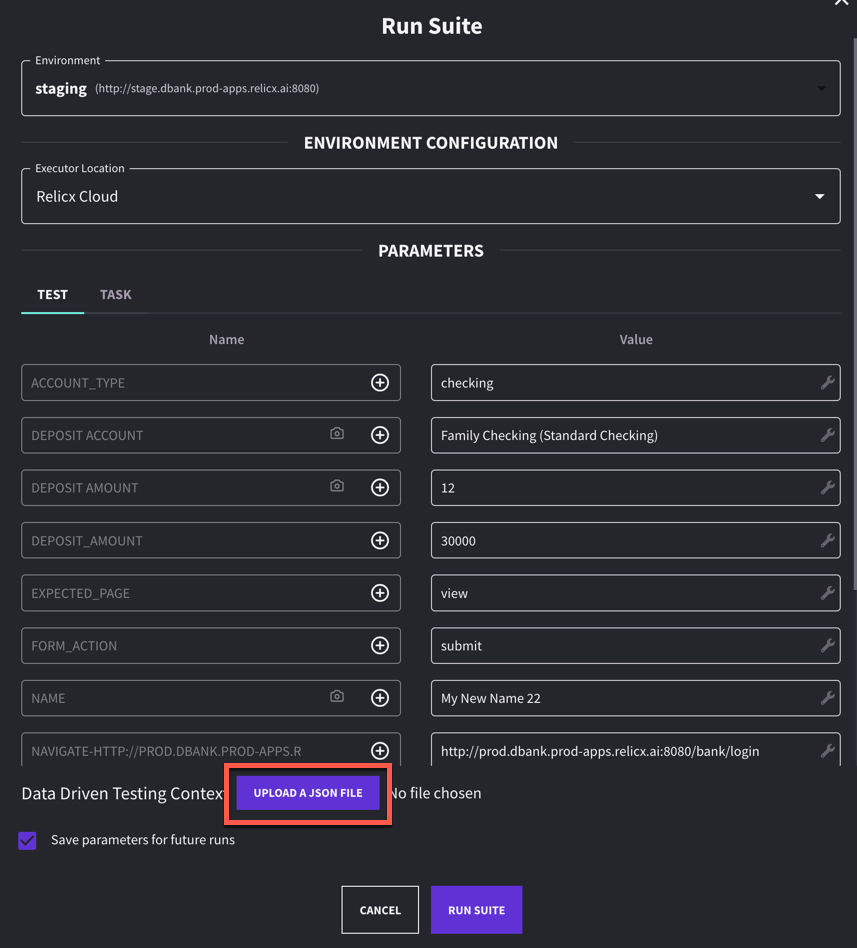
When we execute a suite, we can upload a JSON file that drives the execution of the tests in the file.
Click to view full size image
#### Data driven test results
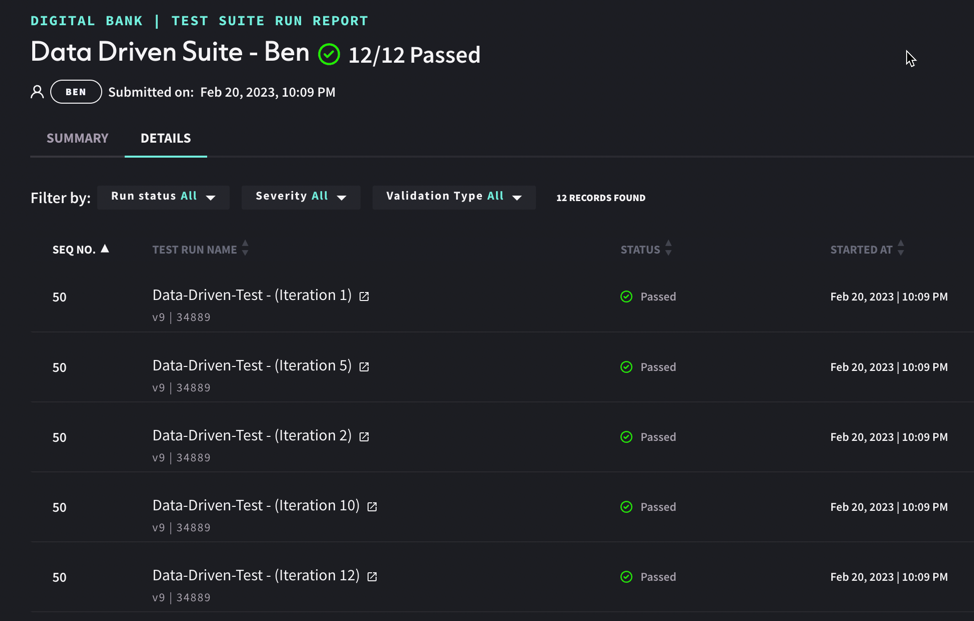
When our test suite has finished executing, the report will display each of the test iterations separately so you can view them each as their own test report
Click to view full size image
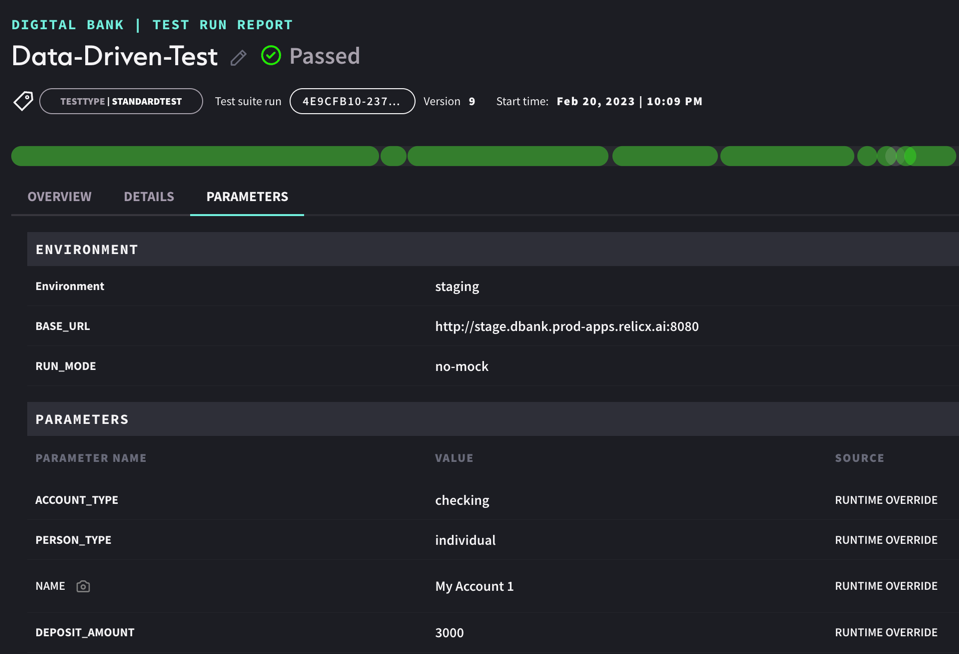
If you click through to one of them you will see a regular test report, you can always view the parameters tab to understand the values used in a particular iteration