> For the complete documentation index, see [llms.txt](https://developer.harness.io/llms.txt). Markdown versions of documentation pages are available by appending `.md` to page URLs; this page is available as [Markdown](https://developer.harness.io/artifact-registry/use-artifact-registry/dependency-firewall/built-in-policy-templates.md).
# Built-in policy templates
Reference for all five built-in Dependency Firewall policy templates, including detection methodology, configuration, and recommended usage.
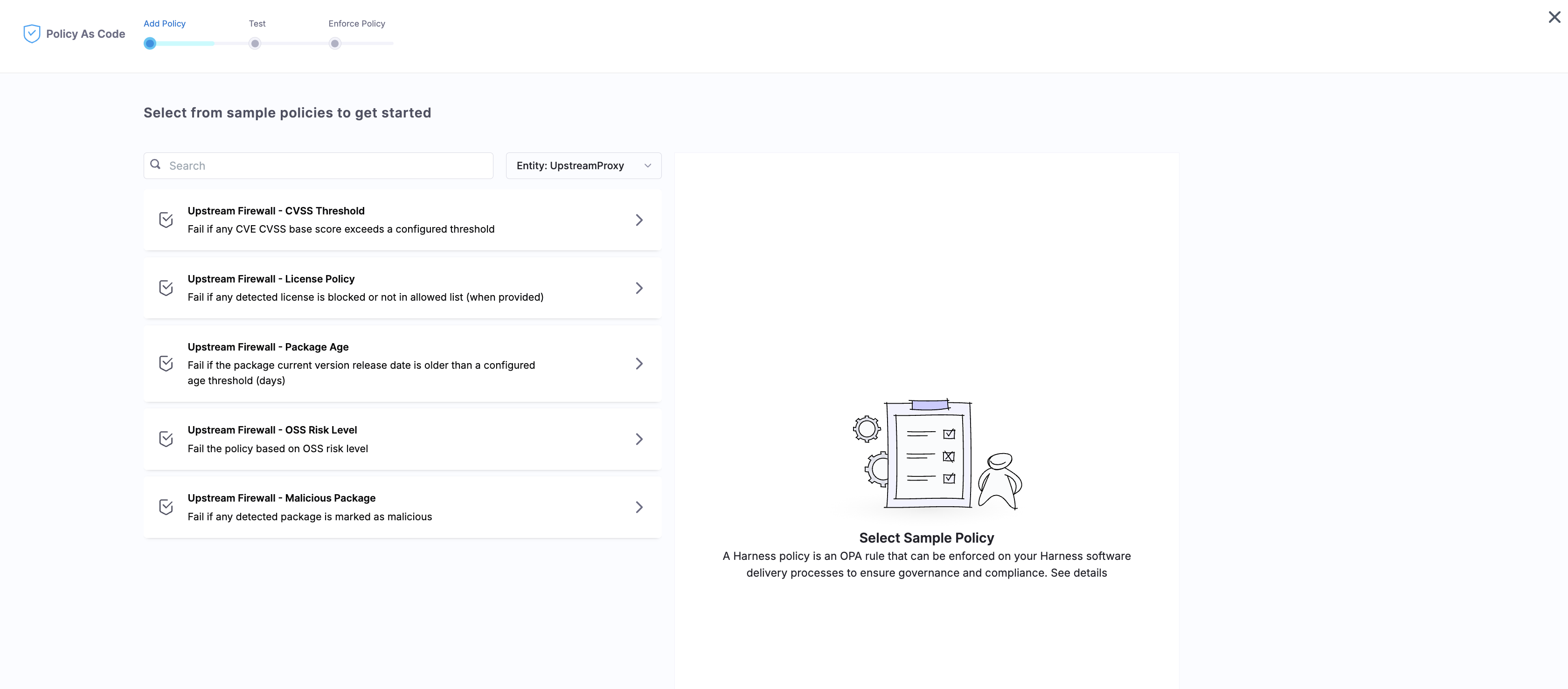
Harness provides five built-in policy templates in the Policy Library for Dependency Firewall. Each template targets a specific supply-chain risk category and is ready to use out of the box. You can also customize any template or write your own policies from scratch using Rego.
All templates use the **Upstream Proxy** entity type and are evaluated automatically every time an artifact is fetched through an upstream proxy registry with Dependency Firewall enabled.
Select from sample policies in the Policy As Code wizard
***
### CVSS Threshold
Evaluates artifacts against Common Vulnerability Scoring System (CVSS) scores from known CVE databases.
**What it detects:** Packages with vulnerabilities that exceed your configured severity threshold. CVSS scores range from 0.0 (no risk) to 10.0 (critical), and you set the threshold at which the policy fails.
**When to use:** Block or warn on packages with known vulnerabilities above your organization's risk tolerance. Most teams set this between 7.0 (high severity) and 9.0 (critical only).
**How it works:**
* At pull time, Dependency Firewall checks the artifact against CVE databases for known vulnerabilities.
* Each vulnerability has a CVSS base score. If any vulnerability on the artifact exceeds your configured threshold, the policy fails.
* The **Vulnerabilities** tab in the Evaluation Details sidebar shows the full breakdown by severity (Critical, High, Medium, Low).
**Recommended configuration:**
| Use case | Threshold | Fail action |
| ------------------------------- | --------- | --------------- |
| Strict security posture | 7.0 | Error and exit |
| Balanced — block critical (9.0) | 9.0 | Error and exit |
| Balanced — warn on high (7.0) | 7.0 | Warn & continue |
| Visibility only | 4.0 | Warn & continue |
***
### License Policy
Checks artifact licenses against your organization's approved or blocked license list.
**What it detects:** Packages whose detected license is not in your allowed list, or is explicitly in your blocked list. This prevents non-compliant open-source licenses from entering your supply chain.
**When to use:** Enforce license compliance requirements. Common scenarios include blocking copyleft licenses (GPL, AGPL) in proprietary software projects, or restricting to a pre-approved set of permissive licenses (MIT, Apache-2.0, BSD).
**How it works:**
* At pull time, Dependency Firewall reads the license metadata from the package.
* The policy compares the detected license against your configured allowed or blocked list.
* If the license is blocked or not in the allowed list (when an allowed list is provided), the policy fails.
**Recommended configuration:**
| Use case | Approach | Fail action |
| -------------------------------- | ---------------------------------------- | --------------- |
| Strict compliance | Allowed list only (MIT, Apache-2.0, BSD) | Error and exit |
| Block known problematic licenses | Blocked list (GPL-3.0, AGPL-3.0) | Error and exit |
| Audit mode | Blocked list | Warn & continue |
***
### Package Age
Evaluates artifacts based on their release date to enforce a cooldown period on newly published versions.
**What it detects:** Package versions whose release date is more recent than your configured age threshold (in days). This helps prevent the use of untested versions that may contain undiscovered security issues.
**When to use:** Enforce a "quarantine window" for new releases. Newly published packages are more likely to contain undiscovered bugs or supply-chain attacks. A cooldown period gives the community time to identify issues before the package enters your supply chain.
**How it works:**
* At pull time, Dependency Firewall checks the version's release date against the current date.
* If the version was released fewer days ago than your configured threshold, the policy fails.
* This is especially useful for transitive dependencies that update frequently.
**Recommended configuration:**
| Use case | Threshold | Fail action |
| ----------------------------- | --------- | --------------- |
| High-security environments | 30 days | Error and exit |
| Moderate cooldown | 7 days | Warn & continue |
| Audit newly released packages | 3 days | Warn & continue |
{% hint style="info" %}
Package Age works well in combination with CVSS Threshold. New packages may not yet have CVE data, so Package Age provides a safety net during the window before vulnerability databases index them.
{% endhint %}
***
### OSS Risk Level
Evaluates artifacts based on their open-source risk score, which aggregates multiple supply-chain health signals into a single composite value.
**What it detects:** Packages that exceed a configured risk threshold based on overall project health. The risk score (0 to 100, where **higher scores indicate greater risk**) is derived from four weighted dimensions:
| Dimension | Weight | What it measures |
| ------------- | ------ | ---------------------------------------------------------------------- |
| Risk | 30% | Supply-chain risk signals (malicious flags, end-of-life, unmaintained) |
| Vulnerability | 40% | Known CVE count and severity distribution |
| License | 20% | License compliance and restrictiveness |
| Quality | 10% | Maintenance activity, release cadence, community health |
**When to use:** Catch packages that may not have critical CVEs today but show signs of being risky dependencies: unmaintained projects, end-of-life packages, or projects with poor security hygiene. The composite score surfaces risk that individual policy templates (CVSS, License) might miss in isolation.
**How it works:**
* At pull time, Dependency Firewall evaluates the artifact's risk score from the threat intelligence database.
* The **OSS Risks** section in the Evaluation Details sidebar shows the score breakdown and key findings, including:
* **End of Life:** The project has been officially deprecated or archived.
* **Unmaintained:** No commits or releases in an extended period.
* **Outdated:** The version being used is significantly behind the latest release.
* **Malicious:** The package has been flagged in threat intelligence (also caught by the Malicious Package template).
* **Unpatched critical CVE:** A critical vulnerability exists with no available fix.
* If the risk score exceeds your configured threshold, the policy fails.
* **Cap rules:** When critical signals are detected (malicious component, unpatched critical CVE, or end-of-life status), the score is automatically clamped to the maximum (100) regardless of the weighted calculation. This ensures that packages with severe risk indicators always exceed standard thresholds.
**Recommended configuration:**
| Use case | Threshold | Fail action |
| ---------------------------- | --------- | --------------- |
| Block high-risk dependencies | 70 | Error and exit |
| Warn on moderate risk | 50 | Warn & continue |
| Strict supply-chain hygiene | 40 | Error and exit |
***
### Malicious Package
Detects packages that have been intentionally designed to attack your software supply chain, powered by a proprietary threat intelligence database that is **automatically refreshed every 4 hours**.
**What it detects:** Packages flagged as intentionally harmful. This is fundamentally different from vulnerability detection (CVSS Threshold), which targets accidental flaws. Malicious packages are purpose-built attacks.
**When to use:** Always. This template should be active on every upstream proxy with Dependency Firewall enabled. There is no valid use case for allowing a known malicious package into your supply chain.
**How it works:**
* At pull time, Dependency Firewall evaluates the artifact against the threat intelligence database.
* If the package version is flagged as malicious, the policy fails immediately.
* Once classified as malicious, that classification is **permanent**. Unlike CVEs that can be patched in a newer version, a malicious package version was intentionally harmful and remains flagged indefinitely.
#### Detection coverage
The threat intelligence database covers the following supply-chain attack categories:
* **History:** Packages with a prior malicious advisory, security yanks, or repeat offenders (recidivism).
* **Integrity:** Artifact source mismatches, obfuscated source code, install-time network calls, and suspicious install scripts.
* **Takeover:** Account takeover signals such as expired maintainer domains, new maintainer publishing immediately after ownership change, release anomalies, and disabled two-factor authentication.
* **Confusion:** Dependency confusion attacks (private package name collision with a public namespace) and scope collisions.
* **Typosquatting:** Packages mimicking popular dependency names to trick developers into installing malicious code.
#### Malicious packages vs vulnerabilities
| Dimension | Vulnerabilities (CVSS Threshold) | Malicious packages |
| -------------------- | ----------------------------------------------------- | ------------------------------------------------ |
| **Nature of threat** | Accidental flaw in legitimate code | Intentionally harmful package |
| **Detection basis** | CVE databases and CVSS scores | Threat intelligence feeds and behavioral signals |
| **Resolution** | Patch available in a newer version | No fix; the package itself is the attack |
| **Classification** | Can change as patches are released | Permanent once flagged |
| **Example** | A library with a known buffer overflow (CVE assigned) | A typosquatted package publishing a backdoor |
**Recommended configuration:**
| Use case | Fail action |
| ---------------- | -------------- |
| All environments | Error and exit |
{% hint style="info" %}
Set the Malicious Package policy to **Error and exit** with no exceptions. Unlike license or age violations where a warning may be acceptable, malicious packages represent active threats and should be blocked immediately.
{% endhint %}
***
### Combine templates in a policy set
You can add multiple templates to a single policy set and assign a different fail action to each. This lets you layer enforcement levels within one evaluation pass.
A common pattern for production environments:
| Policy | Fail action | Rationale |
| -------------------- | --------------- | ------------------------------------ |
| Malicious Package | Error and exit | Zero tolerance for known attacks |
| CVSS Threshold (9.0) | Error and exit | Block critical vulnerabilities |
| CVSS Threshold (7.0) | Warn & continue | Visibility into high-severity issues |
| License Policy | Error and exit | Compliance requirement |
| OSS Risk Level (70) | Warn & continue | Awareness of risky dependencies |
| Package Age (7 days) | Warn & continue | Flag very new releases |
Go to [Configure Policies and Policy Sets](/artifact-registry/use-artifact-registry/dependency-firewall/configure-policies.md) to create a policy set using these templates.
***
### Custom policies
If the built-in templates do not cover your use case, you can write custom Rego policies. Ensure custom policies use the **Upstream Proxy** entity type and maintain the expected output structure so Dependency Firewall can properly evaluate and categorize violations.
Go to [Configure Policies and Policy Sets](/artifact-registry/use-artifact-registry/dependency-firewall/configure-policies.md) for the full policy creation workflow. For Rego language fundamentals, go to the [OPA Policy Authoring course](https://www.openpolicyagent.org/docs/latest/policy-language/).
***
### Troubleshooting My custom policy does not appear in the Policy Library when creating a Dependency Firewall policy set
Ensure the policy's Entity Type is set to Upstream Proxy. Policies with any other entity type are not displayed when creating policy sets for upstream proxy registries.
OSS Risk Level policy never triggers even though I set a low threshold
Verify that the upstream proxy registry has Dependency Firewall enabled and that the policy set is enforced. Risk scores are only evaluated for artifacts fetched through upstream proxies with an active, enforced policy set.
{% @harness-feedback/feedback %}