> For the complete documentation index, see [llms.txt](https://developer.harness.io/llms.txt). Markdown versions of documentation pages are available by appending `.md` to page URLs; this page is available as [Markdown](https://developer.harness.io/artifact-registry/use-artifact-registry/dependency-firewall/exemptions.md).

# Dependency Exemptions

When Dependency Firewall flags a package version as **Blocked** or **Warning**, an exemption is the supported way to grant temporary access. A developer files a request with a business justification and remediation plan, an approver reviews it, and on approval the version becomes usable for a fixed duration. After the duration elapses the exemption expires and the original policy verdict applies again.

### Roles <a href="#roles" id="roles"></a>

| Role                   | Responsibilities                                                                                                                                                 |
| ---------------------- | ---------------------------------------------------------------------------------------------------------------------------------------------------------------- |
| **Requester**          | Any AR user with download access to artifacts in the project. Files exemption requests from the Policy Violations tab and can edit or withdraw pending requests. |
| **Exemption Approver** | Reviews requests and approves or rejects them from the Exemptions tab. The same person can be both Requester and Approver.                                       |

### Prerequisites <a href="#prerequisites" id="prerequisites"></a>

* Dependency Firewall is enabled. Go to the [Dependency Firewall overview](/artifact-registry/use-artifact-registry/dependency-firewall.md) to enable it on your upstream proxy registries.
* At least one upstream proxy registry has produced a `Warning` or `Blocked` policy violation.
* For approval actions, the user holds the **Exemption Approver** role on the project.

### Exemption Lifecycle <a href="#exemption-lifecycle" id="exemption-lifecycle"></a>

Every exemption moves through these states:

| State      | How it gets there                                             | What it allows                                                          |
| ---------- | ------------------------------------------------------------- | ----------------------------------------------------------------------- |
| `PENDING`  | Requester submits the form.                                   | The version stays under its original `Warning` or `Blocked` verdict.    |
| `APPROVED` | Approver approves the request. The duration timer starts now. | The version becomes usable until expiry.                                |
| `REJECTED` | Approver rejects the request.                                 | The original verdict stands.                                            |
| `EXPIRED`  | The approved duration has elapsed.                            | The original verdict applies again. A new request is required to renew. |

The **Exemptions** tab summary cards (`Total`, `Approved`, `Rejected`, `Pending`, `Expired`) and the row **Status** column both reflect these states.

### Request an Exemption <a href="#request-an-exemption" id="request-an-exemption"></a>

Requesters file an exemption from a specific row on the Policy Violations tab.

1. Open **Dependency Firewall** in the project's left navigation and stay on the **Policy Violations** tab.
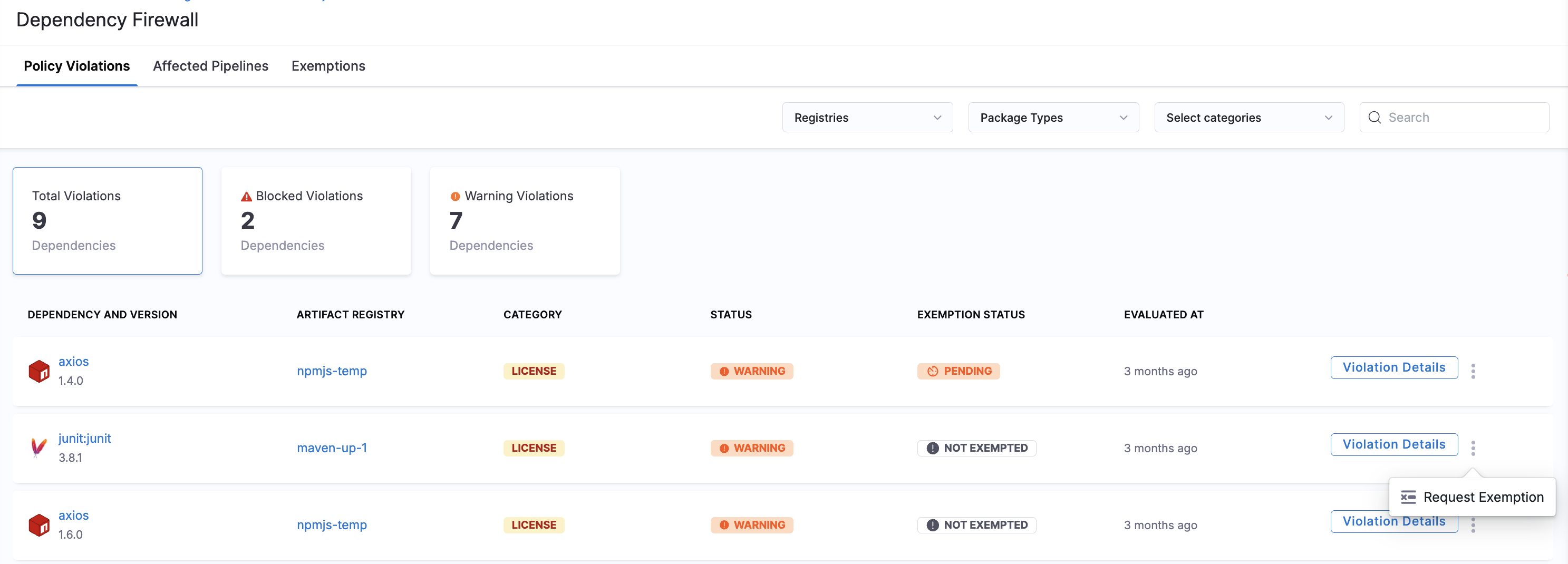
2. Find the dependency and version you need access to. The **Status** column shows `WARNING` or `BLOCKED`.
3. On the row, open the overflow menu (`⋮`) and choose **Request Exemption**.

<figure><img src="/files/N3oEwfVxWUhTXFXDTLJN" alt="Policy Violations tab showing 2,193 total violations split across 2,138 Blocked and 55 Warning, with a Blocked row&#x27;s overflow menu open and Request Exemption highlighted"><figcaption><p>Open Request Exemption from the row overflow on the Policy Violations tab</p></figcaption></figure>

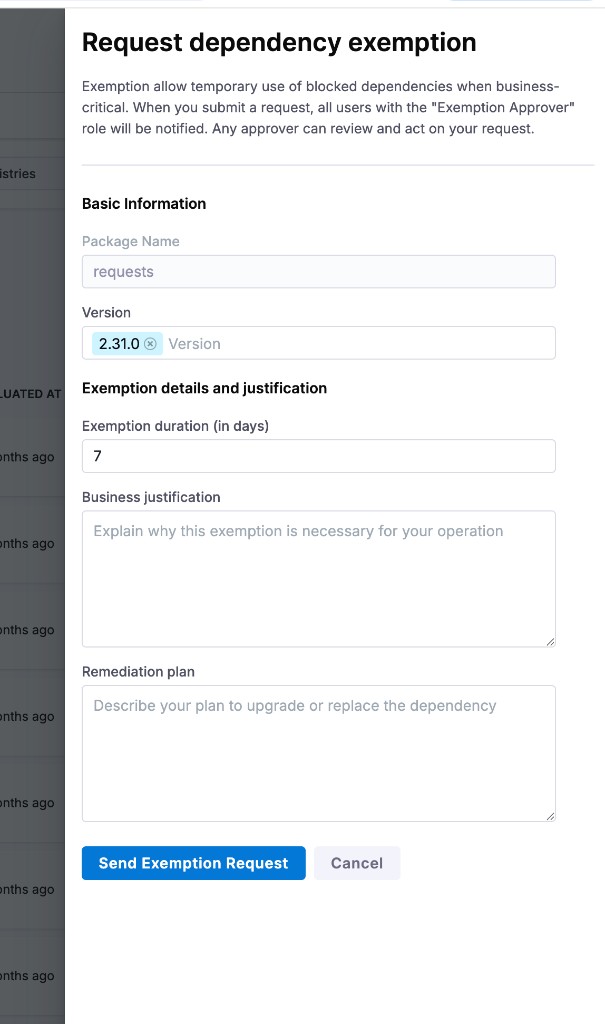
4. Fill in the slide-out form. Package Name and Version are pre-filled from the violation row.

   | Field                            | Description                                                                       |
   | -------------------------------- | --------------------------------------------------------------------------------- |
   | **Package Name**                 | Pre-filled. Read-only.                                                            |
   | **Version**                      | Pre-filled. Add additional versions in the same field if more than one is needed. |
   | **Exemption duration (in days)** | Number of days the exemption stays active once approved.                          |
   | **Business justification**       | Why the exemption is necessary for your operation.                                |
   | **Remediation plan**             | How and when you plan to upgrade or replace the dependency.                       |
5. Click **Send Exemption Request**. The request enters the `PENDING` state and is visible to every Exemption Approver on the Exemptions tab.

<figure><img src="/files/YGDxDwNsnHknGuCmk76k" alt="Request dependency exemption slide-out with Package Name, Version, Exemption duration, Business justification, and Remediation plan fields"><figcaption><p>Request dependency exemption form</p></figcaption></figure>

{% hint style="info" %}
**ROUTE EXEMPTION EVENTS TO SLACK, EMAIL, OR OTHER CHANNELS**

Approvers are not notified by default when a request is filed. To push exemption activity to Slack, Microsoft Teams, email, PagerDuty, webhooks, or Datadog, configure a **Centralised Notification** rule for Artifact Registry. Two events are available today:

* `Dependency Firewall Exemption Requested`: fires when a new request is submitted.
* `Dependency Firewall Exemption Status Changed`: fires on a status transition.

Go to [Artifact Registry Notifications](/harness-ai/use-harness-platform/notifications-alerts-and-banners/notifications/centralised-notification.md#artifact-registry-notifications) to walk through the rule wizard, and [Notification settings](/harness-ai/use-harness-platform/notifications-alerts-and-banners/notifications/notifications-overview.md) to review the supported channels and account-level controls. Notification rules can be scoped to all organizations or specific organizations.
{% endhint %}

### Review and Decide on a Request <a href="#review-and-decide-on-a-request" id="review-and-decide-on-a-request"></a>

Approvers act on `PENDING` requests from the Exemptions tab.

1. Open **Dependency Firewall** and switch to the **Exemptions** tab.
2. Click the **Pending Exemptions** summary card to filter the table, or use **Registries**, **Package Types**, or **Search** to narrow the list.
3. Click **Details** on the row to open the request.
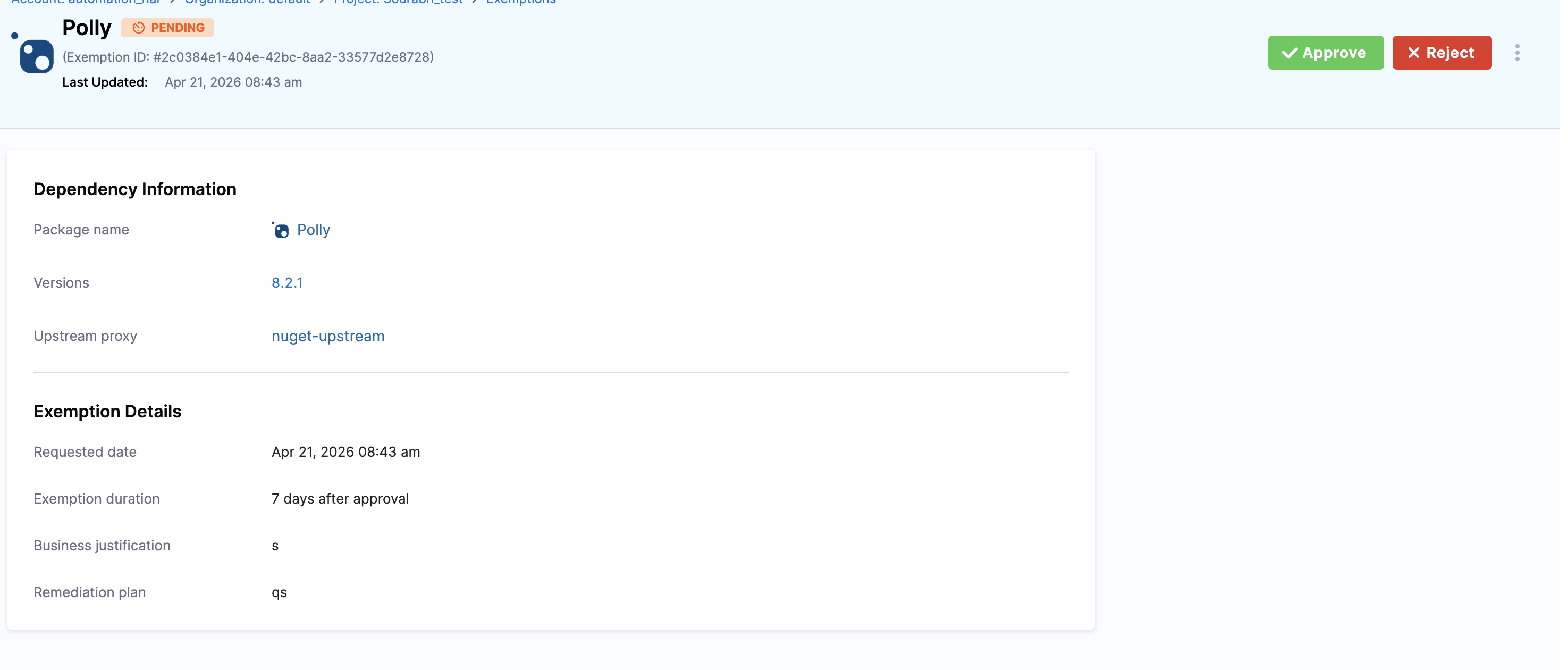
4. Review the **Dependency Information** and **Exemption Details** (requested date, requested duration, business justification, remediation plan).
5. Click **Approve** or **Reject** in the page header.

<figure><img src="/files/6tiiBGDQ8yImGBC1fwgt" alt="Exemption detail page for a Pending request on the Polly nuget-upstream package, showing the Exemption ID in the header, dependency information, exemption details, and Approve and Reject buttons"><figcaption><p>Exemption detail page used by approvers</p></figcaption></figure>

The status updates immediately on the Exemptions tab. The decision is final, the request cannot be re-opened. To make further changes the requester must submit a new request.

When a request is **Approved**, the exact `package@version` is pulled into the corresponding upstream proxy registry and becomes available for use through that registry. Subsequent pulls of that version succeed instead of being blocked by the firewall, until the exemption expires.

### Track Exemptions <a href="#track-exemptions" id="track-exemptions"></a>

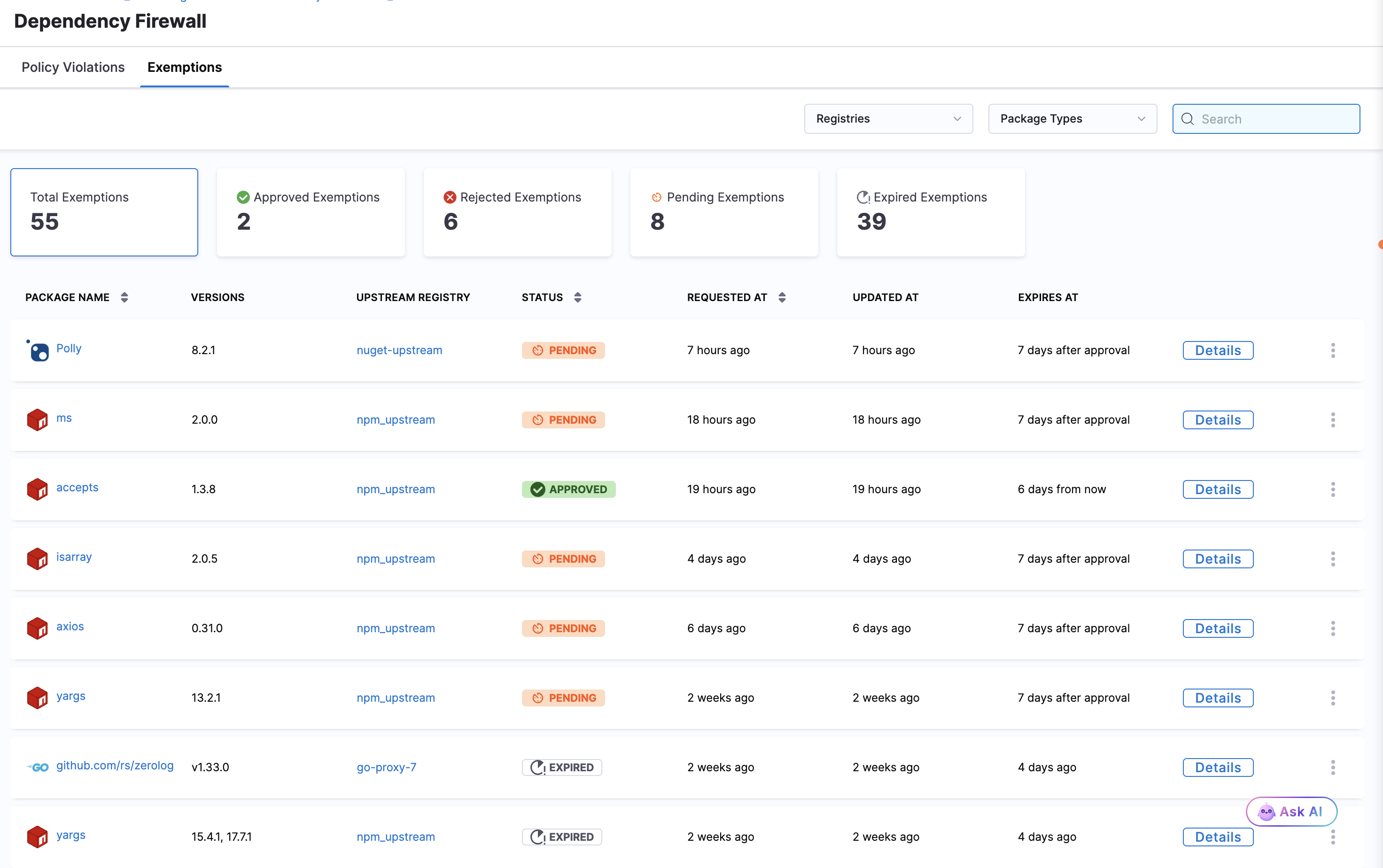
The Exemptions tab provides a view of every exemption at the current scope and its current state.

<figure><img src="/files/bGKrhtMJ2aNLtaHdoUoZ" alt="Exemptions tab showing 55 total exemptions with the lifecycle states broken down across Approved, Rejected, Pending, and Expired summary cards, and a table of requests across npm, nuget, and go upstream proxies in PENDING, APPROVED, and EXPIRED states"><figcaption><p>Exemptions tab with summary cards and a request list spanning every lifecycle state</p></figcaption></figure>

The table columns are:

| Column                | Notes                                                                                   |
| --------------------- | --------------------------------------------------------------------------------------- |
| **Package Name**      | Dependency name with its package-type icon.                                             |
| **Versions**          | Version or versions covered by the exemption.                                           |
| **Upstream Registry** | Upstream proxy that surfaced the violation.                                             |
| **Status**            | Current lifecycle state.                                                                |
| **Requested At**      | Submission time.                                                                        |
| **Updated At**        | Last status change (approval, rejection, edit).                                         |
| **Expires At**        | For `APPROVED` requests, the absolute expiry timestamp. Pending requests do not expire. |

Use the **Registries** and **Package Types** dropdowns or the **Search** box to scope the list.

### Edit or Withdraw a Pending Request <a href="#edit-or-withdraw-a-pending-request" id="edit-or-withdraw-a-pending-request"></a>

Any user with download permission at the current scope can modify a pending request. Once a request reaches `APPROVED` or `REJECTED` it is locked.

1. On the **Exemptions** tab, find the row in `PENDING` status.
2. Open the row overflow menu (`⋮`).
3. Choose **Edit Exemption** to update the duration, justification, or remediation plan, or **Delete** to withdraw the request.

<figure><img src="/files/fhae7gElMxi8Onagvse6" alt="Exemptions tab with a Pending row&#x27;s overflow menu open, showing Edit Exemption and Delete options. Other rows in the table are in PENDING and APPROVED states."><figcaption><p>Edit or Delete options on a Pending exemption row</p></figcaption></figure>

### Troubleshooting <a href="#troubleshooting" id="troubleshooting"></a>

<details>

<summary>Request Exemption is missing from the row overflow on the Policy Violations tab</summary>

Confirm Dependency Firewall is enabled for the upstream proxy that produced the violation, and that the violation status is Warning or Blocked. Passed versions cannot be exempted because they are not violations.

</details>

<details>

<summary>My exemption was approved but the dependency still appears as Blocked when fetched</summary>

Confirm the exemption covers the exact version you are requesting (versions are matched precisely), the upstream proxy on the exemption matches the proxy you are pulling through, and the exemption status on the Exemptions tab is APPROVED rather than EXPIRED.

</details>

<details>

<summary>An approved exemption has expired and the dependency is blocked again</summary>

Expired exemptions are not auto-renewed. Open the Policy Violations tab, choose Request Exemption on the dependency again, and submit a fresh request with an updated remediation plan.

</details>

<details>

<summary>Approvers did not receive a notification when an exemption was submitted</summary>

Approver notifications are not sent by default. Configure a Centralised Notification rule for Artifact Registry on the Dependency Firewall Exemption Requested event and route it to the channel of your choice. Go to \[Artifact Registry Notifications]\(<https://app.gitbook.com/s/3F2TpHXhur2QtQnORSM9/use-harness-platform/notifications-alerts-and-banners/notifications/centralised-notification#artifact-registry-notifications>) to walk through the rule wizard.

</details>

### Next steps <a href="#next-steps" id="next-steps"></a>

* [Dependency Firewall overview](/artifact-registry/use-artifact-registry/dependency-firewall.md)
* [Configure Policies and Policy Sets](/artifact-registry/use-artifact-registry/dependency-firewall/configure-policies.md)
* [Artifact Registry webhooks](/artifact-registry/use-artifact-registry/manage-registries/ar-webhooks.md)