> For the complete documentation index, see [llms.txt](https://developer.harness.io/llms.txt). Markdown versions of documentation pages are available by appending `.md` to page URLs; this page is available as [Markdown](https://developer.harness.io/artifact-registry/use-artifact-registry/manage-artifacts/artifact-details.md).
# Artifact Details
View artifact metadata, package details, security results, and deployments.
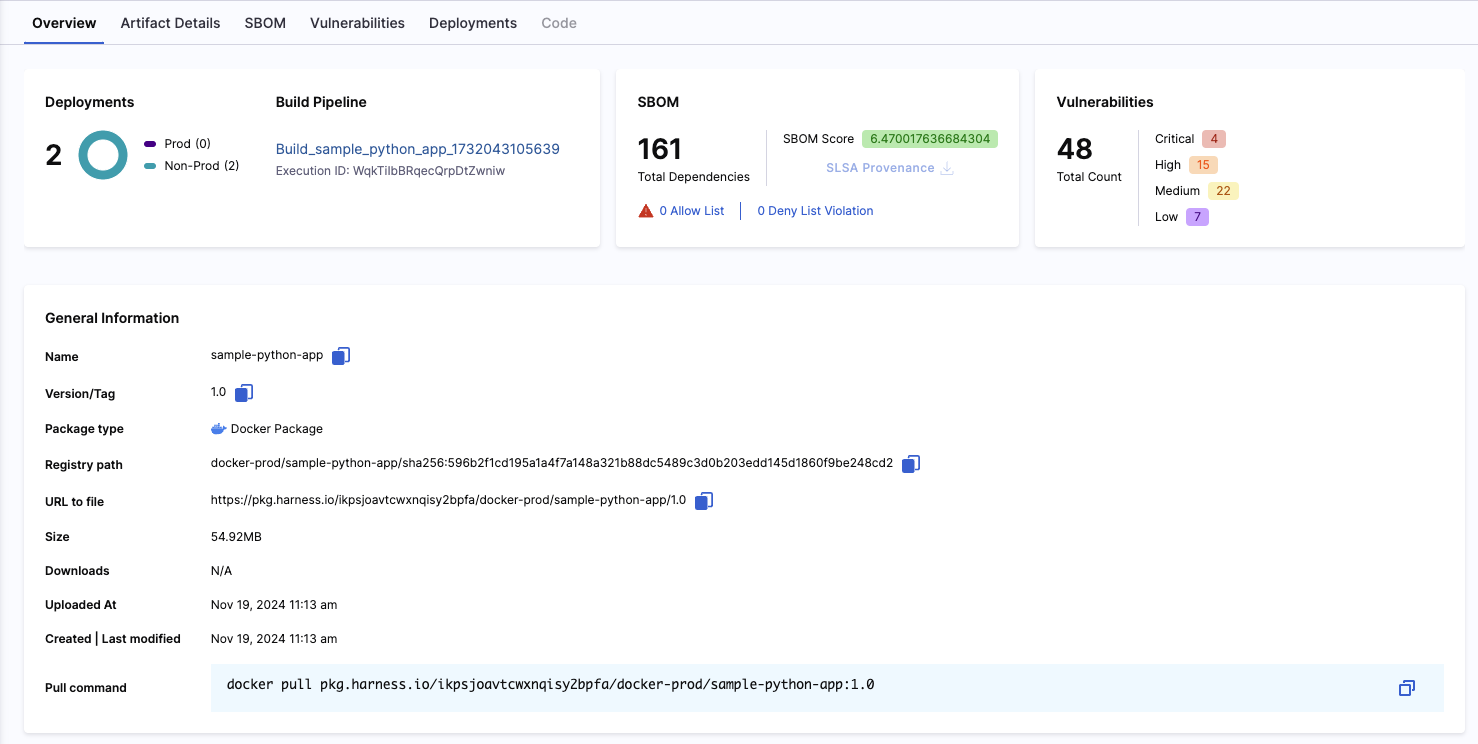
Click an artifact on the **Artifacts** tab to open the artifact details page.
This page offers the following information:
* General Information
* Artifact Details
* SBOM
* Vulnerabilities
* Deployments
Available tabs change based on the artifact type and the Harness modules enabled on your account.
### General information and overview
This section provides the artifact information you need to manage it. Use it to copy the registry path or pull command.
#### Select by tag
All artifact types let you select a tag/version from the header selector. For Docker/OCI images specifically, the selector also lets you choose the image's digest. Both tag names and digest values are clickable. Your selection determines which exact image the details panel shows (layers, manifest, SBOM, vulnerabilities, etc.).
* Use a tag to browse the commonly used label (for example, `latest`, `1.25.2`, etc.).
* For Docker/OCI, use a digest to pin an immutable reference. This is helpful when you need to verify or troubleshoot a specific image instance.
The example below shows the tag/digest selector and how you can switch between them:
{% hint style="info" %}
**DOCKER IMAGE - DIGEST**
The Deployments tab shows data only when a tag is selected. Selecting a digest will not populate deployment details.
{% endhint %}
**Add Metadata to Packages**
You can attach custom metadata to specific package versions to track version-specific information such as build IDs, Git commits, test results, approval status, or deployment targets. This allows you to maintain detailed tracking and audit trails for individual releases.
To add metadata, locate the **Metadata** section. You can add multiple key-value pairs to categorize and track your packages effectively.
Go to [Artifact Registry Metadata](/artifact-registry/use-artifact-registry/metadate-registry.md) to add metadata at the package level.
### Artifact details
The **Artifact Details** tab contains the artifact's layer and manifest.
### SBOM
The **SBOM** tab will show results for the artifact's bill of materials including dependency lists, software suppliers, package managers, etc. To use this feature, you will require the [SCS module](https://app.gitbook.com/s/SN2B2M5cFWy0hhD0xTuE/README).
### Vulnerabilities
The **Vulnerabilities** tab will show results from security tests run on the artifact. Therefore, this feature will only be available to customers who also have the [STO module](https://app.gitbook.com/s/na57sNwixrWxOX8cOMRg/README).
### Deployments
The **Deployments** tab displays information pertaining to the artifact's deployments. This information includes the deployment environments and the number of instances deployed. Therefore, this feature will only be available to customers who also have the [CD module](https://app.gitbook.com/s/y1JhZ4oKIppwY7d5AhPj/README).
{% @harness-feedback/feedback %}