> For the complete documentation index, see [llms.txt](https://developer.harness.io/llms.txt). Markdown versions of documentation pages are available by appending `.md` to page URLs; this page is available as [Markdown](https://developer.harness.io/artifact-registry/use-artifact-registry/manage-artifacts/soft-delete.md).

# Delete Artifacts

Soft delete packages and versions; use the Artifacts Deleted tab and scoped views; restore or permanently delete.

{% hint style="info" %}
**FEATURE FLAG**

Soft delete is behind the `HAR_SOFT_DELETE_SUPPORT` feature flag. To enable the flag, contact [Harness Support](mailto:support@harness.io).
{% endhint %}

Soft deleted packages and versions stay recoverable until the retention window allows them to be purged. During the retention window, soft deleted packages and versions are **not** downloadable. Pipelines and clients that attempt to pull a soft deleted version receive an error. To permanently remove the artifact immediately and skip the retention window, select **Permanently delete** in the delete confirmation dialog.

{% hint style="info" %}
**Upstream proxy artifacts**

Artifacts deleted from an upstream proxy registry need to be pulled again from the remote source. Go to [Create an upstream proxy](https://developer.harness.io/artifact-registry/use-artifact-registry/manage-registries/upstream-proxy.md).
{% endhint %}

When you [delete a registry](https://developer.harness.io/artifact-registry/use-artifact-registry/manage-registries/delete-registry.md) that supports recovery, Harness soft deletes the packages, images, and versions inside that registry at the same time. The same cascade applies if you permanently delete the registry. The **Artifact Registries** > **Deleted** list (registry rows only) is described in that topic.

### Delete artifacts and versions <a href="#delete-artifacts-and-versions" id="delete-artifacts-and-versions"></a>

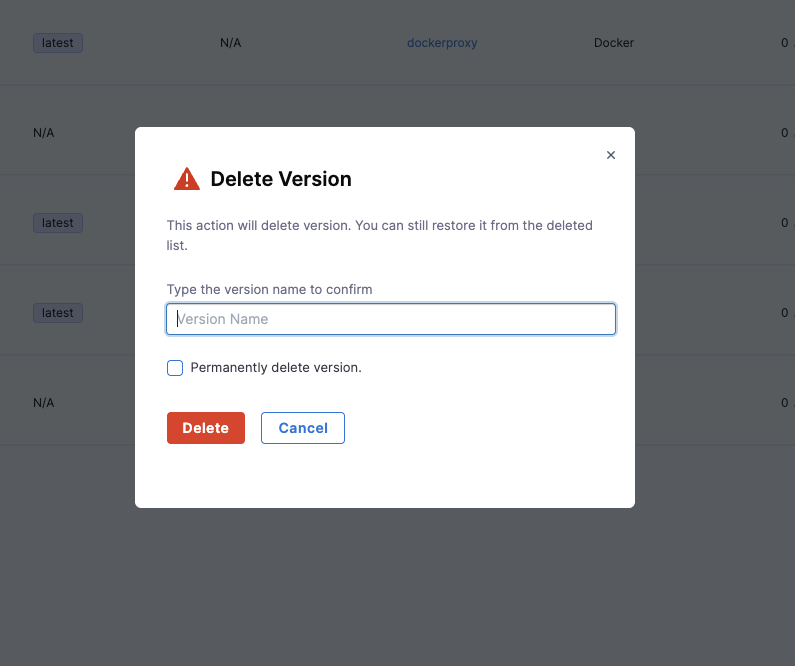
When you delete a package or version from a registry that supports soft deletion, a dialog asks you to enter the name to confirm. For a soft delete, keep the **Permanently delete** checkbox cleared. The item moves to the **Deleted** tab for that scope, where you can restore it or remove it permanently later. Select **Permanently delete** to remove it immediately.

<figure><img src="https://4191040053-files.gitbook.io/~/files/v0/b/gitbook-x-prod.appspot.com/o/spaces%2FGmEmgYs6IUcqNiV0OEgB%2Fuploads%2Fgit-blob-e7bd01d6fd9f3eac74f465fe1f30f3c0f170367f%2Fsoft-delete-version-dialog.png?alt=media" alt="Delete confirmation dialog: name field and permanent delete option"><figcaption><p>Delete confirmation: enter the name and choose soft or permanent delete</p></figcaption></figure>

### Find deleted items on artifacts <a href="#find-deleted-items-on-artifacts" id="find-deleted-items-on-artifacts"></a>

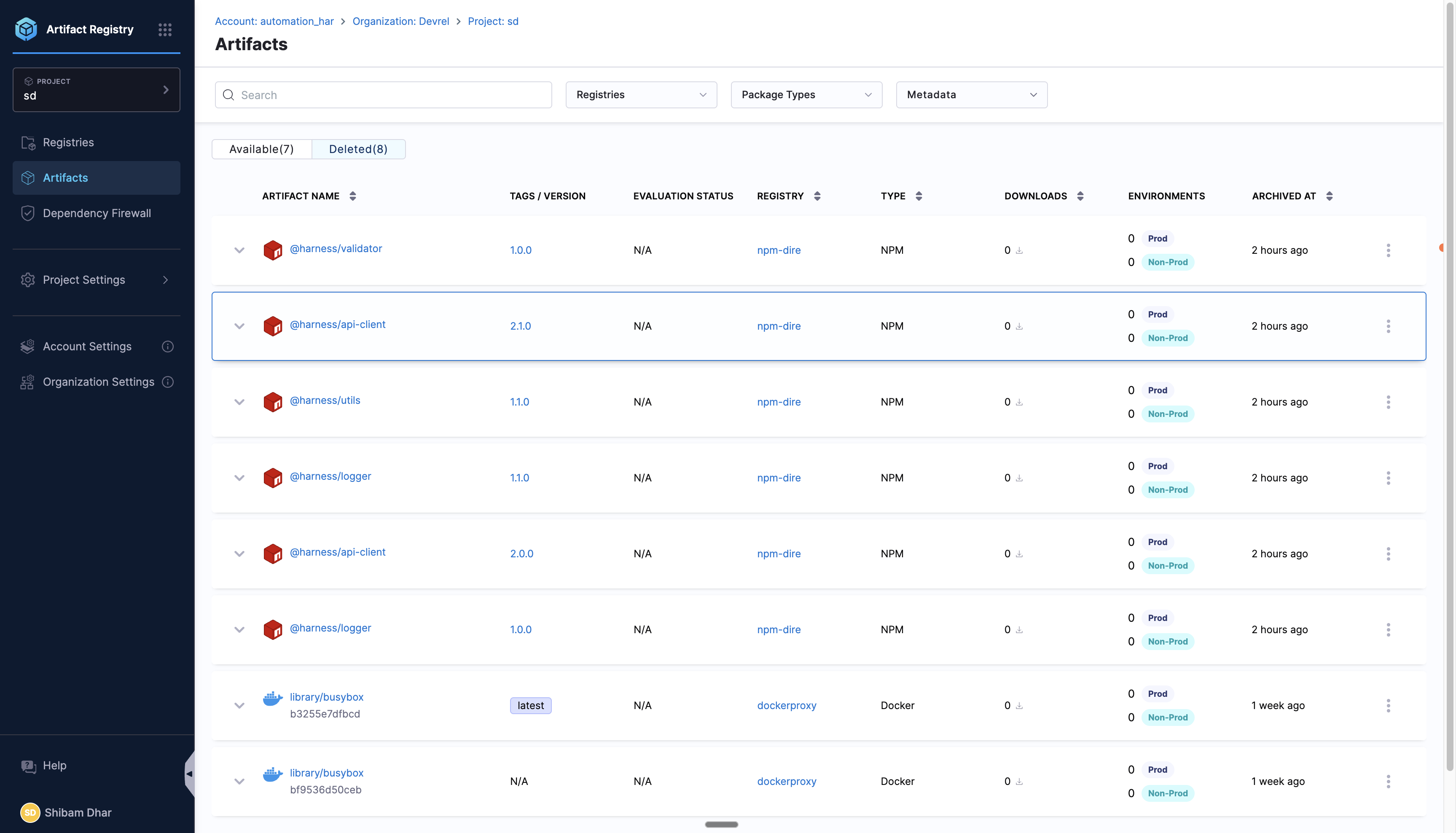
Open **Artifacts** and select the **Deleted** tab. The list shows soft deleted packages, versions, and related rows for the scope you are viewing (account, organization, or project). Filters such as **Registries** and **Package Types** narrow the list. Content from a [soft deleted registry](https://developer.harness.io/artifact-registry/use-artifact-registry/manage-registries/delete-registry.md) still appears under **Deleted**.

<figure><img src="https://4191040053-files.gitbook.io/~/files/v0/b/gitbook-x-prod.appspot.com/o/spaces%2FGmEmgYs6IUcqNiV0OEgB%2Fuploads%2Fgit-blob-9e729252e24e05b0804aaaeb221d44cf260b313d%2Fsoft-delete-project-artifacts-deleted.png?alt=media" alt="Artifacts page Deleted tab listing soft deleted packages, versions, and related rows"><figcaption><p>Artifacts > Deleted: list with filters</p></figcaption></figure>

#### Inside a package <a href="#inside-a-package" id="inside-a-package"></a>

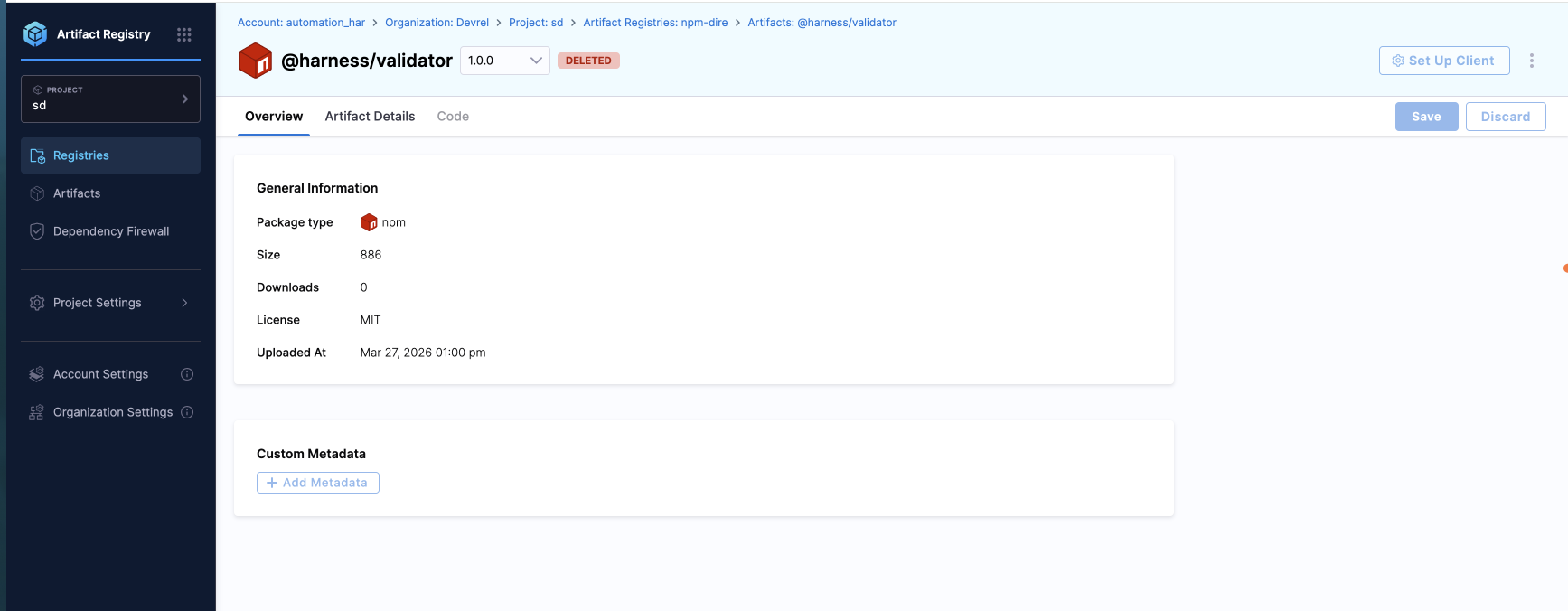
When you open an artifact, use the Available and Deleted sections to list or restore individual versions. If the package itself was soft deleted, the UI may show a DELETED state while you still inspect deleted versions.

<figure><img src="https://4191040053-files.gitbook.io/~/files/v0/b/gitbook-x-prod.appspot.com/o/spaces%2FGmEmgYs6IUcqNiV0OEgB%2Fuploads%2Fgit-blob-b1af54546963eaaddd745ea208a240103e59e646%2Fsoft-delete-artifact-detail-versions-deleted.png?alt=media" alt="Package Versions tab with Available and Deleted sections for versions"><figcaption><p>Package detail: Versions tab with deleted versions visible</p></figcaption></figure>

### Restore, retention, and behavior <a href="#restore-retention-and-behavior" id="restore-retention-and-behavior"></a>

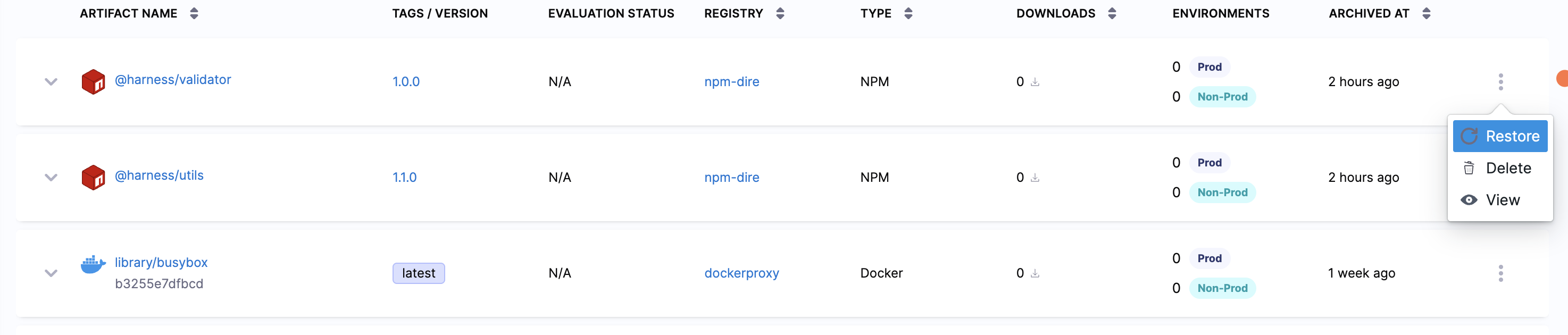
From a Deleted tab or the row menu (⋮), choose Restore or Delete (permanent removal), depending on context.

<figure><img src="https://4191040053-files.gitbook.io/~/files/v0/b/gitbook-x-prod.appspot.com/o/spaces%2FGmEmgYs6IUcqNiV0OEgB%2Fuploads%2Fgit-blob-3a3ab689482e4cf651704dbbb05565ca3c5b1111%2Fsoft-delete-deleted-row-restore-menu.png?alt=media" alt="Row actions menu on a deleted item showing Restore and Delete"><figcaption><p>Deleted item row menu: Restore and permanent Delete</p></figcaption></figure>

Restoring a version or a package can restore the soft deleted parent registry. You do not need to restore the registry from 'Artifact Registries' > 'Deleted' before you restore the package or version. Audit and activity logging follow your environment’s settings for artifact operations.

{% hint style="info" %}
**RETENTION FOR SOFT DELETED ITEMS**

Account administrators set how long soft deleted items are kept in Default Settings > Artifact Registry. Harness applies the saved value to all soft deleted artifacts in that account, organization, or project. Each row is retained for that many days from its own deletion time, so changing the setting applies to existing and new soft deleted items alike. Older deletions may become eligible for purge sooner when you shorten the period.
{% endhint %}

<details>

<summary>Can I delete an artifact by tag using the API?</summary>

The delete API requires the image digest (SHA), not the tag name. To delete a specific version programmatically, first retrieve the digest from the artifact details, then pass it to the delete endpoint.

</details>

<details>

<summary>How do I soft delete or permanently delete via API?</summary>

Use the v3 delete APIs with the force query parameter. Set force=false (or omit it) for soft delete, or force=true for permanent delete. Available endpoints: deleteregistryv3, deletepackagev3, and deleteversionv3. Go to the Harness API documentation at <https://apidocs.harness.io> for complete API reference and authentication details.

</details>

<details>

<summary>Where do I set how long deleted artifacts are kept?</summary>

Go to **Account Settings** > **Default Settings**, then **Artifact Registry**, and set **Soft Delete Retention Period**. Account administrators can change it. The default is 30 days. Enter a whole number from 1 to 3650. The setting exists only at account scope, so you cannot override it for an organization or a project. One value applies to every organization and project in the account. Harness keeps each soft deleted item for that many days from the day you deleted it. A change also applies to items already in the Deleted list. If you shorten the period, items older than the new value are purged the next time the scheduled purge runs. To remove an item sooner, select **Delete** on the item in the Deleted list. A permanent delete cannot be undone.

</details>

<details>

<summary>Are soft deleted artifacts still stored, and are they downloadable?</summary>

Soft deleted items are still stored, and they are not downloadable. Harness keeps soft deleted packages and versions in storage until the retention period ends and a scheduled job purges them. Until then you can restore them. A pull of a soft deleted Docker image returns HTTP 404 with the error code `MANIFEST_UNKNOWN`. A pull of a soft deleted Maven artifact or POM file, or of a Python or Generic version, returns HTTP 404. If the registry lists an upstream proxy, a pull can still succeed from that upstream source. Soft deleted items still count toward your storage usage until Harness purges them. To remove an item before the retention period ends, select **Delete** on the item in the Deleted list. This cannot be undone, and the storage stops counting at the next usage measurement.

</details>

{% @harness-feedback/feedback %}