> For the complete documentation index, see [llms.txt](https://developer.harness.io/llms.txt). Markdown versions of documentation pages are available by appending `.md` to page URLs; this page is available as [Markdown](https://developer.harness.io/artifact-registry/use-artifact-registry/manage-registries/configure-registry.md).
# Configure registries
Configure security scanning, policy sets, artifact filtering, upstream proxies, and dependency firewall settings for your Harness Artifact Registry.
This guide covers the configuration options available for your Harness Artifact Registry, including security scanning, policy enforcement, artifact filtering rules, and upstream proxy settings.
***
### Before you begin
* **Harness account** with Artifact Registry enabled.
* **Registry created:** Go to [Create a registry](/artifact-registry/use-artifact-registry/manage-registries/create-registry.md) to set up your first registry.
***
### Access registry configuration
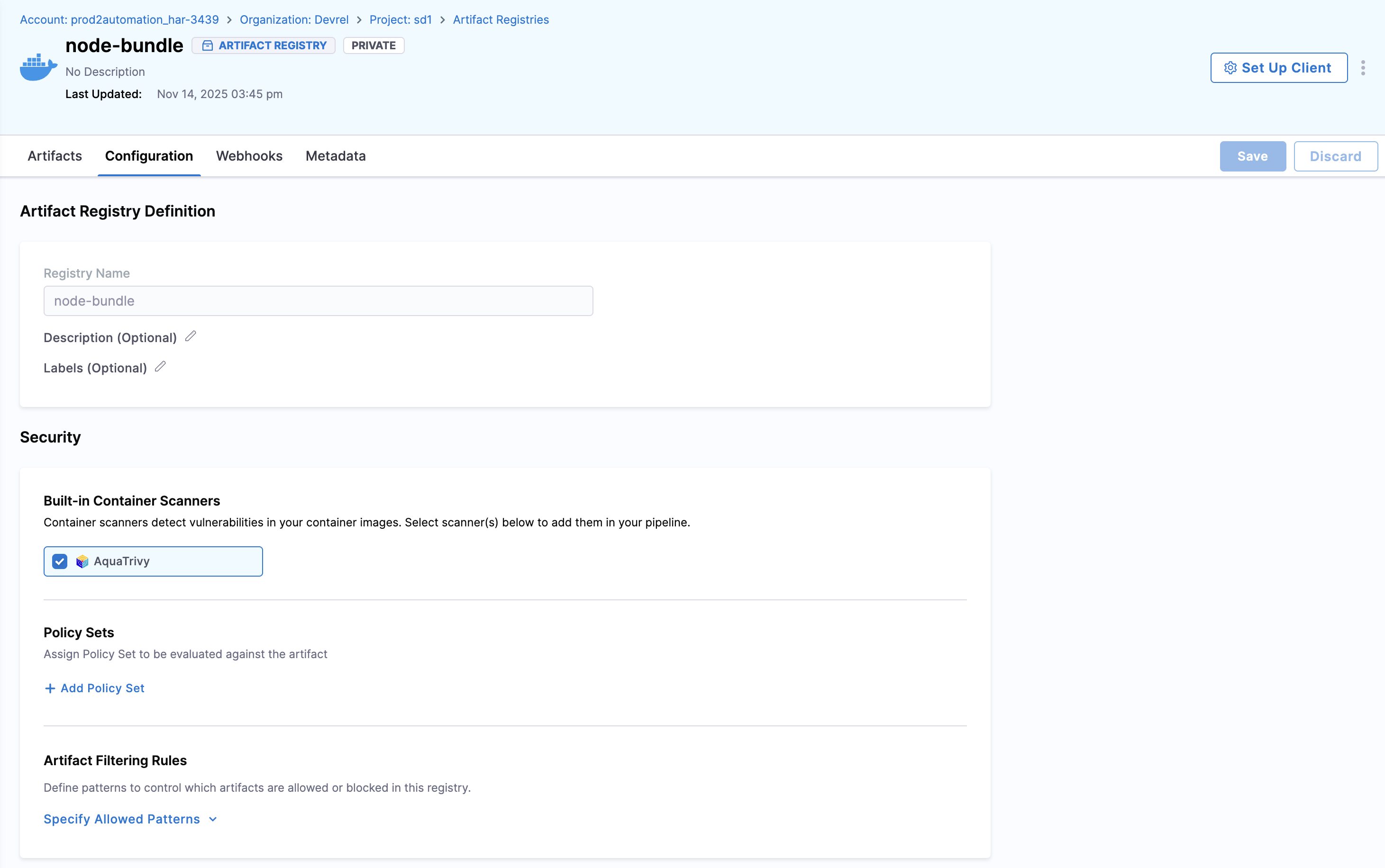
To change your registry settings, go to the registry and select **Configuration**.
From the configuration page you can:
* Change your registry **Description**.
* Add a label under **Labels**.
* Change the registry **Visibility** between Private and Public.
* Manage configuration options relative to your registry type such as setting a security scanner for Docker registries.
* Manage **Advanced** settings which includes setting an upstream proxy.
***
### Change registry visibility
An existing registry can be switched between **Private** and **Public** from its configuration page. The visibility toggle is the same field shown on the Create Registry form.
* **Private:** Only users or service accounts with the required permissions or tokens can view repository contents and pull artifacts.
* **Public:** Anyone can view repository contents and pull artifacts without authentication.
To change visibility, perform the following steps:
1. Go to the registry and select **Configuration**.
2. Under **Visibility**, select **Private** or **Public**.
3. Save the change.
{% hint style="info" %}
**FEATURE FLAG REQUIREMENT**
The **Public** option is gated by the `PL_ALLOW_TO_SET_PUBLIC_ACCESS` feature flag. If the option is missing on the visibility control, the flag is not enabled for your account. Go to [Create an Artifact Registry](/artifact-registry/use-artifact-registry/manage-registries/create-registry.md) to review the enablement steps.
{% endhint %}
***
### Security
#### Built-in container scanners
{% hint style="info" %}
This feature is only available for Docker and Helm registries.
{% endhint %}
When the [Harness Supply Chain Security module](https://developer.harness.io/software-supply-chain-assurance/) is enabled, artifacts in the Harness Artifact Registry are automatically scanned using AquaTrivy, the supported scanner. Built-in container scanning creates a pipeline to ensure every artifact is scanned upon entry. Additional scanner options will be introduced in the future.
#### Policy sets
{% hint style="info" %}
This feature is only available for Docker and Helm registries.
{% endhint %}
Policy sets allow you to define a collection of rules that automatically evaluate and take action on your artifacts. In Artifact Registry, these rules are evaluated as part of the scan pipeline that is triggered automatically when artifacts are ingested. You can add multiple policy sets to a registry for comprehensive protection; for vulnerability enforcement in this context, the policy set must be a Security Tests policy set.
{% hint style="info" %}
Based on the vulnerabilities detected by the built-in container scanner, you can create a Security Tests policy set to automatically quarantine or block artifacts based on the severity of vulnerabilities found.
{% endhint %}
When an artifact violates a policy, it can be automatically quarantined to prevent it from being used in pipelines or downloaded by users. Go to [Artifact quarantine](/artifact-registry/use-artifact-registry/manage-artifacts/artifact-management.md#quarantine-an-artifact) to manage quarantined artifacts.
#### Artifact filtering rules
Use these rules to establish which artifacts are allowed or blocked entry into your registry.
**Allowed patterns**
In **Allowed Patterns**, use a regex string to define which artifacts are allowed into the registry. The regex matches against each incoming artifact and, if the match is successful, allows the push operation.
In **Blocked Patterns**, use a regex string to define which artifacts are blocked from the registry. The regex matches against each incoming artifact and, if the match is successful, disallows the push operation.
**Example:**
If you want to set a registry to store only prod artifacts and block all dev artifacts:
* Set the **Allowed Patterns** regex to `.*-prod`.
* Set the **Blocked Patterns** regex to `dev-.*`.
This allows any artifact that ends with `-prod` and blocks any artifact that starts with `dev-`.
***
### Advanced settings
#### Set proxy for registry
You can configure your artifact registry to fetch artifacts from public upstream registries as well as other configured artifact registries. Harness supports two types of proxy configurations:
* **Upstream Proxy:** Connect to external registries (for example, Docker Hub, Maven Central). Go to [Create an upstream proxy](/artifact-registry/use-artifact-registry/manage-registries/upstream-proxy.md) to set one up.
* **Artifact Registry:** Aggregate multiple Harness artifact registries within your account into a single access point.
**Configure proxy settings**
To set up either an upstream proxy or aggregate multiple registries into a single access point, perform the following steps:
1. In your registry, select **Configuration**.
2. Open the **Advanced (Optional)** dropdown menu.
3. Select **Configure Upstream**.
4. Under **Available upstream proxies**, you will see a list that includes:
* Upstream proxy (indicated by a proxy icon)
* Artifact Registry (indicated by a registry icon)
5. Select the proxies you want to use. You can select multiple proxies of either type.
6. Under **Selected proxies**, arrange the order of proxies. When the registry receives a request, it queries the proxies in order from top to bottom.

In the example above, the registry has three selected proxies. When the registry receives a request, it queries the base registry first, then `docker-up-15`, followed by the two local registries in order.
{% hint style="warning" %}
**DO NOT PUBLISH THE SAME PACKAGE TO BOTH LOCAL AND UPSTREAM REGISTRIES**
When a registry receives a request, it checks the local (base) registry first. If the package exists locally, that version is returned and the upstream proxy is not queried. This means a locally published version can shadow newer versions available upstream. To avoid this, do not publish the same package to both a local registry and an upstream proxy that caches the same scope.
{% endhint %}
7. Select **Save** in the top right corner.
{% hint style="info" %}
**FEATURE FLAG REQUIREMENT**
The feature to add Artifact Registry to the Upstream Proxy list is behind the feature flag `HAR_SUPPORT_LOCAL_REGISTRY_AS_UPSTREAM_PROXY`. Contact [Harness Support](mailto:support@harness.io) to enable it.
{% endhint %}
{% hint style="info" %}
If you are adding an Artifact Registry to the Upstream Proxy list, ensure that there are no upstream proxies configured within your artifact registry.
{% endhint %}
#### Enable Dependency Firewall
{% hint style="info" %}
**FEATURE FLAG**
This feature is behind the feature flag `HAR_DEPENDENCY_FIREWALL`. Contact [Harness Support](mailto:support@harness.io) to enable it.
{% endhint %}
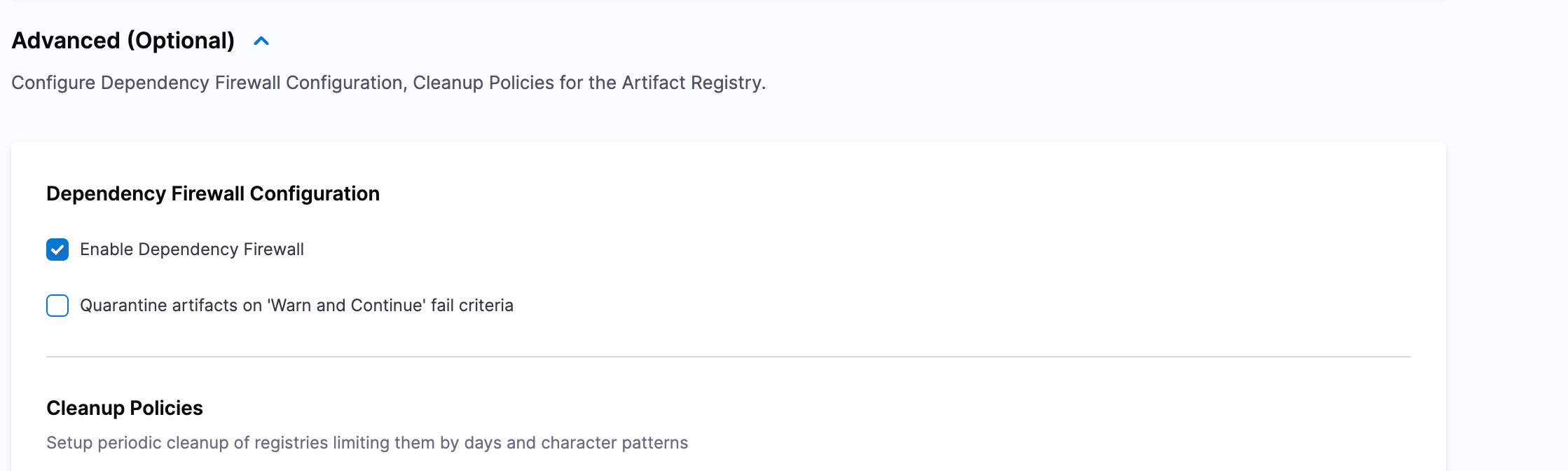
For upstream proxy registries, you can enable **Dependency Firewall** to control and secure artifacts fetched from external sources. When enabled, Dependency Firewall acts as a gatekeeper that evaluates every artifact version against configured security policies before allowing it to be cached in your registry.
To enable Dependency Firewall, perform the following steps:
1. In your upstream proxy registry, select **Configuration**.
2. Open the **Advanced (Optional)** dropdown menu.
3. Under **Dependency Firewall Configuration**, select **Enable Dependency Firewall**.
4. Optionally, select **Quarantine artifacts on 'Warn and Continue' fail criteria** to also quarantine artifacts whose policy verdict is **Warning** (in addition to artifacts whose verdict is **Blocked**). Go to [How the quarantine checkbox behaves](#how-the-quarantine-checkbox-behaves) to understand the full behavior.
5. Select **Save** to apply the changes.
Dependency Firewall Configuration on an upstream proxy registry
Once enabled, every artifact fetched from external sources through this upstream proxy is evaluated against the policy sets that apply to it. Each policy in the set carries its own fail action, either **Error and exit** or **Warn & continue**, chosen when the policy set is authored.
**How the quarantine checkbox behaves**
**Blocked artifacts** (a policy with *Error and exit* failed) are not cached. They require an exemption to consume.
**Warning artifacts** (a policy with *Warn & continue* failed) behave one of two ways:
* **Checkbox cleared (default):** the artifact is cached and remains usable; the violation only shows up on the Dependency Firewall dashboard.
* **Checkbox selected:** the artifact is cached but quarantined. It remains blocked until someone manually unquarantines it. Exemptions do not unblock quarantined packages.
Select the checkbox when you want a stricter posture without changing every individual policy from *Warn & continue* to *Error and exit*.
Go to [Dependency Firewall](/artifact-registry/use-artifact-registry/dependency-firewall.md) to learn how it works and view violations. Go to [Configure Policies and Policy Sets](/artifact-registry/use-artifact-registry/dependency-firewall/configure-policies.md) to configure the per-policy fail action.
#### Lifecycle rules
Use **Lifecycle Rules** to automatically soft-delete stale artifact versions on a schedule, and to protect versions you must keep. Create rules under **Artifact Registry** > **Registries Settings** > **Lifecycle Rules**, then attach them to one or more registries.
Go to [Lifecycle Rules](/artifact-registry/use-artifact-registry/lifecycle-rules.md) to create cleanup and retention rules.
#### Registry metadata
Enhance your registry organization and searchability by adding custom metadata. Metadata allows you to attach key-value pairs to your registries, making it easier to categorize, filter, and manage them based on your organization's specific needs.
You can add metadata such as owner information, environment tags, team assignments, or any custom attributes that help you organize your registries effectively.
Go to [Artifact Registry Metadata](/artifact-registry/use-artifact-registry/metadate-registry.md) to add and manage metadata at the registry, artifact, and package levels.
***
### Next steps
* [Create a registry](/artifact-registry/use-artifact-registry/manage-registries/create-registry.md): Set up new registries in your project.
* [Create an upstream proxy](/artifact-registry/use-artifact-registry/manage-registries/upstream-proxy.md): Connect to external registries like Docker Hub.
* [Dependency Firewall](/artifact-registry/use-artifact-registry/dependency-firewall.md): Configure policies to control artifact ingestion.
* [Lifecycle rules](/artifact-registry/use-artifact-registry/lifecycle-rules.md): Automate cleanup and retention for artifact versions.
* [Artifact management](/artifact-registry/use-artifact-registry/manage-artifacts/artifact-management.md): Manage artifacts including quarantine and deletion.
{% @harness-feedback/feedback %}