> For the complete documentation index, see [llms.txt](https://developer.harness.io/llms.txt). Markdown versions of documentation pages are available by appending `.md` to page URLs; this page is available as [Markdown](https://developer.harness.io/artifact-registry/use-artifact-registry/metadate-registry.md).
# Artifact Registry Metadata
Learn how to use metadata to store additional information about your artifacts and registries.
Metadata in Harness Artifact Registry enables you to attach custom key-value pairs to your artifacts, enhancing searchability, governance, and compliance capabilities. This feature allows you to categorize, tag, and manage artifacts according to your organization's specific workflows and requirements.
### Overview
Custom metadata provides a flexible way to add contextual information to your artifacts without modifying the artifacts themselves.
**Key benefits:**
* **Enhanced searchability**: Filter and search artifacts based on custom attributes
* **Improved governance**: Track ownership, security levels, and compliance information
* **Better organization**: Categorize artifacts by team, component type, or lifecycle stage
* **Audit trail**: Maintain version-specific metadata for build and deployment tracking
### Manage metadata
Harness Artifact Registry supports metadata at three independent levels. Metadata at each level operates independently without inheritance or hierarchy, giving you flexibility to organize and tag artifacts according to your specific needs.
{% tabs %}
{% tab title="Registry Level" %}
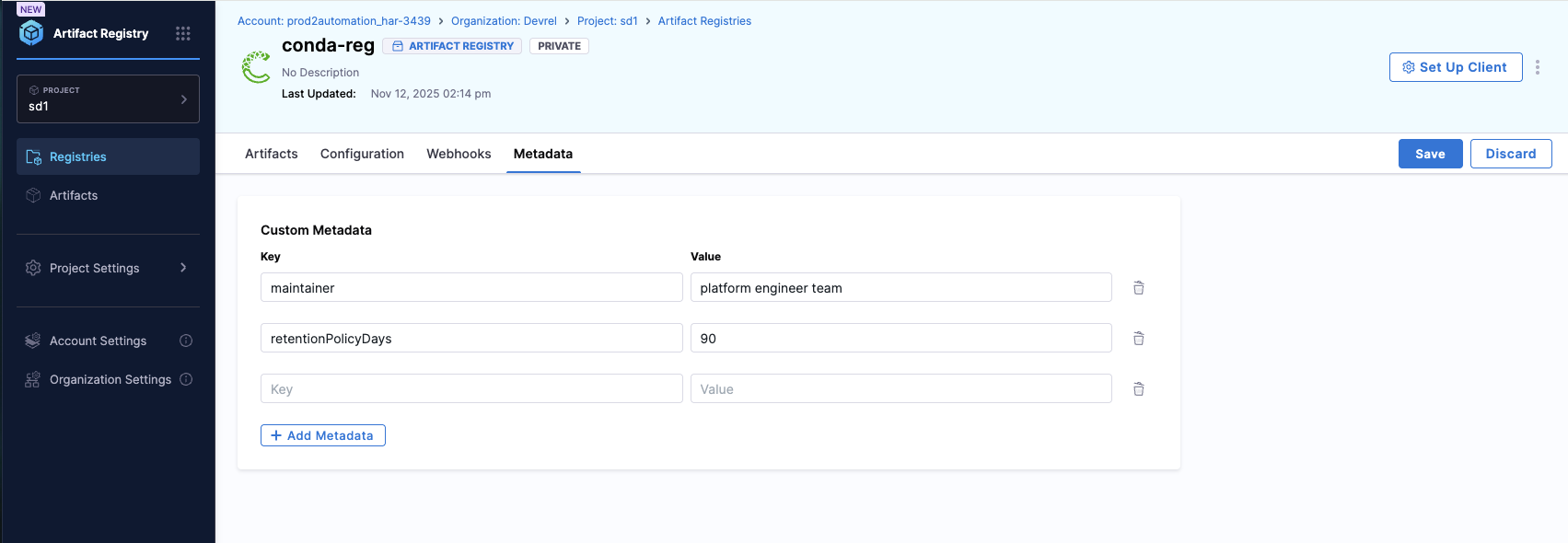
**Registry Level Metadata**
Apply metadata to entire registries for high-level categorization and filtering. This is useful for identifying registry purpose, ownership, or environment classification.
**Use cases:**
* Categorize registries by team, department, or project
* Tag registries by environment (dev, staging, production)
* Track registry ownership and responsibility
**How to add metadata to a registry:**
1. Navigate to the **Artifact Registry** module in your Harness project
2. Locate the registry you want to add metadata to
3. Click on the registry to open its details page
4. Select the **Metadata** tab
5. Click **Add Property**.
6. Enter key-value pairs (e.g., `owner: platform-team`, `environment: production`)
7. Click **Save** to apply the metadata
Your registry metadata will be visible in the registry list and can be used for filtering.
{% endtab %}
{% tab title="Artifact Level" %}
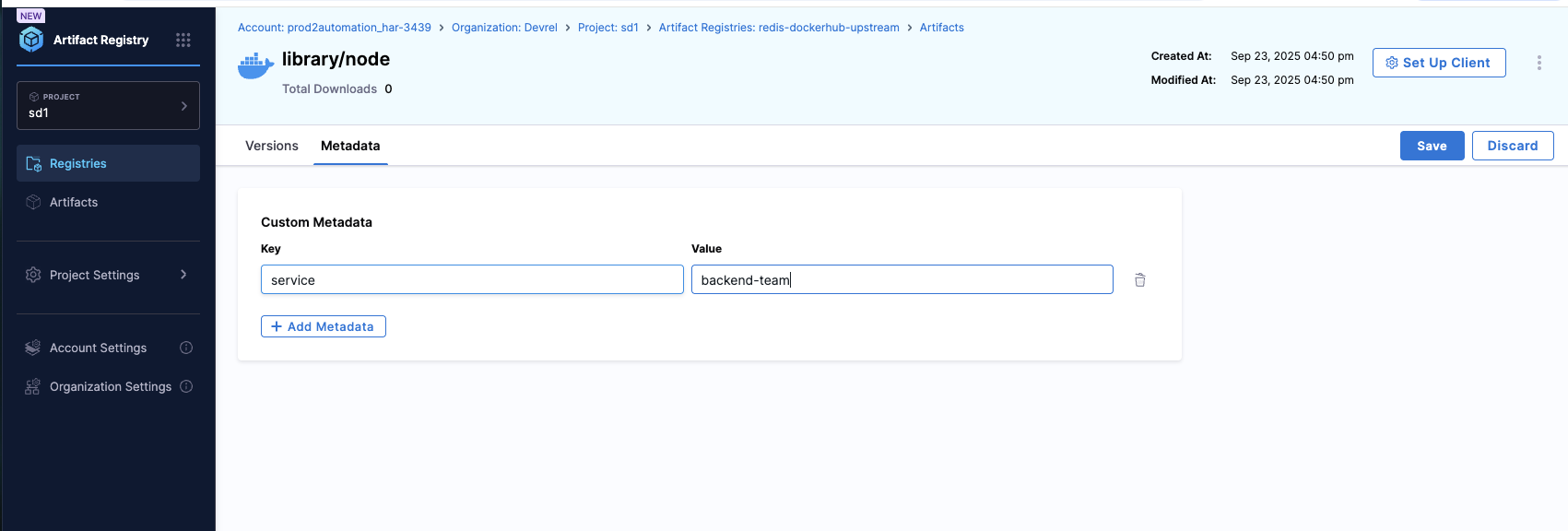
**Artifact Level Metadata**
Attach metadata to specific artifacts within a registry. This level is ideal for properties that apply across all versions of an artifact, such as component type, owner team, or documentation links.
**Use cases:**
* Identify component type (service, library, configuration)
* Track artifact ownership and maintainers
* Link to documentation or source repositories
* Set security classifications
**How to add metadata to an artifact:**
1. Navigate to your registry in the **Artifact Registry** module
2. Click on the registry then select the artifact you want to add metadata to
3. In the artifact details page, locate the **Metadata** tab
4. Click **Add Property**.
5. Add key-value pairs (e.g., `component.type: service`, `owner: backend-team`)
6. Click **Save** to apply the metadata
Artifact metadata will be displayed in the artifact details and can be used for filtering within the registry.
{% endtab %}
{% tab title="Package Level" %}
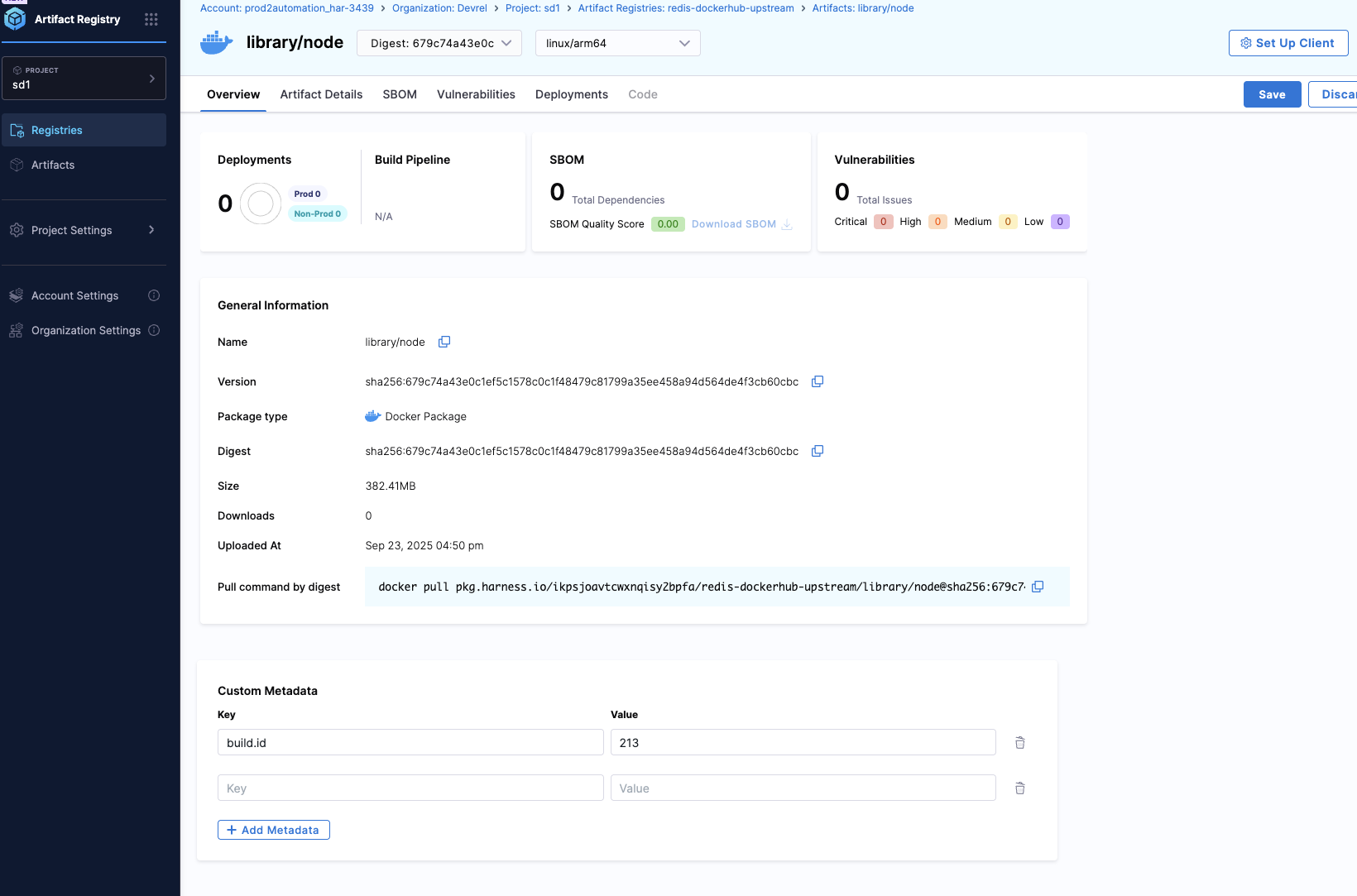
**Package Level Metadata**
Add metadata to individual packages (versions) within an artifact. Use this for version-specific information like build IDs, Git commits, test results, or approval status. Each package version can have its own unique metadata.
**Use cases:**
* Track build information (build ID, timestamp, commit hash)
* Record test and security scan results
* Document approval status and deployment targets
* Link to CI/CD pipeline runs
**How to add metadata to a package:**
1. Navigate to your Artifact list and select an artifact
2. In the artifact details page, locate the **Versions** or **Packages** list
3. Click on the specific version/package you want to add metadata to
4. In the package overview page, locate the **Custom Metadata** below.
5. Click **Add Property**.
6. Add key-value pairs (e.g., `build.id: build-1234`, `git.commit: a1b2c3d4`)
7. Click **Save** to apply the metadata
Package metadata is version-specific and will only appear for that particular version.
{% endtab %}
{% endtabs %}
### Metadata properties
**Key-Value Structure**
* **Multiple pairs**: You can add multiple key-value pairs to any artifact or registry
* **Duplicate keys allowed**: The same key can be used with different values across different artifacts
* **String values**: All values are stored as strings, including numbers and booleans
{% hint style="info" %}
**DATA TYPE HANDLING**
All metadata values are stored as strings, regardless of the input type. Numbers and booleans will be converted to string format (e.g., `true` becomes `"true"`, `42` becomes `"42"`).
{% endhint %}
{% hint style="info" %}
**METADATA LIMITATIONS**
* Maximum of 50 key-value pairs per artifact or registry
* Key length: Maximum 128 characters
* Value length: Maximum 256 characters
{% endhint %}
### Search and filter artifacts using metadata
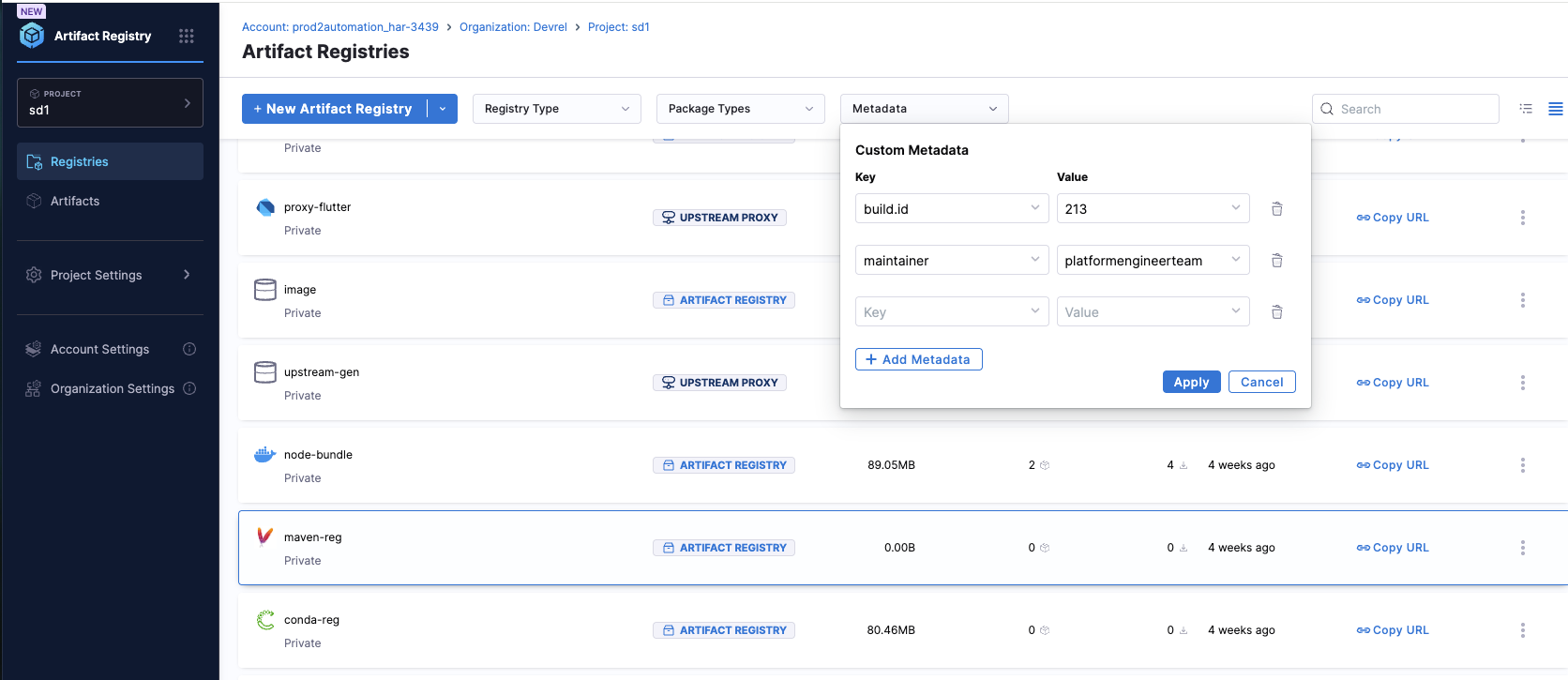
Harness Artifact Registry provides powerful metadata-based search and filtering capabilities at multiple levels, allowing you to quickly find the artifacts you need based on custom attributes.
**Where You Can Filter**
Metadata filtering is available at four levels:
1. **Registry list view**: Filter registries by metadata in the main registry listing page
2. **Artifact list within a registry**: Filter artifacts inside a specific registry using metadata
3. **Package/version list**: Filter specific package versions based on their metadata
4. **Global artifact search**: Search across all artifacts using metadata criteria
Each level includes a dropdown filter that allows you to select metadata keys and values to narrow down your results.
**How to Filter by Metadata**
To filter artifacts and registries using metadata, perform the following steps:
1. Navigate to the appropriate list view (registries, artifacts, or packages)
2. Locate the metadata filter dropdown.
3. Select the metadata key you want to filter by
4. Choose or enter the value to filter
5. The list will update to show only matching items
### Common metadata use cases
**Artifact-Level Metadata Examples**
| Key | Description | Example Value |
| ------------------ | -------------------------- | -------------------------------------------- |
| `owner` | Team or person responsible | `"platform-team"` |
| `component.type` | Type of component | `"service"`, `"library"`, `"config"` |
| `security.level` | Security classification | `"public"`, `"internal"`, `"confidential"` |
| `lifecycle.status` | Current lifecycle stage | `"active"`, `"deprecated"`, `"experimental"` |
| `docs.url` | Documentation link | `"https://docs.example.com/service"` |
| `source.repo` | Source code repository | `"https://github.com/org/repo"` |
**Package-Level Metadata Examples**
| Key | Description | Example Value |
| ---------------------- | --------------------- | --------------------------------------- |
| `build.id` | CI build identifier | `"build-1234"` |
| `build.timestamp` | Build creation time | `"2023-03-15T14:33:22"` |
| `git.commit` | Git commit hash | `"a1b2c3d4e5f6"` |
| `git.branch` | Source branch | `"main"`, `"feature/xyz"` |
| `approvals.status` | Approval status | `"pending"`, `"approved"`, `"rejected"` |
| `security.scan.status` | Security scan result | `"passed"`, `"failed"`, `"exempted"` |
| `tests.status` | Test execution status | `"passed"`, `"failed"` |
| `deployment.targets` | Target environments | `"dev,staging,prod"` |
{% hint style="info" %}
You can combine multiple metadata filters to narrow down your results further and find exactly what you are looking for.
{% endhint %}
### Best practices
Follow these recommendations to effectively use metadata in your Artifact Registry:
1. **Establish naming conventions**: Define standard metadata keys across your organization for consistency
2. **Use hierarchical keys**: Adopt dot notation for related metadata (e.g., `security.level`, `security.scan.status`)
3. **Keep values concise**: Stay within the 256-character limit for better readability
4. **Document your schema**: Maintain documentation of standard metadata keys and their expected values
5. **Leverage version-specific metadata**: Use package-level metadata for build and deployment tracking
6. **Regular cleanup**: Review and remove obsolete metadata to maintain clarity
## Next steps
* [Find artifacts](/artifact-registry/use-artifact-registry/manage-artifacts/find-artifacts.md) using metadata filters
* [Artifact management](/artifact-registry/use-artifact-registry/manage-artifacts/artifact-management.md) for more artifact operations
* [Artifact details](/artifact-registry/use-artifact-registry/manage-artifacts/artifact-details.md) to understand artifact information
{% @harness-feedback/feedback %}