Governance Recommendations
This topic describes how to optimize cloud costs using asset governance.
Recommendations help kickstart your journey with governance. Essentially, Harness run certain policies behind the scenes to generate recommendations for your governance-enabled AWS accounts. These policies not only help to cut costs but also increase the efficiency of your system. On the Governance Overview page, Harness showcases recommendations that will benefit you to save costs on associated resources. You can click on any recommendation to view its details.
Recommendations By Harness
Cloud Asset Governance provides valuable recommendations, but when it comes to operationalizing them at scale, it might become challenging. Additionally, when using shared cloud accounts across teams, project-level recommendations might not work out. With Granular Recommendations, Governance recommendations will now be generated at the individual resource level, ensuring greater granularity and actionable insights for both custom and out-of-the-box (OOTB) recommendations. This enhancement simplifies implementation and tracking, allowing customers to take more effective action on governance recommendations at scale.
GCP Resource Coverage (Examples)
Compute Engine instances
Cloud Storage buckets
App Engine applications
Cloud SQL instances
Cloud IAM policies
For a comprehensive list of all supported GCP resources, refer to the GCP Resource Reference — Cloud Custodian documentation.
Rules Generating Recommendations
The "Rules Generating Recommendations" tab shows all the rules you’ve turned on to generate recommendations. Every day, our system runs these rules across your main accounts and regions. The results are shown as recommendations, so you can track their full lifecycle from when they’re created to when they’re addressed. The tab also gives you insights into the rules you’ve enabled. You can see a breakdown by account and region, including whether the rule ran successfully, had an error, or found resources that don’t have any savings attached.
Using Rules Generating Recommendations
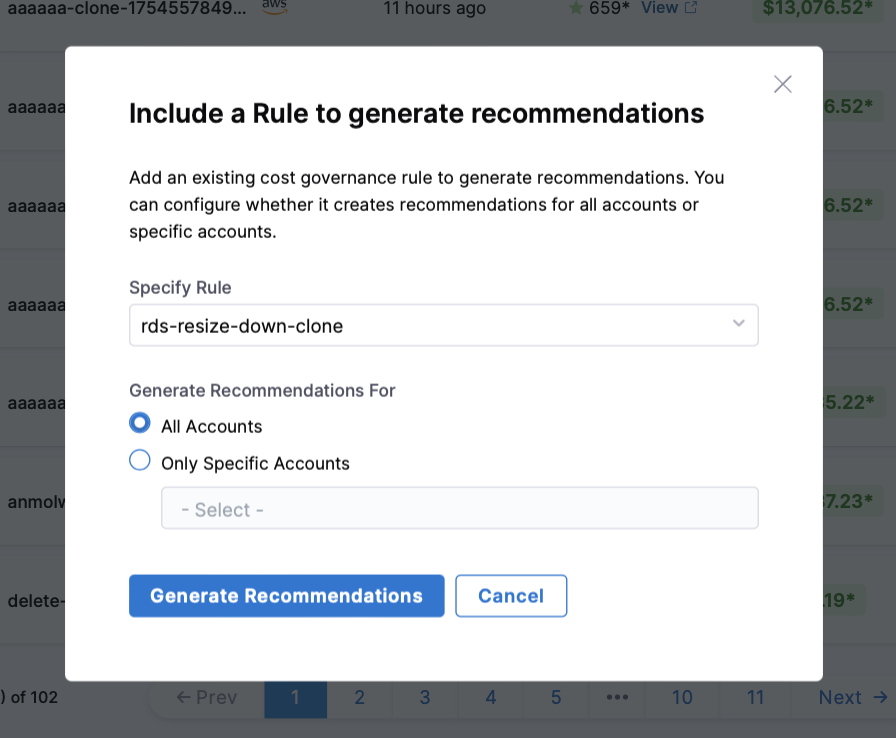
Navigate to the Rules Generating Recommendations > +New Rule to begin the process
Select a governance rule to generate recommendations
Configure the rule's scope:
All Accounts: Apply the rule across your entire cloud infrastructure
Specific Accounts: Target only selected cloud accounts for evaluation
Click Generate Recommendations to initiate the evaluation process

After this, all the rules generating recommendations can be seen in the Rules Generating Recommendations tab alongwith last evaluation, recommendations, potential savings and success rate. If any connector and region combination encounters an issue, the system flags it with a Failed status. The UI displays a detailed error message to assist in resolving the issue quickly.
Status Breakdown:
Failed Status : A failed status indicates one of the following scenarios:
Missing Permissions: The necessary permissions required for Harness to get or list resources are not provided.
Harness Internal Error: A system-level issue occurred during processing.
Ignored Status : An ignored status indicates one of the following scenarios:
No Cost Data Available: Billing connector setup at Harness is missing cost data for the target cloud account.
Cost Threshold Not Met: Cost is less than $300 for the GCP project.
Invalid Region: The regions found in cost data is not valid to run against Governance Rule.
Success Status : A successful status indicates one of the following scenarios:
Recommendation Generated: The system successfully evaluated the rule and created a recommendation.
No Resources in Evaluation: The rule was evaluated, but there were no resources found.
Savings Below Threshold: A recommendation was generated, but the potential savings were calculated to be less than $10.
Granular Recommendations
Cloud Asset Governance provides valuable recommendations, but when it comes to operationalizing them at scale, it might become challenging. Additionally, when using shared cloud accounts across teams, project-level recommendations might not work out. With Granular Recommendations, Governance recommendations will now be generated at the individual resource level, ensuring greater granularity and actionable insights for both custom and out-of-the-box (OOTB) recommendations. This enhancement simplifies implementation and tracking, allowing customers to take more effective action on governance recommendations at scale.
Enabling Granular Recommendations
Owing to this, now, while adding a recommendation to Ignore List, users have the option to specify the scope at which the users want to ignore the recommendation. The scope can be either at:
Rule-level
Rule-level + Project-level
Rule-level + Project-level + Resource-level.
Last updated
Was this helpful?