> For the complete documentation index, see [llms.txt](https://developer.harness.io/llms.txt). Markdown versions of documentation pages are available by appending `.md` to page URLs; this page is available as [Markdown](https://developer.harness.io/cloud-cost-management/resources/cacm-architecture-diagrams/autostopping_for_azure_vms.md).
# AutoStopping for Azure VMs
AutoStopping for Azure VMs
Click to view full size image
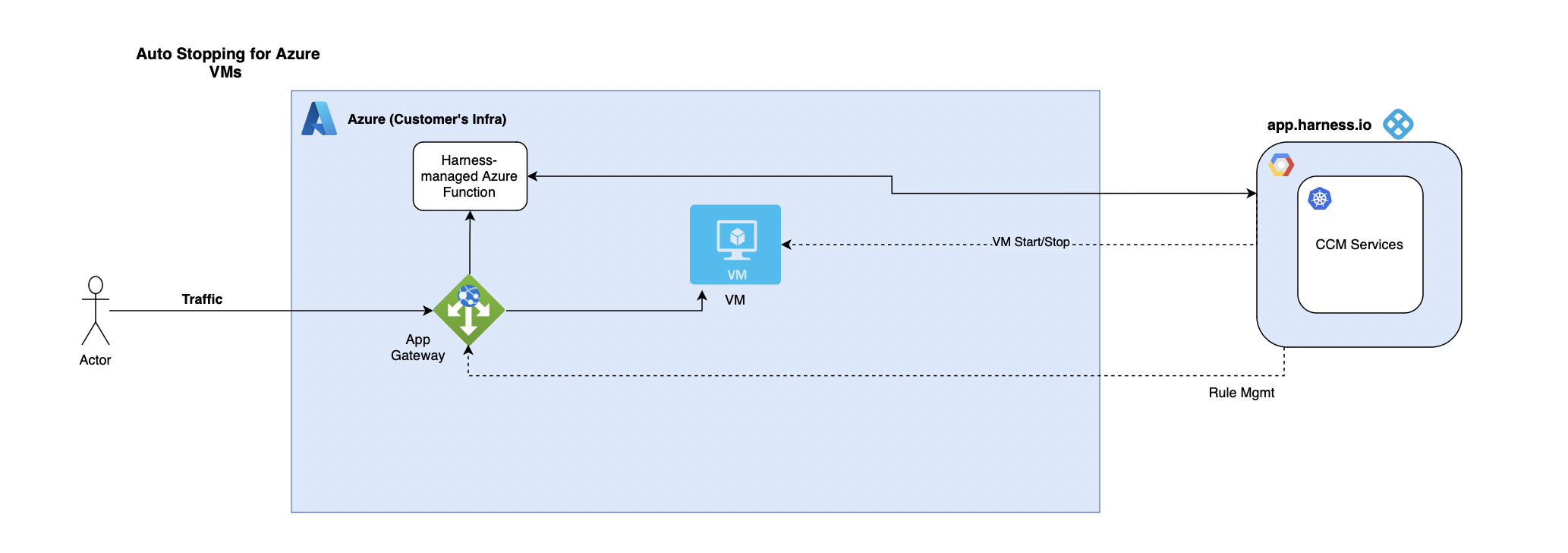
#### AutoStopping for Azure VMs: High-Level Overview
Harness manages the existing App Gateway within the customer environment. In cases where no App Gateway is present, Harness initiates the creation of a new one. Simultaneously, a freshly instantiated Proxy Manager comes into play, diligently tracking traffic directed towards the target resources.
**Components and Flow:**
1. CCM Services:
* A suite of CCM services collaborates seamlessly, orchestrating the AutoStopping mechanism tailored for Azure VMs. These services serve as the backbone, driving automation and intelligence.
2. Customer Infrastructure:
* The customer's infrastructure houses Azure VMs, subject to AutoStopping rules defined by CCM.
3. App Gateway Management by Harness:
* Harness takes charge of managing the existing App Gateway within the customer environment during the onboarding process.
* If no App Gateway is found, Harness proactively creates a new one, establishing a crucial element for directing and managing traffic.
4. Harness-managed Azure Function Creation:
* A newly created Proxy Manager becomes an essential component, actively tracking traffic directed towards Azure VMs.
* The Proxy Manager's role is central to detecting and analyzing traffic patterns for effective AutoStopping actions.
{% @harness-feedback/feedback %}