> For the complete documentation index, see [llms.txt](https://developer.harness.io/llms.txt). Markdown versions of documentation pages are available by appending `.md` to page URLs; this page is available as [Markdown](https://developer.harness.io/continuous-delivery/3.0/use-deployments/helm/helm-deployment-strategies/basic.md).
# Helm basic deployment
Deploy a Helm chart to all instances in a single phase using helm upgrade --install.
A Helm basic deployment runs `helm upgrade --install` against the target cluster in a single phase. Harness fetches the chart, merges values files, executes the Helm command, and waits for all workloads to reach steady state. If the deployment fails, Harness rolls back automatically by running `helm rollback`.
***
### Before you begin
* **A Helm service:** Go [Helm services](/continuous-delivery/3.0/use-deployments/helm/helm-services.md) set up a service with a chart source and values files.
* **A Helm infrastructure:** Go [Helm infrastructure](/continuous-delivery/3.0/use-deployments/helm/helm-infrastructure.md) connect a cluster and namespace.
* **A Harness delegate in the target cluster:** The delegate runs Helm commands against your cluster.
* **Runtime configuration:** Every Helm stage requires a `runtime` block specifying the connector and namespace. Go [Helm runtime configuration](/continuous-delivery/3.0/use-deployments/helm/overview.md#helm-runtime-configuration) understand the required fields.
***
### How basic deployments work
A Helm basic deployment applies your chart directly to all instances in the target namespace in one phase. Harness runs `helm upgrade --install`, which creates a new release if one does not exist or upgrades it in place if it does. Helm handles revision tracking natively; each upgrade increments the release revision, so rollback targets a specific numbered revision rather than a separate manifest copy.
Use a basic deployment when:
* You want the simplest, single-phase delivery path with automatic rollback on failure.
* Your application does not require canary traffic validation or blue-green isolation before full promotion.
* You are updating a chart that is safe to apply immediately to all instances.
***
### Pipeline YAML View complete basic stage YAML
```yaml
pipeline:
name: helm-native-basic
identifier: helm_native_basic
clone:
disabled: true
stages:
- name: basic-deploy
id: basic_deploy
service:
type: helm
items:
-
environment:
id:
deploy-to:
steps:
- name: Helm Basic Deploy
id: helmBasicDeployStep
template:
uses: helmBasicDeployStep
rollback:
- group:
steps:
- name: Helm Rollback
id: helmRollbackStep
template:
uses: helmRollbackStep
id: helmBasicRollback
name: Helm Basic Rollback
on-failure:
errors: all
action: stage-rollback
runtime:
kubernetes:
namespace:
connector:
delegate:
```
Go [Helm runtime configuration](/continuous-delivery/3.0/use-deployments/helm/overview.md#helm-runtime-configuration) understand the required `runtime` block and how to find your connector and namespace values.
***
### Configure basic stage
#### Select basic strategy
When creating a new Helm stage, the strategy wizard asks you to choose a deployment strategy. Select **Basic** from the list.
Harness automatically adds one step to the stage canvas.
#### Configure Helm Basic Deploy step
Click **Helm Basic Deploy** in the stage canvas to open its configuration panel.
The following fields are available:
| Parameter | Description | Default |
| --------------------------------- | -------------------------------------------------------------------------------------------------------------------------------------------------------------- | ------------------- |
| **Name** | Display name for the step in the pipeline canvas. | `Helm Basic Deploy` |
| **Ignore Failed Release History** | When `true`, proceeds with deployment even if the previous Helm release has a failed status. Use this to recover from a broken release without manual cleanup. | `false` |
| **Skip Steady State Check** | When `true`, skips waiting for all deployed workloads to reach steady state after `helm upgrade --install`. | `false` |
| **Run Chart Tests** | When `true`, runs `helm test` against the release after a successful deployment. | `false` |
| **Environment Variables** | Additional environment variables to pass into the Helm plugin execution. | none |
| **Command Flags** | Additional flags to append to the `helm upgrade` command, for example `--atomic` or `--cleanup-on-fail`. | none |
Select **+ More options** to access additional fields:
| Parameter | Description | Default |
| ------------------------- | ------------------------------------------------------------------------------------------------------------------------------- | ------- |
| **Skip Cleanup** | When `true`, skips cleanup of a failed first release. Use this to inspect resources left behind after a failed initial install. | `false` |
| **Print Manifests** | When `true`, logs the full rendered chart manifest to the step output with secrets redacted. | `false` |
| **Server-Side Rendering** | When `true`, passes `--server` to `helm template` so manifests are rendered against the live cluster rather than locally. | `false` |
Go [Helm Basic Deploy step reference](/continuous-delivery/3.0/use-deployments/helm/step-library/helm-basic-deploy.md) review the full field reference.
{% hint style="info" %}
**INSERT STEPS BETWEEN DEPLOY AND END**
The basic strategy adds a single step by default. You can insert approval, verification, or notification steps anywhere in the stage before or after the Helm Basic Deploy step.
{% endhint %}
***
### Rollback
If the Helm Basic Deploy step fails, Harness runs the rollback group automatically. The rollback group contains one step: **Helm Rollback**. Click it in the rollback canvas to configure it.
The following fields are available:
| Parameter | Description | Default |
| --------------------------- | ------------------------------------------------------------------------------------- | --------------- |
| **Name** | Display name for the rollback step. | `Helm Rollback` |
| **Skip Steady State Check** | When `true`, skips waiting for workloads to reach steady state after `helm rollback`. | `false` |
| **Run Chart Tests** | When `true`, runs `helm test` after a successful rollback. | `false` |
| **Environment Variables** | Additional environment variables to pass into the rollback execution. | none |
| **Command Flags** | Additional flags to append to the `helm rollback` command. | none |
The step retrieves the previous release revision from Helm's built-in release history and runs `helm rollback `.
Go [Helm Rollback step reference](/continuous-delivery/3.0/use-deployments/helm/step-library/helm-rollback.md) review the full reference.
***
### What happens on execution
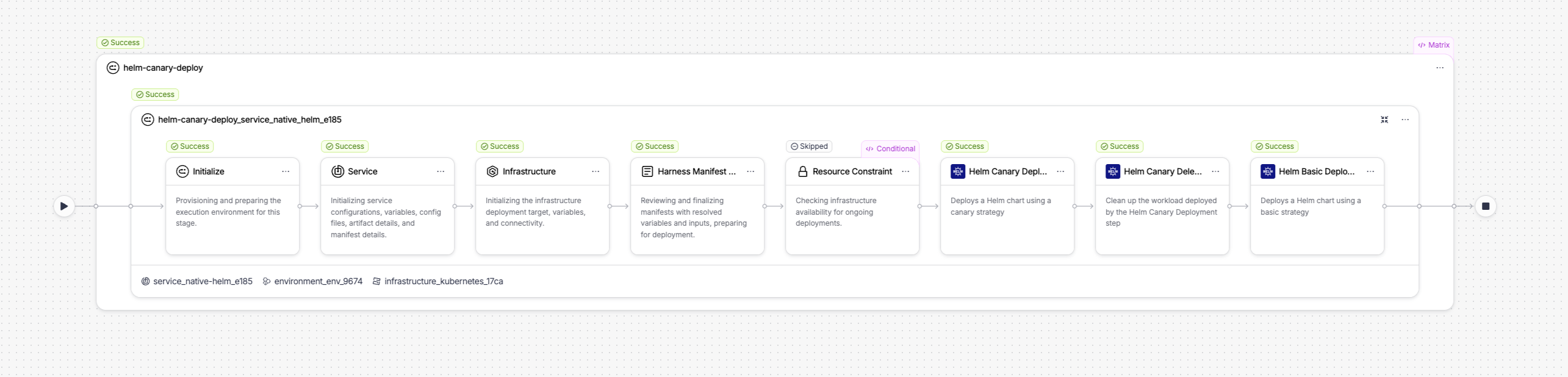
When you run a pipeline with a basic stage, the execution view shows the full step sequence. A successful run looks like this:
Click to view full size image
The execution includes setup steps Harness runs automatically before the configured step:
* **Initialize:** Provisions and prepares the execution environment for the stage.
* **Service:** Initializes service configurations, variables, config files, artifact details, and manifest details.
* **Infrastructure:** Initializes the infrastructure deployment target, variables, and connectivity.
* **Harness Manifest:** Reviews and finalizes manifests with resolved variables and inputs, preparing for deployment.
* **Resource Constraint:** Checks infrastructure availability for concurrent deployments. Skipped if no resource constraints are configured.
The configured step follows.
***
#### Helm Basic Deploy step in execution
The step executes the following actions internally:
1. **Input validation:** Resolves and prints all input parameters, including release name, chart path, values files, Helm flags, namespace, and credentials. Prints `PARAM VALIDATION: All looks good` before proceeding.
2. **Helm version check:** Detects the Helm CLI version available on the delegate. Harness uses `helm3` by default.
3. **Release history check:** Runs `helm history` to inspect the current state of the release. If no release exists, Harness proceeds with a fresh install. If **Ignore Failed Release History** is enabled and the last release shows a failed status, Harness clears it before upgrading.
4. **Helm upgrade:** Runs `helm upgrade --install ` with all resolved values files and command flags. Helm creates a new revision on the release.
5. **Steady state check:** Polls the cluster until all Deployment, StatefulSet, and DaemonSet workloads in the release reach ready status. Bypassed if **Skip Steady State Check** is enabled.
***
### Next steps
* Go [Helm canary deployment](/continuous-delivery/3.0/use-deployments/helm/helm-deployment-strategies/canary.md) deploy to a subset of instances first and validate before promoting.
* Go [Helm blue-green deployment](/continuous-delivery/3.0/use-deployments/helm/helm-deployment-strategies/blue-green.md) route production traffic between two full release environments.
* Go [Helm Basic Deploy step reference](/continuous-delivery/3.0/use-deployments/helm/step-library/helm-basic-deploy.md) review all step settings.
{% @harness-feedback/feedback %}