> For the complete documentation index, see [llms.txt](https://developer.harness.io/llms.txt). Markdown versions of documentation pages are available by appending `.md` to page URLs; this page is available as [Markdown](https://developer.harness.io/continuous-delivery/3.0/use-deployments/kubernetes/step-library/k8s-apply.md).
# Kubernetes Apply
Apply Kubernetes manifests directly to the cluster without using a managed release strategy.
The Kubernetes Apply step applies manifests to a Kubernetes cluster using `kubectl apply`. It does not use release tracking or automatic rollback. Use it for Jobs, ConfigMaps, or supporting resources that do not need a rolling deployment strategy.
{% hint style="info" %}
**NO AUTOMATIC ROLLBACK**
If the step fails, the pipeline follows the failure strategy you configure but does not automatically roll back applied resources. Add a rollback step manually if your stage requires it.
{% endhint %}
***
### Before you begin
Before you configure the step, make sure you have the following in place:
* **A Kubernetes service:** Go [Kubernetes services](/continuous-delivery/3.0/use-deployments/kubernetes/kubernetes-services.md) to set up service manifests and an artifact source.
* **A Kubernetes infrastructure:** Go [Kubernetes infrastructure](/continuous-delivery/3.0/use-deployments/kubernetes/kubernetes-infrastructure.md) to connect a cluster and namespace.
* **A Harness delegate in target cluster:** The delegate runs deployment steps in the cluster.
* **Runtime configuration:** Every Kubernetes stage requires a `runtime` block specifying a connector and namespace. Go [Kubernetes runtime configuration](/continuous-delivery/3.0/use-deployments/kubernetes/overview.md#kubernetes-runtime-configuration) to understand the required fields.
***
### Configure the step
The following parameters are available on the Kubernetes Apply step.
| Parameter | Description | Required |
| --------------------------- | --------------------------------------------------------------------------------------------------------------------- | -------- |
| **Name** | Display name for the step in the pipeline. | Required |
| **Skip Dry Run** | When enabled, skips the `kubectl apply --dry-run` check before applying manifests. Default: `false`. | Optional |
| **Skip Steady State Check** | When enabled, Harness does not wait for workloads to reach steady state after applying. Default: `false`. | Optional |
| **Manifest Path** | One or more relative paths to the manifest files to apply, derived from the service configuration. | Optional |
| **Kubeconfig Path** | Path to the kubeconfig file, derived from the infrastructure configuration. Default: `${{infra.kube_config_path}}`. | Optional |
| **Namespace** | Target namespace on the cluster. Default: `${{infra.namespace}}`. | Optional |
| **Release Name** | Name for this release. Default: `${{infra.releaseName}}`. | Optional |
| **Command Flags** | Additional flags passed to the `kubectl apply` command, such as `--server-side` or `--force-conflicts`. | Optional |
| **Manifest Output Path** | File path where Harness writes the resolved manifest output. | Optional |
| **Release Number** | Release sequence number. Default: `0`. | Optional |
| **Apply Command Timeout** | Timeout for the kubectl apply command. Default: `5m`. | Optional |
| **Log Level** | Verbosity of step logs. Default: `info`. | Optional |
| **Dry Run Only** | When enabled, runs only the dry run and does not apply manifests to the cluster. Default: `false`. | Optional |
| **Release Pruning** | When enabled, removes resources from a previous release that are no longer in the current manifest. Default: `false`. | Optional |
| **Print Manifests** | When enabled, prints the full resolved manifest to the step log before applying. Default: `false`. | Optional |
| **Server Side Apply** | When enabled, passes `--server-side` to `kubectl apply`. Requires Kubernetes 1.18 or later. Default: `false`. | Optional |
***
#### Add command flags
To add a command flag:
1. In the step configuration, click **+ Add** next to **Command Flags**.
2. Enter the flag value.
Common flags include `--server-side`, `--force-conflicts`, and `--validate=strict`. You can also enable server-side apply directly with the **Server Side Apply** toggle, which is equivalent to passing `--server-side` as a command flag.
***
### YAML example
The following is the relevant portion of a pipeline YAML that uses the Kubernetes Apply step:
```yaml
- name: Kubernetes Apply
id: k8sApplyStep
template:
uses: k8sApplyStep
```
To skip the dry run and enable server-side apply:
```yaml
- name: Kubernetes Apply
id: k8sApplyStep
template:
uses: k8sApplyStep
with:
skip_dry_run: "true"
server_side_apply: "true"
```
***
### Supported workload types
The Kubernetes Apply step supports all Kubernetes workload types, including Jobs. All resources in the specified manifests are applied to the cluster.
The Apply step does not version ConfigMap or Secret objects. Every run overwrites the existing ConfigMap or Secret. If you need versioned ConfigMaps or Secrets, use the Kubernetes Rolling Deploy step instead.
The Apply step uses `kubectl apply` merge semantics. Fields present in the existing cluster object but absent from your new manifest may persist.
***
#### Skip a manifest file
To prevent Harness from applying a specific file, add this comment at the top of that file:
```yaml
# harness.io/skip-file-for-deploy
```
***
### Read the step output
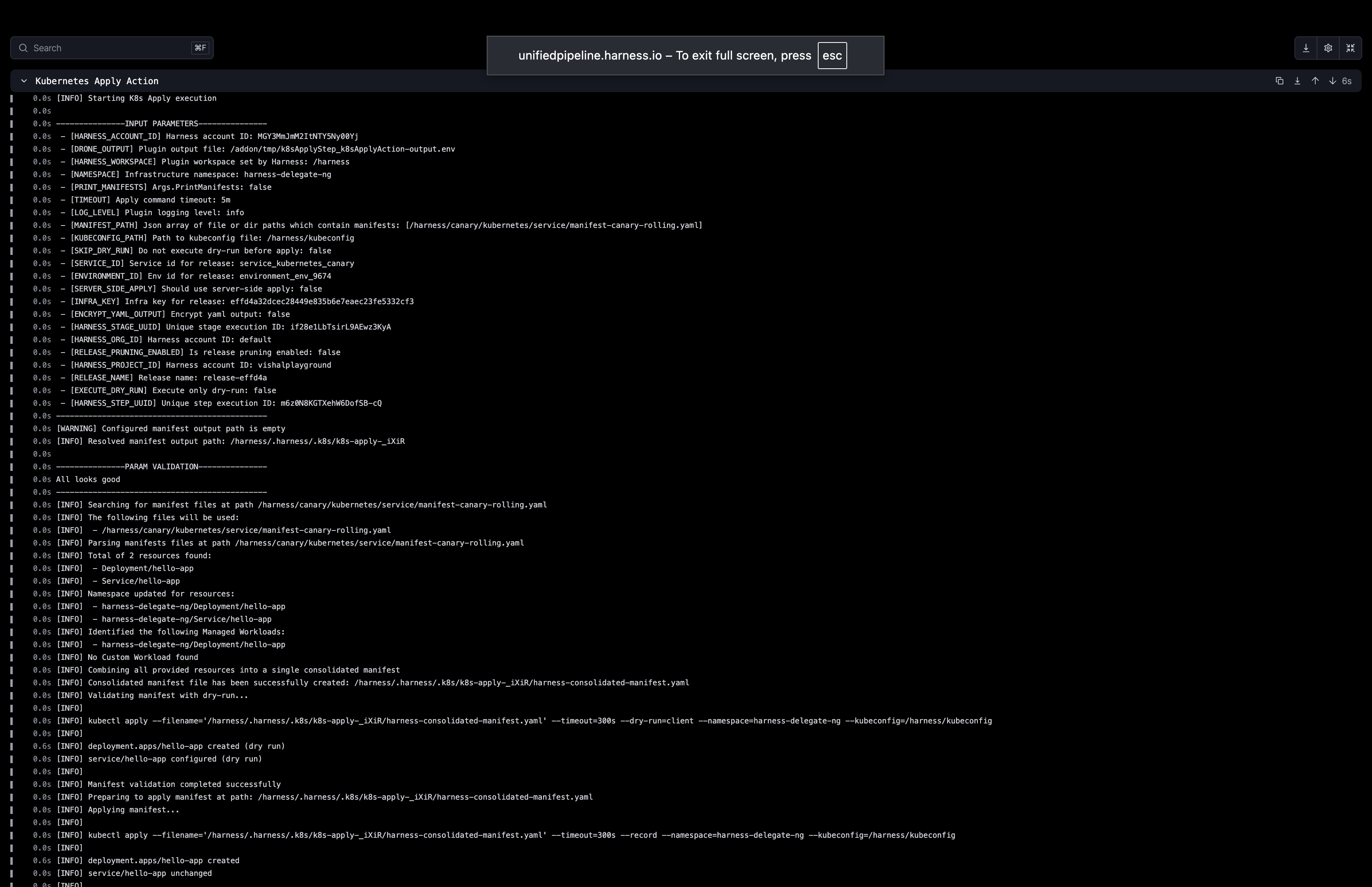
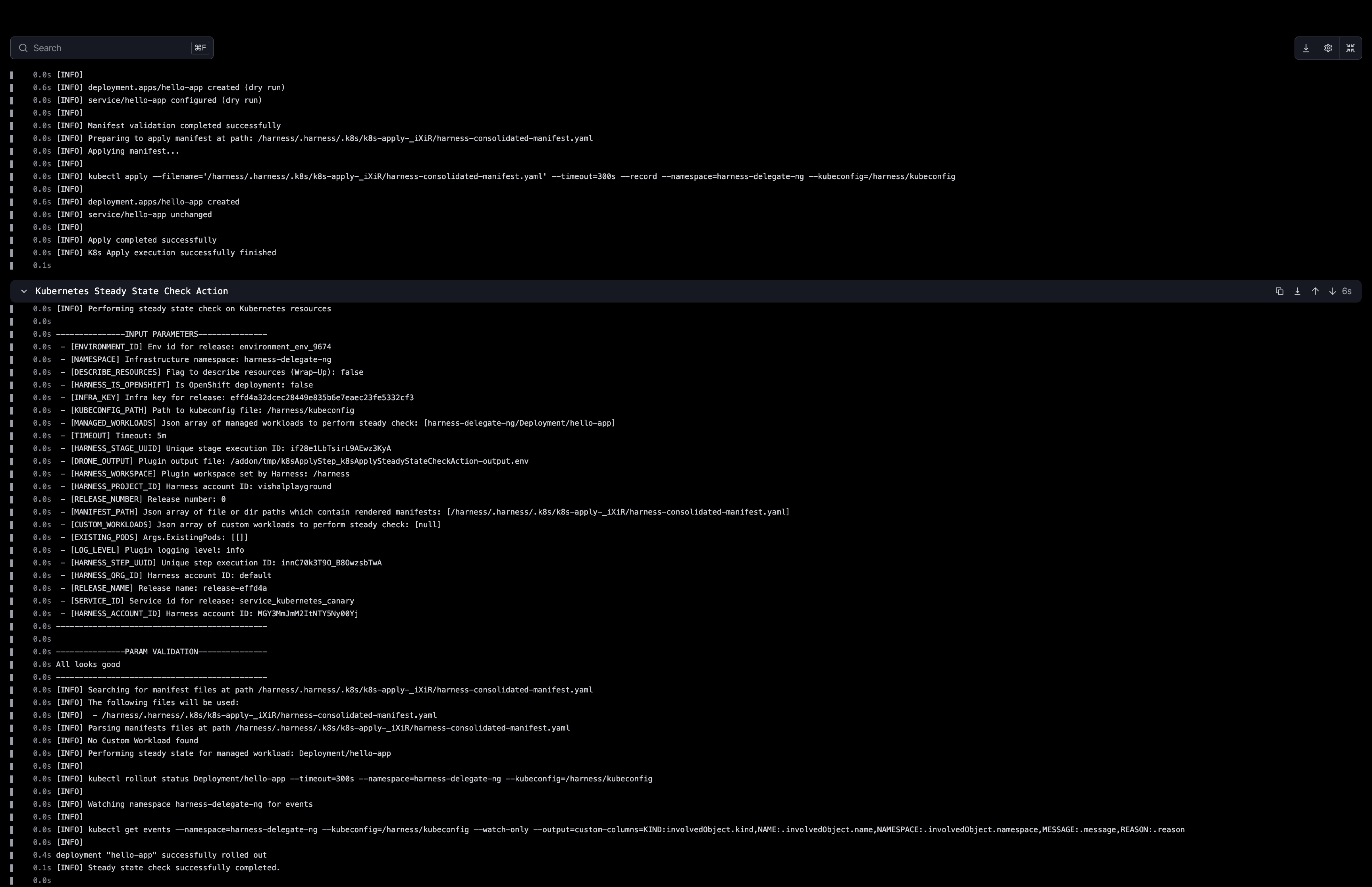
The step log shows each resource fetched, validated, and applied to the cluster.
Click to view full size image
Click to view full size image
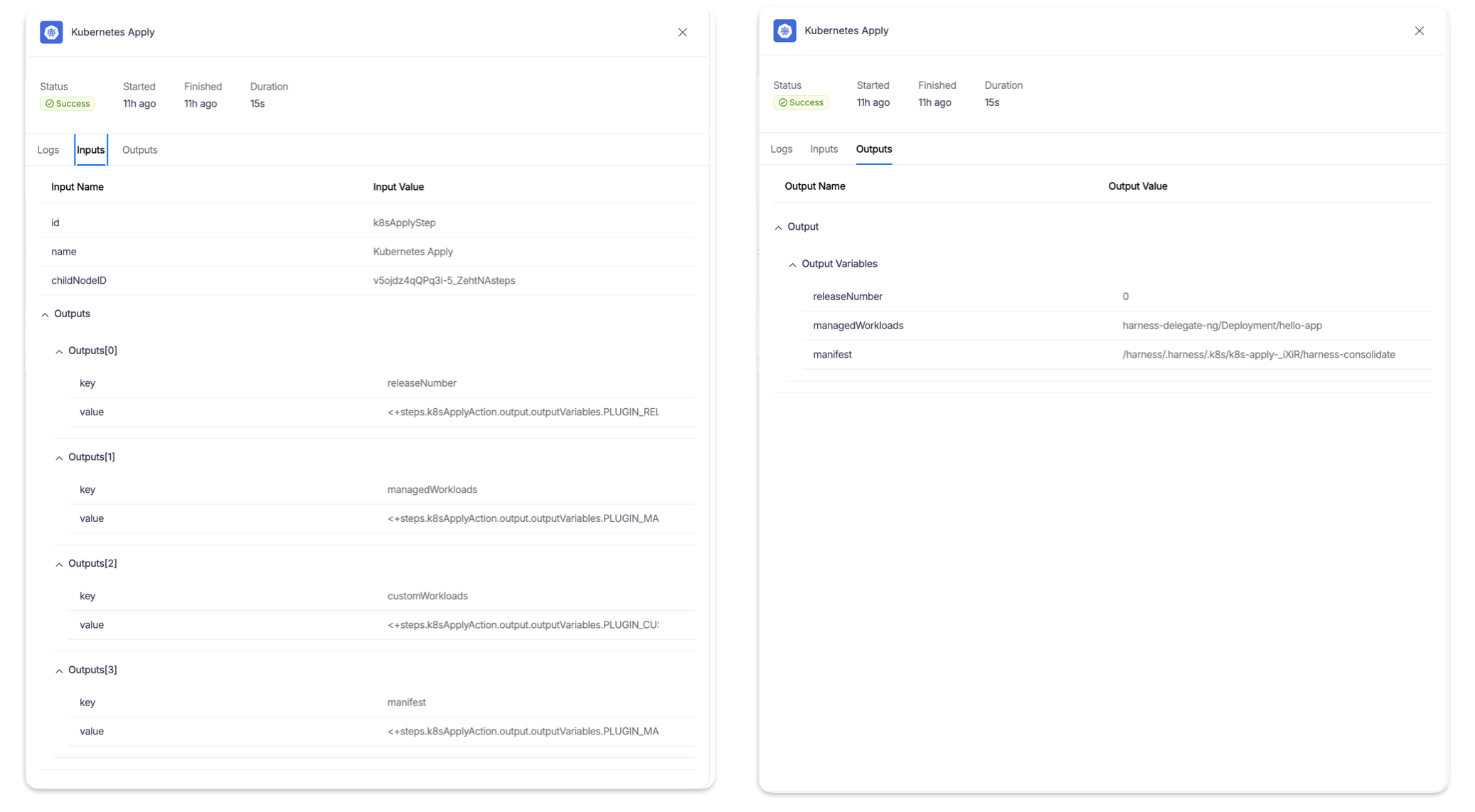
The step also exposes output variables you can reference in downstream steps.
Click to view full size image
The following output variables are available after the step runs:
| Output variable | Description |
| ------------------ | --------------------------------------------------------------------------------------------------------- |
| `releaseNumber` | The release sequence number for this apply. |
| `managedWorkloads` | Comma-separated list of workloads managed by this apply, e.g. `harness-delegate-ng/Deployment/hello-app`. |
| `manifest` | Path to the consolidated manifest file written by this step. |
***
### OpenShift support
When Harness detects OpenShift resources, it automatically switches to the `oc` client instead of `kubectl`. OpenShift resources require a release name to be configured.
***
### Advanced settings
The following advanced settings are available on the Kubernetes Apply step.
* **Timeout duration**: Maximum time the step is allowed to run before being terminated.
* **On failure**: Define what happens if the step fails, such as retry, mark as success, or abort.
* **Strategy**: Configure a looping strategy to run this step over a list of values.
* **Conditional execution**: Run this step only when a specified condition is true.
***
### Next steps
* Go [Kubernetes Steady State Check](/continuous-delivery/3.0/use-deployments/kubernetes/step-library/k8s-steady-state-check.md) to wait for applied workloads to reach a healthy state.
* Go [Kubernetes Dry Run](/continuous-delivery/3.0/use-deployments/kubernetes/step-library/k8s-dry-run.md) to validate manifests before applying them.
* Go [Kubernetes Diff](/continuous-delivery/3.0/use-deployments/kubernetes/step-library/k8s-diff.md) to compare cluster state with your manifests before applying.
* Go [Failure strategies](broken://spaces/iHCl4N3pQkjhOYjQoOs7/pages/DZT9GmawFxfKDDlDDnZd) to configure what happens when the Apply step fails.
{% @harness-feedback/feedback %}