> For the complete documentation index, see [llms.txt](https://developer.harness.io/llms.txt). Markdown versions of documentation pages are available by appending `.md` to page URLs; this page is available as [Markdown](https://developer.harness.io/continuous-delivery/troubleshooting-and-resources/resources/integrating-cd-other-modules.md).
# Integrating CD with other Harness modules
Learn how the CD module works with other Harness modules.
This topic describes a few of the cross-module use cases in the Harness platform.
***
## What you will learn from this topic
* **CI and CD in one pipeline:** How to couple a Harness Continuous Integration (CI) stage with a Harness Continuous Delivery (CD) stage to build, push, and deploy an application.
* **Chaos Engineering integration:** How Harness Chaos Engineering (HCE) experiments run as part of a CD pipeline.
* **Feature Management & Experimentation integration:** How to manage feature flags from within a CD pipeline.
***
### Harness Continuous Integration
You can couple Harness Continuous Integration (CI) and Continuous Delivery (CD) in a single pipeline.
You can use Harness CI as the first stage in the pipeline to build, test, and push your app to a repo, and then have a subsequent CD stage pull that app version from the repo and deploy it to a dev, QA, or prod environment.
Here's the YAML for a simple example that builds and pushes an app in the CI stage and then pulls and deploys the app in the CD stage.
YAML
```yaml
pipeline:
name: tweety
identifier: tweety
projectIdentifier: CD_Docs
orgIdentifier: default
tags: {}
properties:
ci:
codebase:
connectorRef: tweetapp
build: <+input>
stages:
- stage:
name: Tweetapp
identifier: Tweetapp
type: CI
spec:
cloneCodebase: true
infrastructure:
type: KubernetesDirect
spec:
connectorRef: docimmut
namespace: default
automountServiceAccountToken: true
nodeSelector: {}
os: Linux
execution:
steps:
- step:
type: BuildAndPushDockerRegistry
name: Build Tweet App
identifier: Build_Tweet_App
spec:
connectorRef: Docker_Hub_with_Pwd
repo: cretzman/tweetapp
tags:
- <+pipeline.sequenceId>
service:
serviceRef: ""
variables: []
- stage:
name: deploy tweety
identifier: deploy_tweety
description: ""
type: Deployment
spec:
deploymentType: Kubernetes
service:
serviceRef: Tweety
environment:
environmentRef: Tweety
deployToAll: false
infrastructureDefinitions:
- identifier: Tweety
execution:
steps:
- step:
name: Rollout Deployment
identifier: rolloutDeployment
type: K8sRollingDeploy
timeout: 10m
spec:
skipDryRun: false
pruningEnabled: false
rollbackSteps:
- step:
name: Rollback Rollout Deployment
identifier: rollbackRolloutDeployment
type: K8sRollingRollback
timeout: 10m
spec:
pruningEnabled: false
tags: {}
failureStrategies:
- onFailure:
errors:
- AllErrors
action:
type: StageRollback
when:
pipelineStatus: Success
allowStageExecutions: true
```
Here's what the pipeline looks like in pipeline studio:
{% tabs %}
{% tab title="CI stage" %}
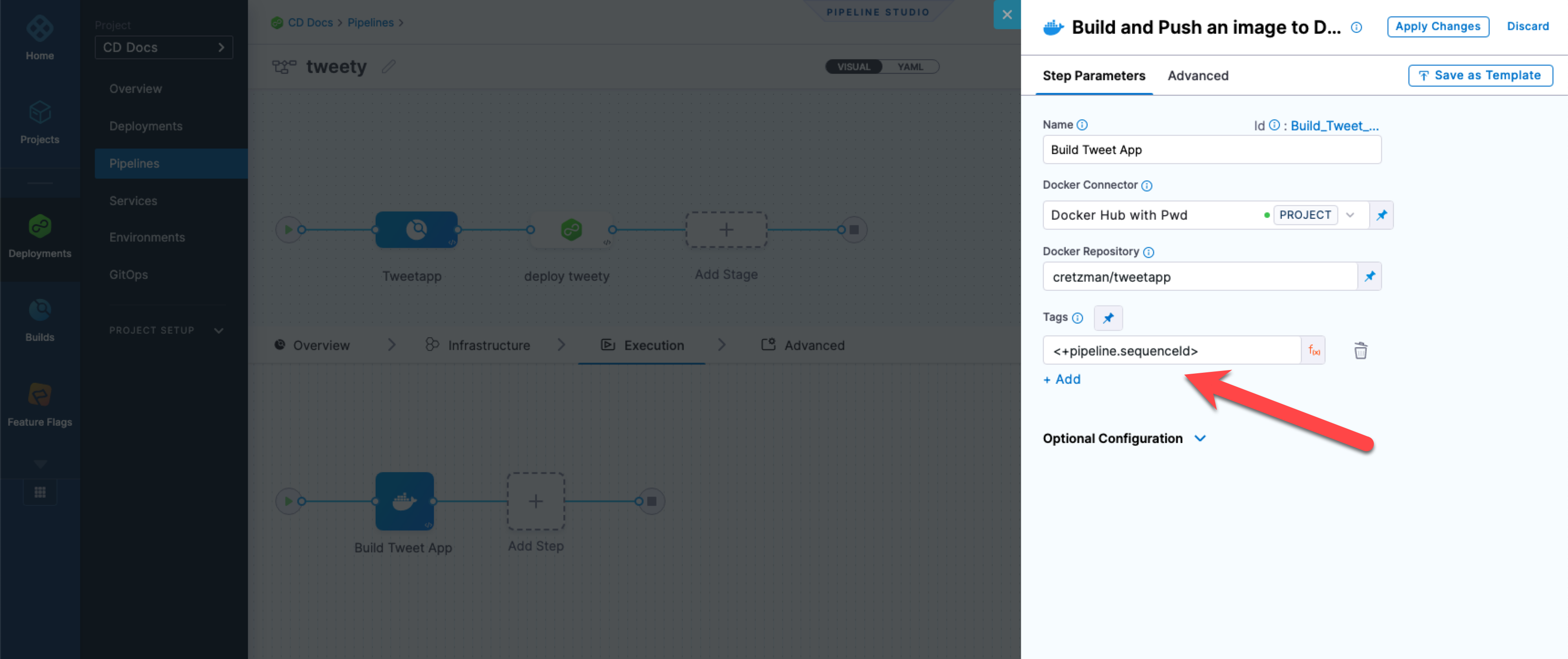
Here's the push step from the CI stage:
Click to view full size image
Note the `<+pipeline.sequenceId>` expression. This is used to tag the artifact pushed to Docker Hub. You can tag your artifact versions in a number of ways. The expression `<+pipeline.sequenceId>` is incremented each time the pipeline is run.
The expression `<+pipeline.sequenceId>` will be used in the subsequent CD stage to fetch the app version.
{% endtab %}
{% tab title="CD stage" %}
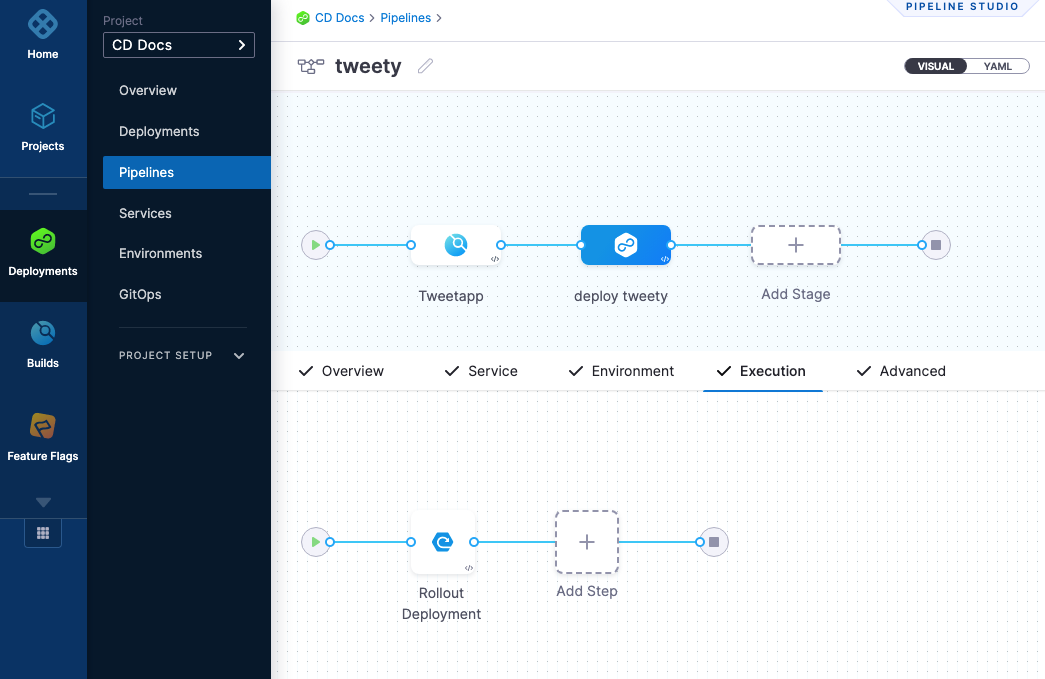
Here's the Kubernetes Rollout Deployment step from the CD stage.
Click to view full size image
In the stage's service, the expression `<+pipeline.sequenceId>` is used pull the app version.

It's that simple to integrate Harness CI and CD.
{% endtab %}
{% endtabs %}
**Learn more**
This was just a simple introduction to the integration.
For a longer tutorial of Harness CI and CD integration, go to [End-To-End CI/CD Pipeline](/continuous-delivery/troubleshooting-and-resources/tutorials/kubernetes-container-deployments/e2e-pipeline.md).
### Harness Chaos Engineering
The [Harness Chaos Engineering (HCE) integration with Harness CD](https://developer.harness.io/resilience-testing/chaos-engineering/integrations/cicd/harness-cd) allows chaos experiments to be executed as part of a Harness CD pipeline.
### Harness Feature Management & Experimentation
You can integrate [Harness Feature Management & Experimentation](https://developer.harness.io/feature-management-experimentation) into your [Harness CD pipelines](https://developer.harness.io/feature-management-experimentation/management-and-administration/pipelines) to manage feature flags as part of your deployment workflow.
By adding FME steps to CD stages, you can create, update, target, and disable feature flags during a pipeline execution. This allows feature flag operations to be versioned, reviewed, and executed alongside application deployments, reducing manual steps and improving release coordination.
You can integrate Harness FME with CD pipelines in the following ways:
* Creating or updating feature flags as part of a release
* Managing individual targeting lists during staged rollouts
* Adjusting default traffic allocations when deploying a new version
* Killing a feature flag immediately in response to deployment issues
For more information, see the [Pipelines documentation](https://developer.harness.io/feature-management-experimentation/management-and-administration/pipelines).
***
## Next steps
* [End-To-End CI/CD Pipeline](/continuous-delivery/troubleshooting-and-resources/tutorials/kubernetes-container-deployments/e2e-pipeline.md): A longer tutorial covering Harness CI and CD integration.
* [Services and environments overview](/continuous-delivery/new-to-continuous-delivery/overview.md): Learn how services and environments work in Harness CD.
{% @harness-feedback/feedback %}