> For the complete documentation index, see [llms.txt](https://developer.harness.io/llms.txt). Markdown versions of documentation pages are available by appending `.md` to page URLs; this page is available as [Markdown](https://developer.harness.io/continuous-delivery/troubleshooting-and-resources/resources/new-user/rampup-dry.md).
# 10. Keep Your Deployment Pipelines DRY
Recommended DRY practices for Harness CD pipelines, and what breaks when teams copy configuration
DRY means Do Not Repeat Yourself. This topic collects the practices Harness recommends so Continuous Delivery (CD) pipelines stay reusable and consistent, along with what tends to break when teams copy the same steps, variables, and Git configs across services. Apply these practices as you design templates, overrides, and Git-backed entities.
***
## Use templates instead of copying stages
Copied stages and pipelines drift the moment one team updates a step and another does not. Templates keep the shared sequence in one place.
* **Stage templates:** Define a sequence of deployment steps once and reuse it across services or environments. If you copy the same Deploy stage into every pipeline, a security or timeout change must be edited in every copy, and missed copies keep shipping the old behavior. Go to [Add a stage template](https://developer.harness.io/docs/platform/templates/add-a-stage-template) to create reusable stages.
* **Pipeline templates:** Model a sequence of stages once so every team shares the same delivery path. Without pipeline templates, each application invents its own stage order, and audits cannot prove a single approved path. Go to [Create a pipeline template](https://developer.harness.io/docs/platform/templates/create-pipeline-template) to reuse full pipelines.
* **Template standards:** Prefer shared templates over one-off YAML. Go to [Templates best practices](https://developer.harness.io/docs/platform/templates/templates-best-practices) for Platform guidance. If teams skip templates, every pipeline becomes a special case and onboarding cost grows with each new service.
***
## Prefer service and environment overrides over hardcoded values
Hardcoding environment-specific values inside the pipeline forces a new pipeline (or a risky edit) for every environment. Overrides keep the pipeline generic.
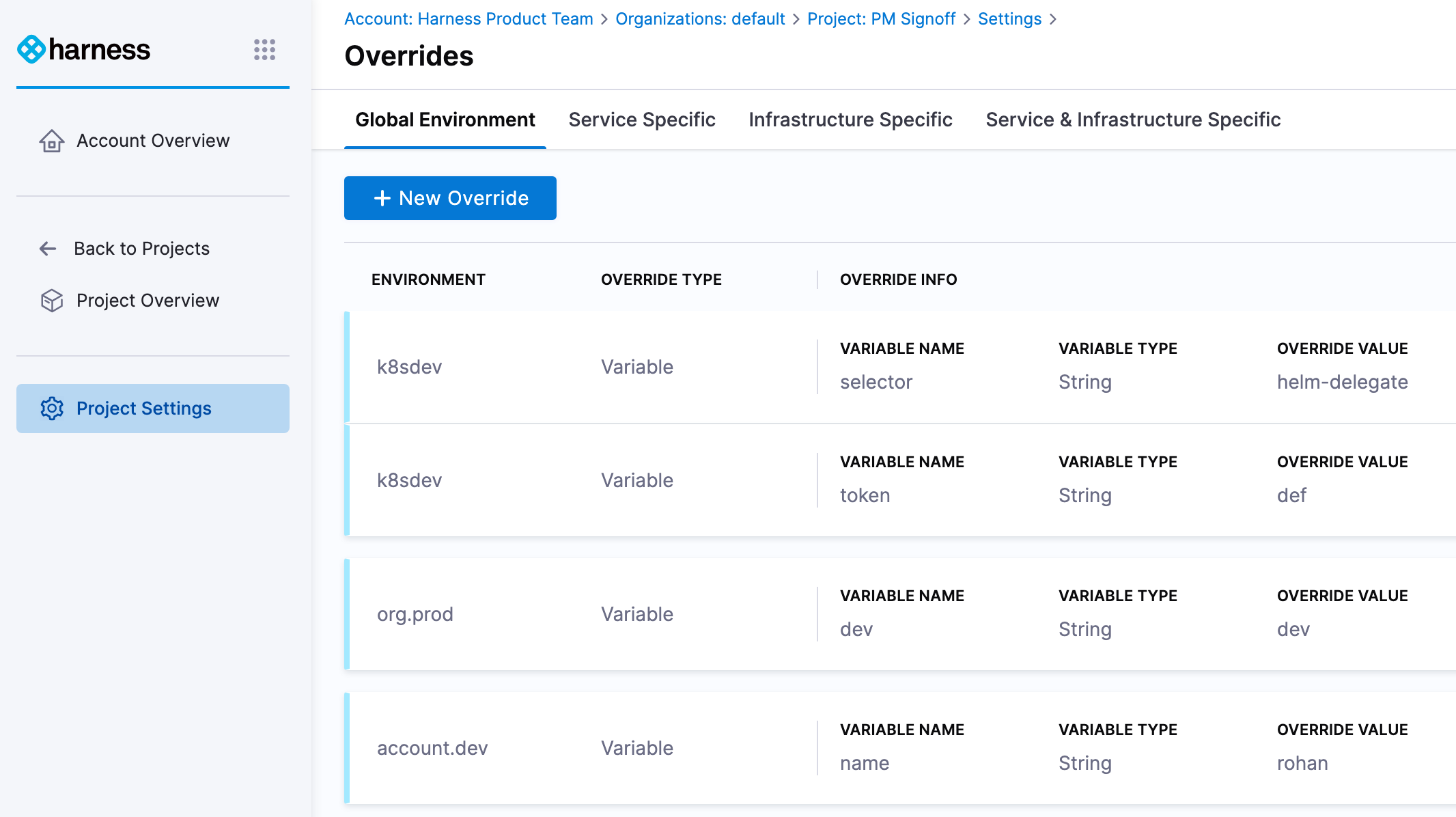
Harness [overrides](/continuous-delivery/use-continuous-delivery/cd-building-blocks/overrides-v2.md) let you define common settings once and override or extend them per service or environment. At runtime, Harness computes the service variables, environment variables, secrets, and override files that apply to the deployment.
* **Define variables once, override per environment:** Put shared service variables on the service, then override values on each environment (development, QA, production). If you embed environment values in the pipeline, promotion to production requires editing execution YAML and errors show up only at deploy time.
* **Keep pipelines generic:** Pair a reusable service and environment with overrides so the same pipeline handles multiple scenarios. Without overrides, teams duplicate pipelines per environment, and a fix in one copy never reaches the others.
***
## Store Harness configuration in Git
UI-only configuration has no review history and is hard to reuse. The Harness [Git Experience](https://developer.harness.io/docs/platform/git-experience/configure-git-experience-for-harness-entities) stores pipelines, templates, and input sets as code so you can reuse components, review changes in pull requests, and version the delivery path.
If configuration lives only in the Harness UI, there is no PR audit trail, rollbacks are manual, and teams recreate the same entities by hand.
Choose a Git layout that matches ownership. Both approaches below keep configurations DRY; they differ in who reviews changes and how wide the blast radius is.
### Manage Git configuration in a centralized repository
Use one central repository when a platform team owns shared golden pipelines and templates.
Pros:
* Central ownership of reviews and merge standards
* Certified changes stay consistent across application teams
* Easier to propagate a single fix to every consumer
Cons:
* One team becomes a bottleneck as request volume grows
* Application teams wait on the central queue for pipeline-specific changes
Centralized deployment configuration modeled
```
├── .harness
│ ├── pipelines
│ │ ├── golden-pipeline.yaml
│ ├── templates
│ │ ├── k8s-deploy-stage.yaml
│ ├── input_sets
│ │ ├── dev-inputs-serviceA.yaml
└── .gitignore
```
### Manage Git configuration in the application team repository
Use the application repository when each product team owns its Harness YAML next to application code.
Pros:
* Team-owned reviews and release cadence
* Smaller blast radius when a change is risky
* Faster local iteration for that team
Cons:
* Similar use cases get re-implemented in many repos, which recreates duplication across the org
* Each team owns validation quality; weak reviews ship broken pipelines only for that team
Manage Git and Harness CD configuration together
```
├── .harness
│ ├── pipelines
│ │ ├── golden-pipeline.yaml
│ ├── templates
│ │ ├── k8s-deploy-stage.yaml
│ ├── input_sets
│ │ ├── dev-inputs-serviceA.yaml
├── src
│ ├── controller
│ ├── views
│ ├── model
│ ├── index.js
├── public
├── dist
├── node_modules
├── package.json
├── package-lock.json
└── .gitignore
```
{% hint style="info" %}
**Trade-off**
Central repos maximize consistency but can slow application teams. App repos maximize autonomy but can recreate the same templates in many places. Pick one default ownership model, then share cross-team templates from a small set of golden repos so DRY does not collapse into copy-paste across Git roots.
{% endhint %}
***
## Use variables and secrets instead of hardcoded literals
Hardcoded hosts, tokens, and keys in pipeline YAML force edits for every environment and leak credentials into Git history.
* **Variables:** Replace literals with variables populated from the environment or runtime context. Go to [Harness variables](https://developer.harness.io/docs/platform/variables-and-expressions/harness-variables) for expression patterns. If you hardcode values, every promotion becomes a search-and-replace exercise and missed replacements fail only in that environment.
* **Secrets:** Store API keys and credentials in secrets management and reference them from workflows. Go to [Secrets management overview](https://developer.harness.io/docs/platform/secrets/secrets-management/harness-secret-manager-overview) and [Reference existing secret manager secrets](https://developer.harness.io/docs/platform/secrets/secrets-management/reference-existing-secret-manager-secrets) for setup. If secrets are pasted into YAML, rotation means editing every pipeline and the value can appear in Git history.
***
## Automate onboarding with Terraform, API, or CLI
Manual UI clicks do not scale and produce inconsistent entity graphs. Automate creation of pipelines, templates, and related resources so every team gets the same baseline.
Harness provides a [Terraform Provider](https://registry.terraform.io/providers/harness/harness/latest/docs), [APIs](https://apidocs.harness.io/), and a [CLI](https://developer.harness.io/docs/platform/automation/cli/install). Many teams automate onboarding with the Terraform Provider.
{% hint style="info" %}
**Terraform Provider**
The most common way to automate and manage Harness resources at scale is the Terraform Provider.
{% endhint %}
Benefits of automation:
* Create or update pipelines, templates, and related configuration the same way every time
* Reuse scripts so updates stay consistent across orgs and projects
If you skip automation, each team clicks a different subset of settings, and drift shows up only when a deploy fails.
Go to the [terraform-development-factory](https://github.com/harness-community/solutions-architecture/tree/main/terraform-development-factory) sample repository for a repository layout patterned from customer engagements.
***
## Next steps
* [Overrides](/continuous-delivery/use-continuous-delivery/cd-building-blocks/overrides-v2.md): Configure service and environment overrides so pipelines stay generic.
* [Templates best practices](https://developer.harness.io/docs/platform/templates/templates-best-practices): Standardize reusable stages and pipelines on the Platform.
* [Configure Git Experience](https://developer.harness.io/docs/platform/git-experience/configure-git-experience-for-harness-entities): Store pipelines, templates, and input sets in Git.
* [Secrets management overview](https://developer.harness.io/docs/platform/secrets/secrets-management/harness-secret-manager-overview): Keep credentials out of pipeline YAML.
{% @harness-feedback/feedback %}