> For the complete documentation index, see [llms.txt](https://developer.harness.io/llms.txt). Markdown versions of documentation pages are available by appending `.md` to page URLs; this page is available as [Markdown](https://developer.harness.io/continuous-delivery/use-continuous-delivery/ai-agents-deployment/google-agent-runtime/environment.md).
# Environment
Configure the environment and infrastructure definition that target Google Agent Runtime for an agent deployment.
The environment defines where an agent deploys. It groups your deployment targets, and its infrastructure definition describes the Google Agent Runtime target, such as the connector, project, region, and networking. This page shows you how to add a Google Agent Runtime infrastructure definition.
{% hint style="info" %}
Agent deployments are behind the feature flag `CDS_AGENT_RUNTIME_DEPLOYMENT`. Contact [Harness Support](mailto:support@harness.io) to enable the feature.
{% endhint %}
You need a registered agent service with **Google Agent Runtime** as its deploy target and a GCP connector with permission to deploy to Agent Runtime. For all prerequisites, go to [Before you begin](/continuous-delivery/use-continuous-delivery/ai-agents-deployment/google-agent-runtime/overview.md#before-you-begin) on the overview. For how environments and infrastructure definitions work in CD, go to [Environment overview](/continuous-delivery/use-continuous-delivery/cd-building-blocks/environments/environment-overview.md).
***
### Create the environment
Create an environment for your agent deployments, or reuse an existing one. Set the environment type to **Production** or **Pre-Production** based on the target. Go to [Create environments](/continuous-delivery/use-continuous-delivery/cd-building-blocks/environments/create-environments.md) to add one.
***
### Add an infrastructure definition
The infrastructure definition describes the cloud target for one environment. In the environment, open the **Infrastructure Definitions** tab and select **Infrastructure Definition** to add one.
1. Enter a name for the infrastructure definition.
2. Set **Deployment Type** to **AI Agent Services**.
3. Under **Select Infrastructure Type**, select **Google Agent Runtime**.
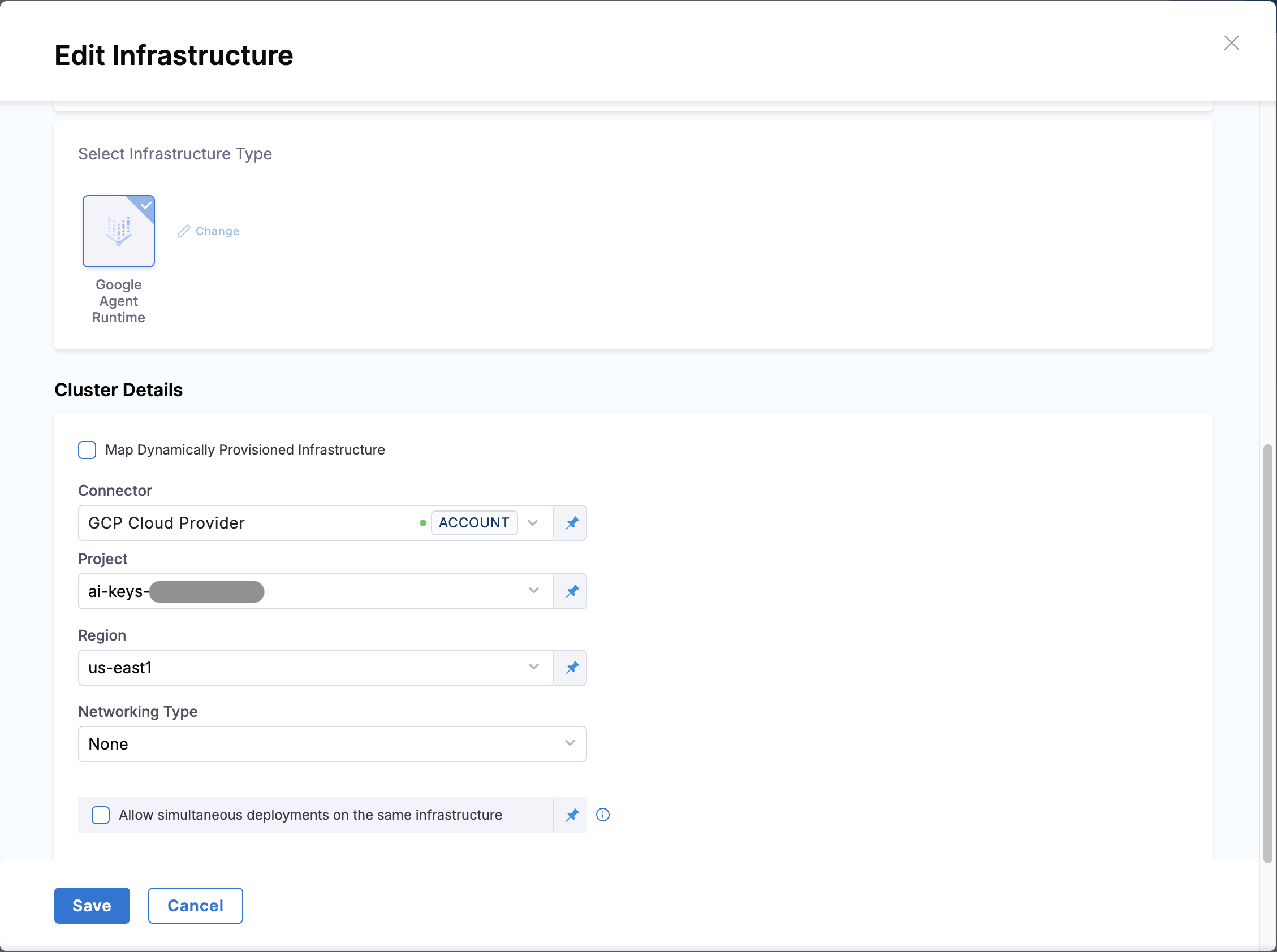
4. Under **Cluster Details**, configure the connector and target. Go to [Configure the infrastructure](#configure-the-infrastructure) for the fields.
5. Select **Save**.
#### Configure the infrastructure
The cluster details define the connector Harness uses and the Vertex target the agent deploys to. Configure the following fields:
* **Connector:** The GCP connector with permission to deploy to Agent Runtime.
* **Project:** The GCP project that hosts the agent runtime.
* **Region:** A region where Vertex Agent Runtime is available, for example `us-east1`.
* **Networking Type:** Select **None** for public access, or **PSC (Private Service Connect)** when the agent must reach private resources.
When you select **PSC (Private Service Connect)**, provide the **Network Attachment** and, optionally, one or more **DNS Peering** entries. Each DNS peering entry takes a **Domain**, which must end with a dot, a **Target Project**, and a **Target Network**.
Click to view full size
Google Agent Runtime infrastructure definition YAML
```yaml
infrastructureDefinition:
name: GoogleAgentPlatform
identifier: GoogleAgentPlatform
orgIdentifier: default
projectIdentifier: Demo
environmentRef: Google_Agent_Platform
deploymentType: AiAgent
type: GoogleAgentRuntime
spec:
connectorRef: account.gcp_connector
projectId: my-gcp-project
location: us-east1
networking:
type: none
allowSimultaneousDeployments: false
```
***
### Next steps
With the infrastructure defined, build the pipeline stage that wires the service, environment, and infrastructure together.
* [Canary deployment](/continuous-delivery/use-continuous-delivery/ai-agents-deployment/google-agent-runtime/canary-deployment.md)
* [Agent service](/continuous-delivery/use-continuous-delivery/ai-agents-deployment/google-agent-runtime/agent-service.md)
{% @harness-feedback/feedback %}