> For the complete documentation index, see [llms.txt](https://developer.harness.io/llms.txt). Markdown versions of documentation pages are available by appending `.md` to page URLs; this page is available as [Markdown](https://developer.harness.io/continuous-delivery/use-continuous-delivery/cd-building-blocks/environments/create-environments.md).
# Create environments
Create Continuous Delivery environments, configure overrides, add infrastructure definitions, and manage GitOps clusters
Environments represent your deployment targets, such as QA or Production. Each environment contains one or more **Infrastructure Definitions** that list your target clusters, hosts, namespaces, and other resources.
***
## What you will learn from this topic
* How to [create an environment](#create-an-environment) from within or outside a pipeline, or at an account or organization level
* How to [define the environment configuration](#define-the-environment-configuration)
* How to [create service overrides](#create-service-overrides) and understand [override priority](#override-priority)
* How to [add infrastructure definitions](#add-infrastructure-definitions)
* How to [propagate environments](#propagate-environments-through-multiple-stages) across pipeline stages
* How to [define GitOps clusters](#define-gitops-clusters) and [clone environments](#clone-environments)
***
## Before you begin
Complete the following prerequisites before you create or configure an environment:
* **Harness account access:** Permission to create and manage environments at the project, organization, or account scope. Go to [RBAC in Harness](https://developer.harness.io/docs/platform/role-based-access-control/rbac-in-harness) to configure roles.
* **Environment permissions:** Create/Edit (and View) on Environments at the scope where you create the environment. Go to the [permissions reference](https://developer.harness.io/docs/platform/role-based-access-control/permissions-reference) for Environment permissions.
* **Deploy stage (pipeline path only):** At least one Deploy stage in a pipeline if you plan to create an environment from within a pipeline.
{% hint style="info" %}
**Contact Harness Support**
If Continuous Delivery does not appear under **Deployments**, contact your account administrator or [Harness Support](mailto:support@harness.io).
{% endhint %}
***
## Create an environment
You can create environments from the following places:
* Within a pipeline
* Outside a pipeline
* An account
* An organization
{% tabs %}
{% tab title="Within a pipeline" %}
To create an environment from inside a pipeline, select **New Environment** in the **Infrastructure** tab of a new Deploy stage.

{% endtab %}
{% tab title="Outside a pipeline" %}
To create an environment from outside a pipeline, go to **Environments** in the navigation pane.

{% endtab %}
{% tab title="From organization or account" %}
You can create an environment and provide infrastructure definitions at an account or organization level from the Harness UI, using APIs, or Terraform.
{% tabs %}
{% tab title="Pipeline Studio" %}
To create an environment at an account or organization level, go to **Organization Resources** -> **Environments**.

Expand the sections below to review sample YAML.
Account level environment YAML
```yaml
environment:
name: dev
identifier: dev
description: account wide dev environment
tags:
status: non-regulated
type: PreProduction
variables:
- name: port
type: String
value: "8080"
description: ""
- name: namespace
type: String
value: <+service.name>-dev
description: "namespace environment variable"
```
Account level infrastructure definition YAML
```yaml
infrastructureDefinition:
name: dev-k8s
identifier: dev
description: development Kubernetes cluster
tags: {}
environmentRef: dev
deploymentType: Kubernetes
type: KubernetesDirect
spec:
connectorRef: account.Harness_Kubernetes_Cluster
namespace: <+service.name>-dev
releaseName: release-<+INFRA_KEY_SHORT_ID>
allowSimultaneousDeployments: false
```
Organization level environment YAML
```yaml
environment:
name: prod
identifier: prod
description: production environment for the organization
tags:
status: regulated
type: Production
orgIdentifier: default
variables:
- name: namespace
type: String
value: <+service.name>-prod
description: "namespace for prod environment"
- name: port
type: String
value: "8080"
description: "port for prod environment"
```
Organization level infrastructure definition YAML
```yaml
infrastructureDefinition:
name: prod-k8s
identifier: prodk8s
description: production kubernetes cluster
tags: {}
orgIdentifier: default
environmentRef: prod
deploymentType: Kubernetes
type: KubernetesDirect
spec:
connectorRef: account.Harness_Kubernetes_Cluster
namespace: production
releaseName: release-<+INFRA_KEY_SHORT_ID>
allowSimultaneousDeployments: false
```
{% endtab %}
{% tab title="API" %}
Go to [Create an environment](https://apidocs.harness.io/tag/Environments#operation/createEnvironmentV2) to create an environment with the API.
Go to [Create an infrastructure in an environment](https://apidocs.harness.io/tag/Infrastructures#operation/createInfrastructure) to create an infrastructure definition with the API.
The `orgIdentifier` and `projectIdentifier` field definitions are optional and depend on where you create the environment. For example, if you create an environment at an account level, you do not need organization or project identifiers in the post API call payload.
{% endtab %}
{% tab title="Terraform" %}
Go to [harness\_platform\_environment (Resource)](https://registry.terraform.io/providers/harness/harness/latest/docs/resources/platform_environment) to create a Harness platform environment with Terraform.
Harness platform environment
```hcl
resource "harness_platform_environment" "example" {
identifier = "identifier"
name = "name"
org_id = "org_id"
project_id = "project_id"
tags = ["foo:bar", "baz"]
type = "PreProduction"
## ENVIRONMENT V2 Update
## The YAML is needed if you want to define the Environment Variables and Overrides for the environment
## Not Mandatory for Environment Creation nor Pipeline Usage
yaml = <<-EOT
environment:
name: name
identifier: identifier
orgIdentifier: org_id
projectIdentifier: project_id
type: PreProduction
tags:
foo: bar
baz: ""
variables:
- name: envVar1
type: String
value: v1
description: ""
- name: envVar2
type: String
value: v2
description: ""
overrides:
manifests:
- manifest:
identifier: manifestEnv
type: Values
spec:
store:
type: Git
spec:
connectorRef: <+input>
gitFetchType: Branch
paths:
- file1
repoName: <+input>
branch: master
configFiles:
- configFile:
identifier: configFileEnv
spec:
store:
type: Harness
spec:
files:
- account:/Add-ons/svcOverrideTest
secretFiles: []
EOT
}
```
Go to [harness\_platform\_infrastructure (Resource)](https://registry.terraform.io/providers/harness/harness/latest/docs/resources/platform_infrastructure) to create a Harness platform infrastructure definition with Terraform.
Harness platform infrastructure definition
```hcl
resource "harness_platform_infrastructure" "example" {
identifier = "identifier"
name = "name"
org_id = "orgIdentifer"
project_id = "projectIdentifier"
env_id = "environmentIdentifier"
type = "KubernetesDirect"
deployment_type = "Kubernetes"
yaml = <<-EOT
infrastructureDefinition:
name: name
identifier: identifier
description: ""
tags:
asda: ""
orgIdentifier: orgIdentifer
projectIdentifier: projectIdentifier
environmentRef: environmentIdentifier
deploymentType: Kubernetes
type: KubernetesDirect
spec:
connectorRef: account.gfgf
namespace: asdasdsa
releaseName: release-<+INFRA_KEY_SHORT_ID>
allowSimultaneousDeployments: false
EOT
}
```
The `org_id` and `project_id` field definitions are optional and depend on where you create the environment. For example, if you create an environment at an account level, you do not need organization or project identifiers.
{% endtab %}
{% endtabs %}
{% endtab %}
{% endtabs %}
***
## Define the environment configuration
In the environment **Configuration**, you can manage the **Name**, **Description**, **Tags**, and **Environment Type** of the environment.

You can also set default manifests, specifications, config files, and variables to use whenever Harness deploys a service to this environment.
For example, a stage has a Kubernetes service with a manifest, but whenever that service is deployed to the **QA** environment, the manifest in that environment's **Configuration** overwrites the namespace of the manifest in the service with `QA`.
***
## Create service overrides
Service overrides differ from **Environment Configuration** in the following ways:
* **Environment Configuration:** Applies to every service that is used with the environment.
* **Environment Service Overrides:** Apply to specific services you select. Whenever that service is used with that environment, the **Service Override** is applied.
***
## Override priority
When you use environment configuration and service overrides to override service settings, understand the priority of the overrides.
The priority from top to bottom is:
1. Environment service overrides
2. Environment configuration
3. Service settings

***
## Override values.yaml
You can specify values YAML files at the environment's **Service Overrides** and **Configuration**, and at the service itself.
Here is an example of specifying it at the environment's **Configuration**:

When you have a values YAML file at two or more of the environment **Service Overrides**, **Environment Configuration**, and the service itself, Harness merges the files into a single values YAML for deployment. This merging runs at pipeline execution runtime.
Overriding occurs when the higher priority setting has the same `name:value` pair as a lower priority setting.
The following two examples show how merging and full overriding work.
### Merge values.yaml name:value pairs
An environment's **Service Overrides** values YAML has the name:value pair `servicePort: 80` but no `replicas` name:value.
A service's **Service Definition** has a values YAML with `replicas: 2` but no `servicePort` name:value.
At runtime, the two values YAML files merge into one.
The `servicePort: 80` from the environment **Service Overrides** values YAML merges with the **Service Definition** `replicas: 2` in the values YAML:

### Fully override values.yaml name:value pairs
An environment's **Service Overrides** values YAML has the name:value pairs `replicas: 2` and `servicePort: 80`.
A service's **Service Definition** has a values YAML with `replicas: 4` and `servicePort: 8080`.
At runtime, the name:value pairs from the environment **Service Overrides** values YAML fully override the service values YAML. The `replicas: 2` and `servicePort: 80` from the environment **Service Overrides** are used.

***
## Fully override config files and variables
Config files are a black box that can contain multiple formats and content, such as YAML, JSON, and plain text. Consequently, they cannot be overridden like Values YAML files.
Variables cannot be partially overridden either. They are completely replaced.
When you have **Config files** at two or more of the environment **Service Overrides**, **Configuration**, and the service itself, the standard override priority is applied.
When you have **Variables** with the same name at two or more of the environment **Service Overrides**, **Configuration**, and the service itself, the standard override priority is applied.
***
## Add infrastructure definitions
Infrastructure definitions represent an environment's infrastructures physically. They are the actual clusters, hosts, namespaces, and related resources where you deploy a service.
An environment can have multiple **Infrastructure Definitions**.

When you select an environment in a stage, you can select the **Infrastructure Definition** to use for that stage.

***
## Propagate environments through multiple stages
When modeling multiple Deploy stages in a pipeline, you can propagate the environment and infrastructure definition selected in one stage to one or more subsequent stages.
When you propagate an environment, you can either use the same infrastructure definition that was used in the parent stage or [select a different infrastructure definition](#select-a-different-infrastructure-when-propagating-environment-from-a-previous-stage).
{% hint style="info" %}
**Propagate services as well**
You can also propagate services between stages. Go to [Propagate Continuous Delivery services](/continuous-delivery/use-continuous-delivery/cd-building-blocks/services/propagate-and-override-cd-services.md) to carry a service forward across stages.
{% endhint %}
### Important notes
Review the following constraints before you propagate an environment between stages:
* Propagation is only supported for Deploy stages. Custom stages do not have environments.
* You cannot propagate environments between different deployment types. For example, you cannot propagate a Kubernetes environment between a Kubernetes deployment stage and a Shell Script deployment stage.
* Environment propagation is not supported when using multiple environments in a single stage (multi environment deployments).
* Environment propagation is progressive. You can only propagate environments from stage to stage in a forward direction in your pipeline. For example, Stage 2 cannot propagate an environment from a subsequent Stage 3.
* In a pipeline's **Advanced Options**, in **Stage Execution Settings**, you can set up selective stage executions. This lets you select which stages to deploy at runtime.
* If you select a stage that uses a propagated environment (a child environment), that stage will not work. The parent environment's settings must be resolved as part of the deployment.
* When propagation is set up between a parent stage and child stage, moving the parent or child stage out of sequence resets any propagated settings to their defaults. If you do this, you are prompted to confirm. If you confirm, the stages are reset to their defaults.
* You cannot propagate an environment from a stage that also propagates an environment from another stage.

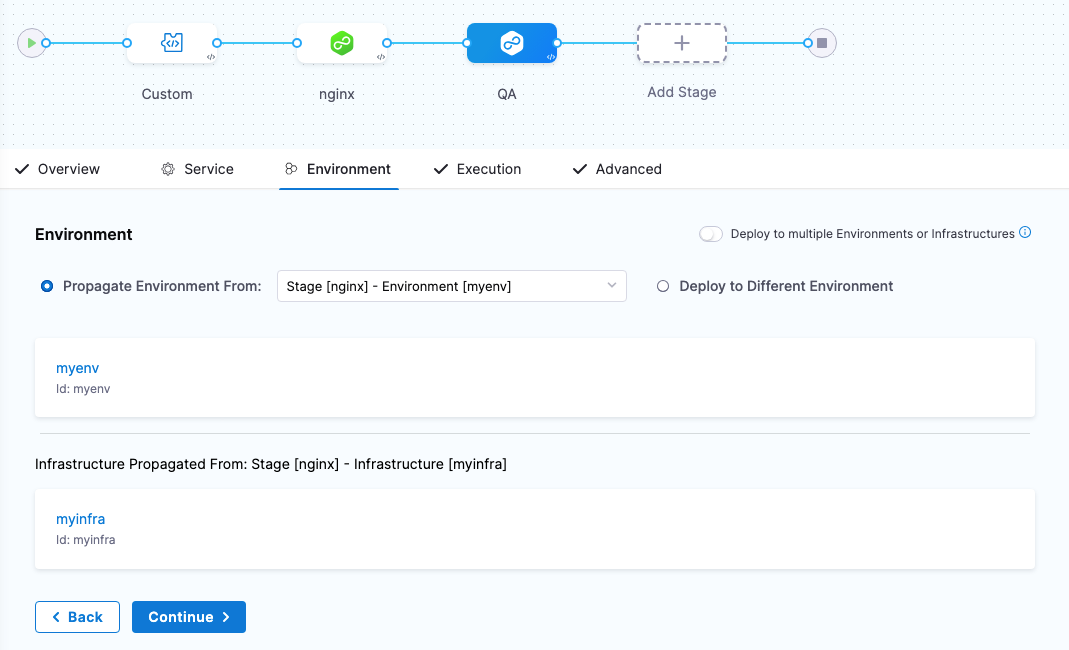
### Propagate an environment
Perform the following steps to propagate an environment to a subsequent stage:
1. Open a pipeline that contains at least one Deploy stage.
2. Add a subsequent Deploy stage.
3. In **Service**, select a service for the stage, then select **Continue**.
4. In **Environment**, select **Propagate Environment From**.
5. In **Propagate Environment From**, select the environment of a previous stage.
The environment and infrastructure definition from the previous stage are now configured in this stage.
### Select a different infrastructure when propagating environment from a previous stage
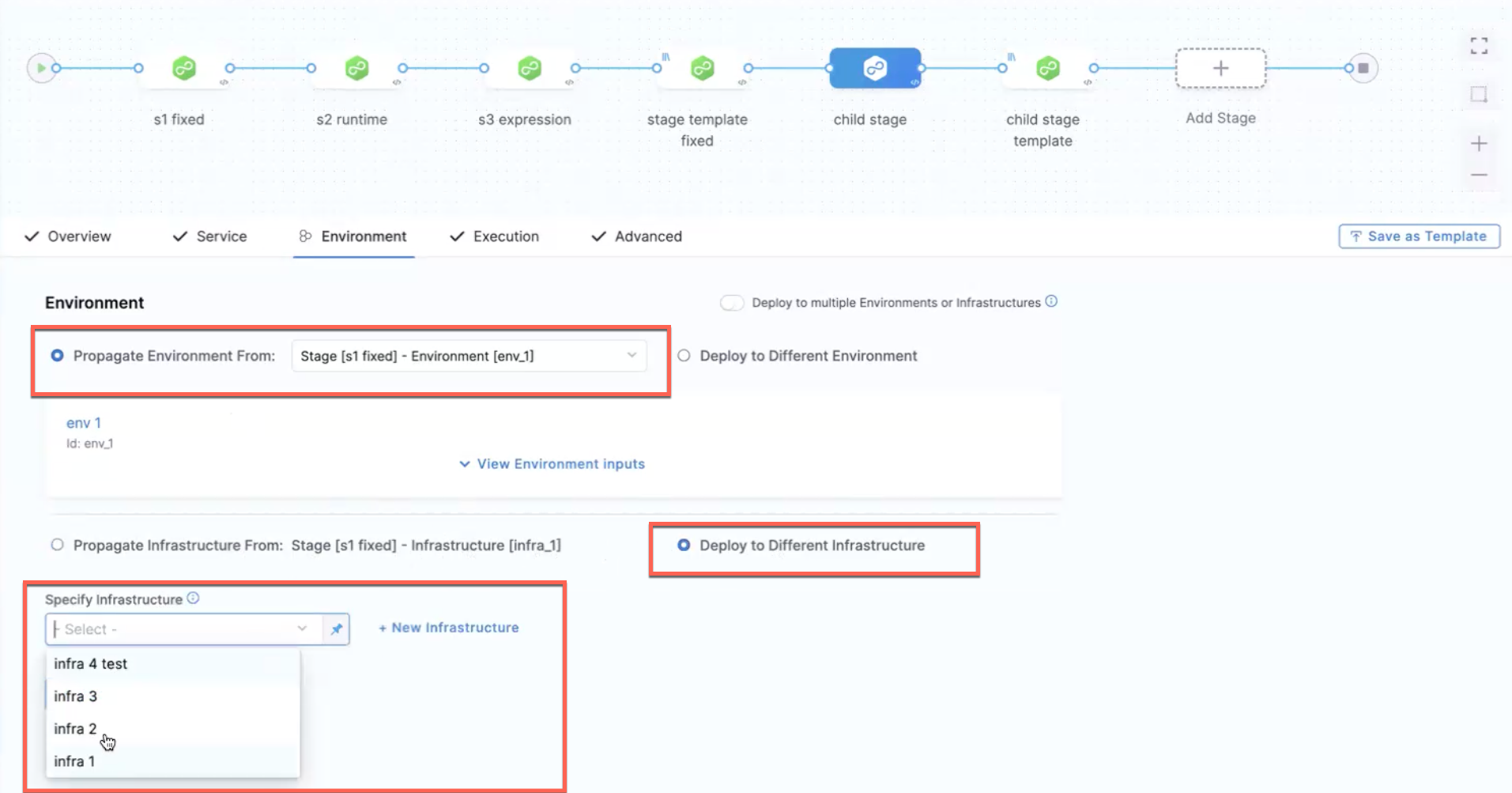
When you [propagate an environment](#propagate-an-environment) from a previous stage, you can select a different infrastructure definition. Perform the following steps to select a different infrastructure:
1. Select a stage for which you want to propagate the environment and infrastructure. Make sure that the selected stage has at least one previous Deploy stage.
2. In the **Environment** tab, select **Propagate Environment From**, then select the environment of a previous stage.
3. Select **Deploy to Different Infrastructure**, then select an infrastructure. This option lets you select a different infrastructure definition.
4. Select **+ New Infrastructure** to [create a new infrastructure definition](#add-infrastructure-definitions) for use in your stage.
{% hint style="warning" %}
**Nested propagation is not supported**
* Harness does not support nested propagation. For example, if Stage 2 is propagated from Stage 1, you cannot propagate Stage 3 from Stage 2.
* This feature is not supported when deploying to multiple environments or infrastructures.
{% endhint %}
The following sample YAML shows a different infrastructure definition when the environment is propagated:
```yaml
environment:
useFromStage:
stage: s1
infrastructureDefinitions:
- identifier: infra_1
inputs:
identifier: infra_1
type: KubernetesDirect
spec:
connectorRef: <+input>
```
***
## Define GitOps clusters
When you use Harness GitOps, you can add GitOps clusters to an environment.
Go to [Harness GitOps basics](/continuous-delivery/use-gitops/get-started/harness-git-ops-basics.md) to review GitOps concepts.
When you create a pipeline, you can select the environment and the GitOps cluster(s) to use.

GitOps clusters are used in a PR pipeline. A PR pipeline creates and merges a Git PR on the `config.json` for a destination cluster as part of an ApplicationSet. The PR pipeline runs, merges a change to the config.json, and a GitOps sync on the ApplicationSet is initiated.
GitOps Clusters are not used in standard Continuous Delivery pipelines. They are used only when using GitOps.
***
## Clone environments
You can clone an environment across scopes, for example from one project to another, from a project to an organization, or from an account to a project.
Select **More Options**, then select **Clone**.

After you select **Clone**, the **Clone Environment** settings appear.
You can change the **Name**, and add tags or a description for this cloned environment.
You can modify the destination of your cloned environment using the **Organization** and **Project** fields.
The checkbox **Do you want to clone infrastructures?** is selected by default. The infrastructures in the environment are cloned as inline by default, regardless of whether the destination environment is remote or inline. Clear the checkbox if you do not want to clone all the infrastructures in the environment.
You can choose between **Inline** and **Remote** to set up your environment. Choose **Inline** when you want your environments stored in Harness. Choose **Remote** when storing your environment in a third-party Git repository or Harness Code Repository.
To clone a remote environment to an inline environment, specify the source branch where the remote environment is stored.

To clone an inline environment or remote environment to a remote environment, specify the target repository, Harness Code Repository (to store the environment in the Harness repository) or Third-party Git provider (to store the environment in a third-party Git provider), define the Git Connector if you use a third-party Git provider, and specify the Repository name, the YAML path, and the commit message.

{% hint style="info" %}
**Connectors are not cloned across scopes**
When you clone an environment from a different organization or project, the connector referenced in the infrastructure does not get cloned and must be created explicitly.
{% endhint %}
***
## Runtime inputs and expressions in environments
If you use runtime inputs in your environments, provide values for them when you run a pipeline that uses these environments.
If you use expressions in your environments, Harness must be able to resolve these expressions when users run a pipeline that uses these environments.
Select **Runtime input** for the environment.

When you run the pipeline, you can select the environment for the runtime inputs.

Go to [Fixed values, runtime inputs, and expressions](https://developer.harness.io/docs/platform/variables-and-expressions/runtime-inputs) to configure runtime inputs and expressions.
***
## Troubleshooting
A selectively executed stage that uses a propagated environment fails
Selective stage execution does not resolve the parent stage that owns the environment. Run the parent stage as well, or stop using propagation for stages you plan to run alone.
Nested environment propagation is rejected
You cannot propagate an environment from a stage that already propagates from another stage. Propagate each child stage directly from the original parent stage.
Cloned environment infrastructure connector is missing
When you clone an environment across organization or project scope, connectors referenced by infrastructure definitions are not cloned. Create the connector in the destination scope, then update the infrastructure definition.
***
## Next steps
* [Create services](/continuous-delivery/use-continuous-delivery/cd-building-blocks/services/create-services.md): Define the service you deploy to this environment.
* [Propagate Continuous Delivery services](/continuous-delivery/use-continuous-delivery/cd-building-blocks/services/propagate-and-override-cd-services.md): Carry a service forward across pipeline stages.
* [Harness GitOps basics](/continuous-delivery/use-gitops/get-started/harness-git-ops-basics.md): Review how GitOps clusters synchronize with the environments you create here.
{% @harness-feedback/feedback %}