> For the complete documentation index, see [llms.txt](https://developer.harness.io/llms.txt). Markdown versions of documentation pages are available by appending `.md` to page URLs; this page is available as [Markdown](https://developer.harness.io/continuous-delivery/use-continuous-delivery/cd-building-blocks/services/export-ser-var-as-env-var.md).
# Exporting service variables as environment variables in a Shell Script step
Learn how to export service variables as environment variables when using a Shell Script step
You can use the **Export Service Variables as Env Variables** setting to export service variables as environment variables. This setting is available at account, organization, and project levels.
To enable this setting, go to **Account Settings > Account Resources > Default Settings > Pipeline**, and then expand **Pipeline**. Next, set the **Export Service Variables as Env Variables** setting to `true`.
Once you enable this setting, a service's variables are available as Bash variables in any Shell Script step in a stage that deploys that service. You can access the service variables like you access any Bash variables. For example, the service variable, `var1` is available for use in a Shell Script step as `$var1`.
When you [add a service variable](/harness-platform/use-harness-platform/variables-and-expressions/add-a-variable.md), you can select variables of type **String**, **Secret**, or **Number**.
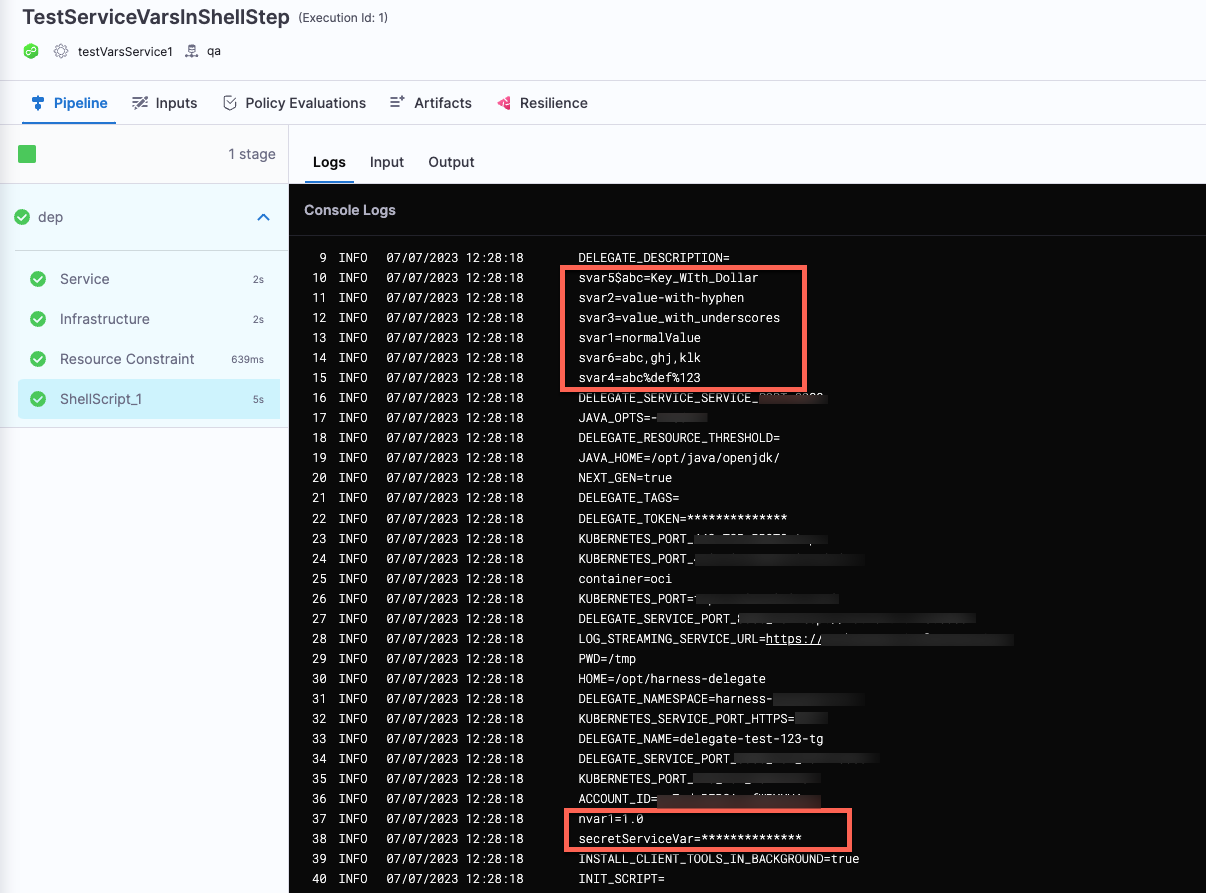
Let's consider an example where you have added the following service variables:
| **Variable name** | **Type** | **Value** |
| ------------------ | -------- | ------------------------ |
| `svar1` | String | normalValue |
| `svar2` | String | value-with-hyphen |
| `svar3` | String | value\_with\_underscores |
| `secretServiceVar` | Secret | `yourSecret` |
| `nvar1` | Number | 1 |
| `svar4` | String | abc%def%123 |
| `svar5$abc` | String | key\_With\_Dollar |
| `svar6` | String | abc,ghj,klk |
In your Shell Script step, you can use these service variables as environment variables if you had enabled the **Export Service Variables as Env Variables** setting.
{% hint style="info" %}
**LIMITATION**
Shell scripts executing on remote hosts cannot export the correct value if you're using special characters such as `-`, `_`, `$`, `%`, and spaces in Bash.
{% endhint %}
When you run the pipeline, you can see the value of the service variables passed as environment variables.
Click to view full size image
### See also
* [Using Shell Script steps in CD stages](/continuous-delivery/use-continuous-delivery/cd-building-blocks/cd-steps/utilities/shell-script-step.md)
* [Define variables](/harness-platform/use-harness-platform/variables-and-expressions/add-a-variable.md)
* [Services overview](/continuous-delivery/use-continuous-delivery/cd-building-blocks/services/services-overview.md)
* [Environments overview](/continuous-delivery/use-continuous-delivery/cd-building-blocks/environments/environment-overview.md)
{% @harness-feedback/feedback %}