> For the complete documentation index, see [llms.txt](https://developer.harness.io/llms.txt). Markdown versions of documentation pages are available by appending `.md` to page URLs; this page is available as [Markdown](https://developer.harness.io/continuous-delivery/use-continuous-delivery/deploy-services-on-different-platforms/aws/asg/asg-traffic-shift.md).
# ASG Blue-Green Traffic Shifting Step
ASG Blue-Green deployment strategy with native support for phased traffic shifting using ALB weighted target groups.
In the **ASG Blue-Green Traffic Shifting Step**, you define the production and stage listener ports and rules that the ASG Blue Green Deploy step uses. Then, the ASG Swap Services step shifts all traffic from the stage target group back to production.
A Blue/Green deployment ensures reliable updates by running both the new and existing ASGs behind an Application Load Balancer (ALB). The ALB uses two listeners—**stage** and **prod**—each forwarding to its corresponding target group, where the new and existing ASGs handle traffic.
**Advantages:**
* Configure multiple target groups in a **single rule** with adjustable traffic weights.
* Incrementally test new versions in development before rolling out to production.
* Implement gradual rollouts with approval gates between steps.
* Automatically revert to the original configuration if issues occur.
### Set up an ASG Blue-Green Traffic Shifting Step Group
1. Add an ASG stage to your pipeline.
2. In that stage’s **Service** section, add a Harness ASG service. For more information, see [Adding an ECS Service](/continuous-delivery/use-continuous-delivery/deploy-services-on-different-platforms/aws/asg/asg-tutorial.md#harness-asg-services).
3. In the **Environment** section, add a Harness ASG environment and infrastructure. For more information, see [Adding an ECS Environment](/continuous-delivery/use-continuous-delivery/deploy-services-on-different-platforms/aws/asg/asg-tutorial.md#harness-asg-environments).
4. On the **Execution strategies** tab, choose **Blue Green**, then select **Add Traffic Shifting Steps** under **Enable Traffic Shifting for ECS Deployment**.
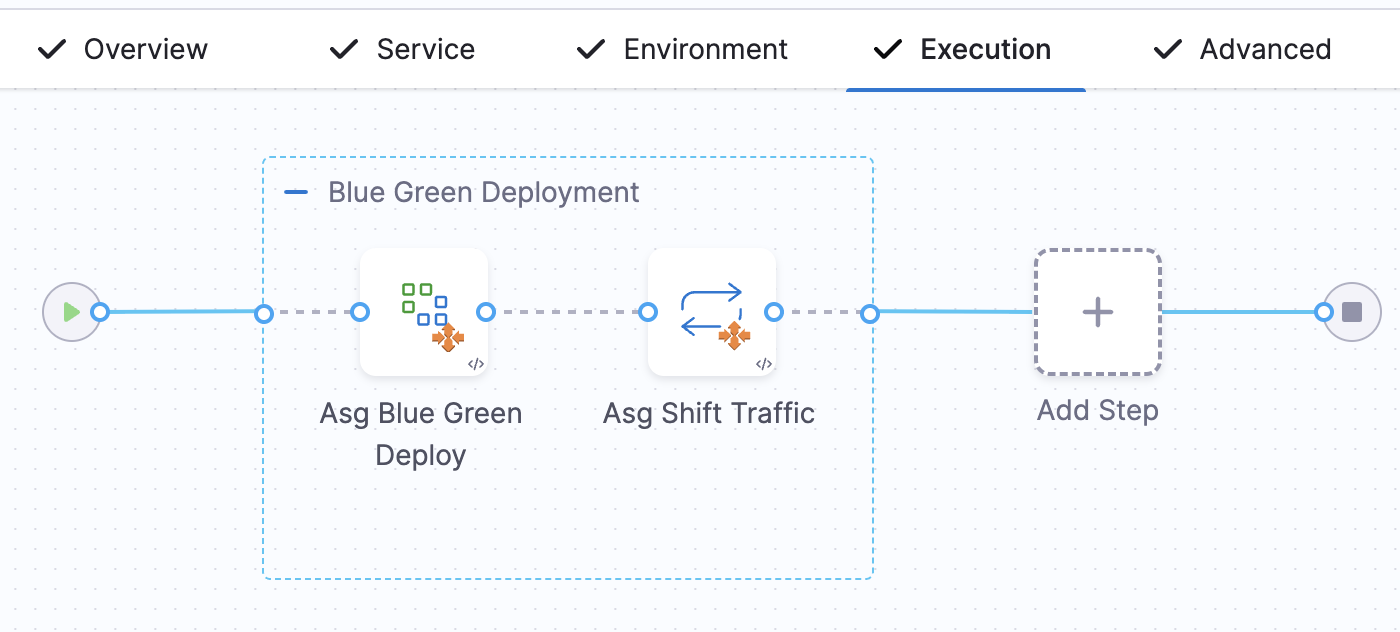
Your **Execution** tab now shows a Blue Green Deployment group containing both **ASG Blue Green Deploy Step** and **ASG Traffic Shift**.
Click to view full size image
If you don’t select **Add Traffic Shifting Steps**, you’ll instead see **ASG Blue Green Deploy Step** and **ASG Swap Service** in the group.
You can also start from a blank canvas and manually add **ASG Blue Green Deploy Step** and **ASG Traffic Shift** to your stage.
### Configure the ASG Blue Green Deploy Step
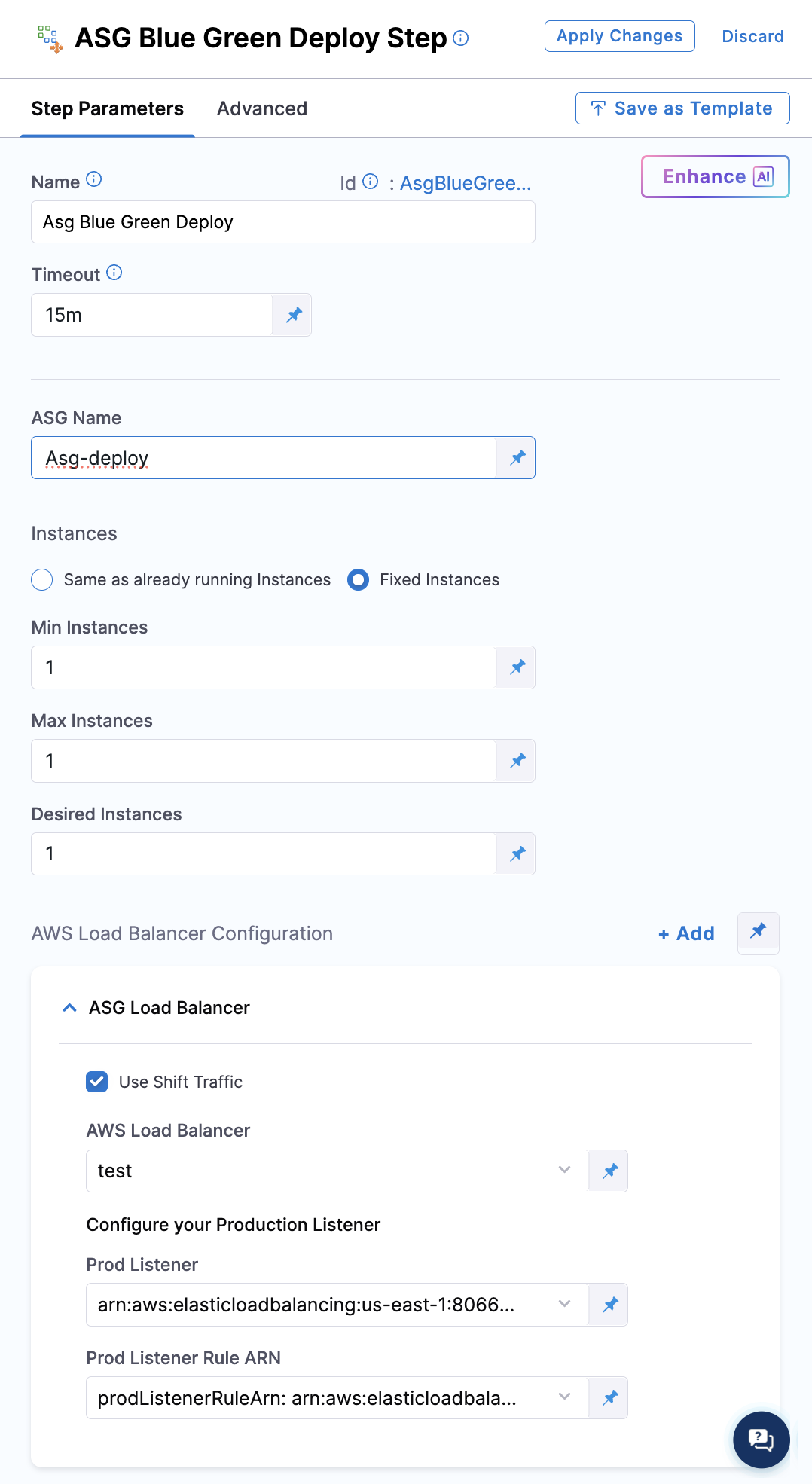
* **Name**: Logical name for the step.
* **Timeout**: Maximum execution duration.
* **App Name**: Name for the ASG application that Harness creates. You can use expressions such as `<+project.identifier>_<+service.identifier>_<+env.identifier>_basic2`, or set a fixed value or runtime input.
* **Instances**: Choose:
* **Same as already running instances** to replicate existing capacity.
* **Fixed**, then specify **Min Instances**, **Max Instances**, and **Desired Instances**.
* **Connected Cloud Provider**: Select the AWS connector and region explicitly; this is not inherited from your service or infrastructure.
* **AWS Load Balancer Configuration**: Click **Add** (or edit an existing entry):
* **AWS Load Balancer**: Choose your load balancer.
* Select **Use Shift Traffic** to enable the **ASG Blue-Green Traffic Shift** on this listener.
* **Prod Listener**: Choose the ALB listener for production traffic.
* **Prod Listener Rule ARN**: Select the listener rule that forwards to both stage and prod target groups, supporting weighted traffic distribution.
{% hint style="info" %}
If you do not select **Use Shift Traffic**, the **ASG Traffic Shift** step will be omitted from the pipeline.
{% endhint %}
Click to view full size image
You can define multiple **AWS Load Balancer Configuration** entries, each opting in or out of traffic shifting.
Yaml sample for the step
Yaml sample for the step
```yaml
- step:
- step:
name: Asg Blue Green Deploy
identifier: AsgBlueGreenDeploy
type: AsgBlueGreenDeploy
timeout: 15m
spec:
instances:
type: Fixed
spec:
min: 1
max: 1
desired: 1
loadBalancers:
- loadBalancer: -asg-test
prodListener: arn:..
prodListenerRuleArn: arn:...
```
### Configure the ASG Blue Green Deploy Step
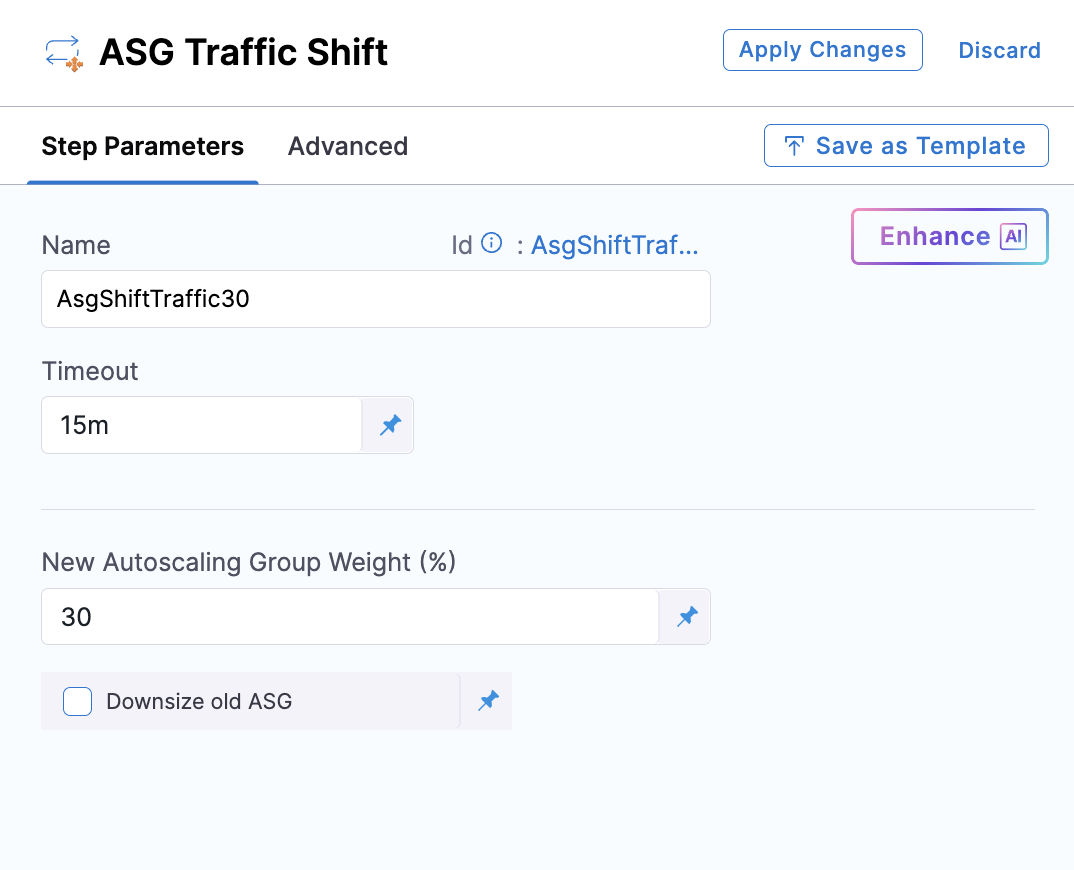
* **Name**: Logical name for the step.
* **Timeout**: Maximum execution duration.
* **New Autoscaling Group Weight (%)**: Enter the percentage of traffic to shift to the new ASG.
Click to view full size image
Here's a demo video of Blue Green with incremental traffic shift summary:
{% embed url="" %}
This approach lets you incrementally shift production traffic from your existing ASG to the new one:
Add multiple ASG Traffic Shift steps (you can intersperse approval steps as needed).
In the first ASG Traffic Shift step, set New Autoscaling Group Weight to the desired percentage.
Repeat for subsequent steps.
Enable Downsize Old ASG at 0% weight only on the step that shifts to 100%—this automatically scales down the old ASG.
### Advanced settings
In the **Advanced** settings of all step, you can use the following options:
* [Delegate Selector](/harness-ai/use-harness-platform/delegates/delegate/manage-delegates/select-delegates-with-selectors.md)
* [Conditional Execution](/harness-ai/use-harness-platform/pipelines/step-skip-condition-settings.md)
* [Failure Strategy](/harness-ai/use-harness-platform/pipelines/failure-handling/define-a-failure-strategy-on-stages-and-steps.md)
* [Looping Strategy](/harness-ai/use-harness-platform/pipelines/looping-strategies/looping-strategies-matrix-repeat-and-parallelism.md)
* [Policy Enforcement](/harness-ai/use-harness-platform/governance/policy-as-code/harness-governance-overview.md)
### Sample pipeline YAML for traffic shifting step
Below is a ready-to-use pipeline YAML that demonstrates how to configure the traffic shifting mode in an ASG Blue-Green deployment.
Sample YAML
```
pipeline:
name: PIPELINE_NAME
identifier: PIPELINE_ID
projectIdentifier: PROJECT_ID
orgIdentifier: ORG_ID
tags: {}
stages:
- stage:
name: DeployBG
identifier: DeployBG
description: ""
type: Deployment
spec:
deploymentType: Asg
service:
serviceRef: AsgService_6SIiP
serviceInputs:
serviceDefinition:
type: Asg
spec:
artifacts:
primary:
primaryArtifactRef: AMI-ARTIFACT
environment:
environmentRef: AsgEnv
deployToAll: false
infrastructureDefinitions:
- identifier: AsgInfra
execution:
steps:
- stepGroup:
name: Blue Green Deployment
identifier: blueGreenDeployment
steps:
- step:
name: Asg Blue Green Deploy
identifier: AsgBlueGreenDeploy
type: AsgBlueGreenDeploy
timeout: 15m
spec:
instances:
type: Fixed
spec:
min: 1
max: 1
desired: 1
loadBalancers:
- loadBalancer: asg-ng-test
prodListener: arn:aws:elasticloadbalancing:us-east-1...
prodListenerRuleArn: arn:aws:elasticloadbalancing:us-east-1...
- step:
name: AsgShiftTraffic30
identifier: AsgShiftTraffic30
type: AsgShiftTraffic
timeout: 15m
spec:
weight: 30
downsizeOldAsg: false
- step:
name: AsgShiftTraffic100
identifier: AsgShiftTraffic100
type: AsgShiftTraffic
timeout: 15m
spec:
weight: 100
downsizeOldAsg: true
rollbackSteps:
- step:
name: Asg Blue Green Rollback
identifier: AsgBlueGreenRollback
type: AsgBlueGreenRollback
timeout: 10m
spec: {}
tags: {}
failureStrategies:
- onFailure:
errors:
- AllErrors
action:
type: StageRollback
```
{% @harness-feedback/feedback %}