> For the complete documentation index, see [llms.txt](https://developer.harness.io/llms.txt). Markdown versions of documentation pages are available by appending `.md` to page URLs; this page is available as [Markdown](https://developer.harness.io/continuous-delivery/use-continuous-delivery/deploy-services-on-different-platforms/aws/ecs/ecs-scale.md).
# Scale ECS services
Scale up or down any ECS service in a cluster without triggering a full deployment.
The ECS Scale step lets you scale any ECS service running in a cluster, independent of your deployment execution. Instead of triggering a full deployment stage to adjust instance counts, you can add this step to any pipeline and target any service in any ECS cluster you have access to.
This is useful when you need to scale services that are not part of the current deployment. For example, you might want to scale down a background worker service before deploying a new version of your primary application, or scale up a dependent service after deployment completes.
{% hint style="info" %}
**DELEGATE VERSION REQUIREMENT**
This step requires a minimum delegate version of `88503`.
{% endhint %}
{% hint style="info" %}
If you are new to Harness ECS support, go to [ECS deployments](/continuous-delivery/use-continuous-delivery/deploy-services-on-different-platforms/aws/ecs/ecs-deployment-tutorial.md).
{% endhint %}
## What you will learn from this topic
* How the [ECS Scale step](#key-capabilities) works and when to use it
* How to [add and configure the ECS Scale step](#configure-the-ecs-scale-step) in a pipeline
* How to [set scaling targets](#step-parameters) for ECS services using desired count or percentage
***
## Before you begin
Confirm the following before you add an ECS Scale step:
* **Harness ECS deployment configured**: You need a Harness pipeline with an ECS deployment stage or a Custom stage to add the ECS Scale step to. Go to [ECS deployments](/continuous-delivery/use-continuous-delivery/deploy-services-on-different-platforms/aws/ecs/ecs-deployment-tutorial.md) to set one up.
* **AWS connector**: An AWS connector with access to the target ECS cluster. Required in a Custom stage; optional in a Deploy stage, where the step can inherit it from the stage's infrastructure configuration.
* **Minimum delegate version**: Delegate version `88503` or later.
***
## Key capabilities
The ECS Scale step provides the following capabilities:
* **Scale any service in a cluster**: Scale up or down any ECS service running in a cluster, even if that service is not part of the current deployment.
* **Flexible infrastructure configuration**: Optionally override the AWS connector, region, and cluster at the step level. If omitted, the step inherits these from the stage's infrastructure configuration.
* **Works in Deploy and Custom stages**: Use this step in a Deploy stage alongside other ECS steps, or in a Custom stage as a standalone utility.
## Configure the ECS Scale step
Perform the following steps to add and configure an ECS Scale step:
1. In your pipeline, go to the **Execution** tab of your Deploy stage.
2. Select **Add Step**, then select **ECS Scale** from the step library.
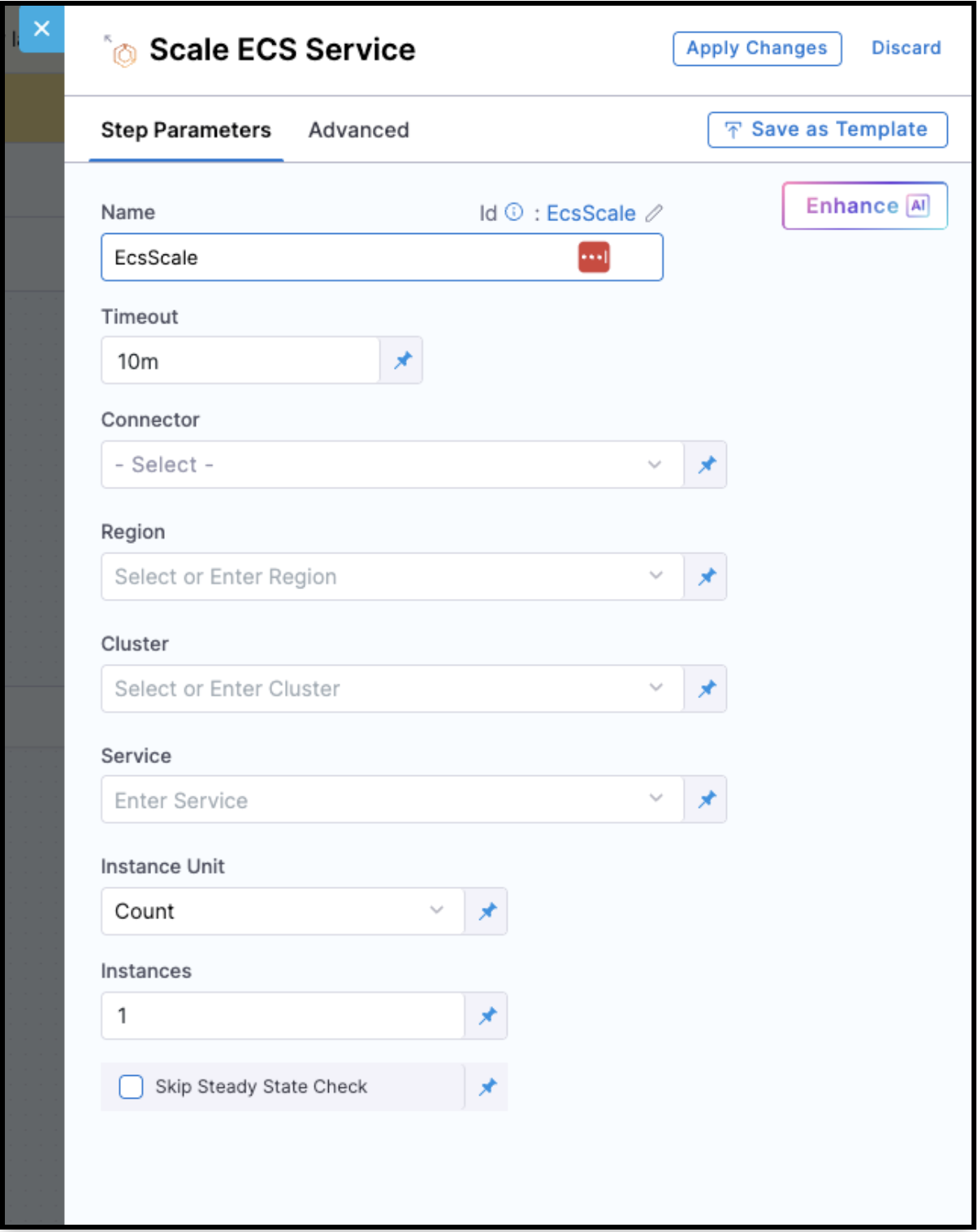
3. Configure the following fields.
### Step parameters
Configure the following fields for the ECS Scale step:
| Field | Description |
| --------------------------- | ------------------------------------------------------------------------------------------------------------------------------------------------------------------------------------------------------------------------------------- |
| **Name** | A name for the step. |
| **Timeout** | How long Harness should wait for the step to complete before failing. Default is `10m`. |
| **Connector** | Reference to an AWS connector. Required or optional depending on the stage type. Go to [Behavior in Deploy vs. Custom stages](#behavior-in-deploy-vs-custom-stages) to review when each field is required. |
| **Region** | The AWS region where the ECS cluster is running. Required or optional depending on the stage type. Go to [Behavior in Deploy vs. Custom stages](#behavior-in-deploy-vs-custom-stages) to review when each field is required. |
| **Cluster** | The ECS cluster name. Required or optional depending on the stage type. Go to [Behavior in Deploy vs. Custom stages](#behavior-in-deploy-vs-custom-stages) to review when each field is required. |
| **Service** | (Required) The name of the ECS service to scale. This value is always required and is not inherited from the stage's service or infrastructure configuration. You can select from the list of services running in the target cluster. |
| **Instance Unit** | Select **Count** (absolute number of tasks) or **Percentage** (percentage of the service's current desired count). |
| **Instances** | The target number or percentage of instances to scale to. |
| **Skip Steady State Check** | When enabled, Harness triggers the scale operation but does not wait for the service to reach a steady state. Default is `false`. |
### Behavior in Deploy vs. Custom stages
The **Connector**, **Region**, and **Cluster** fields behave differently depending on the stage type:
* **Deploy stage**: These fields are optional. If left empty, the step inherits the values from the stage's infrastructure configuration. If you provide values in the step, they take precedence over the infrastructure configuration. This lets you target a service in a different cluster, region, or AWS account within the same Deploy stage.
* **Custom stage**: All fields are required. Since Custom stages do not have an infrastructure configuration to inherit from, you must explicitly provide the Connector, Region, and Cluster.
## YAML example
ECS Scale step YAML
The following YAML scales the `my_backend_service` to 4 instances in a specific cluster:
```yaml
- step:
type: EcsScale
name: Scale Backend Service
identifier: ScaleBackendService
spec:
service: my_backend_service
instanceUnit: Count
instances: 4
connectorRef: my_aws_connector
region: us-east-1
cluster: my-ecs-cluster
timeout: 10m
```
### Pipeline example
This pipeline shows a common use case: deploying a primary ECS service using a basic deployment strategy, then scaling a different backend service in a separate cluster after an approval gate. The ECS Scale step targets `my_backend_service` on `my-ecs-cluster` using its own AWS connector and region, independent of the infrastructure defined in the stage's environment.
This pattern is useful when a deployment to one service requires a dependent service to be scaled up (or down) as part of the same pipeline, without triggering a full redeployment of that dependent service.
Pipeline YAML with ECS Scale step
```yaml
pipeline:
name: ecs_basic_with_scale
identifier: ecs_basic_with_scale
projectIdentifier: my_project
orgIdentifier: default
tags: {}
stages:
- stage:
name: ecs_deploy
identifier: ecs_deploy
description: ""
type: Deployment
spec:
deploymentType: ECS
service:
serviceRef: my_ecs_service
environment:
environmentRef: staging
deployToAll: false
infrastructureDefinitions:
- identifier: my_ecs_infra
execution:
steps:
- stepGroup:
name: Basic Deployment
identifier: basicDeployment
steps:
- step:
name: ECS Service Setup
identifier: EcsServiceSetup
type: EcsServiceSetup
timeout: 10m
spec:
resizeStrategy: ResizeNewFirst
- step:
name: ECS Upgrade Container
identifier: EcsUpgradeContainer
type: EcsUpgradeContainer
timeout: 10m
spec:
newServiceInstanceCount: 5
newServiceInstanceUnit: Count
downsizeOldServiceInstanceCount: 1
downsizeOldServiceInstanceUnit: Count
- step:
type: HarnessApproval
name: Approval Before Scale
identifier: ApprovalBeforeScale
spec:
approvalMessage: Please review and approve before scaling the backend service.
includePipelineExecutionHistory: true
isAutoRejectEnabled: false
approvers:
userGroups:
- account._account_all_users
minimumCount: 1
disallowPipelineExecutor: false
approverInputs: []
timeout: 1d
- step:
type: EcsScale
name: Scale Backend Service
identifier: ScaleBackendService
spec:
service: my_backend_service
instanceUnit: Count
instances: 4
connectorRef: my_aws_connector
region: us-east-1
cluster: my-ecs-cluster
timeout: 10m
rollbackSteps:
- step:
name: ECS Basic Rollback
identifier: EcsBasicRollback
type: EcsBasicRollback
timeout: 10m
spec: {}
tags: {}
failureStrategies:
- onFailure:
errors:
- AllErrors
action:
type: StageRollback
```
## Advanced settings
In the **Advanced** tab, you can configure the following settings.
* [Delegate Selector](https://developer.harness.io/docs/platform/delegates/manage-delegates/select-delegates-with-selectors)
* [Conditional Execution](https://developer.harness.io/docs/platform/pipelines/step-skip-condition-settings)
* [Failure Strategy](https://developer.harness.io/docs/platform/pipelines/failure-handling/define-a-failure-strategy-on-stages-and-steps)
* [Looping Strategy](https://developer.harness.io/docs/platform/pipelines/looping-strategies/looping-strategies-matrix-repeat-and-parallelism)
* [Policy Enforcement](https://developer.harness.io/docs/platform/governance/policy-as-code/harness-governance-overview)
***
## Next steps
* Go to [ECS deployment tutorial](/continuous-delivery/troubleshooting-and-resources/tutorials/aws-deployments/amazon-ecs.md) to deploy a complete ECS service.
* Go to [ECS deployments overview](/continuous-delivery/use-continuous-delivery/deploy-services-on-different-platforms/aws/ecs/ecs-deployment-tutorial.md) to learn about ECS deployment types and strategies.