> For the complete documentation index, see [llms.txt](https://developer.harness.io/llms.txt). Markdown versions of documentation pages are available by appending `.md` to page URLs; this page is available as [Markdown](https://developer.harness.io/continuous-delivery/use-continuous-delivery/deploy-services-on-different-platforms/aws/ecs/traffic-shifting.md).
# ECS Blue-Green traffic shifting step
ECS Blue-Green deployment strategy with native support for phased traffic shifting using ALB weighted target groups.
Harness supports gradual traffic shifting during ECS Blue-Green deployments using [AWS Application Load Balancer (ALB)](https://docs.aws.amazon.com/elasticloadbalancing/latest/application/introduction.html) weighted target groups. This enhancement enables you to progressively direct live traffic to a new ECS service version.
## What you will learn from this topic
* How to [set up an ECS Blue-Green Traffic Shifting step group](#set-up-a-ecs-blue-green-traffic-shifting-step-group).
* How to configure [automated stage target group discovery](#automated-stage-target-group-discovery).
* How to configure the ECS Blue-Green Traffic Shifting step using [Inherit](#inherit) or [Standalone](#standalone) mode.
* How to compare [traditional Blue-Green deployments with traffic shifting](#comparison-traditional-blue-green-vs-traffic-shifting).
* How to interpret [rollback behavior](#rollback-behavior) for each traffic shifting mode.
## Before you begin
Confirm the following before you configure ECS Blue-Green traffic shifting:
* **ECS stage**: An ECS stage in your pipeline.
* **Harness ECS service**: A Harness ECS service configured in the stage. Go to [Adding an ECS Service](/continuous-delivery/use-continuous-delivery/deploy-services-on-different-platforms/aws/ecs/ecs-deployment-tutorial.md#add-the-harness-service) to configure it.
* **Harness ECS environment and infrastructure**: A Harness ECS environment and infrastructure configured in the stage. Go to [Adding an ECS Environment](/continuous-delivery/use-continuous-delivery/deploy-services-on-different-platforms/aws/ecs/ecs-deployment-tutorial.md#define-the-infrastructure) to configure it.
* **AWS Application Load Balancer**: An AWS ALB with a listener rule that forwards traffic to the production and stage target groups.
## Overview
Traditionally, ECS Blue-Green deployments in Harness used two listener rules: Stage and Prod listener rules. This setup lacked the flexibility to support multiple rules or test traffic on alternate listener rules before shifting production traffic. All validation was done on the Stage listener rule before traffic was swapped to Prod.
To solve this, you can configure **traffic shifting** between target groups attached to the same listener rule, giving you the flexibility to:
* Use multiple target groups in a **single rule** with configurable traffic distribution across target groups.
* Test new versions incrementally in development and then production environments.
* Perform gradual roll-outs with approval gates between steps.
* Revert traffic back to the original forward configuration in case of issues.
## Set up an ECS Blue-Green Traffic Shifting step group
Perform the following steps to set up an ECS Blue-Green Traffic Shifting step group:
1. Add an ECS stage to your pipeline.
2. In the stage Service, go to [Adding an ECS Service](/continuous-delivery/use-continuous-delivery/deploy-services-on-different-platforms/aws/ecs/ecs-deployment-tutorial.md#add-the-harness-service) to add a Harness ECS service.
3. In the stage Environment, go to [Adding an ECS Environment](/continuous-delivery/use-continuous-delivery/deploy-services-on-different-platforms/aws/ecs/ecs-deployment-tutorial.md#define-the-infrastructure) to add a Harness ECS environment and infrastructure.
4. In the Execution strategies tab, select the **Blue Green** strategy and select the **Add Traffic Shifting Steps** checkbox under the **Enable Traffic Shifting for ECS Deployment** section.
Your Execution tab includes a Blue Green Deployment step group with the **ECS Blue Green Create Service step** and **ECS Blue-Green Traffic Shifting** step.
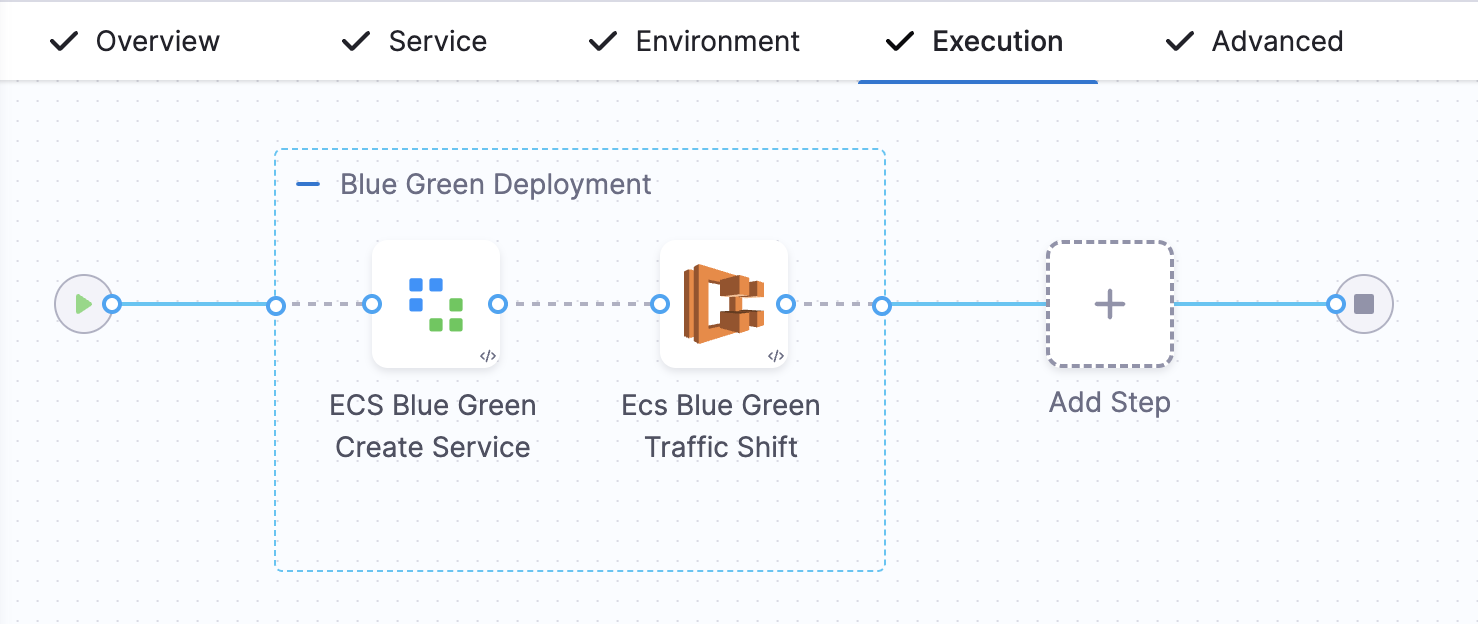
If you do not select the **Add Traffic Shifting Steps** checkbox, then you will have a Blue Green Deployment step group with steps **Configure Blue Green Deployment** and **ECS Blue Green Swap Target Groups**.
You can also use a blank canvas and manually add the **ECS Blue Green Create Service step** and **ECS Blue-Green Traffic Shifting** step to your stage.
{% hint style="info" %}
You cannot have an **ECS Blue-Green Traffic Shifting** step and a **Configure Swap Target Groups** step within the same stage, because both use the same configure step, which is the **ECS Blue Green Create Service step**.
{% endhint %}
### Configure the ECS Blue Green Create Service step
The following figure shows the ECS Blue Green Create Service step configuration.
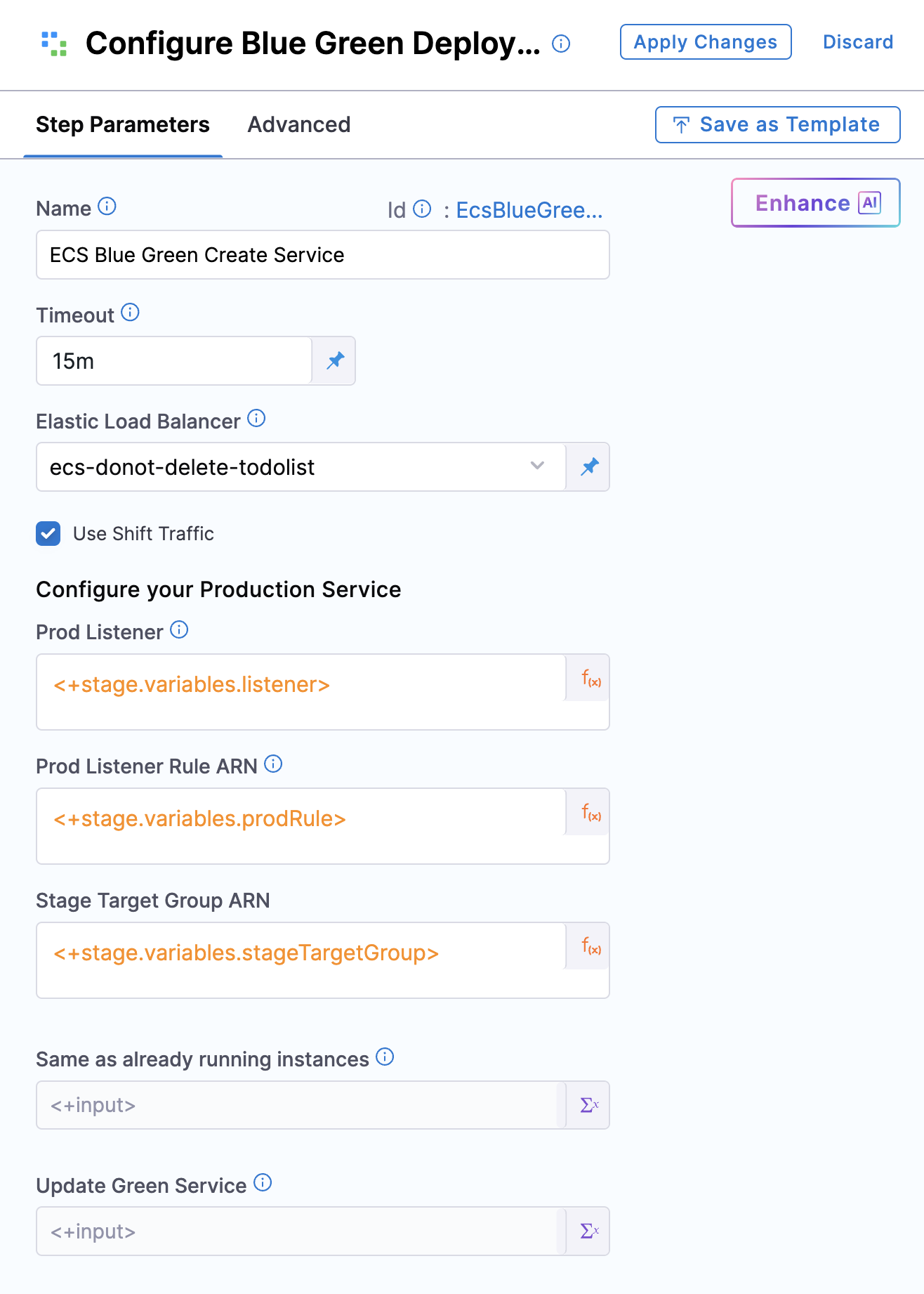
The step includes the following fields:
* **Name**: Name of the step.
* **Timeout**: Execution timeout.
* **Elastic Load Balancer**: Select the AWS load balancer to use.
Select the **Use Shift Traffic** checkbox to enable the ECS Blue-Green Traffic Shifting step.
{% hint style="info" %}
If this checkbox is not selected, the **ECS Blue-Green Traffic Shifting** step will not be available.
{% endhint %}
In **Configure your Production Service**:
* **Prod Listener**: Select the ELB listener you want to use for production.
* **Prod Listener Rule ARN**: Select the listener rule that forwards traffic to the production and stage target groups.
* **Stage Target Group ARN** (Optional): Select the target group where the new service version will be deployed.
The specified listener rule must reference exactly two target groups: one for the existing (production) service and one for the new (stage) service. This field identifies the stage target group in that rule.
{% hint style="info" %}
**Automated stage target group discovery**
The production listener rule must have exactly two target groups. Harness **automatically discovers** the correct stage target group when the **Stage Target Group ARN** is not provided.
**Automatic discovery (recommended)**:
* Leave **Stage Target Group ARN** empty (or set to `<+input>` in YAML).
* Harness automatically identifies the target group with **0% traffic weight** as the stage target group.
* The system validates that traffic distribution is either 100/0, 0/100, or 0/0 (NULL values are also supported).
* Deployment fails fast if weights are ambiguous (for example, 60/40).
* The selected stage target group is displayed in the console logs for verification.
**Manual selection (backward compatible)**:
* If you provide a specific **Stage Target Group ARN**, Harness uses your selection.
* You must manually alternate between target groups with each deployment.
* Select the target group with **0% traffic** to avoid deleting your active production service.
**Why automatic discovery prevents outages**: Harness deletes non-blue services from the stage target group at the start of each deployment. Manual selection errors, such as pointing to the active blue service, cause production downtime. Automatic discovery eliminates this risk by always selecting the target group with 0% traffic.
{% endhint %}
The step also includes the following options:
* **Same as already running instances**: When selected, the new ECS service uses the same instances as the old service after deployment.
* **Update Green Service**: When selected, Harness updates the green service instead of deleting and re-creating it during deployment.
Yaml sample for the step
```yaml
- step:
name: ECS Blue Green Create Service
identifier: EcsBlueGreenCreateService
type: EcsBlueGreenCreateService
timeout: 15m
spec:
loadBalancer: ecs
isTrafficShift: true
sameAsAlreadyRunningInstances: false
updateGreenService: true
prodListener: <+input>
prodListenerRuleArn: <+input>
stageTargetGroupArn: <+input> # Optional: Leave empty for automatic discovery
```
## Automated stage target group discovery
Harness automatically detects the correct stage target group when `stageTargetGroupArn` is not provided, eliminating the risk of deployment failures caused by manual selection errors.
### How automatic discovery works
When you leave the **Stage Target Group ARN** field empty, Harness follows this sequence:
1. **Query AWS**: Harness retrieves the current traffic weights for all target groups in the specified listener rule.
2. **Validate distribution**: The system verifies that the traffic distribution follows one of these patterns:
* **100/0**: One target group has 100% traffic (active BLUE), the other has 0% (empty STAGE).
* **0/100**: Inverse of above.
* **0/0**: Both target groups have 0% traffic (initial state).
* **NULL values**: Target groups with no weight assigned are treated as 0%.
3. **Select stage target group**: Harness automatically selects the target group with **0% traffic weight** as the stage target group.
4. **Fast-fail on ambiguity**: If weights do not match the expected patterns (for example, 60/40 or 70/30), the deployment fails immediately with a clear error message.
5. **Log selection**: The chosen stage target group ARN is displayed in the deployment console logs for verification.
### Benefits of automatic discovery
Automatic discovery provides the following benefits:
* **Prevents production outages**: Eliminates the risk of accidentally deploying to the active production target group.
* **No manual tracking required**: No need to remember which target group was used in the previous deployment.
* **Safer deployments**: System validates the traffic state before proceeding.
* **Backward compatible**: Manual selection still works if you prefer explicit control.
### Example scenario
The following example illustrates automatic discovery across two consecutive deployments.
**Initial state**:
* Target Group A: 100% traffic (active BLUE service).
* Target Group B: 0% traffic (empty).
**Deployment 1 (automatic)**:
* Harness detects Target Group B has 0% traffic and deploys the new service to Target Group B.
* After the traffic shift reaches 100%, Target Group B becomes the active BLUE target group.
**Deployment 2 (automatic)**:
* Harness detects Target Group A has 0% traffic and deploys the new service to Target Group A.
* After the traffic shift reaches 100%, Target Group A becomes the active BLUE target group.
No manual intervention is required between deployments.
### Configure the ECS Blue-Green Traffic Shifting step
This step adjusts traffic weights between target groups.
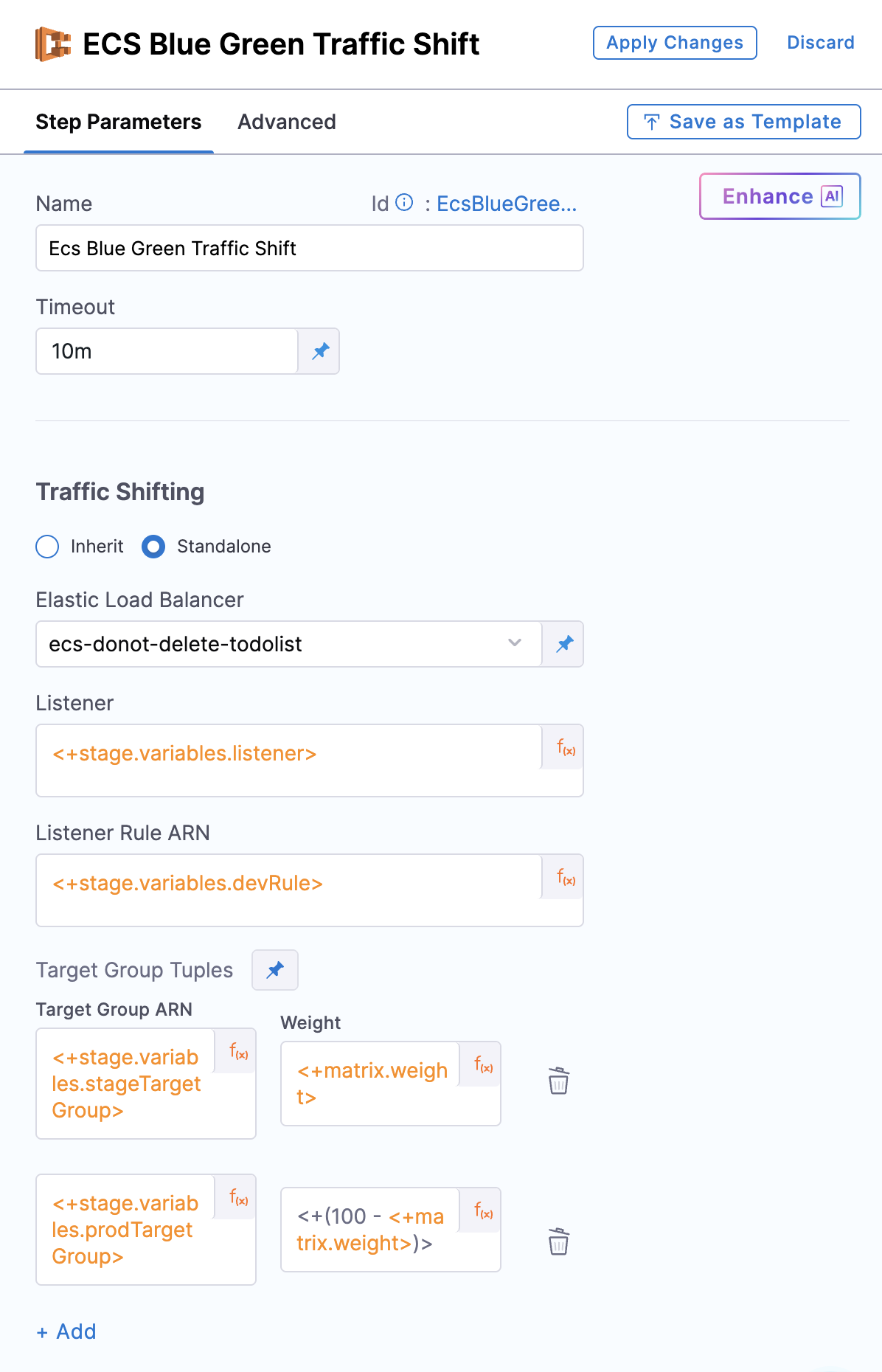
The step includes the following parameters:
* **Name**: Name of the step.
* **Timeout**: Execution timeout.
In the **Traffic Shifting** configuration, you have the option to either:
* **Inherit** the configuration from the previous ECS Blue-Green Create Service step using the **Inherit** checkbox, or
* Select the **Standalone** checkbox to define a new configuration.
### Inherit
When **Inherit** is selected, the step behaves as follows:
* Provide the **New ECS Weight**.
* Configuration such as Elastic Load Balancer, Listener, and Listener Rule ARN is inherited from the **ECS Blue Green Create Service** step.
The step adjusts traffic distribution between the **Stage Target Group** (where the new service version is deployed) and the **Prod Target Group** (where the existing version is running):
* Weight `50` → 50% traffic to Stage Target Group, 50% to Prod Target Group.
* Weight `70` → 70% to Stage Target Group, 30% to Prod Target Group.
* Weight `100` → The step routes 100% traffic to the **Stage target group**.
The **Inherit** step updates blue and green tags only when 100% of the traffic is shifted to the Stage Target Group.\
In this case, the new service deployed is tagged as **BLUE**. For any lower weight, tagging does not occur.
**Downsize old service after traffic shift**
{% hint style="info" %}
**Feature flag**
This feature is behind the feature flag `CDS_ECS_BG_TRAFFIC_SHIFT_DOWNSIZE_OLD_SERVICE`. Contact [Harness Support](mailto:support@harness.io) to enable the feature.
{% endhint %}
When ECS Blue-Green Traffic Shift (Inherit mode) shifts 100% of traffic to the new service, the old ECS service continues running at its original desired task count. Idle containers remain registered with ECS and accrue infrastructure costs even though they receive no live traffic. The **Downsize old service** option instructs Harness to automatically downsize the old service once the traffic shift reaches 100%.
The **Inherit** configuration includes two optional fields:
* **Downsize old service**: Select this checkbox to downsize the old ECS service after traffic reaches 100%. When enabled, Harness removes the auto-scaling policies, deregisters the scalable target, and sets the desired task count on the old service to zero. This checkbox is cleared by default.
* **Downsize Old Service Delay (Seconds)**: Optionally specify a grace period in seconds between the 100% traffic shift and the start of the downsize sequence. This gives in-flight requests time to complete before the old service stops. When not set or set to zero, the downsize begins immediately.
{% hint style="info" %}
**Behavior notes**
* Downsizing only triggers when `weightPercentage` reaches 100. Pipeline steps that shift traffic to an intermediate value (for example, 10% or 50%) never downsize the old service, regardless of this setting.
* This applies only to **Inherit mode**. Standalone mode does not support automatic downsizing.
* The feature is opt-in and backward-compatible. Pipelines created before this change, or pipelines that do not set `downsizeOldService`, behave exactly as before.
{% endhint %}
**Rollback behavior**:
Rollback works correctly regardless of whether downsizing is enabled. The **ECS Blue Green Rollback** step restores the old service's desired count and auto-scaling configuration from a snapshot that Harness captures at the very start of deployment, before any traffic shifting or downsizing occurs. Whether `downsizeOldService` is true or false, triggering a rollback (for example, by rejecting an approval step or failing a shell script step) restores the old service to its pre-deployment state.
Sample YAML
```yaml
- step:
name: Ecs Blue Green Traffic Shift
identifier: EcsBlueGreenTrafficShift
type: EcsBlueGreenTrafficShift
timeout: 10m
spec:
ecsTrafficShiftWrapper:
type: Inherit
spec:
weightPercentage: <+matrix.weight>
downsizeOldService: true
downsizeOldServiceDelayInSecs: 30
```
### Standalone
When the **Standalone** checkbox is selected, the step behaves as follows:
* You can provide a new set of Elastic Load Balancer, Listener, and Listener Rule ARN values.
* This allows you to set the **forward configuration** for the specified listener rule, which defines how traffic is distributed across multiple target groups.
* A common use case is to validate the new service independently in lower environments by referencing the same target groups used in the production rule from the Blue-Green Create step.
{% hint style="warning" %}
You must not reuse the same listener rule that is specified in the **ECS Blue Green Create Service** step. Doing so results in a failure during execution.
{% endhint %}
The **Standalone** configuration includes the following fields:
* **Elastic Load Balancer**: Select the AWS load balancer to use.
Harness uses the delegate to locate the load balancers and list them in Elastic Load Balancer. If you do not see your load balancer, confirm that the delegate can connect to ECS.
* **Listener**: Select the ELB listener to associate with this deployment.
* **Listener Rule ARN**: Select the Listener Rule ARN that defines the routing of traffic to the appropriate target group.
In **Target Group Tuples**, specify:
* **Target Group ARN**: Select the target group to which traffic should be shifted.
* **Weight**: Specify the weight to be associated with the target group in the listener rule.
Go to the [AWS ALB Listener Rule documentation](https://docs.aws.amazon.com/elasticloadbalancing/latest/application/load-balancer-listeners.html) to review how listener rule weighting works.
You can provide one or more **Target Group Tuples**, and the forward configuration for the listener rule will be set accordingly based on the weights specified in each tuple.
{% hint style="info" %}
If only one **Target Group Tuple** is provided, 100% of the traffic will be routed to the specified **Target Group ARN** for the listener rule.
{% endhint %}
Sample YAML of the step group
```yaml
stepGroup:
name: Blue Green Deployment
identifier: blueGreenDeployment
steps:
- step:
name: ECS Blue Green Create Service
identifier: EcsBlueGreenCreateService
type: EcsBlueGreenCreateService
timeout: 10m
spec:
loadBalancer: my-app-elb
prodListener: arn:aws:elasticloadbalancing:region:account-id:listener/app/my-app/123456
prodListenerRuleArn: arn:aws:elasticloadbalancing:region:account-id:listener-rule/app/my-app/123456/abc123
isTrafficShift: true
stageTargetGroupArn: arn:aws:elasticloadbalancing:region:account-id:targetgroup/stage-group/abcdef
- step:
name: Ecs Blue Green Traffic Shift
identifier: EcsBlueGreenTrafficShift
type: EcsBlueGreenTrafficShift
timeout: 10m
spec:
ecsTrafficShiftWrapper:
type: Standalone
spec:
loadBalancer: my-app-elb
listener: arn:aws:elasticloadbalancing:region:account-id:listener/app/my-app/123456
listenerRuleArn: arn:aws:elasticloadbalancing:region:account-id:listener-rule/app/my-app/123456/dev123
forwardConfig:
- targetGroupArn: arn:aws:elasticloadbalancing:region:account-id:targetgroup/stage-group/abcdef
weight: 70
- targetGroupArn: arn:aws:elasticloadbalancing:region:account-id:targetgroup/prod-group/123456
weight: 30
rollbackSteps:
- step:
name: ECS Blue Green Rollback
identifier: EcsBlueGreenRollback
type: EcsBlueGreenRollback
timeout: 10m
spec: {}
- step:
name: Stand Alone Traffic Shift Rollback
identifier: StandAloneTrafficShiftRollback
type: StandAloneTrafficShiftRollback
timeout: 10m
spec: {}
```
The **Standalone** step does not assign blue or green tags to the associated ECS services.
## Rollback behavior
When you run the **ECS Blue Green Create Service** step, the system stores the initial configuration as **Prepare Rollback Data** before execution begins.
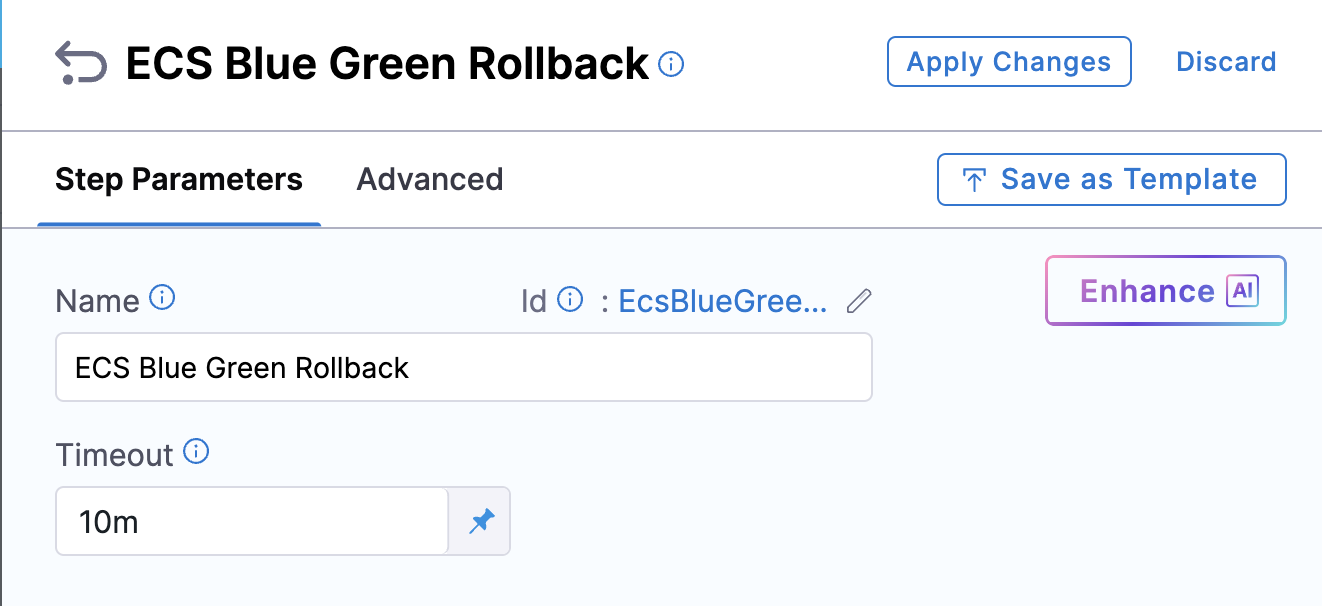
* In **Inherit mode**, if the step fails mid-execution, the rollback is handled by the **ECS Blue Green Rollback** step, which restores the traffic weights and blue/green tag assignments using the stored rollback data.
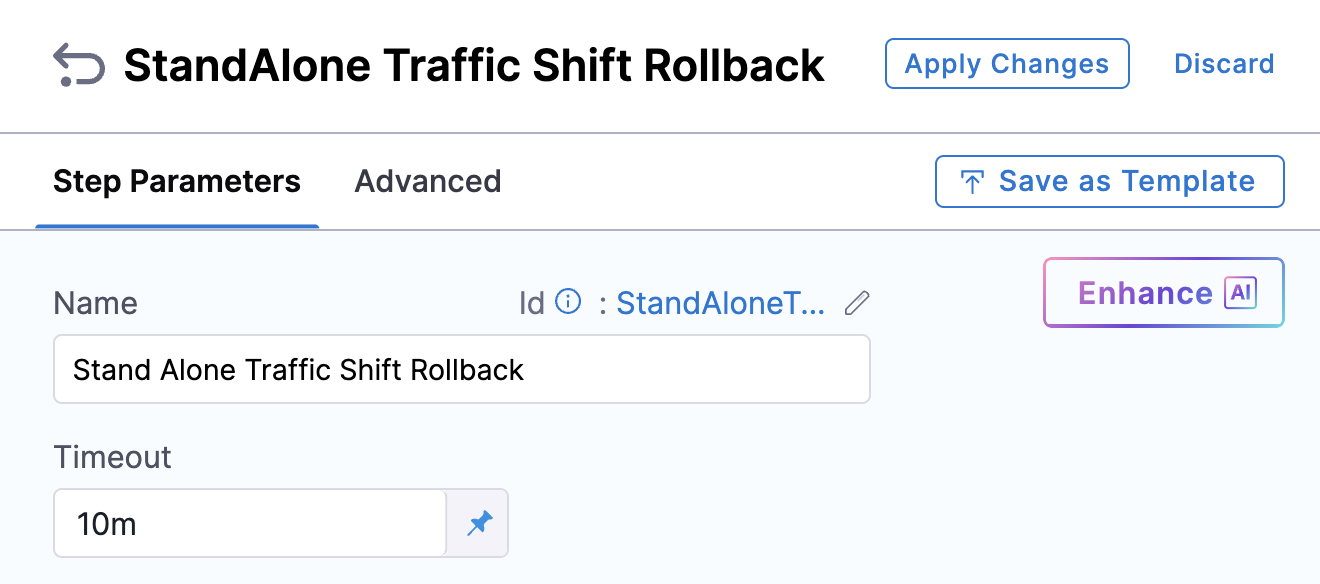
* In **Standalone mode**, during the first execution of each listener rule, the system captures the original forward configuration as part of the rollback data. If a failure occurs, the **Standalone Traffic Shift Rollback** step restores the original forward configuration for all affected listener rules.
In both cases, rollback steps route traffic back to the original setup if a failure occurs.
Rollback behavior depends on the mode used:
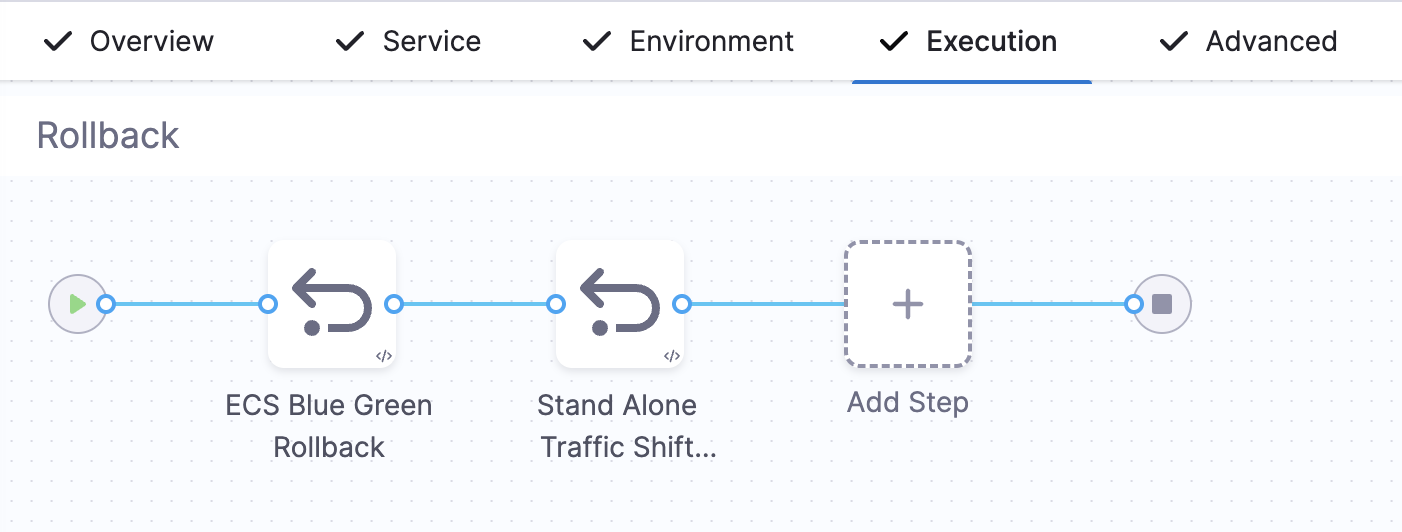
* **Inherit mode**: Restores the initial traffic weights using the **ECS BG Rollback** step.
* **Standalone mode**: Resets the original forward configuration for all listener rules used in the stage using the **Standalone Traffic Shift Rollback** step.
In both cases, the original forward configuration is restored in the event of a failure or rollback trigger, using the appropriate rollback step for each mode.
## Comparison: traditional Blue-Green vs. traffic shifting
### Traditional Blue-Green deployment (pre-traffic shifting)
Before traffic shifting, Blue-Green deployments in Harness worked as follows:
* Requires two separate listener rules (typically configured on different ports).
* New version is deployed to the Stage target group associated with a different listener rule (commonly mapped to a separate port).
* After manual or automated validation, a Swap Target Groups step is used to direct 100% traffic to the new version.
* You cannot test the new version on live production traffic until after the swap.
* Swap is atomic, with no gradual rollout or partial traffic shift.
### Blue-Green deployment with traffic shifting (new flow)
With traffic shifting, Blue-Green deployments work as follows:
* Uses a single listener rule with weighted target groups.
* New version is deployed to a target group under the same listener rule as the old version.
* Allows progressive traffic rollout (for example, 10% → 50% → 100%) using the ECS Traffic Shift step.
* Eliminates need for separate ports or manual AWS CLI scripts.
* Enables staged rollout with approval gates, monitoring, and rollback safety.
* No Swap step needed, as transition to full traffic is handled by adjusting target group weights.
This traffic-shifting approach makes Blue-Green deployments safer, more controlled, and aware of production traffic.
## General solution pattern for traffic shifting
If you want to implement progressive traffic shifting (for example, 10% → 30% → 100%) across environments, use the following pattern:
* Attach two target groups to a single ALB **listener rule** designated as the production rule.
* Create a separate **listener rule** for the development environment that uses the same two target groups.
* In the **ECS Blue Green Create Service** step, specify the **production listener rule**.
* In lower environments, shift traffic to the stage target group using the **Standalone Traffic Shift** step with the development listener rule.
* In production, use **Inherit mode** to gradually increase traffic to the new service version via the stage target group.
* Use **ECS Traffic Shift** steps to adjust traffic incrementally (for example, 10%, 50%, 100%) with optional approval gates between shifts.
* Finalize with a full cut-over to the stage target group, which is tagged as **BLUE** when traffic reaches 100%.
## Limitations
The following limitations apply to ECS traffic shifting:
* For supported target group weights and configuration options, see the [AWS ALB Listener Rules documentation](https://docs.aws.amazon.com/elasticloadbalancing/latest/application/load-balancer-listeners.html).
* Maximum of five target groups per rule (AWS limitation).
* **Swap** step and **Auto Scaling during swap** are not supported.
* For automatic stage target group discovery, the listener rule must have a clear traffic distribution pattern (100/0, 0/100, or 0/0). Ambiguous weight distributions (for example, 60/40) cause the deployment to fail.
## Example use case: controlled traffic shifting across environments
Perform the following steps to roll out and validate a new version of your service across different environments before promoting it to production:
1. Deploy the new version of the service once and attach it to the **Stage Target Group**.
2. Keep the **Prod Target Group** mapped to the existing (old) service.
3. In lower environments, incrementally shift traffic to the new service version and validate using **CV (Continuous Verification)**, **approval steps**, or **custom scripts**.
4. Once validated, deploy the new version in the production environment and mark the new service as the **blue** version.
## Example use case: step-by-step flow for gradual traffic shifting
Perform the following steps to implement ECS Blue-Green deployments with traffic shifting:
1. Add the **ECS Blue-Green Create Service** step with `isTrafficShift: true`. Optionally leave `stageTargetGroupArn` empty for automatic discovery (recommended), or provide a specific target group ARN for manual control.
2. Add an **ECS Traffic Shift** step (Inherit or Standalone) to begin shifting traffic incrementally.
3. **(Optional)** Add an **approval step** to control progression between shifts.
4. Repeat the **ECS Traffic Shift** steps to gradually increase traffic to 100%.
## Sample pipeline YAML for Inherit traffic shifting step
Below is a ready-to-use pipeline YAML that demonstrates how to configure the **Inherit traffic shifting mode** in an ECS Blue-Green deployment with **automatic stage target group discovery**.
Sample pipeline YAML
```yaml
pipeline:
name: ecs-bluegreen-inherit-example
identifier: ecs_bluegreen_inherit_example
projectIdentifier: demo_project
orgIdentifier: demo_org
tags: {}
delegateSelectors:
- my-delegate
stages:
- stage:
name: ecs-inherit-stage
identifier: ecs_inherit_stage
type: Deployment
spec:
deploymentType: ECS
service:
serviceRef: <+input>
serviceInputs: <+input>
environment:
environmentRef: <+input>
deployToAll: false
environmentInputs: <+input>
serviceOverrideInputs: <+input>
infrastructureDefinitions: <+input>
execution:
steps:
- stepGroup:
name: Blue Green Deployment
identifier: blueGreenDeployment
steps:
- step:
name: ECS Blue Green Create Service
identifier: EcsBlueGreenCreateService
type: EcsBlueGreenCreateService
timeout: 10m
spec:
loadBalancer: <+input>
prodListener: <+input>
prodListenerRuleArn: <+input>
isTrafficShift: true
stageTargetGroupArn: <+input> # Leave empty at runtime for automatic discovery
- step:
name: ECS Blue Green Traffic Shift
identifier: EcsBlueGreenTrafficShift
type: EcsBlueGreenTrafficShift
timeout: 10m
spec:
ecsTrafficShiftWrapper:
type: Inherit
spec:
weightPercentage: 70
rollbackSteps:
- step:
name: ECS Blue Green Rollback
identifier: EcsBlueGreenRollback
type: EcsBlueGreenRollback
timeout: 10m
spec: {}
- step:
name: Standalone Traffic Shift Rollback
identifier: StandAloneTrafficShiftRollback
type: StandAloneTrafficShiftRollback
timeout: 10m
spec: {}
tags: {}
failureStrategies:
- onFailure:
errors:
- AllErrors
action:
type: StageRollback
```
## Sample pipeline YAML for Standalone traffic shifting step
Below is a ready-to-use pipeline YAML that demonstrates how to configure the **Standalone traffic shifting mode** in an ECS Blue-Green deployment.
Sample pipeline YAML
```yaml
pipeline:
name: ecs-bluegreen-sample
identifier: ecs_bluegreen_sample
projectIdentifier: demo_project
orgIdentifier: demo_org
tags: {}
stages:
- stage:
name: ecs-traffic-shifting
identifier: ecstrafficshifting
description: ""
type: Deployment
spec:
deploymentType: ECS
service:
serviceRef: <+input>
serviceInputs: <+input>
environment:
environmentRef: <+input>
deployToAll: false
environmentInputs: <+input>
serviceOverrideInputs: <+input>
infrastructureDefinitions: <+input>
execution:
steps:
- stepGroup:
name: Blue Green Deployment
identifier: blueGreenDeployment
steps:
- step:
name: ECS Blue Green Create Service
identifier: EcsBlueGreenCreateService
type: EcsBlueGreenCreateService
timeout: 10m
spec:
loadBalancer: <+input>
prodListener: <+input>
prodListenerRuleArn: <+input>
isTrafficShift: true
stageTargetGroupArn: <+input>
- step:
name: Ecs Blue Green Traffic Shift
identifier: EcsBlueGreenTrafficShift
type: EcsBlueGreenTrafficShift
timeout: 10m
spec:
ecsTrafficShiftWrapper:
type: Standalone
spec:
loadBalancer: <+input>
listener: <+input>
listenerRuleArn: <+input>
forwardConfig:
- targetGroupArn: <+stage.variables.stageTargetGroup>
weight: 70
- targetGroupArn: <+stage.variables.prodTargetGroup>
weight: 30
rollbackSteps:
- step:
name: ECS Blue Green Rollback
identifier: EcsBlueGreenRollback
type: EcsBlueGreenRollback
timeout: 10m
spec: {}
- step:
name: Stand Alone Traffic Shift Rollback
identifier: StandAloneTrafficShiftRollback
type: StandAloneTrafficShiftRollback
timeout: 10m
spec: {}
tags: {}
failureStrategies:
- onFailure:
errors:
- AllErrors
action:
type: StageRollback
delegateSelectors:
- harness-dev
```
***
## Multiple ALB listener rules in ECS Blue-Green deployments
{% hint style="info" %}
This feature is behind the feature flag `CDS_ECS_BG_MULTIPLE_LISTENER_RULES`. Contact [Harness Support](mailto:support@harness.io) to enable the feature.
{% endhint %}
When you centrally manage ECS deployment templates across many services or teams, a single production listener often routes traffic through several listener rules (one per environment tier, path pattern, or service). Previously, you had to configure a separate pipeline or matrix to shift traffic on each rule individually. With multiple ALB listener rule support, you can configure multiple production listener rule ARN and stage target group pairs in the **ECS Blue Green Create Service** step, and Harness shifts traffic across all of them in a single pipeline run.
### Configure multiple listener rules in the ECS Blue Green Create Service step
When the feature flag is enabled, the **ECS Blue Green Create Service** step shows a **Prod Listener Rule Configs** section. Each entry in the list has two fields:
* **Prod Listener Rule ARN**: The ALB listener rule ARN to use for this configuration.
* **Stage Target Group ARN (optional)**: The stage target group for this rule. Leave empty to let Harness automatically discover the stage target group.
Select **+ Add** to add more listener rule configs. Harness applies the traffic-shifting operation to every entry in the list during the **ECS Blue-Green Traffic Shifting** step (traffic shift mode) or the **ECS Blue Green Swap Target Groups** step (traditional swap mode).
In the pipeline YAML, use `prodListenerRuleConfigs` to provide the list:
ECS Blue Green Create Service step with multiple listener rule configs
```yaml
- step:
name: ECS Blue Green Create Service
identifier: EcsBlueGreenCreateService
type: EcsBlueGreenCreateService
timeout: 15m
spec:
loadBalancer: <+input>
prodListener: <+input>
isTrafficShift: true
prodListenerRuleConfigs:
- prodListenerRuleArn: <+input>
stageTargetGroupArn: <+input> # Optional: leave empty for automatic discovery
- prodListenerRuleArn: <+input>
stageTargetGroupArn: <+input>
```
You can use pipeline variables to supply the list dynamically, which is useful when the same pipeline template deploys across services with different listener rule ARNs:
Sample pipeline YAML with multiple listener rule configs and traffic shifting
```yaml
pipeline:
name: ecs-multi-listener-example
identifier: ecs_multi_listener_example
projectIdentifier: my_project
orgIdentifier: my_org
stages:
- stage:
name: ecs-multi-listener
identifier: ecs_multi_listener
type: Deployment
spec:
deploymentType: ECS
service:
serviceRef: <+input>
serviceInputs: <+input>
environment:
environmentRef: <+input>
deployToAll: false
infrastructureDefinitions: <+input>
execution:
steps:
- stepGroup:
name: Blue Green Deployment
identifier: blueGreenDeployment
steps:
- step:
name: ECS Blue Green Create Service
identifier: EcsBlueGreenCreateService
type: EcsBlueGreenCreateService
timeout: 15m
spec:
loadBalancer: <+input>
prodListener: <+input>
isTrafficShift: true
prodListenerRuleConfigs:
- prodListenerRuleArn: <+input>
stageTargetGroupArn: <+input>
- prodListenerRuleArn: <+input>
stageTargetGroupArn: <+input>
- step:
name: ECS Blue Green Traffic Shift
identifier: EcsBlueGreenTrafficShift
type: EcsBlueGreenTrafficShift
timeout: 10m
spec:
ecsTrafficShiftWrapper:
type: Inherit
spec:
weightPercentage: 100
rollbackSteps:
- step:
name: ECS Blue Green Rollback
identifier: EcsBlueGreenRollback
type: EcsBlueGreenRollback
timeout: 10m
spec: {}
tags: {}
failureStrategies:
- onFailure:
errors:
- AllErrors
action:
type: StageRollback
```
### Configure per-rule weight overrides in the ECS Blue-Green Traffic Shifting step
When multiple listener rule configs are configured, the **ECS Blue-Green Traffic Shifting** step (Inherit mode) shows a **Rule Overrides** section. Each entry in the list has two fields:
* **Listener Rule ARN**: The ALB listener rule ARN to override.
* **New ECS Weight (%)**: The traffic weight percentage to apply to the stage target group for that specific rule.
If you do not add a rule override for a given listener rule, Harness applies the top-level **New ECS Weight** value to all listener rules uniformly. Select **+ Add** to override the weight for individual rules.
### Behavior during deployment and rollback
When multiple listener rule configs are configured, Harness processes them in sequence during both deployment and rollback:
* **Deployment**: Harness registers the stage service with the target group for each listener rule config, then applies the traffic shift (or swap) to all rules in the list.
* **Rollback**: The **ECS Blue Green Rollback** step restores the original forward configuration for every listener rule that was modified, using the snapshot captured at the start of the deployment.
***
## Next steps
* [ECS Blue-Green Deployment FAQs](/continuous-delivery/use-continuous-delivery/deploy-services-on-different-platforms/aws/ecs/ecs-blue-green-faqs.md): Review frequently asked questions about ECS Blue-Green deployments.
* [ECS Deployments Overview](/continuous-delivery/use-continuous-delivery/deploy-services-on-different-platforms/aws/ecs/ecs-deployment-tutorial.md): Go to the ECS deployment tutorial to configure the service, environment, and infrastructure referenced in this topic.
{% @harness-feedback/feedback %}