> For the complete documentation index, see [llms.txt](https://developer.harness.io/llms.txt). Markdown versions of documentation pages are available by appending `.md` to page URLs; this page is available as [Markdown](https://developer.harness.io/continuous-delivery/use-continuous-delivery/deploy-services-on-different-platforms/aws/sam-image-build.md).
# Build AWS SAM runtime images
A reusable Harness pipeline to build customized AWS SAM images.
This topic provides a Harness CD pipeline to help you build your own Docker images for the AWS SAM CLI.
The purpose of this pipeline is to give you flexibility, so you can adopt newer AWS Lambda runtimes or tailor the image to your specific serverless application needs.
## What you will learn from this topic
* What the [pipeline does](#what-this-pipeline-does) and which [SAM runtimes](#understanding-sam-runtimes) it supports.
* The [key components and prerequisites](#key-components-and-pre-requisites) for running the pipeline.
* How to [run the pipeline](#quick-start) and review its [pipeline YAML](#pipeline-yaml).
## What this pipeline does
This pipeline automates building AWS SAM images for different programming languages using Harness. It enables you to keep up with the latest SAM versions and apply customizations as required for your projects.
You can find the full pipeline YAML in the [Pipeline YAML](#pipeline-yaml) section below.
## SAM runtimes
SAM runtimes refer to the programming language environments that AWS Serverless Application Model (SAM) supports for Lambda function development. Each runtime provides the necessary language-specific libraries, tools, and dependencies needed to build, test, and deploy serverless applications.
Common SAM runtimes include:
* **Node.js**: Versions like nodejs18.x, nodejs20.x
* **Python**: Versions like python3.9, python3.10, python3.11
* **Java**: Versions like java11, java17
* **Ruby**: Versions like ruby3.2
* **Go**: Versions like go1.x
When you build your own image using the Harness pipeline, you are combining the Harness SAM base image (which provides the integration with Harness CD) with a specific SAM runtime image from AWS. This allows you to deploy serverless applications written in your preferred programming language while using Harness deployment capabilities.
## Key components and prerequisites
This pipeline helps you build **custom AWS SAM images** using Harness, integrating the Harness SAM image with supported AWS Lambda runtimes. Key details about the pipeline include:
* **Deployment Stage with Kubernetes Infrastructure**
* Uses a Deployment stage configured to run on Kubernetes.
* **Privileged Mode and Kubernetes Cluster Setup**
* The pipeline requires privileged mode enabled on the Kubernetes step group to support Docker-in-Docker (DinD) for building and pushing images.
* This mode grants necessary permissions to install and run Docker CLI commands and access the Docker daemon inside pipeline containers.
* When using managed Kubernetes services like GKE, **do not use Autopilot clusters**, which restrict privileged containers.
* Instead, use standard clusters with node pools configured to permit privileged pods.
* Connect your Kubernetes cluster to Harness via a Kubernetes Cluster connector with appropriate permissions.
* **Use of Official AWS SAM Images**
* Pulls SAM base images exclusively from the [AWS ECR public gallery](https://gallery.ecr.aws/sam?page=1) for compatibility.
* **Automatic Extraction of Runtime and Version**
* The pipeline extracts runtime and version details directly from the SAM base image name.
* **Final Image Naming Convention**
* The final built images follow the pattern:\
`aws-sam-plugin:{VERSION}-{SAM_RUNTIME}-{SAM_VERSION}-linux-amd64`\
Example: `aws-sam-plugin:1.1.2-nodejs18.x-1.143.0-linux-amd64`
### Pipeline runner privileged mode requirement
Certain steps in the pipeline require the Kubernetes pod to run in privileged mode. This is necessary for starting Docker daemons (DinD), building container images inside pipeline steps, and granting the permissions Docker needs at runtime.
**Why privileged mode is required**:
* Enables Docker-in-Docker (DinD) support for building and pushing images.
* Allows installation and execution of docker CLI and manipulation of containers within the build step.
* Required for root access and mounting Docker volumes.
To enable privileged execution, set `privileged: true` in the step group or step-level security context.
**Example: Step group**
```yaml
stepGroup:
privileged: true
name: k8s-step-group
sharedPaths:
- /var/run
- /var/lib/docker
```
**Example: Individual step**
```yaml
step:
name: dinD
privileged: true
...
```
Without this setting, Docker builds and image pushes may fail due to insufficient permissions inside the container.
## Quick start
Perform the following steps to run the pipeline:
1. Copy the provided [pipeline YAML](#pipeline-yaml) and paste it in your Harness Project.
2. Add an **empty/do-nothing service** to the pipeline.
3. Add a **Kubernetes environment** to the pipeline.
4. In the **Execution section**, enable **container-based execution** in the **step group**.
5. Add the Kubernetes cluster connector inside the container step group.
6. Save the pipeline.
7. Click **Run Pipeline**.
8. Enter the required parameters:
* `VERSION`: Version number for your plugin (e.g., `1.1.2`). Harness publishes a new tag and Docker image with each code change, so you can use a specific plugin version. Go to [Harness DockerHub](https://hub.docker.com/r/harness/aws-sam-plugin/tags) to find the Harness base image.
* `SAM_BASE_IMAGE`: SAM base image from AWS ECR Gallery (e.g., `public.ecr.aws/sam/build-nodejs18.x:1.143.0-20250502200316-x86_64`).
### Base image requirements
Only official AWS SAM build images from the [AWS ECR Public Gallery](https://gallery.ecr.aws/sam?page=1) are supported.
* Only use SAM base images from: AWS ECR Gallery - SAM
* Only `x86_64` architecture images are supported
* Using different base images may cause library dependency issues
* Non-standard base images may cause the plugin to not function as required
**SAM Base Image Format**
The pipeline supports only full formats for the SAM base image:
Full format: `public.ecr.aws/sam/build-nodejs18.x:1.143.0-20250502200316-x86_64`
**Image configuration**
The final image follows this naming pattern.
```
aws-sam-plugin:${VERSION}-${SAM_RUNTIME}-${SAM_VERSION}-linux-amd64
```
**Example**:
```
aws-sam-plugin:1.1.2-nodejs18.x-1.138.0-linux-amd64
```
Where:
* `VERSION`: Harness base image (e.g., `1.1.2`)
* `SAM_RUNTIME`: Runtime extracted from SAM base image (e.g., `nodejs18.x`)
* `SAM_VERSION`: Version extracted from SAM base image (e.g., `1.143.0`)
### Variables used in pipeline
These variables are actively used in the pipeline for building and pushing the image that you need to configure.
**Pipeline variables**: `TARGET_REPO`, `DOCKER_USERNAME`, and `DOCKER_PASSWORD` are set once as pipeline-level variables.
| Variable | Description | Example | Required |
| ----------------- | ------------------------------ | ----------------------------- | -------- |
| `TARGET_REPO` | Target Docker repository | `your_account/aws-sam-plugin` | Yes |
| `DOCKER_USERNAME` | Docker registry username | `your_dockerhub_username` | Yes |
| `DOCKER_PASSWORD` | Docker registry password/token | `your_dockerhub_pat` | Yes |
**Runtime inputs**:
| Variable | Description | Example | Required |
| -------------------- | ---------------------------------- | ------------------------------------------------------------------- | -------- |
| `VERSION` | Harness base image-version tag | `1.1.2` | Yes |
| `HARNESS_BASE_IMAGE` | Reference to your built base image | `harness/aws-sam-plugin:1.1.2-beta-base-image` | Yes |
| `SAM_BASE_IMAGE` | AWS SAM base image from ECR | `public.ecr.aws/sam/build-python3.12:1.143.0-20250822194415-x86_64` | Yes |
### Pipeline YAML
The following is the YAML for the AWS SAM image build pipeline. You can copy and paste it into your Harness Project.
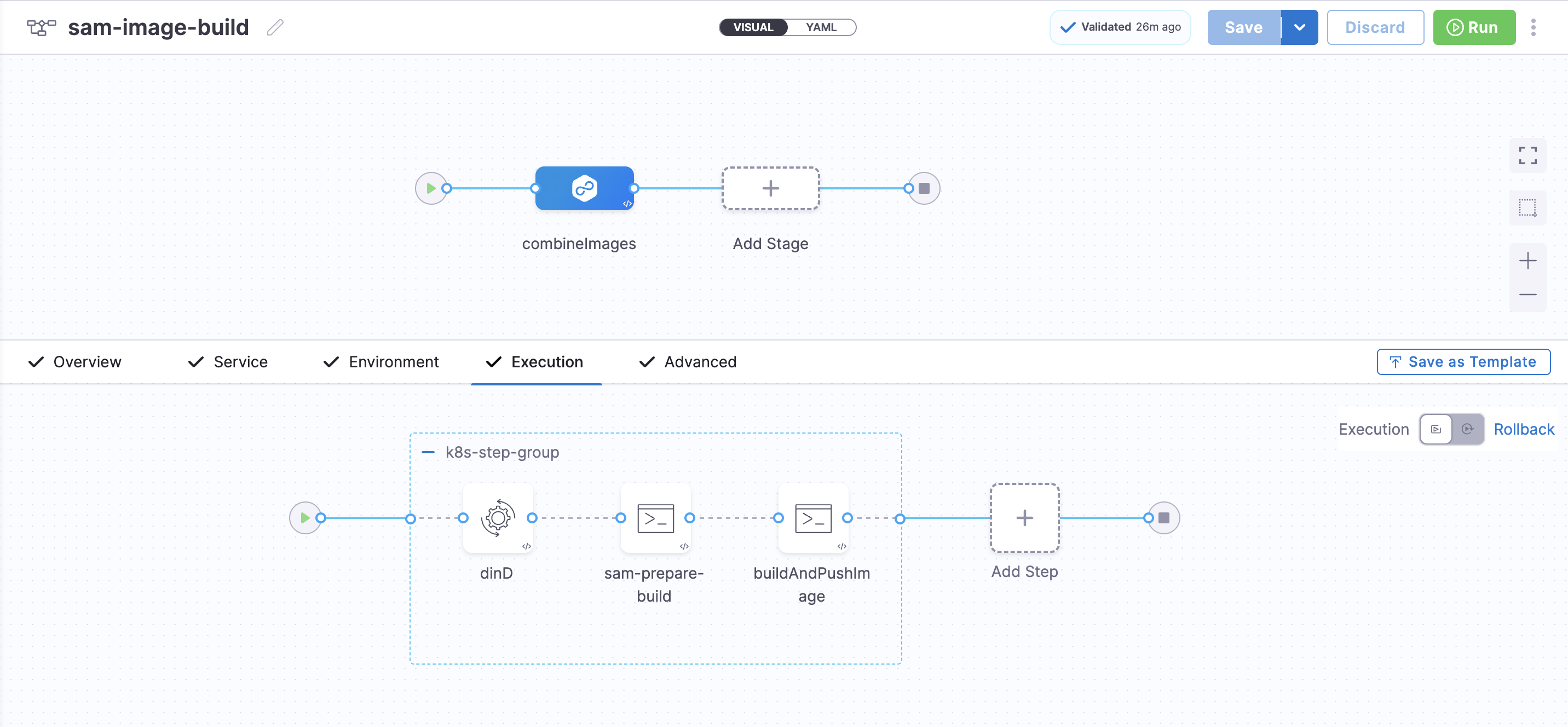
The stage renders in the UI as shown below.
Click to view full size image
Pipeline YAML
Parameters to change after you copy the pipeline YAML and paste it in your Harness Project:
* `projectIdentifier`, `orgIdentifier`, `environmentRef`, `infrastructureDefinitions`, `connectorRef` - docker-connector, `connectorRef` - k8s-connector.
```yaml
pipeline:
name: sam-image-build
identifier: samimagebuild
projectIdentifier: your_project
orgIdentifier: default
tags: {}
stages:
- stage:
name: combineImages
identifier: combineImages
description: Combine Harness base image with SAM base image and push to Docker
type: Deployment
spec:
deploymentType: Kubernetes
service:
serviceRef: service
environment:
environmentRef: k8s
deployToAll: false
infrastructureDefinitions:
- identifier: your_k8s_infra
execution:
steps:
- stepGroup:
privileged: true
name: k8s-step-group
identifier: k8sstepgroup
sharedPaths:
- /var/run
- /var/lib/docker
steps:
- step:
type: Background
name: dinD
identifier: Background
spec:
connectorRef: account.dockerhub
image: docker:24-dind
shell: Sh
privileged: true
- step:
identifier: generateTimestamp
type: Run
name: sam-prepare-build
spec:
connectorRef: account.dockerhub
image: docker:24
shell: Sh
command: |-
#!/bin/bash
set -e
echo "Waiting for Docker daemon"
ls -l /var/run/docker.sock
until docker info; do sleep 1; done
export DEBIAN_FRONTEND=noninteractive
export TZ=UTC
VERSION="${VERSION:-<+pipeline.variables.VERSION>}"
HARNESS_BASE_IMAGE="${HARNESS_BASE_IMAGE:-<+pipeline.variables.HARNESS_BASE_IMAGE>}"
SAM_BASE_IMAGE="${SAM_BASE_IMAGE:-<+pipeline.variables.SAM_BASE_IMAGE>}"
TARGET_REPO="${TARGET_REPO:-<+pipeline.variables.TARGET_REPO>}"
DOCKER_USERNAME="<+pipeline.variables.DOCKER_USERNAME>"
DOCKER_PASSWORD="<+pipeline.variables.DOCKER_PASSWORD>"
TIMESTAMP=$(date -u +"%Y%m%d%H%M%S")
SAM_RUNTIME=$(echo "${SAM_BASE_IMAGE}" | sed 's|.*build-\([^:]*\):.*|\1|')
SAM_VERSION=$(echo "${SAM_BASE_IMAGE}" | sed 's|.*:\([0-9]*\.[0-9]*\.[0-9]*\).*|\1|')
if [ -z "$SAM_RUNTIME" ] || [ -z "$SAM_VERSION" ]; then
echo "ERROR: Could not parse SAM base image format"
exit 1
fi
FINAL_IMAGE="${TARGET_REPO}:${VERSION}-${SAM_RUNTIME}-${SAM_VERSION}-linux-amd64-${TIMESTAMP}"
if ! command -v docker >/dev/null 2>&1; then
apt-get update && apt-get install -y docker.io
fi
echo "=== Waiting for Docker daemon ==="
until docker info >/dev/null 2>&1; do
sleep 2
done
echo "=== Docker login ==="
echo "${DOCKER_PASSWORD}" | docker login -u "${DOCKER_USERNAME}" --password-stdin
echo "=== Creating build context ==="
mkdir -p /tmp/sam-build
cd /tmp/sam-build
cat > Dockerfile << EOF
FROM ${SAM_BASE_IMAGE}
ENV HARNESS_GO_PLUGIN_VERSION=v0.4.5
ENV DOCKER_VERSION=26.0.1
ENV INSTALL_GO_TEMPLATE_BINARY=true
ENV UNIFIED_PIPELINE=false
# Install Docker CLI
# RUN apt-get update && \\
# apt-get install -y docker.io && \\
# rm -rf /var/lib/apt/lists/*
RUN if command -v apt-get >/dev/null 2>&1; then \
apt-get update && apt-get install -y docker.io && rm -rf /var/lib/apt/lists/*; \
elif command -v yum >/dev/null 2>&1; then \
yum install -y yum-utils && \
echo "[docker-ce]" > /etc/yum.repos.d/docker-ce.repo && \
echo "name=Docker CE Repository" >> /etc/yum.repos.d/docker-ce.repo && \
echo "baseurl=https://download.docker.com/linux/centos/7/x86_64/stable" >> /etc/yum.repos.d/docker-ce.repo && \
echo "enabled=1" >> /etc/yum.repos.d/docker-ce.repo && \
echo "gpgcheck=1" >> /etc/yum.repos.d/docker-ce.repo && \
echo "gpgkey=https://download.docker.com/linux/centos/gpg" >> /etc/yum.repos.d/docker-ce.repo && \
yum install -y docker-ce-cli; \
elif command -v microdnf >/dev/null 2>&1; then \
echo "[docker-ce]" > /etc/yum.repos.d/docker-ce.repo && \
echo "name=Docker CE Repository" >> /etc/yum.repos.d/docker-ce.repo && \
echo "baseurl=https://download.docker.com/linux/centos/7/x86_64/stable" >> /etc/yum.repos.d/docker-ce.repo && \
echo "enabled=1" >> /etc/yum.repos.d/docker-ce.repo && \
echo "gpgcheck=1" >> /etc/yum.repos.d/docker-ce.repo && \
echo "gpgkey=https://download.docker.com/linux/centos/gpg" >> /etc/yum.repos.d/docker-ce.repo && \
microdnf install -y docker-ce-cli; \
elif command -v apk >/dev/null 2>&1; then \
apk add --no-cache docker-cli; \
else \
echo "Package manager not found, skipping docker CLI install"; \
fi
RUN mkdir -m 777 -p /opt/harness/bin/ && \\
mkdir -m 777 -p /opt/harness/scripts/ && \\
mkdir -m 777 -p /opt/harness/client-tools/
COPY --from=${HARNESS_BASE_IMAGE} /opt/harness/bin/harness-sam-plugin /opt/harness/bin/harness-sam-plugin
COPY --from=${HARNESS_BASE_IMAGE} /opt/harness/scripts/ /opt/harness/scripts/
RUN chmod +x /opt/harness/bin/harness-sam-plugin && \\
chmod +x /opt/harness/scripts/sam-plugin.sh
RUN if [ "\$INSTALL_GO_TEMPLATE_BINARY" = "true" ] && [ "\$UNIFIED_PIPELINE" != "true" ]; then \\
curl -s -L -o /opt/harness/client-tools/go-template https://app.harness.io/public/shared/tools/go-template/release/\${HARNESS_GO_PLUGIN_VERSION}/bin/linux/amd64/go-template && \\
chmod +x /opt/harness/client-tools/go-template; \\
else \\
echo "Skipping go-template binary."; \\
fi
ENTRYPOINT ["/opt/harness/scripts/sam-plugin.sh"]
EOF
echo "=== Building and pushing image ==="
docker build -t ${FINAL_IMAGE} .
docker push ${FINAL_IMAGE}
echo "✓ SUCCESS: ${FINAL_IMAGE}"
envVariables:
VERSION: <+pipeline.variables.VERSION>
SAM_BASE_IMAGE: <+pipeline.variables.SAM_BASE_IMAGE>
SOURCE_REGISTRY: <+pipeline.variables.SOURCE_REGISTRY>
TARGET_REGISTRY: <+pipeline.variables.TARGET_REGISTRY>
outputVariables:
- name: TIMESTAMP
type: String
value: TIMESTAMP
- name: VCS_REF
type: String
value: VCS_REF
- name: SAM_RUNTIME
type: String
value: SAM_RUNTIME
- name: SAM_VERSION
type: String
value: SAM_VERSION
resources:
limits:
memory: 4Gi
cpu: 2000m
description: SAM Prepare Build
timeout: 30m
- step:
identifier: buildAndPushFinal
type: Run
name: buildAndPushImage
spec:
connectorRef: account.dockerhub
image: ubuntu:20.04
shell: Bash
command: |-
#!/bin/bash
set -e
# Set non-interactive mode
export DEBIAN_FRONTEND=noninteractive
export TZ=UTC
# Set non-interactive mode
export DEBIAN_FRONTEND=noninteractive
export TZ=UTC
# Define variables from pipeline variables
VERSION="<+pipeline.variables.VERSION>"
HARNESS_BASE_IMAGE="<+pipeline.variables.HARNESS_BASE_IMAGE>"
SAM_BASE_IMAGE="<+pipeline.variables.SAM_BASE_IMAGE>"
TIMESTAMP="<+pipeline.variables.TIMESTAMP>"
# Print all variables for debugging
echo "VERSION: $VERSION"
echo "HARNESS_BASE_IMAGE: $HARNESS_BASE_IMAGE"
echo "SAM_BASE_IMAGE: $SAM_BASE_IMAGE"
echo "TIMESTAMP: $TIMESTAMP"
apt-get update && apt-get install -y docker.io
# Start Docker daemon
dockerd &
sleep 10
# Wait for Docker
until docker info >/dev/null 2>&1; do sleep 1; done
# Login to Docker
echo "${DOCKER_PASSWORD}" | docker login -u "${DOCKER_USERNAME}" --password-stdin
# Go to build context (created by Step 1)
cd /harness/sam-build
# Build and push (exactly like your local script)
echo "=== Building and pushing image ==="
docker build -t ${FINAL_IMAGE} .
docker push ${FINAL_IMAGE}
echo "✓ SUCCESS: ${FINAL_IMAGE}"
privileged: true
envVariables:
VERSION: <+pipeline.variables.VERSION>
SAM_BASE_IMAGE: <+pipeline.variables.SAM_BASE_IMAGE>
SOURCE_REGISTRY: <+pipeline.variables.SOURCE_REGISTRY>
TARGET_REGISTRY: <+pipeline.variables.TARGET_REGISTRY>
SOURCE_REGISTRY_HOST: <+pipeline.variables.SOURCE_REGISTRY_HOST>
TARGET_REGISTRY_HOST: <+pipeline.variables.TARGET_REGISTRY_HOST>
DOCKER_USERNAME: <+pipeline.variables.DOCKER_USERNAME>
DOCKER_TOKEN: <+pipeline.variables.DOCKER_TOKEN>
TARGET_DOCKER_USERNAME: <+pipeline.variables.TARGET_DOCKER_USERNAME>
TARGET_DOCKER_TOKEN: <+pipeline.variables.TARGET_DOCKER_TOKEN>
TIMESTAMP: <+steps.generateTimestamp.output.outputVariables.TIMESTAMP>
VCS_REF: <+steps.generateTimestamp.output.outputVariables.VCS_REF>
SAM_RUNTIME: <+steps.generateTimestamp.output.outputVariables.SAM_RUNTIME>
SAM_VERSION: <+steps.generateTimestamp.output.outputVariables.SAM_VERSION>
resources:
limits:
memory: 8Gi
cpu: 4000m
timeout: 30m
stepGroupInfra:
type: KubernetesDirect
spec:
connectorRef: your_k8s_connector
rollbackSteps: []
tags: {}
failureStrategies:
- onFailure:
errors:
- AllErrors
action:
type: StageRollback
allowStageExecutions: true
variables:
- name: VERSION
type: String
description: Plugin version (e.g., 1.1.2-beta)
required: true
value: <+input>.default(1.1.2)
- name: HARNESS_BASE_IMAGE
type: String
description: harness base image from Pipeline 1
required: true
value: <+input>.default(harness/aws-sam-plugin:1.1.2-beta-base-image)
- name: SAM_BASE_IMAGE
type: String
description: SAM base image (e.g., public.ecr.aws/sam/build-python3.12:1.143.0-20250822194415-x86_64)
required: true
value: <+input>.default(public.ecr.aws/sam/build-nodejs22.x:1.144.0-20250911030138-x86_64)
- name: DOCKER_USERNAME
type: String
description: Docker Hub username
required: false
value: your_dockerhub_username
- name: DOCKER_PASSWORD
type: String
description: Docker Hub PAT
required: false
value: <+secrets.getValue("dockerhub_pat")>
- name: TARGET_REPO
type: String
description: Target repository
required: false
value: your_target_repository
- name: TIMESTAMP
type: String
description: Build timestamp
required: false
value: <+execution.steps.k8sstepgroup.steps.sampreparebuild.output.outputVariables.TIMESTAMP>
```
{% @harness-feedback/feedback %}