> For the complete documentation index, see [llms.txt](https://developer.harness.io/llms.txt). Markdown versions of documentation pages are available by appending `.md` to page URLs; this page is available as [Markdown](https://developer.harness.io/continuous-delivery/use-continuous-delivery/deploy-services-on-different-platforms/azure/azure-container-apps/step-references/rollback.md).
# Azure Container Apps Rollback
Rollback step for Azure Container Apps deployments.
The **Azure Container Apps Rollback** step restores your container app to its previous state using the rollback data captured before deployment. This step is automatically executed when a deployment fails or when you manually trigger a rollback.
{% hint style="info" %}
**PREREQUISITES**
* This step must be added within a **Container Step Group** in the Rollback section. The step runs as a containerized task and requires the container infrastructure configuration provided by the step group.
* An **Azure Container Apps Prepare Rollback Data** step must have executed successfully to capture the current state before deployment.
{% endhint %}
## What this step does
The Azure Container Apps Rollback step performs the following operations:
1. **Retrieves rollback data**: Reads the rollback data captured by the Prepare Rollback Data step
2. **Restores traffic configuration**: Reverts traffic distribution to the previous state
3. **Reactivates previous revisions**: Ensures the previous revisions are active and receiving traffic
4. **Deactivates failed revision**: Optionally deactivates the newly deployed revision that failed
This step ensures that if something goes wrong during deployment, Harness can restore your container app to its exact previous state, including traffic distribution across revisions.
## Step configuration
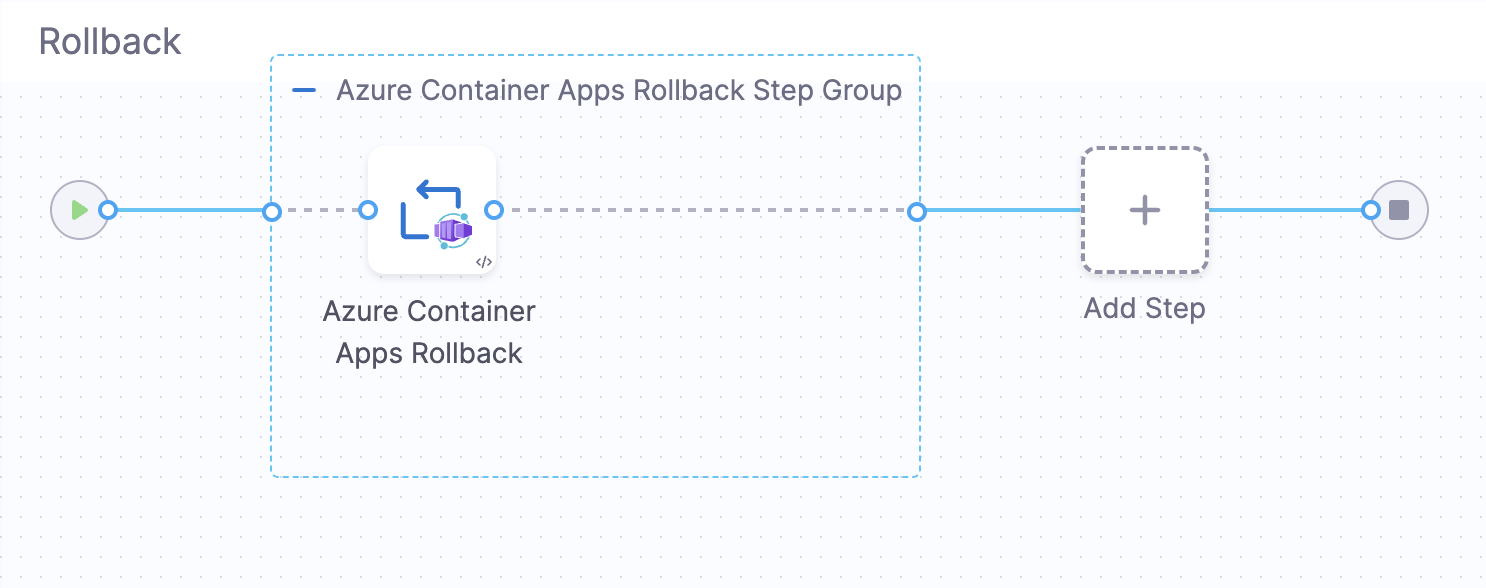
Click to view full size image
The rollback step appears in the Rollback section of your deployment pipeline and is automatically configured when you use the Basic or Canary deployment strategies.
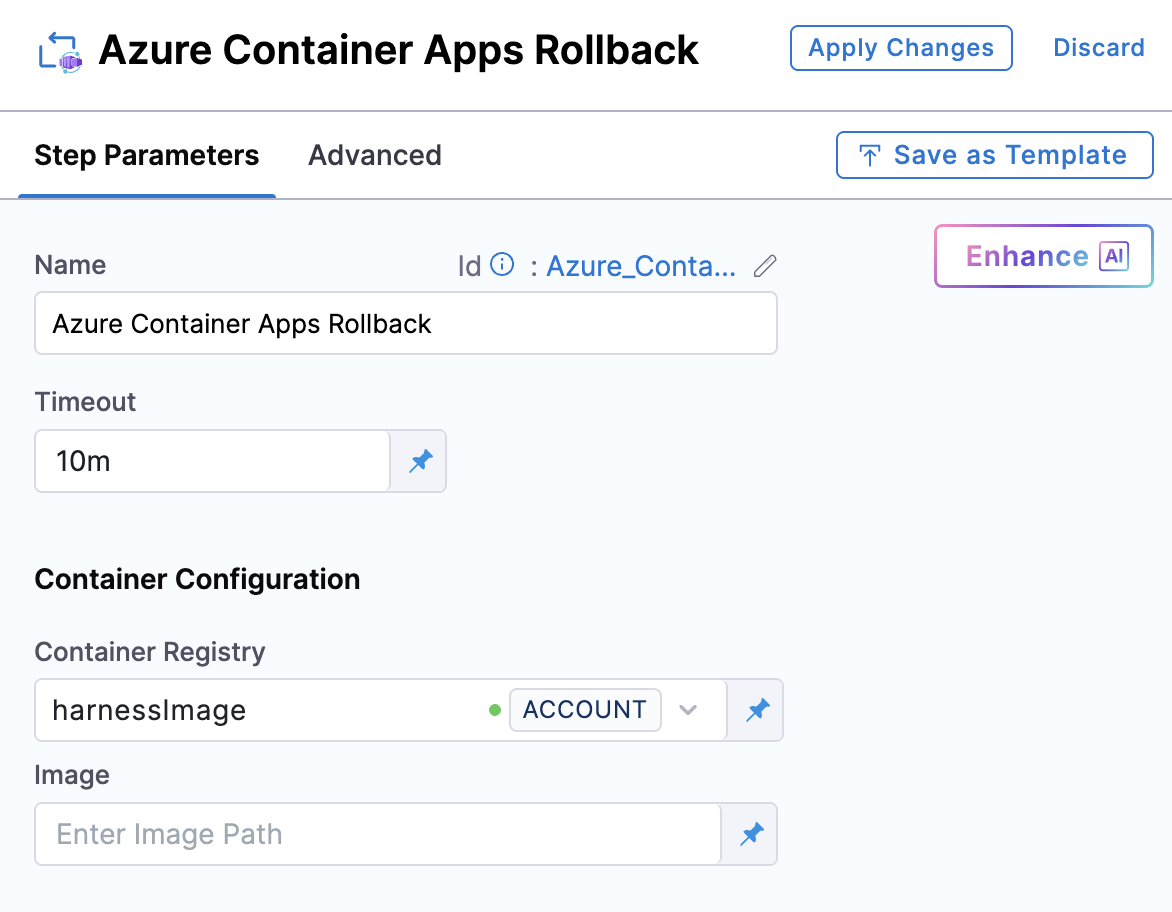
Click to view full size image
## Step parameters
| Parameter | Description | Required |
| ----------- | -------------------------------------------------------------- | -------- |
| **Name** | Display name for the step | No |
| **Timeout** | Maximum time allowed for the step to complete (default: `30m`) | No |
## Container configuration
| Parameter | Description |
| ---------------------- | --------------------------------------------------------------------------------------------------------------------------------------------------------------------------------------------------- |
| **Container Registry** | Harness connector for authenticating to your container registry. This connector pulls the deployment plugin image. |
| **Image** | The deployment plugin container image. Use the official Harness image: [`harness/azure-container-apps-plugin:0.0.1-linux-amd64`](https://hub.docker.com/r/harness/azure-container-apps-plugin/tags) |
| **Image Pull Policy** | Policy for pulling the container image (default: `Always`) |
| **Resources** | Resource limits for the container (e.g., `512Mi` memory, `0.5` CPU) |
## When rollback executes
The rollback step executes automatically in the following scenarios:
* **Deployment failure**: When any step in the deployment workflow fails
* **Manual rollback**: When you manually trigger a rollback from the Harness UI
* **Failure strategy**: When a failure strategy is configured to trigger rollback on specific errors
## Rollback process
The rollback step restores your container app using the following process:
1. **Parse rollback data**: Reads the saved traffic configuration and revision details
2. **Restore previous state**: Updates the container app to match the previous configuration
3. **Reactivate revisions**: Ensures previous revisions are active and receiving traffic according to the saved weights
4. **Verify restoration**: Confirms the rollback completed successfully
## Usage in pipeline
The Azure Container Apps Rollback step should be placed in the **Rollback Steps** section within a Container Step Group. When you select Basic or Canary deployment strategies, Harness automatically adds this step to the rollback section.
## YAML Example
```yaml
rollbackSteps:
- stepGroup:
name: Azure Container Apps Rollback Step Group
identifier: aca_rollback
steps:
- step:
name: Azure Container Apps Rollback
identifier: AcaRollbackStep
type: AzureContainerAppsRollback
timeout: 30m
spec:
connectorRef: account.harnessImage
image: harness/azure-container-apps-plugin:0.0.1-linux-amd64
imagePullPolicy: Always
stepGroupInfra:
type: KubernetesDirect
spec:
connectorRef: <+input>
namespace: default
```
## Related resources
* [Basic Deployment Strategy](/continuous-delivery/use-continuous-delivery/deploy-services-on-different-platforms/azure/azure-container-apps/basic-deployment.md)
* [Canary Deployment Strategy](/continuous-delivery/use-continuous-delivery/deploy-services-on-different-platforms/azure/azure-container-apps/canary-deployment.md)
* [Azure Container Apps Prepare Rollback Data](/continuous-delivery/use-continuous-delivery/deploy-services-on-different-platforms/azure/azure-container-apps/step-references/prepare-rollback-data.md)
* [Azure Container Apps documentation](https://learn.microsoft.com/en-us/azure/container-apps/)
{% @harness-feedback/feedback %}