> For the complete documentation index, see [llms.txt](https://developer.harness.io/llms.txt). Markdown versions of documentation pages are available by appending `.md` to page URLs; this page is available as [Markdown](https://developer.harness.io/continuous-delivery/use-continuous-delivery/deploy-services-on-different-platforms/google-cloud-functions/mig/mig-blue-green-deployment.md).
# Blue-Green Deployment
Configure and execute Blue-Green MIG deployments.
This topic explains how to configure and execute deployments for Google Cloud Managed Instance Groups (MIG) using the Blue-Green strategy in Harness.
## What you will learn from this topic
* GCP prerequisites required before configuring a MIG Blue-Green deployment in Harness
* How Harness automatically configures the Blue-Green step group with Download Manifests, Deploy, Steady State, and Traffic Shift steps
* How the Blue-Green strategy works with Google Cloud Service Mesh for traffic shifting between stable and stage environments
* How to add approval gates for staged traffic validation before full production cutover
## Before you begin
Before setting up your Blue-Green deployment, ensure you have the following GCP resources already provisioned:
* **Backend Service**: A GCP backend service configured with appropriate health checks
* **Instance Group**: At least one Managed Instance Group must be pre-configured with your MIG service already running
* **Cloud Service Mesh**: HTTPRoute or GRPCRoute resources configured for traffic management using Google Cloud Service Mesh (CSM). The route must be configured with the backend service as a destination
These resources form the foundation of your Blue-Green deployment infrastructure. Harness will manage the deployment lifecycle, but these core GCP resources must exist beforehand.
## Select deployment strategy
After configuring your service, environment, and infrastructure, navigate to the **Execution** tab and select the **Blue-Green** execution strategy. Harness automatically adds a pre-configured step group containing all the necessary deployment steps. This automated setup eliminates manual configuration and ensures best practices for zero-downtime deployments with instant rollback.
## Blue-Green deployment step group
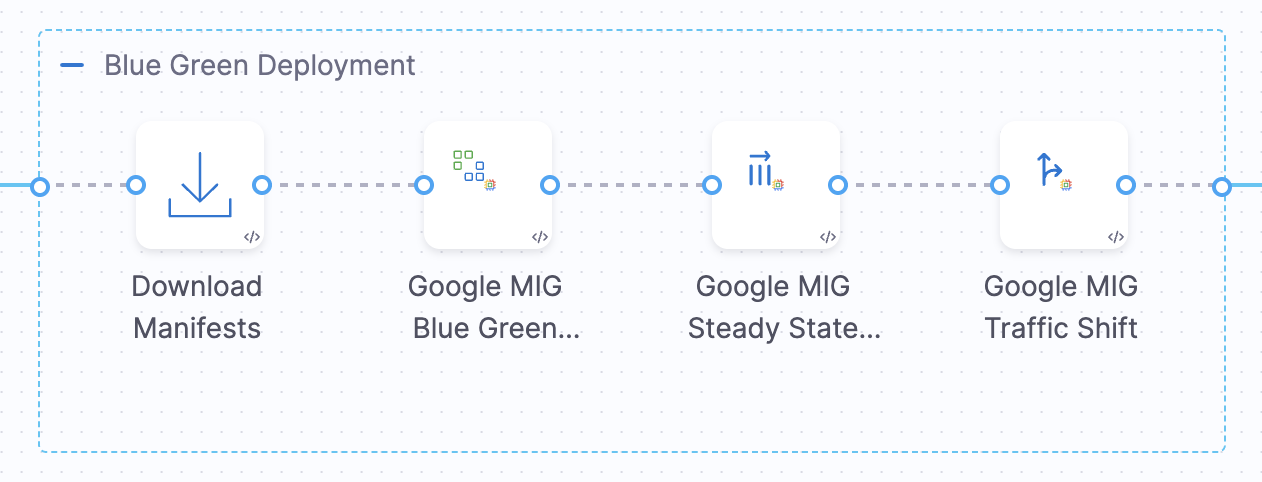
When you select the Blue-Green strategy, Harness automatically configures the **Google MIG Blue Green Deploy** step group with essential steps that orchestrate the entire deployment lifecycle:
* **Download Manifests** - Downloads your MIG configuration files from the specified manifest store
* **Google MIG Blue Green Deploy** - Creates or updates the MIG and orchestrates the Blue-Green deployment
* **Google MIG Steady State** - Verifies that all instances reach a healthy, stable state
* **Google MIG Traffic Shift** - Manages traffic distribution between stable and stage environments using Cloud Service Mesh, and can optionally expose the staging environment for testing
For validation workflows that require pre-production testing, configure the Traffic Shift step to expose the staging environment via custom headers or a test endpoint. Add external validation steps outside the step group, such as manual approval or automated tests. Then add a final Traffic Cutover step group for the production traffic shift.
## How Blue-Green deployment works
{% hint style="info" %}
**PREREQUISITES**
This section assumes you have already configured your backend service, at least one Managed Instance Group with your service running, and Cloud Service Mesh (HTTPRoute or GRPCRoute) in GCP as outlined in the [Before you begin](#before-you-begin) section.
{% endhint %}
Blue-Green deployment maintains two identical environments that alternate roles with each deployment, ensuring zero downtime and instant rollback capabilities. Harness supports two deployment scenarios based on your existing infrastructure.
For validation workflows, you can configure the Traffic Shift step to expose the staging environment for testing by routing traffic with custom headers or through a test endpoint before performing the final production traffic shift. This allows you to run validation tests, automated checks, or manual QA against the new version without affecting production users. The validation and approval steps run outside the containerized step group, with a separate Traffic Cutover step group handling the final production traffic shift.
### Scenario 1: starting with one backend service and MIG
This is the most common starting point: you have one backend service and one MIG, with your service already running. Harness sets up the Blue-Green infrastructure on the first deployment, and subsequent deployments follow an alternating pattern.
**Prerequisites**:
* One backend service with appropriate health checks configured
* One MIG with your service running on it
* Cloud Service Mesh route (HTTPRoute or GRPCRoute) configured
**What you provide in the Blue-Green Deploy step**:
* Backend service path (e.g., `projects/my-project/regions/us-central1/backendServices/ABC`)
* MIG name (e.g., `my-app-mig`)
### First deployment
During the first deployment, Harness creates the Blue-Green infrastructure.
**Step 1: Blue-Green Deploy**
Harness performs the following operations:
1. Clones the backend service and appends `-1` suffix (e.g., `ABC` becomes `ABC-1`)
2. Creates a second MIG based on your configuration (`ABC-1`)
3. Labels the initial service/MIG as `harness-blue-green-version: stable` (primary/production)
4. Labels the newly created service/MIG as `harness-blue-green-version: stage` (secondary/deployment target)
This step only creates the infrastructure and adds labels. No deployment or traffic shifting occurs in this step.
**Step 2: Steady State Check**
This step checks the steady state of the MIG specified in its configuration. You should configure this step to check the newly created MIG (the one labeled `stage`), since it is not currently handling traffic. Harness verifies that the specified MIG has reached a stable, healthy state before proceeding with traffic shifting.
**Step 3: Traffic Shift**
Harness shifts traffic from stable to stage based on configured weights (e.g., 0% → 20% → 50% → 100%). Once the stage service reaches 100% traffic weight, the labels automatically swap:
* Stage service becomes the new `stable` (now serving production traffic)
* Stable service becomes the new `stage` (ready for next deployment)
After the first deployment, you have two backend services and two MIGs that will alternate between stable and stage roles for all future deployments.
### Subsequent deployments
After the first deployment completes, all subsequent deployments follow this pattern. Harness uses the existing labels to identify which environment is stable (production) and which is stage (deployment target).
**Step 1: Blue-Green Deploy**
Harness does NOT create any new services or MIGs. Instead, it:
1. Identifies which service has the `stable` label (primary/production)
2. Identifies which service has the `stage` label (secondary/deployment target)
3. Deploys the new version only to the service labeled as `stage`.
4. Production traffic continues flowing to the `stable` service (zero downtime)
**Step 2: Steady State Check**
This step checks the steady state of the MIG specified in its configuration. You should configure this step to check the secondary MIG (the one labeled as `stage`) since it contains the new deployment and is not currently handling production traffic.
**Step 3: Traffic Shift**
Harness shifts traffic from the primary (stable) to the secondary (stage) based on configured weights. Once the secondary reaches 100% traffic, the labels swap:
* Secondary becomes the new `stable` (now primary/production)
* Primary becomes the new `stage` (now secondary/deployment target)
This pattern repeats for every subsequent deployment, with services alternating roles indefinitely.
### Scenario 2: two existing services
If you already have two backend services and two MIGs set up, you can configure them directly in the Blue-Green Deploy step. However, you must manually add labels to the MIGs before running the deployment.
**Prerequisites**:
* Two backend services already exist (e.g., `ABC` and `ABC-1`)
* Two MIGs already exist with services running
* Labels manually configured on both MIGs (see below)
### Adding labels manually
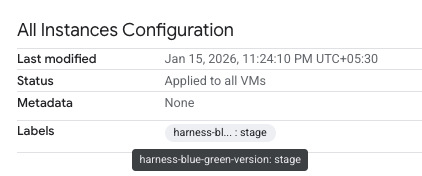
Before running the Blue-Green deployment, you must add labels to your MIGs in GCP. Navigate to your MIG's **All Instances Configuration** section and add the following labels:
* Add `harness-blue-green-version: stable` to the MIG you want as your primary/production environment
* Add `harness-blue-green-version: stage` to the MIG you want as your secondary/deployment target
**What you provide in the Blue-Green Deploy step**:
* **Blue Environment**: Backend service path and MIG name for your stable service
* **Green Environment**: Backend service path and MIG name for your stage service
**Step 1: Blue-Green Deploy**
Harness does NOT create new services, MIGs, or labels. Instead, it:
1. Recognizes both services already exist with labels configured
2. Identifies the stable-labeled MIG as primary and the stage-labeled MIG as secondary
3. Deploys the new version to the stage-labeled MIG (green environment)
**Step 2: Steady State Check**
This step checks the steady state of the MIG specified in its configuration. You should configure this step to check the green environment MIG (the one labeled `stage`), since it is not currently handling traffic.
**Step 3: Traffic Shift**
Harness shifts traffic from stable (blue) to stage (green) based on configured weights. Once the stage reaches 100% traffic, labels are swapped, and subsequent deployments follow the same pattern as in Scenario 1.
## Deployment steps overview
The Blue-Green deployment workflow consists of coordinated steps that work together to achieve zero-downtime deployments. Each step performs a specific function in the deployment lifecycle, from downloading configurations to validating staging environments and shifting production traffic. Understanding these steps helps you troubleshoot deployments and customize the workflow for your exact requirements.
### 1. Download Manifests
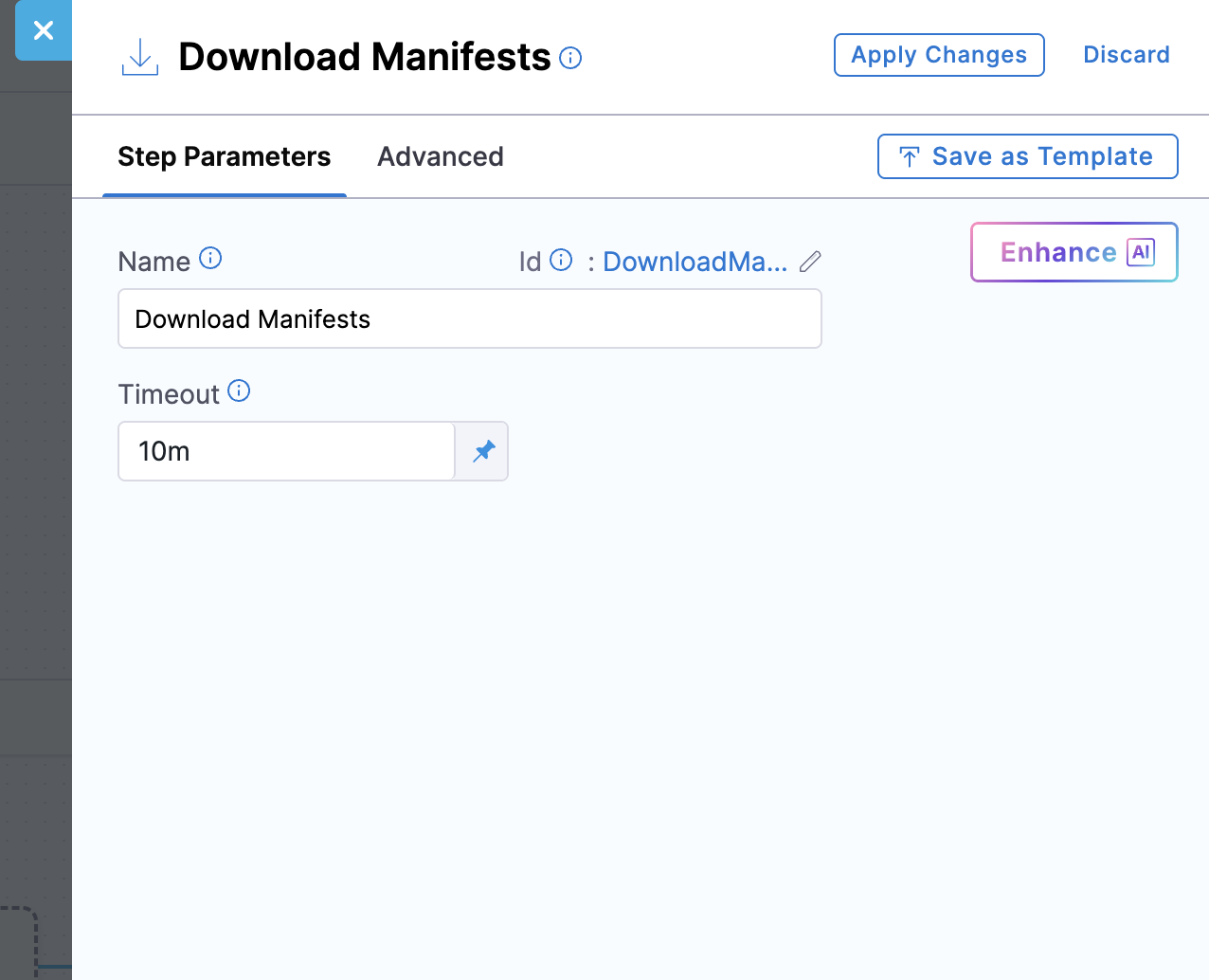
This step downloads all manifest files specified in your service configuration and makes them available for subsequent deployment steps. Harness fetches the files from your configured manifest store (Harness File Store, Git, or other supported sources), validates their JSON structure, and stages them for use by the deployment steps.
**Step parameters**:
* **Name**: Display name for the step (default: **Download Manifests**)
* **Timeout**: Maximum time allowed for downloading manifests (default: 10m)
YAML Example
```yaml
- step:
type: DownloadManifests
name: DownloadManifests
identifier: DownloadManifests
spec: {}
failureStrategies: []
```
***
### 2. Google MIG Blue Green Deploy
This step orchestrates the Blue-Green deployment and behaves differently based on your deployment scenario:
* **Scenario 1 (Starting with one service)**: On the first deployment, creates a second backend service (with `-1` suffix) and MIG, then labels both environments (`stable` and `stage`). On subsequent deployments, identifies existing labels and deploys only to the `stage` labeled service without creating new resources
* **Scenario 2 (Two existing services with manual labels)**: Recognizes both services already exist with labels you have manually configured. Does not create services or add labels; deploys to the stage-labeled MIG (green environment)
The step handles instance template creation or updates, MIG updates, backend service configuration, and environment labeling based on the scenario.
**Important**: This step only deploys the infrastructure and does not shift production traffic. Traffic shifting happens exclusively in the **Google MIG Traffic Shift** step, giving you control over when to expose the new version to users.
**Step parameters**:
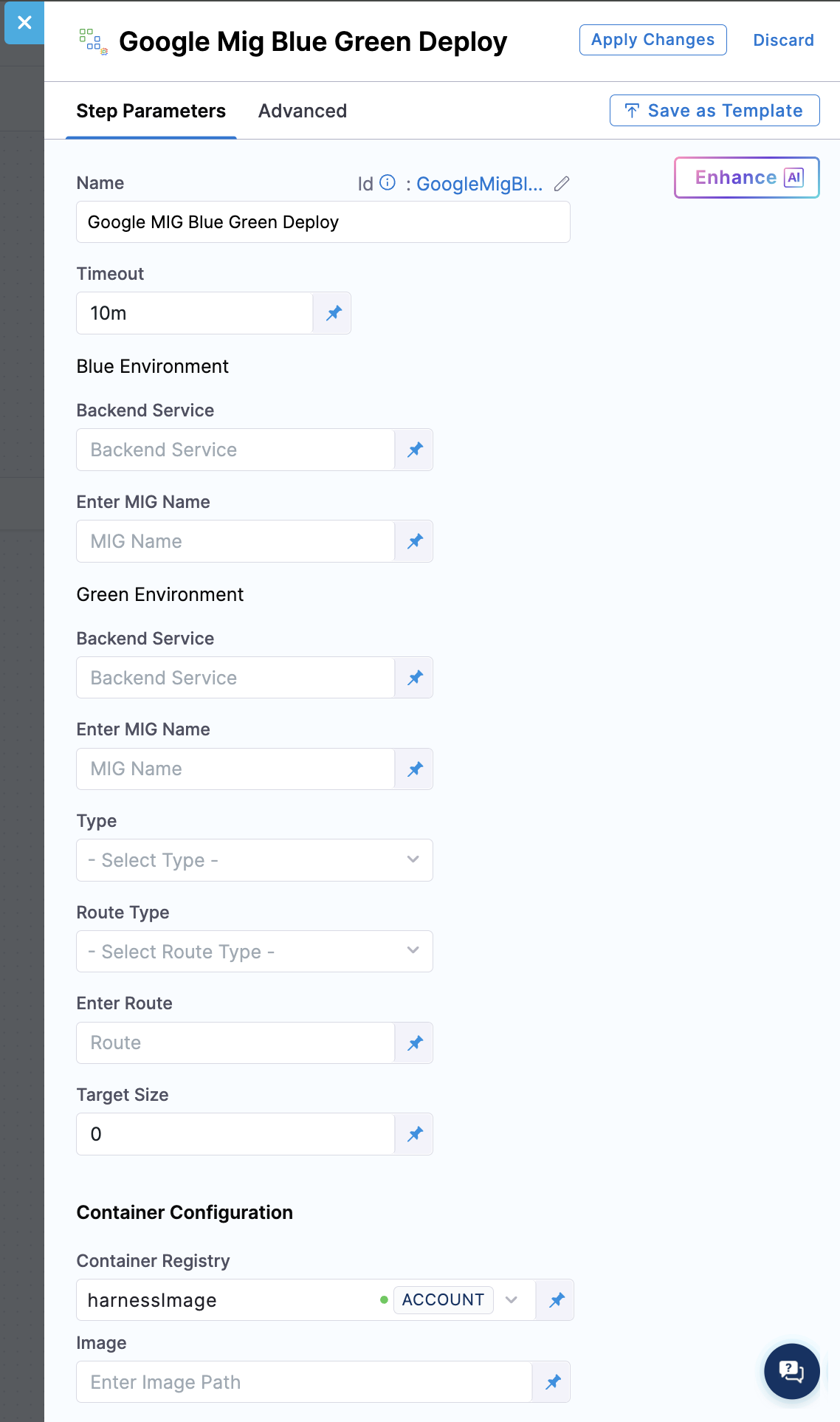
**Blue Environment (First Environment)**:
**Backend Service**: This field specifies the full GCP resource path to your backend service for the first environment. The format should be: `projects/PROJECT_ID/regions/REGION/backendServices/SERVICE_NAME`. You should ensure the backend service exists and is correctly configured with health checks before deployment.
**Enter MIG Name**: This field specifies the name of the Managed Instance Group for your first environment (e.g., my-app-mig). This should be a simple name, not a full resource path. You should choose a meaningful name that reflects your application or service.
**Green Environment (Second Environment)** (Optional for first deployment):
**Backend Service**: This field specifies the full GCP resource path to your backend service for the second environment. The format should be: `projects/PROJECT_ID/regions/REGION/backendServices/SERVICE_NAME`.
This field behavior depends on your deployment scenario:
* **Scenario 1 (First deployment)**: Optional. If left empty, Harness automatically creates a second backend service by cloning your first environment configuration with a **-1** suffix. On subsequent deployments, this is automatically populated based on existing labeled services
* **Scenario 2 (Two existing services)**: Provide the path to your second existing backend service. You must manually add the `stage` label to the MIG before deployment
Both backend services work together to enable zero-downtime Blue-Green deployments with instant rollback capability.
**Enter MIG Name**: This field specifies the name of the Managed Instance Group for your second environment.
This field behavior depends on your deployment scenario:
* **Scenario 1 (First deployment)**: Optional. If not provided, Harness creates it automatically by appending **-1** to your first MIG name (e.g., my-app-mig-1). On subsequent deployments, this is automatically identified based on existing labeled MIGs
* **Scenario 2 (Two existing MIGs)**: Provide the name of your second existing MIG. You must manually add the `stage` label to this MIG before deployment
This second MIG forms the other half of your Blue-Green setup, alternating with the first MIG between stable and stage roles.
**Type**: This field determines how traffic is shifted between stable and stage environments. Currently, only the **CSM** (Cloud Service Mesh) option is supported, which uses HTTPRoute or GRPCRoute resources for advanced, granular traffic control, including weighted routing, header-based routing, and service-to-service communication. CSM is ideal for microservice architectures and service-mesh deployments.
**Route Type**: This field specifies the Cloud Service Mesh route resource type that controls traffic distribution. The **HTTPRoute** option is for HTTP and HTTPS traffic and supports path matching, header matching, and query parameter routing. The **GRPCRoute** option is for gRPC services with method-level routing. This field is only applicable when the Type field is set to **CSM**. The route resource must exist in your GCP project and be configured appropriately to reference both backend services before deployment.
**Enter Route**: This field specifies the full GCP resource path to your Cloud Service Mesh route resource. The format should be: `projects/PROJECT_ID/locations/global/httpRoutes/ROUTE_NAME` (for HTTPRoute) or `projects/PROJECT_ID/locations/global/grpcRoutes/ROUTE_NAME` (for GRPCRoute). This route controls how traffic is distributed between your stable and stage environments by adjusting weights. Harness updates this route during traffic shifting to gradually move traffic from the current stable version to the newly deployed stage version.
**Target Size** (optional): This field specifies the desired number of instances to maintain in the newly deployed MIG. If left empty, Harness automatically fetches the current instance count from the stable MIG and applies the same size to the stage MIG. This ensures the new deployment matches your production capacity without requiring manual input.
You can also set a specific number to override this behavior (e.g., 3, 5, 10). This is useful when you want to validate a new version with fewer instances before scaling up, or when you need to adjust capacity for a specific deployment.
{% hint style="info" %}
If an autoscaler is configured on the MIG, the autoscaler controls the final instance count and may override the specified target size.
{% endhint %}
**Container Configuration**:
**Container Registry**: This field specifies the Harness connector that provides authentication to your container registry (e.g., Docker Hub, GCR, GAR, ECR). This connector pulls the deployment plugin image, which executes the deployment operations. The plugin runs in a containerized environment and needs access to pull its image from the registry. You should select a connector with appropriate read permissions to the registry where your plugin images are stored. This is part of Harness's containerized step execution model.
**Image**: This field specifies the full path to the deployment plugin container image used to execute this deployment step. This image contains the deployment logic and tools needed to interact with GCP APIs, create and update MIGs, configure backend services, and manage Cloud Service Mesh routes. Use the official Harness image: [`harness/google-mig-bluegreen-deploy:0.1.0-linux-amd64`](https://hub.docker.com/r/harness/google-mig-bluegreen-deploy/tags) for Blue-Green deployments.
{% hint style="info" %}
**DEPLOYMENT SCENARIOS**
Harness supports two deployment scenarios:
**Scenario 1 - Starting with one backend service and MIG**: Provide only the blue environment (backend service + MIG where your service is running). On the first deployment, Harness automatically clones the backend service (adds **-1** suffix) and creates a second MIG with appropriate labels (`stable` and `stage`). Subsequent deployments use these labels to identify environments; no new services are created.
**Scenario 2 - Two existing services with manual labels**: If you already have two backend services and two MIGs, provide both blue and green environments. You must manually add labels (`stable` to blue MIG, `stage` to green MIG) in GCP before running the deployment. Harness does not create services or add labels in this scenario.
{% endhint %}
YAML Example
```yaml
- step:
type: GoogleMigBlueGreenDeploy
name: BlueGreen_Deploy
identifier: BlueGreen_Deploy
spec:
blueEnvironment:
backendService: projects/PROJECT_ID/locations/global/backendServices/BACKEND_SERVICE_NAME
mig: MIG_NAME
trafficConfig:
type: CSM
spec:
type: GRPCRoute
route: projects/PROJECT_ID/locations/global/grpcRoutes/ROUTE_NAME
connectorRef: account.harnessImage
image: harness/google-mig-bluegreen-deploy:0.1.0-linux-amd64
imagePullPolicy: Always
resources:
limits:
memory: 512Mi
cpu: 0.5
outputVariables: []
timeout: 10m
```
***
### 3. Google MIG Steady State
This step verifies that the newly deployed MIG (the one labeled as `stage` or secondary service) has reached a stable, healthy state before proceeding with traffic shifting or validation testing. Harness checks that the MIG status is `stable` and that all instances use the correct instance template version.
The step only monitors the secondary (stage) service, not the primary (stable) service, since the primary is already running and serving production traffic. The step fails if the secondary MIG does not achieve steady state within the configured timeout. This validation prevents premature traffic shifting to an unhealthy environment and is critical for zero-downtime deployments.
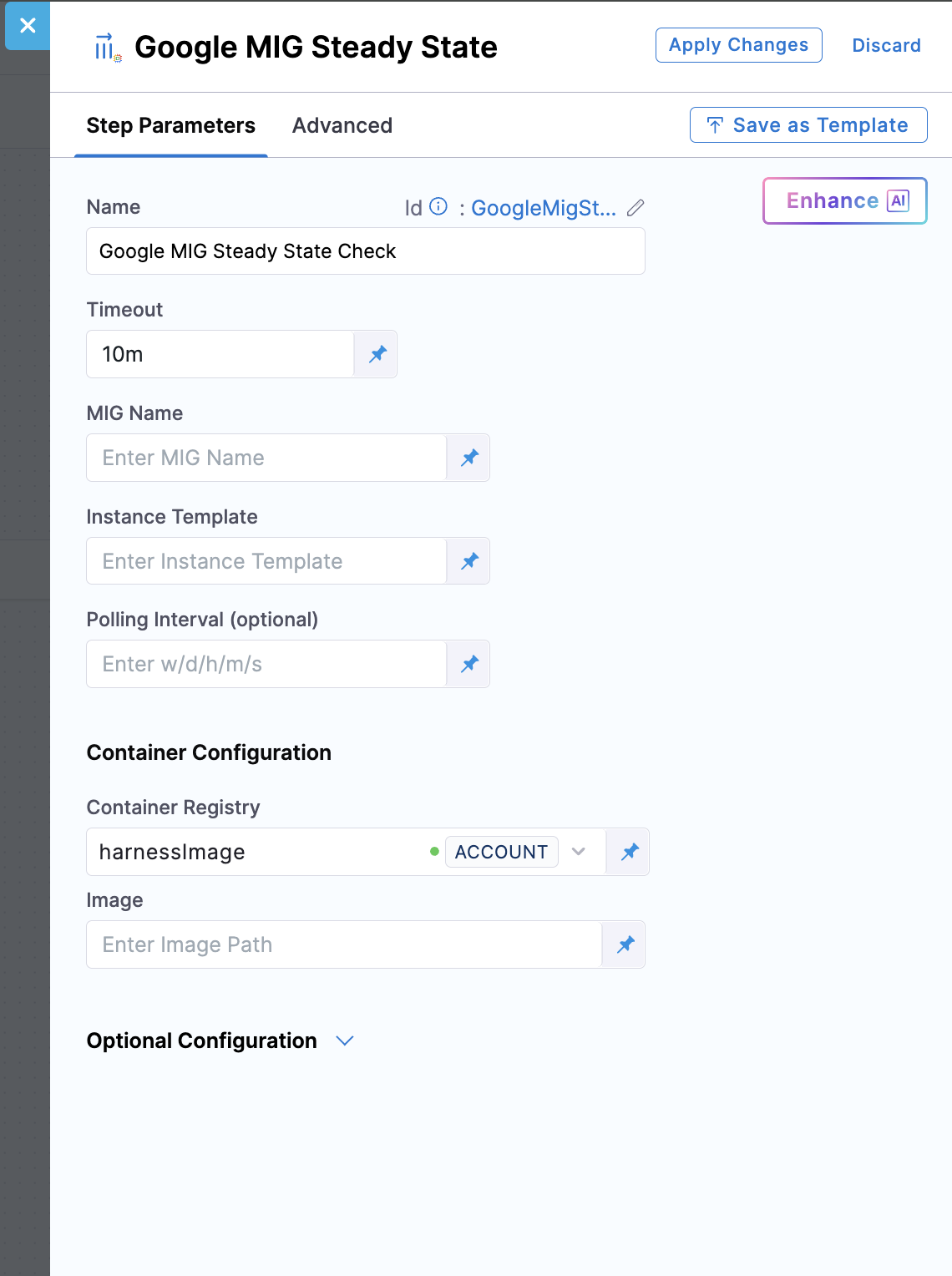
**Step parameters**:
**MIG Name**: Specify the name of the Managed Instance Group that Harness should monitor for steady state. This should be the secondary (stage-labeled) MIG where the new version was just deployed. Harness continuously polls this MIG's status to verify that the status is `stable` and all instances are using the expected instance template. This ensures your new deployment is fully ready before allowing traffic to reach it.
{% hint style="info" %}
**EXPRESSION**
Use this expression to fetch the MIG name from the Blue-Green Deploy step:
```
<+pipeline.stages.BlueGreen_Traffic_shift.spec.execution.steps.blueGreenDeployment.steps.GoogleMigBlueGreenDeploy.GoogleMigBlueGreenDeployOutcome.rollbackData.deploymentMetadata.stage.mig>
```
{% endhint %}
**Instance Template**: Specify the instance template name that Harness should verify. Harness checks that the MIG is using this specific template version. During a rolling update, a MIG can temporarily have multiple templates, which is expected behavior. Once the rolling update completes, the MIG will be fully updated with the latest applied template. The template name typically includes version information or timestamps (e.g., my-app-template-v2-20260120).
{% hint style="info" %}
**EXPRESSION**
Use this expression to fetch the instance template name from the Blue-Green Deploy step:
```
<+steps.blueGreenDeployment.steps.GoogleMigBlueGreenDeploy.GoogleMigBlueGreenDeployOutcome.rollbackData.deploymentMetadata.stage.instanceTemplate>
```
{% endhint %}
**Polling Interval** (optional): Specify how frequently Harness checks the MIG status during steady state verification (e.g., 30s, 1m, 2m). Shorter intervals (10-30 seconds) provide faster detection of steady state and quicker deployments but generate more API calls to GCP. Longer intervals (1-2 minutes) reduce API load but slow down deployment feedback. The default is typically 30 seconds. Balance between deployment speed and API rate limits based on your requirements.
**Container Configuration**:
**Container Registry**: Harness connector for authenticating to your container registry (Docker Hub, GCR, GAR, ECR). This connector pulls the deployment plugin image that executes the deployment operations.
**Image**: Full path to the deployment plugin container image for this step. Use the official Harness image: [`harness/google-mig-steady-state:0.1.0-linux-amd64`](https://hub.docker.com/r/harness/google-mig-steady-state/tags) for steady state verification.
**Timeout**: The default timeout is 10 minutes. If your MIG requires more time to reach steady state, increase this value accordingly.
YAML Example
```yaml
- step:
identifier: mig_steady_state_check
type: GoogleMigSteadyState
name: Steady_State_Check
spec:
mig: <+pipeline.stages.Deploy.spec.execution.steps.STEP_GROUP_ID.steps.DEPLOY_STEP_ID.GoogleMigBlueGreenDeployOutcome.stageMig>
instanceTemplate: <+pipeline.stages.Deploy.spec.execution.steps.STEP_GROUP_ID.steps.DEPLOY_STEP_ID.GoogleMigBlueGreenDeployOutcome.rollbackData.deploymentMetadata.stage.instanceTemplate>
connectorRef: account.harnessImage
image: harness/google-mig-steady-state:0.1.0-linux-amd64
imagePullPolicy: Always
resources:
limits:
memory: 512Mi
cpu: 0.5
outputVariables: []
```
***
### 4. Google MIG Traffic Shift
This step shifts production traffic from the primary (stable) service to the secondary (stage) service. It enables safe, controlled rollouts by allowing you to move traffic incrementally (e.g., 10% → 25% → 50% → 100%) while monitoring application metrics, error rates, and performance.
For validation workflows, you can configure this step to expose the staging environment for testing before shifting production traffic. The step supports routing traffic with custom headers to the staging backend, allowing your test tools, QA team, or automated tests to access the new deployment independently of production users. After validation completes (using manual approval steps or automated validation outside the containerized step group), you add a separate Traffic Cutover step group to perform the final production traffic shift.
Traffic flows from the primary (currently serving production) to the secondary (newly deployed). Once the secondary service reaches 100% traffic weight, Harness automatically swaps the labels: the secondary becomes the new `stable` (primary) and the previous primary becomes the new `stage` (secondary).
If issues arise at any traffic percentage, you can halt the shift or roll back. This step supports multiple traffic shift steps in sequence for phased rollouts, making it the key step that enables safe Blue-Green deployments in production.
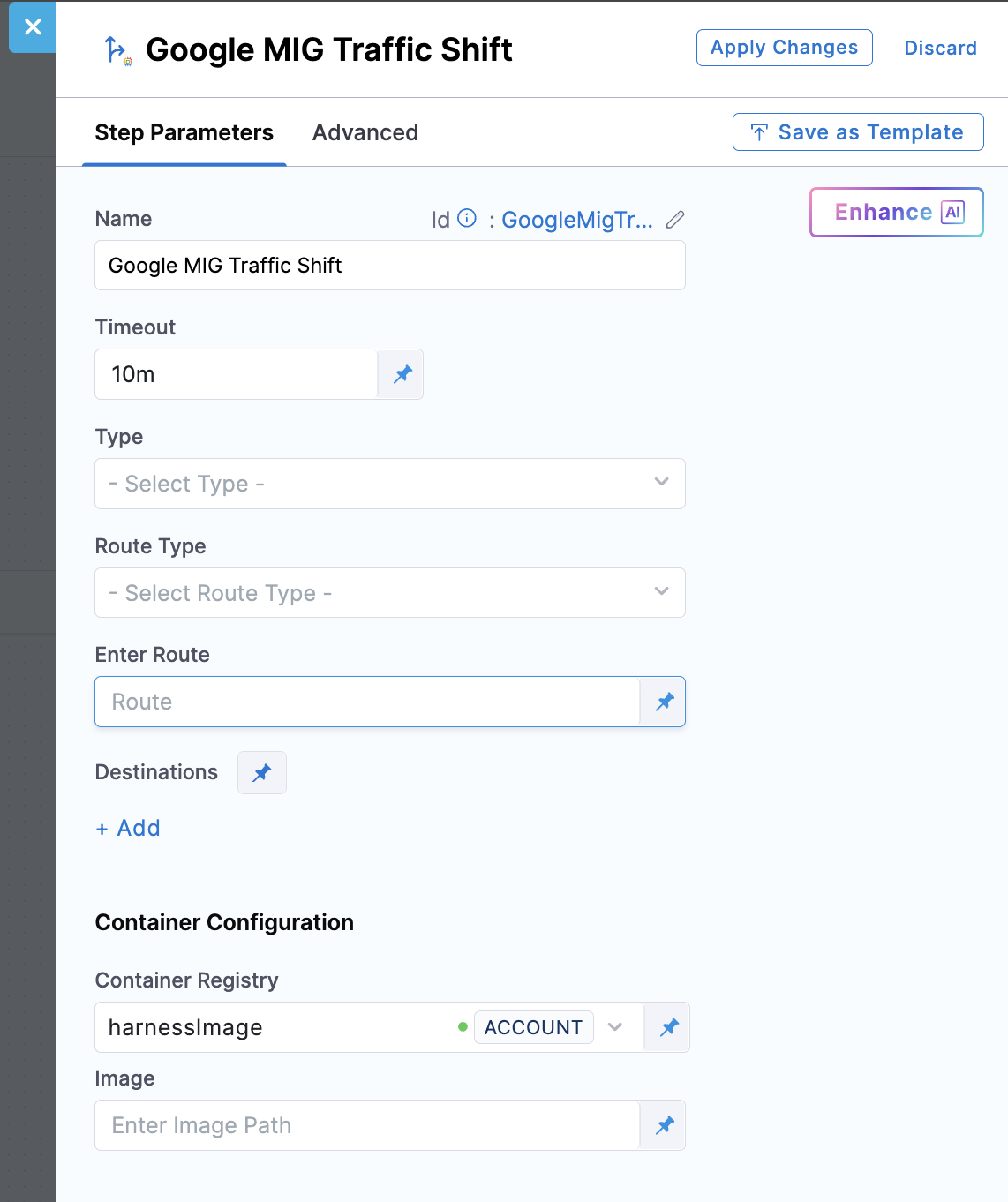
**Step parameters**:
**Type**: This field specifies the mechanism used to control traffic distribution between your stable and stage environments. Currently, only **CSM** (Cloud Service Mesh) is supported, which adjusts weights on your HTTPRoute or GRPCRoute resources, providing fine-grained control ideal for service-to-service (east-west) traffic and microservice architectures. CSM supports advanced features like header-based routing and A/B testing.
**Route Type**: Specify the type of Cloud Service Mesh route resource that Harness will update with new traffic weights. The **HTTPRoute** option works for HTTP and HTTPS services, allowing path-based and header-based routing in addition to weighted traffic distribution. The **GRPCRoute** option specifically serves gRPC services with support for method-level routing. This field only applies when you set the Type field to **CSM**. The route must be properly configured with both backend services (stable and stage) as destinations before traffic shifting. Harness modifies the weight values while preserving other route configurations.
**Enter Route**: Specify the full GCP resource path to the Cloud Service Mesh route that controls traffic flow to your application (format: `projects/PROJECT_ID/locations/global/httpRoutes/ROUTE_NAME` or `projects/PROJECT_ID/locations/global/grpcRoutes/ROUTE_NAME`). Harness updates the weights in this route's rule configuration to shift traffic between stable and stage environments. The route must already exist, be properly configured with both backend services as weighted destinations, and have appropriate mesh associations. Verify the route path is correct before deployment to avoid traffic disruption.
**Destinations**: Define the traffic distribution percentages between your environments by adding multiple destinations with weight values that total 100%. For destinations, you can provide the full backend service path (e.g., `projects/PROJECT_ID/regions/REGION/backendServices/SERVICE_NAME`) or use placeholders like `stable` (primary) and `stage` (secondary).
For example, setting Stable=90 and Stage=10 sends 90% of requests to the primary environment and 10% to the secondary. Use gradual shifts across multiple traffic shift steps (e.g., Step 1: 80/20, Step 2: 50/50, Step 3: 0/100) to safely validate new versions under increasing load.
When the secondary (stage) reaches 100% traffic weight, Harness automatically swaps the labels: the secondary becomes the new primary (stable) and serves production traffic going forward. Monitor application metrics between shifts to catch issues early.
**Header Routing Add** (optional): Configure custom header-based routing rules to expose the staging environment for testing. This field allows you to add header matching rules that route requests with specific headers to the staging backend, independent of the weight-based traffic distribution. Each header rule specifies a key, value, match type (exact or regex), and destination (stage or stable). Use this to enable QA teams or automated tests to access the staging environment by sending requests with specific headers (e.g., `X-Test-Stage: true`). This pattern is useful for pre-production validation workflows where you want to test the staging environment before shifting production traffic.
**Header Routing Remove** (optional): Specify header keys to remove from the route configuration during the traffic cutover phase. After validation completes and you are ready to shift production traffic, use this field in the Traffic Cutover step to clean up the header routing rules added during the staging validation phase. This ensures that header-based routing rules do not remain in the route after the deployment completes.
**Downsize Old MIG** (optional): Enable this flag to automatically downscale the old MIG (the one that was previously serving production traffic) to zero instances after the label swap completes during a traffic shift. This only takes effect when the stage service reaches 100% traffic weight and the label swap occurs. Enabling this flag optimizes costs and resource utilization by ensuring unused instances from the previous deployment are scaled down. If the old MIG has an associated autoscaler, Harness manages the autoscaler configuration during the downsize operation. The step output includes a `downsizedOldMig` property indicating whether the old MIG was successfully downsized.
**Container Configuration**:
**Container Registry**: Harness connector for authenticating to your container registry (Docker Hub, GCR, GAR, ECR). This connector pulls the deployment plugin image that executes the deployment operations.
**Image**: Full path to the deployment plugin container image for this step. Use the official Harness image: [`harness/google-mig-traffic-shift:0.1.0-linux-amd64`](https://hub.docker.com/r/harness/google-mig-traffic-shift/tags) for traffic shifting operations.
### Staging validation workflow
For teams requiring pre-production testing, perform the following steps to configure a multi-step validation workflow:
1. **Initial Traffic Shift** (within Blue Green Deployment step group): Configure the Traffic Shift step to route traffic with custom headers to the staging backend. This exposes the staging environment for testing without affecting production users.
2. **Validation Steps** (outside the containerized step group): Add manual approval steps, automated test execution, or other validation steps. These run outside the step group since Harness does not support approval steps inside containerized step groups.
3. **Traffic Cutover** (separate step group): Add a final Traffic Cutover step group containing a Traffic Shift step that performs the production traffic shift (100% to stage). This completes the Blue-Green deployment after validation.
This pattern matches the workflow shown in the Harness UI where the Blue Green Deployment step group, Validate Stage Environment step, and Traffic Cutover step group are separate pipeline components.
YAML Example - Basic Traffic Shift
```yaml
- step:
identifier: traffic_shift_100
type: GoogleMigTrafficShift
name: Traffic_Shift_100
spec:
trafficConfig:
type: CSM
spec:
type: GRPCRoute
route: projects/PROJECT_ID/locations/global/grpcRoutes/ROUTE_NAME
destinations:
- destination: stable
weight: 0
- destination: stage
weight: 100
downsizeOldMig: true
connectorRef: account.harnessImage
image: harness/google-mig-traffic-shift:0.1.0-linux-amd64
imagePullPolicy: Always
resources:
limits:
memory: 512Mi
cpu: 0.5
outputVariables: []
```
YAML Example - Traffic Shift with Header Routing for Staging Validation
```yaml
- step:
identifier: traffic_shift_with_headers
type: GoogleMigTrafficShift
name: Traffic Shift with Header Routing
spec:
trafficConfig:
type: CSM
spec:
type: GRPCRoute
route: projects/PROJECT_ID/locations/global/grpcRoutes/ROUTE_NAME
destinations:
- destination: stage
weight: 100
- destination: stable
weight: 0
headerRoutingAdd:
- key: X-Test-Stage
value: "true"
matchType: exact
destination: stage
- key: X-QA-Version
value: <+pipeline.variables.versionTag>
matchType: regex
destination: stage
connectorRef: account.harnessImage
image: harness/google-mig-traffic-shift:0.1.0-linux-amd64
imagePullPolicy: Always
resources:
limits:
memory: 512Mi
cpu: 0.5
```
***
## Gradual traffic shifting
For safe production rollouts, you can add multiple **Google MIG Traffic Shift** steps with increasing traffic percentages:
**Example phased rollout**:
1. **Traffic Shift 1**: 10% to stage, 90% to stable (validation with minimal risk)
2. **Traffic Shift 2**: 50% to stage, 50% to stable (balanced load testing)
3. **Traffic Shift 3**: 100% to stage, 0% to stable (full cutover)
Between each shift, you can:
* Monitor application metrics and error rates
* Run verification steps or manual approvals
* Add custom scripts or API calls for validation
* Roll back if issues are detected
**YAML example with gradual shift**:
```yaml
- step:
name: Traffic Shift - 10%
type: GoogleMigTrafficShift
spec:
destinations:
- environment: stable
weight: 90
- environment: stage
weight: 10
- step:
name: Approval - Validate 10%
type: HarnessApproval
spec:
approvalMessage: Validate metrics before proceeding to 50%
- step:
name: Traffic Shift - 50%
type: GoogleMigTrafficShift
spec:
destinations:
- environment: stable
weight: 50
- environment: stage
weight: 50
- step:
name: Traffic Shift - 100%
type: GoogleMigTrafficShift
spec:
destinations:
- environment: stable
weight: 0
- environment: stage
weight: 100
```
***
## Rollback step
One of the most valuable features of Blue-Green deployment is instant rollback capability. With Harness, you are never more than 30 seconds away from a working state, providing a critical safety net for production deployments.
### When to rollback
Rollback is triggered automatically when a deployment step fails. This can occur due to:
* Failed health checks for the new instances
* Deployment step failures or timeouts
* Infrastructure issues preventing successful deployment
* Any critical errors during the deployment process
The advantage of Blue-Green deployment is that your previous version remains running and ready to receive traffic again immediately.
### How rollback works
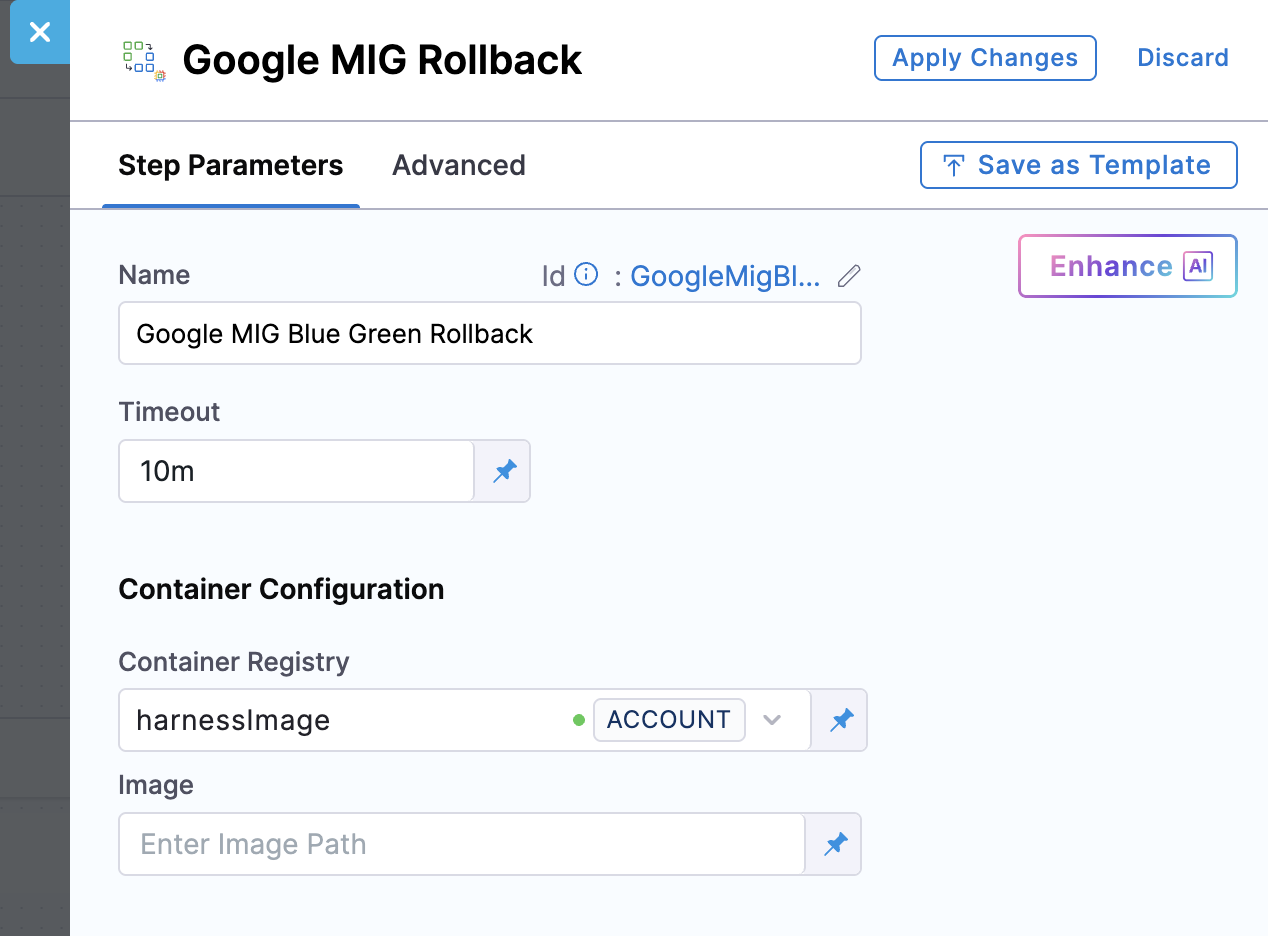
Harness provides the **GoogleMigBlueGreenRollback** step that you configure in your pipeline's rollback section. This step triggers automatically when any deployment step fails. The step uses the rollback data captured during the Blue Green Deploy step, which includes a complete snapshot of your previous configuration state.
### Rollback execution process
When you execute a rollback, Harness performs the following operations:
**Phase 1: Retrieve rollback data**
Harness retrieves the deployment state captured during the Blue Green Deploy step, including the previous MIG configuration, backend service settings, autoscaler policy, and traffic routing configuration.
**Phase 2: Restore traffic routing**
Harness immediately updates the HTTPRoute or GRPCRoute to shift 100% of traffic back to the stable environment (the version that was working before). This traffic shift happens in seconds, quickly routing users away from the problematic version.
**Phase 3: Restore environment configuration**
Harness restores the stage MIG to the previous instance template version, restores the autoscaler configuration to its original settings, and reverts the MIG labels that identify stable versus stage environments. Optionally, you can configure the step to delete any newly created resources by setting the `deleteNewResources` parameter.
### Configuring rollback
Configure the **GoogleMigBlueGreenRollback** step in the Rollback Steps section of your pipeline. The step triggers automatically when any deployment step fails.
**Configuration options**:
* **deleteNewResources**: Set to `true` to remove any resources created during the failed deployment
* **preserveCapacity**: Set to `true` to maintain the stage environment capacity for troubleshooting, or `false` to scale it down and save costs
**Container Configuration**:
* **Container Registry**: Harness connector for authenticating to your container registry
* **Image**: Use the official Harness image: [`harness/google-mig-bluegreen-rollback:0.1.0-linux-amd64`](https://hub.docker.com/r/harness/google-mig-bluegreen-rollback/tags) for rollback operations
**YAML example**:
```yaml
rollbackSteps:
- step:
type: GoogleMigBlueGreenRollback
name: Rollback on Failure
identifier: rollback_on_failure
spec:
deleteNewResources: true
preserveCapacity: false
connectorRef: account.harnessImage
image: harness/google-mig-bluegreen-rollback:0.1.0-linux-amd64
imagePullPolicy: Always
resources:
limits:
memory: 512Mi
cpu: 0.5
timeout: 15m
```
***
## Complete pipeline examples
### Basic Blue-Green deployment pipeline
This example shows a complete Blue-Green deployment pipeline with automatic rollback configuration. The pipeline deploys a new version to the stage environment, verifies it reaches steady state, and shifts 100% traffic in a single step. For validation workflows, you can add the optional Google MIG Staging Endpoint step after the Blue Green Deploy step.
Complete Pipeline YAML Example
```yaml
pipeline:
projectIdentifier: PROJECT_ID
orgIdentifier: ORG_ID
tags: {}
stages:
- stage:
name: Deploy
identifier: Deploy
description: Blue-Green MIG Deployment
type: Deployment
spec:
deploymentType: GoogleManagedInstanceGroup
service:
serviceRef: MIG_SERVICE_REF
serviceInputs:
serviceDefinition:
type: GoogleManagedInstanceGroup
spec:
artifacts:
primary:
primaryArtifactRef: <+input>
sources: <+input>
environment:
environmentRef: ENVIRONMENT_REF
deployToAll: false
infrastructureDefinitions:
- identifier: INFRA_ID
execution:
steps:
- stepGroup:
steps:
- step:
type: DownloadManifests
name: DownloadManifests
identifier: DownloadManifests
spec: {}
failureStrategies: []
- step:
type: GoogleMigBlueGreenDeploy
name: BlueGreen_Deploy
identifier: BlueGreen_Deploy
spec:
blueEnvironment:
backendService: projects/PROJECT_ID/locations/global/backendServices/BACKEND_SERVICE_NAME
mig: MIG_NAME
trafficConfig:
type: CSM
spec:
type: GRPCRoute
route: projects/PROJECT_ID/locations/global/grpcRoutes/ROUTE_NAME
connectorRef: account.harnessImage
image: harness/google-mig-bluegreen-deploy:0.1.0-linux-amd64
imagePullPolicy: Always
resources:
limits:
memory: 512Mi
cpu: 0.5
outputVariables: []
timeout: 10m
- step:
identifier: mig_steady_state_check
type: GoogleMigSteadyState
name: Steady_State_Check
spec:
mig: <+pipeline.stages.Deploy.spec.execution.steps.Google_MIG_Step_Group.steps.BlueGreen_Deploy.GoogleMigBlueGreenDeployOutcome.stageMig>
instanceTemplate: <+pipeline.stages.Deploy.spec.execution.steps.Google_MIG_Step_Group.steps.BlueGreen_Deploy.GoogleMigBlueGreenDeployOutcome.rollbackData.deploymentMetadata.stage.instanceTemplate>
connectorRef: account.harnessImage
image: harness/google-mig-steady-state:0.1.0-linux-amd64
imagePullPolicy: Always
resources:
limits:
memory: 512Mi
cpu: 0.5
outputVariables: []
- step:
identifier: traffic_shift_100
type: GoogleMigTrafficShift
name: Traffic_Shift_100
spec:
trafficConfig:
type: CSM
spec:
type: GRPCRoute
route: projects/PROJECT_ID/locations/global/grpcRoutes/ROUTE_NAME
destinations:
- destination: stable
weight: 0
- destination: stage
weight: 100
downsizeOldMig: true
connectorRef: account.harnessImage
image: harness/google-mig-traffic-shift:0.1.0-linux-amd64
imagePullPolicy: Always
resources:
limits:
memory: 512Mi
cpu: 0.5
outputVariables: []
name: Google MIG Step Group
identifier: Google_MIG_Step_Group
stepGroupInfra:
type: KubernetesDirect
spec:
connectorRef: K8S_CONNECTOR_ID
namespace: NAMESPACE
serviceAccountName: SERVICE_ACCOUNT_NAME
automountServiceAccountToken: true
rollbackSteps:
- stepGroup:
name: Google Mig Rollback
identifier: Google_Mig_Rollback
steps:
- step:
type: GoogleMigBlueGreenRollback
name: GoogleMigBlueGreenRollback_1
identifier: GoogleMigBlueGreenRollback_1
spec:
connectorRef: account.harnessImage
image: harness/google-mig-bluegreen-rollback:0.1.0-linux-amd64
timeout: 10m
stepGroupInfra:
type: KubernetesDirect
spec:
connectorRef: K8S_CONNECTOR_ID
namespace: NAMESPACE
serviceAccountName: SERVICE_ACCOUNT_NAME
automountServiceAccountToken: true
tags: {}
failureStrategies:
- onFailure:
errors:
- AllErrors
action:
type: StageRollback
delegateSelectors:
- DELEGATE_SELECTOR
identifier: PIPELINE_ID
name: Blue-Green MIG Deployment Pipeline
```
### Blue-Green deployment with staging validation
This example demonstrates a deployment pipeline that exposes the staging environment for validation testing before shifting production traffic. The pipeline uses three main components:
1. **Blue Green Deployment** step group - Deploys to staging, verifies steady state, and configures traffic routing with headers for testing
2. **Validate Stage Environment** step - Automated test step outside the containerized step group (Harness does not support approval steps inside containerized step groups)
3. **Traffic Cutover** step group - Performs the final production traffic shift after validation
This workflow is ideal for teams that require explicit QA sign-off or automated test execution against production-like environments before committing to a full traffic shift.
Complete Pipeline YAML Example with Staging Validation
```yaml
pipeline:
identifier: PIPELINE_ID
name: mig-staging-validation
projectIdentifier: PROJECT_ID
orgIdentifier: ORG_ID
tags: {}
stages:
- stage:
name: Deploy
identifier: Deploy
description: Blue-Green MIG Deployment with Staging Validation
type: Deployment
spec:
deploymentType: GoogleManagedInstanceGroup
service:
serviceRef: MIG_SERVICE_REF
environment:
environmentRef: ENVIRONMENT_REF
deployToAll: false
infrastructureDefinitions:
- identifier: INFRA_ID
execution:
steps:
# Step Group 1: Blue Green Deployment
- stepGroup:
name: Blue Green Deployment
identifier: blueGreenDeployment
steps:
- step:
type: DownloadManifests
name: Download Manifests
identifier: DownloadManifests
spec: {}
failureStrategies: []
- step:
name: Google MIG Blue Green Deploy
identifier: GoogleMigBlueGreenDeploy
type: GoogleMigBlueGreenDeploy
timeout: 10m
spec:
connectorRef: account.harnessImage
image: harness/google-mig-bluegreen-deploy:0.1.0-linux-amd64
blueEnvironment:
backendService: projects/PROJECT_ID/locations/global/backendServices/BACKEND_SERVICE_NAME
mig: MIG_NAME
trafficConfig:
type: CSM
spec:
type: GRPCRoute
route: projects/PROJECT_ID/locations/global/grpcRoutes/ROUTE_NAME
targetSize: 3
- step:
name: Google MIG Traffic Shift
identifier: GoogleMigTrafficShift
type: GoogleMigTrafficShift
timeout: 10m
spec:
connectorRef: account.harnessImage
image: harness/google-mig-traffic-shift:0.1.0-linux-amd64
trafficConfig:
type: CSM
spec:
type: GRPCRoute
route: projects/PROJECT_ID/locations/global/grpcRoutes/ROUTE_NAME
destinations:
- destination: stage
weight: 100
- destination: stable
weight: 0
headerRoutingAdd:
- key: X-Test-Stage
value: "true"
matchType: exact
destination: stage
- key: X-QA-Version
value: <+pipeline.variables.versionTag>
matchType: regex
destination: stage
resources:
limits:
memory: 512Mi
cpu: "0.5"
stepGroupInfra:
type: KubernetesDirect
spec:
connectorRef: K8S_CONNECTOR_ID
namespace: NAMESPACE
# Validation Step (outside containerized step group)
- step:
type: ShellScript
name: Validate Stage Environment
identifier: ValidateStageEnvironment
timeout: 10m
spec:
shell: Bash
executionTarget: {}
source:
type: Inline
spec:
script: |
# Run automated tests against staging with header X-Test-Stage: true
# Example: curl with custom header to access staging backend
echo "Running validation tests against staging environment..."
environmentVariables: []
outputVariables: []
# Step Group 2: Traffic Cutover
- stepGroup:
name: Traffic Cutover
identifier: trafficCutover
steps:
- step:
name: Google MIG Traffic Shift Cutover
identifier: GoogleMigTrafficShiftCutover
type: GoogleMigTrafficShift
timeout: 10m
spec:
connectorRef: account.harnessImage
image: harness/google-mig-traffic-shift:0.1.0-linux-amd64
trafficConfig:
type: CSM
spec:
type: GRPCRoute
route: projects/PROJECT_ID/locations/global/grpcRoutes/ROUTE_NAME
destinations:
- destination: stage
weight: 100
- destination: stable
weight: 0
headerRoutingRemove:
- key: X-Test-Stage
- key: X-QA-Version
downsizeOldMig: true
resources:
limits:
memory: 512Mi
cpu: "0.5"
stepGroupInfra:
type: KubernetesDirect
spec:
connectorRef: K8S_CONNECTOR_ID
namespace: NAMESPACE
rollbackSteps:
- stepGroup:
name: Blue Green Rollback
identifier: blueGreenRollback
steps:
- step:
name: Google MIG Blue Green Rollback
identifier: GoogleMigBlueGreenRollback
type: GoogleMigBlueGreenRollback
timeout: 10m
spec:
connectorRef: account.harnessImage
image: harness/google-mig-bluegreen-rollback:0.1.0-linux-amd64
stepGroupInfra:
type: KubernetesDirect
spec:
connectorRef: K8S_CONNECTOR_ID
namespace: NAMESPACE
tags: {}
failureStrategies:
- onFailure:
errors:
- AllErrors
action:
type: StageRollback
```
### Gradual traffic shifting pipeline
This complete pipeline example shifts traffic in three increments (20% -> 50% -> 100%) to the stage environment, with a steady state check before shifting begins.
Complete Pipeline YAML Example for Gradual Traffic Shifting
```yaml
pipeline:
projectIdentifier: PROJECT_ID
orgIdentifier: ORG_ID
tags: {}
stages:
- stage:
name: Deploy
identifier: Deploy
description: Gradual Traffic Shift (20% -> 50% -> 100%)
type: Deployment
spec:
deploymentType: GoogleManagedInstanceGroup
service:
serviceRef: MIG_SERVICE_REF
serviceInputs:
serviceDefinition:
type: GoogleManagedInstanceGroup
spec:
artifacts:
primary:
primaryArtifactRef: <+input>
sources: <+input>
environment:
environmentRef: ENVIRONMENT_REF
deployToAll: false
infrastructureDefinitions:
- identifier: INFRA_ID
execution:
steps:
- stepGroup:
steps:
- step:
type: DownloadManifests
name: DownloadManifests
identifier: DownloadManifests
spec: {}
failureStrategies: []
- step:
type: GoogleMigBlueGreenDeploy
name: BlueGreen_Deploy
identifier: BlueGreen_Deploy
spec:
blueEnvironment:
backendService: projects/PROJECT_ID/locations/global/backendServices/BACKEND_SERVICE_NAME
mig: MIG_NAME
trafficConfig:
type: CSM
spec:
type: GRPCRoute
route: projects/PROJECT_ID/locations/global/grpcRoutes/ROUTE_NAME
connectorRef: account.harnessImage
image: harness/google-mig-bluegreen-deploy:0.1.0-linux-amd64
imagePullPolicy: Always
resources:
limits:
memory: 512Mi
cpu: 0.5
outputVariables: []
timeout: 10m
- step:
identifier: mig_steady_state_check
type: GoogleMigSteadyState
name: Steady_State_Check
spec:
mig: <+pipeline.stages.Deploy.spec.execution.steps.Google_MIG_Step_Group.steps.BlueGreen_Deploy.GoogleMigBlueGreenDeployOutcome.stageMig>
instanceTemplate: <+pipeline.stages.Deploy.spec.execution.steps.Google_MIG_Step_Group.steps.BlueGreen_Deploy.GoogleMigBlueGreenDeployOutcome.rollbackData.deploymentMetadata.stage.instanceTemplate>
connectorRef: account.harnessImage
image: harness/google-mig-steady-state:0.1.0-linux-amd64
imagePullPolicy: Always
resources:
limits:
memory: 512Mi
cpu: 0.5
outputVariables: []
- step:
identifier: traffic_shift_20
type: GoogleMigTrafficShift
name: Traffic_Shift_20_Percent
spec:
trafficConfig:
type: CSM
spec:
type: GRPCRoute
route: projects/PROJECT_ID/locations/global/grpcRoutes/ROUTE_NAME
destinations:
- destination: stable
weight: 80
- destination: stage
weight: 20
connectorRef: account.harnessImage
image: harness/google-mig-traffic-shift:0.1.0-linux-amd64
imagePullPolicy: Always
resources:
limits:
memory: 512Mi
cpu: 0.5
outputVariables: []
- step:
identifier: traffic_shift_50
type: GoogleMigTrafficShift
name: Traffic_Shift_50_Percent
spec:
trafficConfig:
type: CSM
spec:
type: GRPCRoute
route: projects/PROJECT_ID/locations/global/grpcRoutes/ROUTE_NAME
destinations:
- destination: stable
weight: 50
- destination: stage
weight: 50
connectorRef: account.harnessImage
image: harness/google-mig-traffic-shift:0.1.0-linux-amd64
imagePullPolicy: Always
resources:
limits:
memory: 512Mi
cpu: 0.5
outputVariables: []
- step:
identifier: traffic_shift_100
type: GoogleMigTrafficShift
name: Traffic_Shift_100_Percent
spec:
trafficConfig:
type: CSM
spec:
type: GRPCRoute
route: projects/PROJECT_ID/locations/global/grpcRoutes/ROUTE_NAME
destinations:
- destination: stable
weight: 0
- destination: stage
weight: 100
downsizeOldMig: true
connectorRef: account.harnessImage
image: harness/google-mig-traffic-shift:0.1.0-linux-amd64
imagePullPolicy: Always
resources:
limits:
memory: 512Mi
cpu: 0.5
outputVariables: []
name: Google MIG Step Group
identifier: Google_MIG_Step_Group
stepGroupInfra:
type: KubernetesDirect
spec:
connectorRef: K8S_CONNECTOR_ID
namespace: NAMESPACE
serviceAccountName: SERVICE_ACCOUNT_NAME
automountServiceAccountToken: true
rollbackSteps: []
tags: {}
failureStrategies:
- onFailure:
errors:
- AllErrors
action:
type: StageRollback
delegateSelectors:
- DELEGATE_SELECTOR
identifier: PIPELINE_ID
name: Gradual Traffic Shift MIG Pipeline
```
## Next steps
* [GCE provision backend service](/continuous-delivery/use-continuous-delivery/deploy-services-on-different-platforms/google-cloud-functions/mig/step-references/gce-provision-backend-service.md)
* [Google Cloud Run deployments](/continuous-delivery/use-continuous-delivery/deploy-services-on-different-platforms/google-cloud-functions/google-cloud-run.md)
* [CD best practices](/continuous-delivery/troubleshooting-and-resources/cd-best-practices.md)
{% @harness-feedback/feedback %}