> For the complete documentation index, see [llms.txt](https://developer.harness.io/llms.txt). Markdown versions of documentation pages are available by appending `.md` to page URLs; this page is available as [Markdown](https://developer.harness.io/continuous-delivery/use-continuous-delivery/deploy-services-on-different-platforms/google-cloud-functions/mig/step-references/deploy-mig.md).
# Google MIG Deploy
Deploy step for Google Cloud Managed Instance Groups.
The **Google MIG Deploy** step creates a new version of the instance template and, if the instance group does not exist, creates the instance group.
{% hint style="info" %}
**PREREQUISITES**
* This step must be added within a **Container Step Group**. The step runs as a containerized task and requires the container infrastructure configuration provided by the step group.
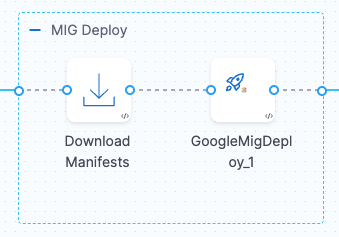
* A **Download Manifests** step must be added before this step to fetch the required manifest files (instance template, MIG manifest, etc.) from your configured manifest store.
Click to view full size image
{% endhint %}
## What you will learn from this topic
* How to follow the [deployment flow](#deployment-flow) between the Download Manifests and Google MIG Deploy steps
* Understand [what this step does](#what-this-step-does) when creating or updating a Managed Instance Group
* How to prepare the [required manifests](#required-manifests) for the deployment
* How to set the [step parameters](#step-parameters) and [container configuration](#container-configuration)
* How to deploy a Google Cloud Managed Instance Group using the Google MIG Deploy step in your stepgroup YAML
## Deployment flow
1. **Download Manifests**: Fetches all manifest files (instance template, MIG configuration, autoscaler, health check) from your configured manifest store and makes them available for subsequent steps.
2. **Google MIG Deploy**: Reads the downloaded manifests and executes the deployment by creating the instance template version and provisioning the MIG in GCP.
Click to view full size image
## What this step does
* Creates a new version of the instance template based on your manifest configuration
* Creates the instance group if it does not exist
* Applies the target size configuration to the MIG
## Required manifests
This step requires the following manifest files configured in your service:
* **Instance template**: Defines the VM configuration (machine type, boot disk, network interfaces, startup scripts, metadata, labels)
* **MIG manifest**: Defines the Managed Instance Group configuration (distribution policy, update policy, constraints)
* **Autoscaler manifest** (optional): Defines autoscaling rules based on metrics
* **Health check configuration** (optional): Defines health check settings for instance monitoring
## Step parameters
| Parameter | Description | Required |
| --------------- | ----------------------------------------------------------------------------------------------------------------------------------- | -------- |
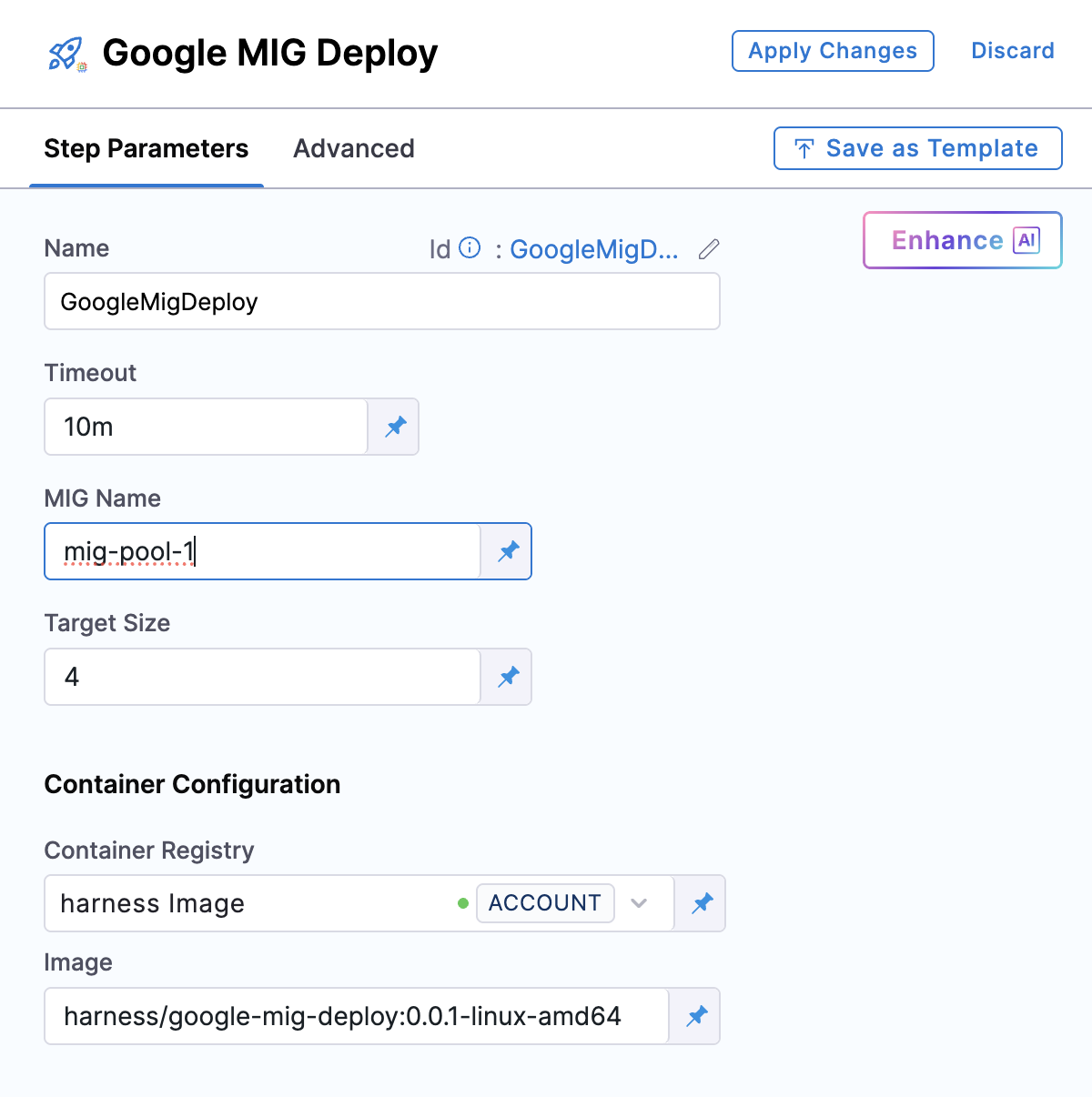
| **MIG Name** | The name of the Managed Instance Group to deploy. This should be a unique identifier for your MIG (e.g., `basic-deploy-testing-2`). | Yes |
| **Target Size** | The desired number of instances to maintain in the MIG (e.g., `1`, `3`, `5`). | Yes |
| **Timeout** | Maximum time allowed for the step to complete (default: `10m`). | No |
## Container configuration
| Parameter | Description |
| ---------------------- | ------------------------------------------------------------------------------------------------------------------------------------------------------------------------------- |
| **Container Registry** | Harness connector for authenticating to your container registry. This connector pulls the deployment plugin image. |
| **Image** | The deployment plugin container image. Use the official Harness image: [`harness/google-mig-deploy:0.0.1-linux-amd64`](https://hub.docker.com/r/harness/google-mig-deploy/tags) |
## Stepgroup YAML
```yaml
- stepGroup:
name: Deployment MIG
identifier: blueGreenDeployment
steps:
- step:
type: DownloadManifests
name: Download Manifests
identifier: DownloadManifests
spec: {}
failureStrategies: []
- step:
type: GoogleMigDeploy
name: GoogleMigDeploy
identifier: GoogleMigDeploy
spec:
connectorRef: account.harnessImage
mig: mig-pool-1
image: harness/google-mig-deploy:0.0.1-linux-amd64
targetSize: 4
timeout: 10m
stepGroupInfra:
type: KubernetesDirect
spec:
connectorRef: k8s-connector
namespace: default
```
{% @harness-feedback/feedback %}